Auto Class

by Nathonius
5
4
3
2
1
Score: 43/100

Description

Category: Customization & UI

The Auto Class plugin allows users to automatically apply CSS classes to notes in Obsidian based on their file paths or tags. This makes it easy to customize the appearance of notes without manually editing YAML headers or adding CSS classes. Users can configure folder paths or tags to apply specific CSS classes to child notes or tagged files. For more advanced usage, glob matching can be enabled to create dynamic and flexible class assignments. The plugin supports the use of CSS snippets, enabling custom visual themes or layout changes for specific notes or folders. Once the rules are set, the plugin automatically applies the CSS classes whenever the view is updated, streamlining customization across an entire vault.

Reviews

No reviews yet.

Stats

62
stars
6,093
downloads
9
forks
1,635
days
85
days
1,193
days
27
total PRs
4
open PRs
9
closed PRs
14
merged PRs
32
total issues
14
open issues
18
closed issues
2
commits

Latest Version

3 years ago

Changelog

Features

  • Glob matching support. Contributed by @rliugorilla!

README file from

Github

Development Status: Maintenance Mode

This plugin is now entering maintenance mode for the time being. If interested in taking over this plugin, message me on Discord.

  1. PR's will be reviewed.
  2. Bugs will be reviewed and worked if able.
  3. Feature Requests will not be worked.

Auto Class

Quality Gate Status

An Obsidian plugin to automatically apply CSS classes to the markdown view as if you had added them in a cssClasses YAML key, based on a note's path and tags. Combine this with CSS snippets targeting a CSS class and you can have different snippets applied to different paths in a single vault without having to add any HTML or CSS classes yourself.

Install

Install from the community plugin registry under the name Auto Class, by using the BRAT plugin with repository nathonius/obsidian-auto-class, or manually by copying the release files (main.js, manifest.json, and styles.css) to .obsidian/plugins/auto-class in your vault.

Use

Classes can be applied based on a note's path or tags. In settings, configure a folder path or tag and the classes to apply to the children of that folder or the files with that tag. For advanced use-cases, enable glob matching in settings.
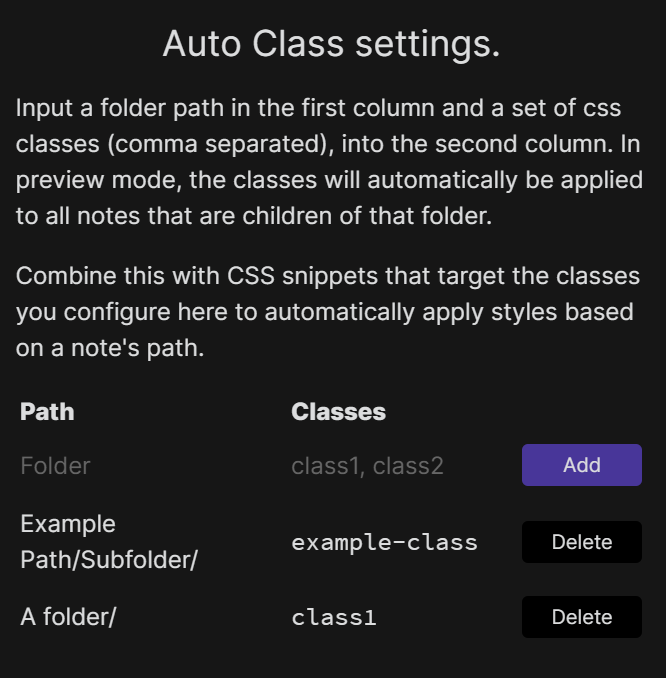
AutoClass

Once configured, the next time the view is updated the classes will be applied.

Contributing

Feel free to raise an issue or open a PR.

Similar Plugins

info
• Similar plugins are suggested based on the common tags between the plugins.
Auto switch themes between dark/light mode
a year ago by Robert Storlind
Obsidian plugin for switching themes when toggling dark/light mode
Callout Manager
3 years ago by eth-p
An Obsidian.md plugin that makes creating and configuring callouts easy.
Canvas CSS class
3 years ago by Lisandra-dev
A plugin that will add a css class to your canvas & adding to each canvas the path to help personnalization
Code Styler
3 years ago by Mayuran Visakan
A plugin for Obsidian.md for styling codeblocks and inline code
CSS Inlay Colors
2 years ago by Benji Grant
Show inline color hints for CSS colors in Obsidian
CSS Inserter
2 years ago by Erika Gozar
Inserts user-defined css snippets into the selected text.
css snippets
5 years ago by Daniel Brandenburg
Obsidian plugin for css snippets
Custom Theme Studio
7 months ago by @gapmiss
An Obsidian.md plugin to create and tweak custom themes with live CSS editing, element styling, and instant previews. All without leaving Obsidian.
Day and Night
4 years ago by Kevin Patel
An Obsidian plugin to automatically switch between day and night themes based on a set schedule
Dynamic Background
4 years ago by Samuel Song
Adding dynamic background effects to the Obsidian editor
Fast Text Color
2 years ago by Leon Holtmeier
Obsidian plugin to enable colored text with a custom syntax.
Friday
a year ago by sunwei
Write anywhere. Publish everywhere. Sync your notes, publish instantly, turn Markdown into websites.
Group Snippets
4 years ago by Mara-Li
Create folder of snippets to activate them in one click !
HelpMate
2 years ago by TfTHacker
HelpMate for Obsidian - providing help and documentation from within Obsidian
Hyphenation
3 years ago by 7596ff
Enables justified text and hyphenation
Linter
5 years ago by Victor Tao
An Obsidian plugin that formats and styles your notes with a focus on configurability and extensibility.
Mermaid Themes
3 years ago by jvsteiner
mermaid themes for obsidian
Minimal Theme Settings
5 years ago by @kepano
Settings plugin to control colors and fonts in Minimal Theme
MySnippets
5 years ago by Chetachi
MySnippets is a plugin that adds a status bar menu allowing the user to quickly manage their snippets within the comfort of their workspace 🖌.
Obsifetch
a year ago by tabibyte
neofetch but for obsidian
Ordered List Style
4 years ago by erykwalder
Painter
2 years ago by KraXen72 and Chetachi Ezikeuzor
paint text different colors
Pia viewer
2 years ago by dldisud
Rainbow-Colored Sidebar
a year ago by Kevin Woblick
Automatically color your sidebar like a rainbow. No configuration needed. 8 themes included.
Regex Mark
2 years ago by Mara-Li
Smart DayNight switcher
a year ago by Andrii Hrushetskyi
Snippet Commands
5 years ago by death_au
Registers custom css snippets as commands (which you can bind hotkeys to)
Snippetor
4 years ago by ebullient
An assist for creating CSS snippets for Obsidian
Style Importer
3 years ago by Josh Rouwhorst
Obsidian.md plugin to import a stylesheet from a URL to the snippets folder.
Style Settings
5 years ago by mgmeyers
A dynamic user interface for adjusting theme, plugin, and snippet CSS variables within Obsidian
Style Text
3 years ago by Juanjo Arranz
Apply custom CSS styles to selected text in your Obsidian Notes
Theme Controller
a year ago by Binaris
Set when and how the themes will be displayed
Theme Design Utilities
4 years ago by pseudometa
Some utilities and Quality-of-Life features for designers of Obsidian themes.
Theme Picker
5 years ago by kenset
Theme toggle
a year ago by @gapmiss
Obsidian.md plugin … adds a ribbon icon and command for toggling between dark & light theme modes.
Theme Toggler
4 years ago by larsmagnus
Toggle the theme in Obsidian's panels
VARE
2 years ago by 4Source
This is a plugin for Obsidian (https://obsidian.md). Allows you to easily manage your plugins and themes inside Obsidian.
Write Good
a year ago by Mark Hesketh
Obsidian plugin to help improve writing style