Group Snippets

by Mara-Li
5
4
3
2
1
Score: 51/100

Description

Category: Customization & UI

The Group Snippets plugin allows users to organize and manage CSS snippets in Obsidian by creating snippet groups that can be activated with a single command or linked to specific themes or color schemes. The plugin automatically switches between snippet groups when you change themes or toggle between light and dark modes. It supports customization for mobile and desktop platforms, enabling different snippet configurations for devices like phones and tablets.

Reviews

No reviews yet.

Stats

24
stars
5,581
downloads
1
forks
1,366
days
714
days
714
days
1
total PRs
0
open PRs
0
closed PRs
1
merged PRs
5
total issues
2
open issues
3
closed issues
19
commits

Latest Version

2 years ago

Changelog

Changelog

All notable changes to this project will be documented in this file. See commit-and-tag-version for commit guidelines.

1.10.3 (2024-05-26)

Bug Fixes

README file from

Github

-> FR

Obsidian Group Snippet

This plugin allow you to set group of CSS snippets to class them and enable them in one click (or command). Also, this plugin allows you to 'link' a group of snippets to a theme, enabling it when you switch theme ! It works also for switching between light & dark theme !

Usage

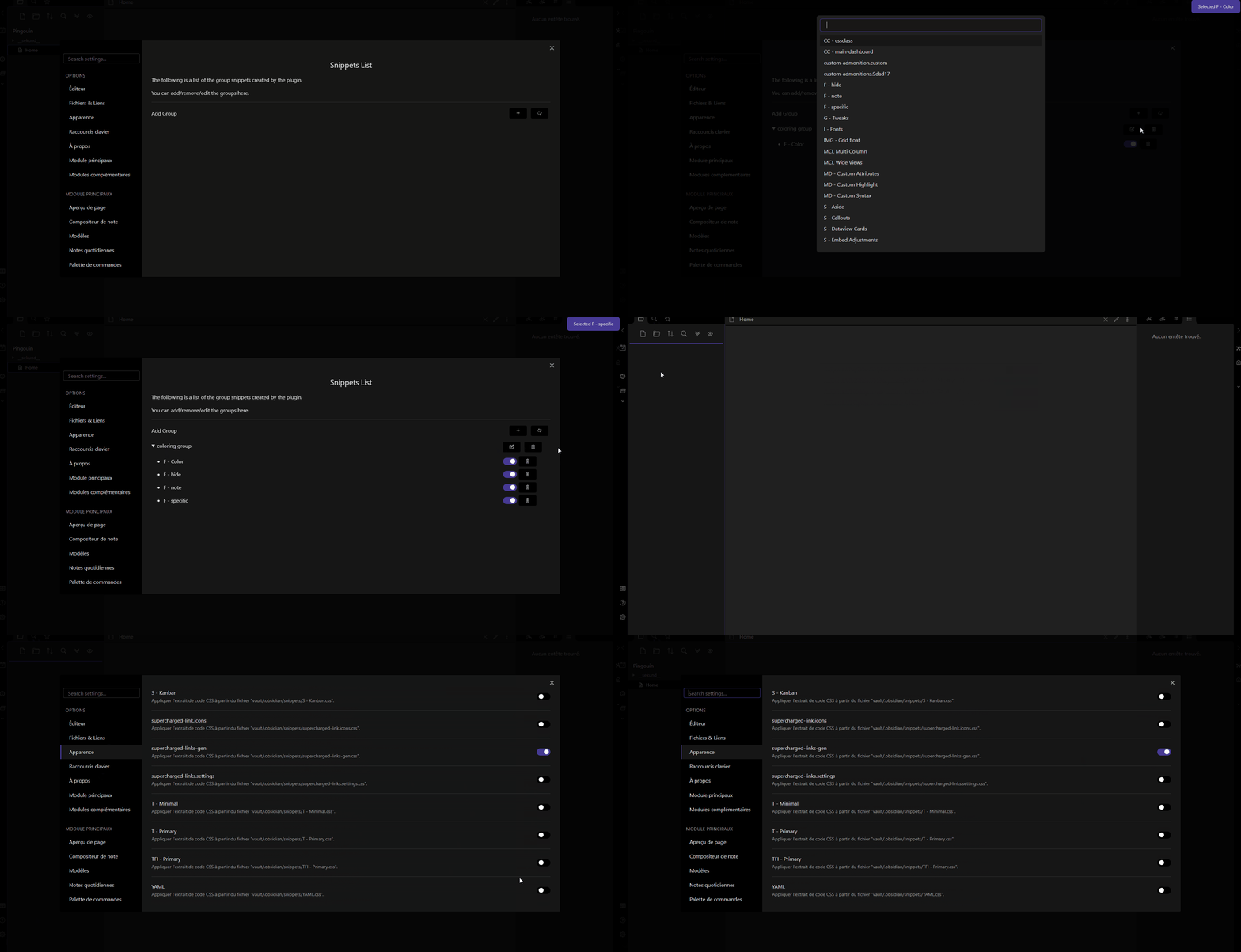
  1. Go to the Settings of the plugin
  2. Add a group (clicking on the + button)
  3. Add a name to the group
  4. Click on the edit button to add CSS snippets to the group

After this, you have your group of CSS snippets ! 🎉🎉

The plugin will enable the enabled snippet, and disable the disabled snippets!

To run the commands, you can :

  1. From command palette
    1. reload snippets to reload the group of snippets (and the newly added groups)
    2. Activate the group : ${groupName} to activate the group
  2. From directly the settings tab by clicking on the command windows icon.

You can also enable every snippets in the group by clicking on the check icon. Clicking on the cross will disable every snippets in the group.

Also, and it's my game changer here! You can automatically switch group snippets based on your theme or color scheme! The switch is based on the group name, and the theme name. The group name must include the theme name, and optionally the color scheme name based on dark or light.1 For example, minimal dark will be enabled if you switch to the dark theme or from any theme to minimal, in a dark color scheme.

Warning
The plugin will differentiate mobile from phone : phone is your "smartphone", because this setting is based on your phone size. In the same idea, tablet is a bigger platform. So, a mobile group will be enabled for both phone and tablet. For example, if you want to have a different group for your Iphone and your Ipad, you should create a phone group (for your Iphone) and a tablet group (for your ipad).

Moreover, snippets linked to other theme (or color Scheme) will be disabled 😀 !

The plugin will also detect if you set a snippet for mobile or desktop. Just put :

  • IOS, Android, Mobile for a mobile group
  • Desktop, PC, windows, mac, linux, for a desktop group

Finally, each time you switch of theme/color scheme, the plugin will toggle2 snippets with a name containing :

  • The same platform you are on
  • The same theme you are on or switch to
  • The same color scheme you are on or switch to
  • Any snippets with no indication of platform/theme/color scheme

When switching, the plugin will disable the snippets in the group that :

  • Have a different platform in name than the current one
  • Have a different theme you are on or switch to
  • Have a different color scheme you are on or switch to

Normally, this plugin can totally override the Appareance for Snippets !

🗒️ Some notes : You need to reload the snippets (using the button refresh) when you remove snippets. But, no worry, the plugin can't activate snippet that doesn't exist ! It's just the list that need some refreshing :).
🤖 Development

  1. Fork the repository on GitHub
  2. Clone the repository on your computer
  3. Run npm install in the cloned repository
  4. Run npm run build in the cloned repository to build the plugin, you can also use npm run dev to watch the changes !

Credit and thanks

Footnotes

  1. The translation of the plugin apply for color scheme with addition with the english dark and light.

  2. Here, toggle meaning that the plugin will disable the disabled snippets and enable the enabled snippets in the group list, mimic the behavior of toggling snippet in the Snippet CSS from Appearance tab.

Similar Plugins

info
• Similar plugins are suggested based on the common tags between the plugins.
Auto Class
4 years ago by Nathonius
Automatically add CSS classes to notes based on file path.
Auto Math
2 months ago by Vladislav Sorokin
Auto-expands LaTeX snippets. External rules with live reload, Custom Rules Editor, and default math pack.
Auto switch themes between dark/light mode
a year ago by Robert Storlind
Obsidian plugin for switching themes when toggling dark/light mode
Callout Manager
3 years ago by eth-p
An Obsidian.md plugin that makes creating and configuring callouts easy.
Canvas CSS class
3 years ago by Lisandra-dev
A plugin that will add a css class to your canvas & adding to each canvas the path to help personnalization
Cliplet
6 months ago by namikaze-40p
An Obsidian plugin that serves as a clipboard and snippet manager — your own, separate from the OS clipboard.
Code Styler
3 years ago by Mayuran Visakan
A plugin for Obsidian.md for styling codeblocks and inline code
CSS Editor
3 years ago by Zachatoo
Edit CSS snippets in Obsidian.
CSS Inlay Colors
2 years ago by Benji Grant
Show inline color hints for CSS colors in Obsidian
CSS Inserter
2 years ago by Erika Gozar
Inserts user-defined css snippets into the selected text.
css snippets
5 years ago by Daniel Brandenburg
Obsidian plugin for css snippets
Custom Theme Studio
7 months ago by @gapmiss
An Obsidian.md plugin to create and tweak custom themes with live CSS editing, element styling, and instant previews. All without leaving Obsidian.
Day and Night
4 years ago by Kevin Patel
An Obsidian plugin to automatically switch between day and night themes based on a set schedule
Dynamic Background
4 years ago by Samuel Song
Adding dynamic background effects to the Obsidian editor
Fast Text Color
2 years ago by Leon Holtmeier
Obsidian plugin to enable colored text with a custom syntax.
Friday
a year ago by sunwei
Write anywhere. Publish everywhere. Sync your notes, publish instantly, turn Markdown into websites.
HelpMate
2 years ago by TfTHacker
HelpMate for Obsidian - providing help and documentation from within Obsidian
Hyphenation
3 years ago by 7596ff
Enables justified text and hyphenation
Inline Code Copy
a year ago by Hongchen Lin
Jelly Snippets
3 years ago by Spencer Gouw
A simple text snippets plugin for Obsidian.md. BACKUP SNIPPETS BEFORE UPDATING.
Mermaid Themes
3 years ago by jvsteiner
mermaid themes for obsidian
Minimal Theme Settings
5 years ago by @kepano
Settings plugin to control colors and fonts in Minimal Theme
MySnippets
5 years ago by Chetachi
MySnippets is a plugin that adds a status bar menu allowing the user to quickly manage their snippets within the comfort of their workspace 🖌.
Obsifetch
a year ago by tabibyte
neofetch but for obsidian
Pieces for Developers
3 years ago by Pieces For Developers
Pieces' powerful extension for Obsidian-MD that allows users to access their code snippets directly within the Obsidian workspace
Rainbow-Colored Sidebar
a year ago by Kevin Woblick
Automatically color your sidebar like a rainbow. No configuration needed. 8 themes included.
Regex Mark
2 years ago by Mara-Li
Slash snippets
10 months ago by echo-saurav
Insert snippet of text with slash command
Smart DayNight switcher
a year ago by Andrii Hrushetskyi
Snippet Commands
5 years ago by death_au
Registers custom css snippets as commands (which you can bind hotkeys to)
Snippetor
4 years ago by ebullient
An assist for creating CSS snippets for Obsidian
Snippets
5 years ago by Pelao
Snippets Manager
2 years ago by Venkatraman Dhamodaran
Snippets Manager (Text Expander) For Obsidian
Snippetsaurus
a year ago by Christian Humbert
Style Settings
5 years ago by mgmeyers
A dynamic user interface for adjusting theme, plugin, and snippet CSS variables within Obsidian
Style Text
3 years ago by Juanjo Arranz
Apply custom CSS styles to selected text in your Obsidian Notes
Text Snippets
5 years ago by Ariana Khitrova
Snippets plugin for obsidian
Theme Controller
a year ago by Binaris
Set when and how the themes will be displayed
Theme Design Utilities
4 years ago by pseudometa
Some utilities and Quality-of-Life features for designers of Obsidian themes.
Theme Picker
5 years ago by kenset
Theme toggle
a year ago by @gapmiss
Obsidian.md plugin … adds a ribbon icon and command for toggling between dark & light theme modes.
Theme Toggler
4 years ago by larsmagnus
Toggle the theme in Obsidian's panels
Typst Mate
3 months ago by azyarashi
Render math expressions with Typst instead of MathJax in Obsidian.
VARE
2 years ago by 4Source
This is a plugin for Obsidian (https://obsidian.md). Allows you to easily manage your plugins and themes inside Obsidian.