Typst Mate

by azyarashi
5
4
3
2
1
Score: 47/100

Description

Category: Note Enhancements

The Typst Mate plugin replaces MathJax with Typst for rendering math expressions offering inline math, display math and code block support. It includes productivity features like snippet expansion, symbol completion (with LaTeX command search via backslash), bracket jumping and a linter. The plugin supports preambles and templates called processors, works with nearly all Typst packages and handles custom fonts on desktop. Background rendering keeps things smooth while you type. Context menu options let you copy rendered output as SVG or PNG. Integration exists for Excalidraw, Equation Citator, and various export plugins. Typst Tools provide a symbols viewer, packages browser, handwritten symbol recognition via Detypify, LaTeX-to-Typst conversion through TyLax and a commutative diagram editor.

Reviews

No reviews yet.

Stats

191
stars
11,540
downloads
9
forks
88
days
2
days
68
days
15
total PRs
1
open PRs
0
closed PRs
14
merged PRs
86
total issues
18
open issues
68
closed issues
0
commits

Latest Version

2 months ago

Changelog

  • It is now correctly syntax-highlighted.
  • SymbolSuggest is now shown only when in math mode.
  • The .typ Editor has been greatly enhanced.
  • In the processor, the Fit to parent width option has been abolished, and Fit to note width has been introduced. Set the value WIDTH to the page.
  • In the processor, the Use replace all option has been introduced.
  • Apply processor to MathJax has been added to Advanced Settings. When this is enabled, {CODE} will be replaced even in a processor where all MathJax engines are enabled.

README file from

Github

Typst Mate

Render math expressions in Obsidian using Typst instead of MathJax.
TypstMate

SymbolSuggest

Snippet Script
Snippet Script

For details, refer to the Documentation section below.

I welcome Discussions featuring your wonderful snippets!

Are you an Obsidian LaTeX Suite user? Check out this guide, or if you want to use only Typst codeblocks, check out this issue.

[!NOTE] For a smoother experience, some values are different from (or added to) standard Typst defaults. (e.g. datetime, smallcaps, fontsize, and CURSOR) See the notes here for details.


Features

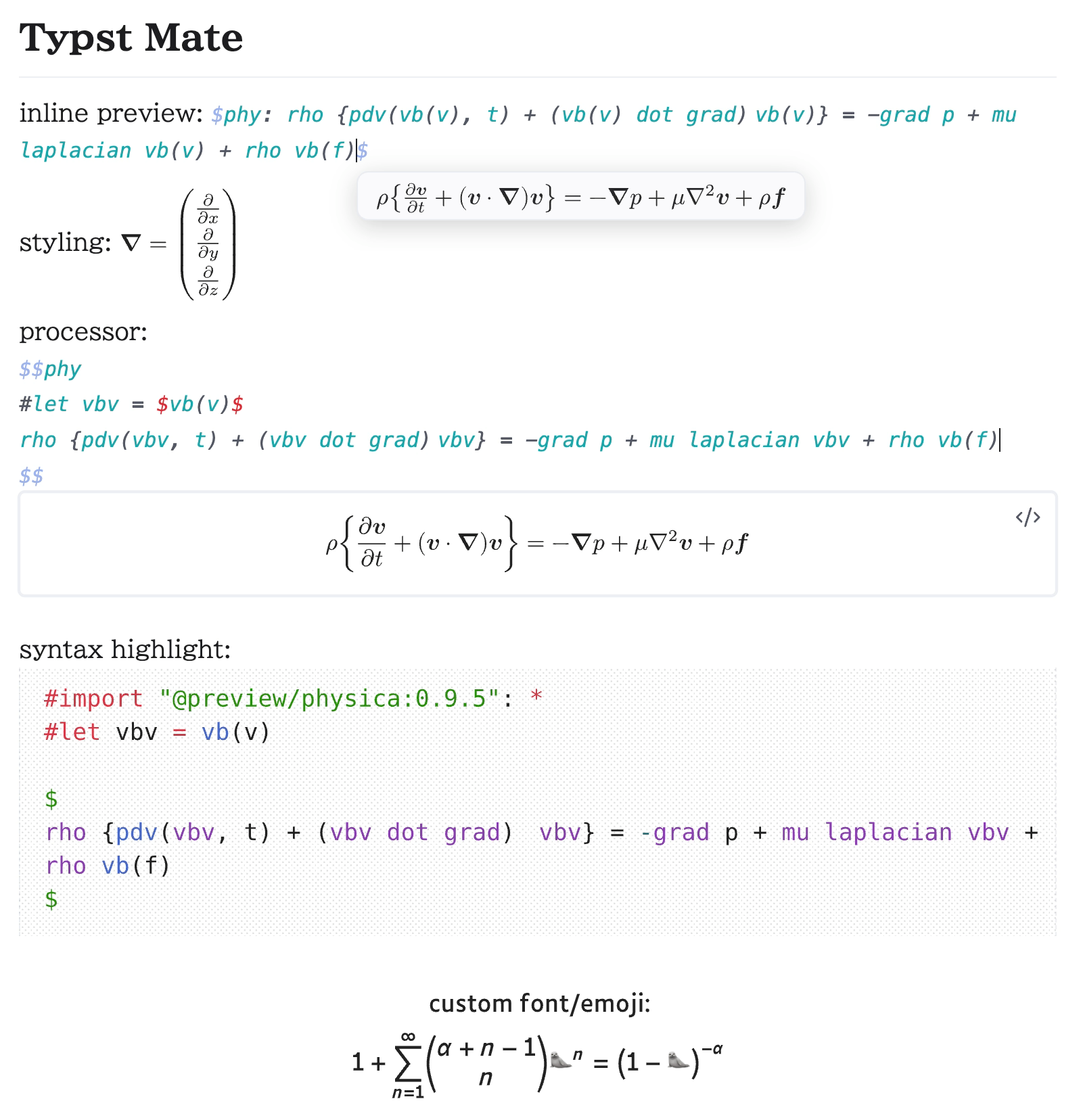
  • Support inline math, display math, and code blocks
  • Support preamble and templates (called processors)
  • Linter
  • .typ View
  • Bracket Jump
  • Typst Shortcut
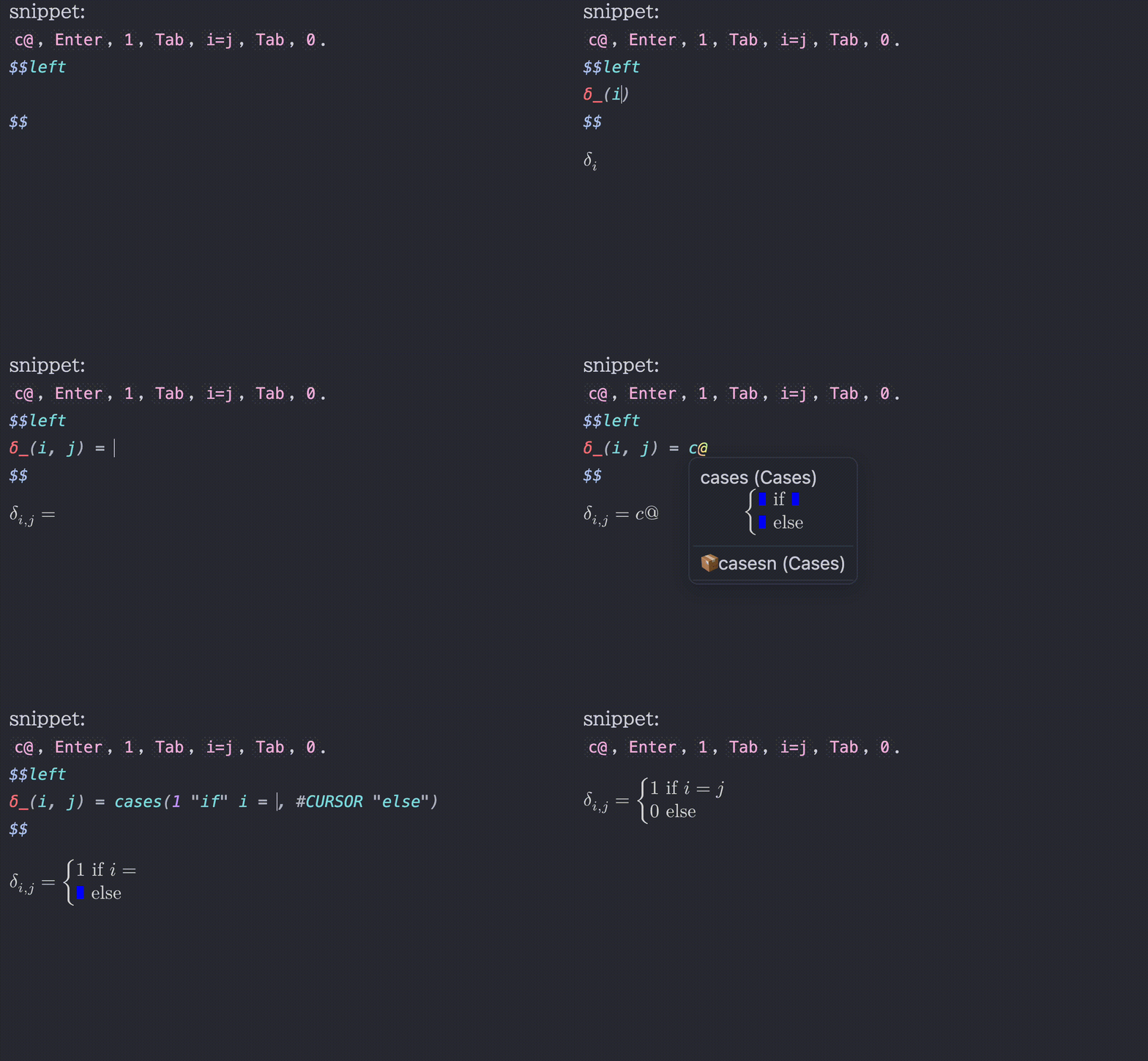
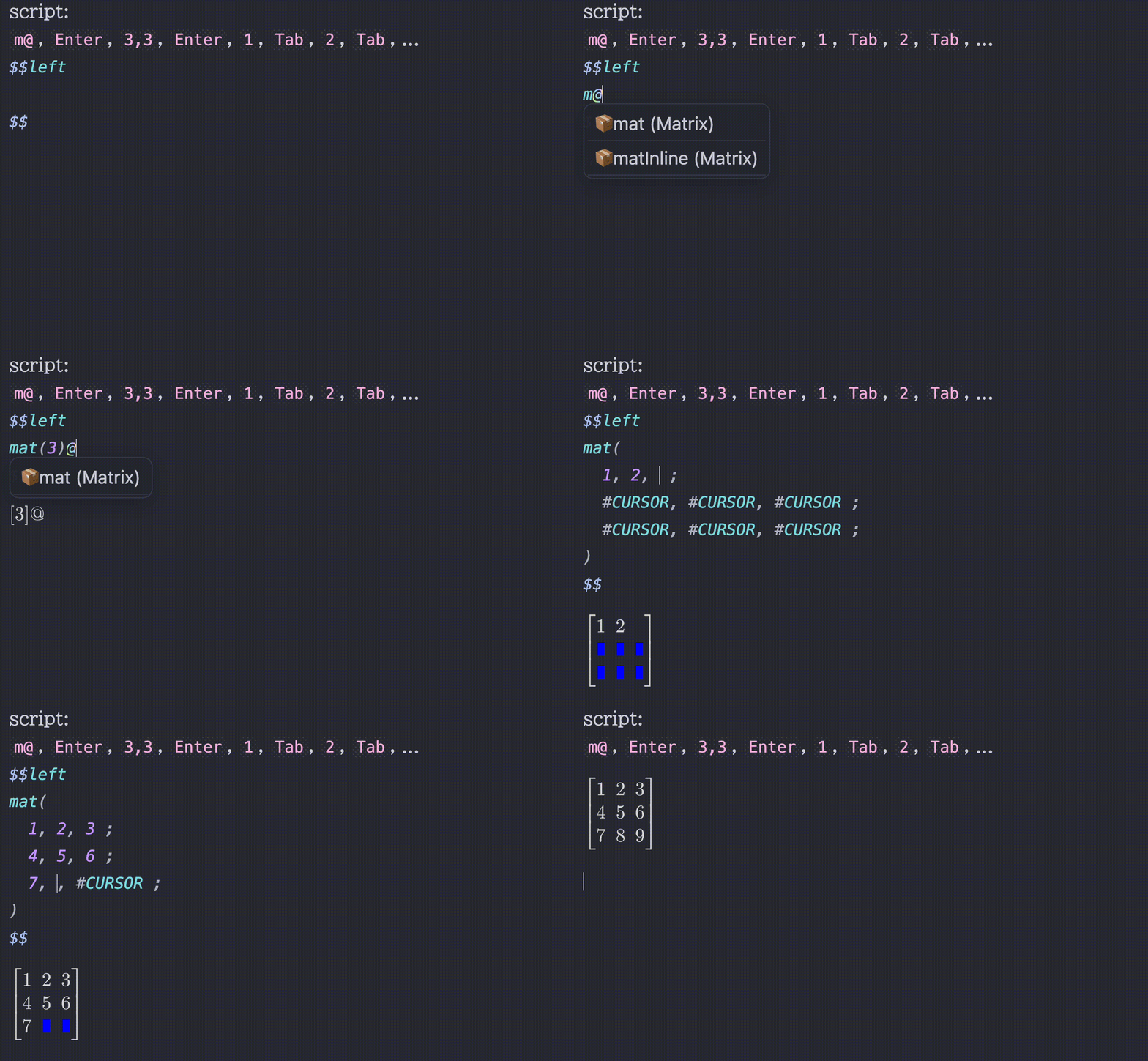
  • Snippets / Scripts
  • Bracket highlights
  • Symbol completion
    • Type a leading backslash \ to make the search look for LaTeX commands
  • Inline math preview / Codeblock preview
  • Available on mobile app
  • Support background rendering
  • Use font size from Obsidian settings
  • Inherit text color from Obsidian theme
  • Additional styling customization
    • e.g., an option inline-middle to vertically center inline math so it lines up naturally with the surrounding text
  • Use custom fonts and import system fonts (desktop app only for importing)
  • Almost all1 Typst packages are supported (desktop app only for importing local packages)
  • Tables and blockquotes support with proper display math handling (<br> and \n[\s\t]*> will be automatically replaced with line breaks)
  • Excalidraw integration
  • Equation Citator integration
  • No more flickering inline math compatibility
  • PDF Export, Better Export PDF, Export Image plugin, and Webpage HTML Export compatibility
  • Typst Tools
    • Symbols viewer
    • Packages viewer
    • Snippets editor
    • Typst handwritten symbol recognition with Detypify
    • Bidirectional converter between TeX/LaTeX and Typst with TyLax
    • Commutative diagram editor with Quiver
  • Context Menu
    • Copy as SVG (Obsidian Theme / Typst Default)
    • Copy as PNG (Transparent / Opaque)
    • Copy as img tag (for embedding into Obsidian notes)
  • Support 'click to jump' (experimental)
    • Click codeblock output
    • Click math output with ctrl

For a better typing experience, I strongly recommend installing the No more flickering inline math plugin by RyotaUshio:

Turned OFF Turned ON

Installation

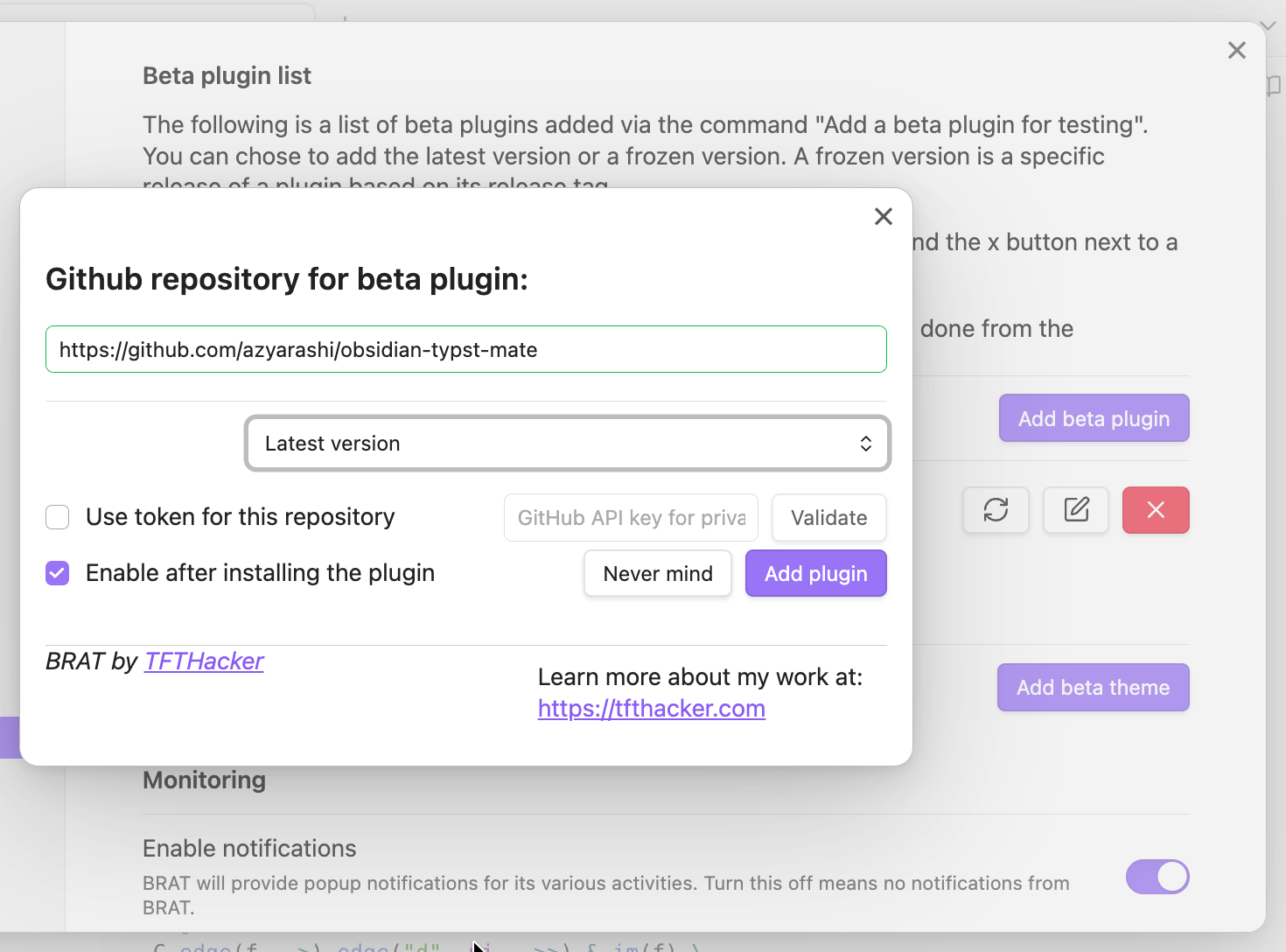
You can install this plugin via the Community Plugins tab within Obsidian. Search for "Typst Mate". Alternatively, you can also install using BRAT.
Screenshot

Documentation

Compatibility

Official Features

  • PDF Export

Community Plugins

If the export doesn't work correctly, try disabling background rendering before exporting.

Customization

Default Preamble

#set page(margin: 0pt, width: auto, height: auto)
#show raw: set text(1.25em)
#set text(size: fontsize)  // `fontsize` refers to the settings in Obsidian
#import "@preview/mannot:0.3.1": *
#import "@preview/quick-maths:0.2.1": shorthands
#show: shorthands.with(
  ($+-$, sym.plus.minus),
  ($|-$, math.tack),
)
// Typst 0.13.1 or before (plugin 2.1.7 or before)
// #let scr(it) = text(features: ("ss01",), box($cal(it)$))

Custom Styling

You can apply your own custom CSS, not just the styling included in the plugin. Depending on the three modes (inline, display, and codeblock), the styling method (style), and the identifier (id), the following CSS classes will be added:

  • typstmate-(mode)
  • typstmate-style-(style)
  • typstmate-id-(id)

Acknowledgements

Typst Mate leverages the following open-source projects:

and contributors:

I'm grateful to the developers for making this plugin possible!


Disclosures

This section contains wording required for publishing on Obsidian's official Community Plugins page, so I include it here.

Network

This plugin makes use of a large WebAssembly (Wasm) binary. Bundling it directly would significantly increase startup time, so it is automatically downloaded from the Releases page instead.

Network access is required to install Typst packages, and is also required by Typst Tools to display lists of packages and symbols and to use Detypify and Quiver.

Reading Local Files (Desktop App only)

If the cache for a given package cannot be found inside the Vault, this plugin will fall back to accessing the same local package files used by the Typst CLI. For the exact locations, see typst/README.md#local-packages.

Planned Update Contents

See Discussion#10.

Footnotes

  1. jlyfish probably won't work correctly.

Similar Plugins

info
• Similar plugins are suggested based on the common tags between the plugins.
Completr
4 years ago by tth05
Auto-completion plugin for the obsidian editor.
Snippetor
4 years ago by ebullient
An assist for creating CSS snippets for Obsidian
Obsidian matrix
4 years ago by Jonas Mohr
Desmos
4 years ago by Nigecat
Embed graphs directly into your obsidian notes
Latex Suite
4 years ago by artisticat1
Make typesetting LaTeX as fast as handwriting through snippets, text expansion, and editor enhancements
Obsidian Math+
4 years ago by Oscar Capraro
This is an Obsidian plugin for taking math notes using Excalidraw.
Function Plot
4 years ago by leonhma
A obsidian.md plugin for rendering maths graphs.
Group Snippets
4 years ago by Mara-Li
Create folder of snippets to activate them in one click !
TikZJax
4 years ago by artisticat1
Render LaTeX and TikZ diagrams in your notes
Obsidian asciimath
3 years ago by widcardw
Asciimath support for Obsidian (based on asciimath-parser)
Numerals
3 years ago by RyanC
An obsidian plugin which turns a math code block into a full featured calculator
LaTeX Algorithms
3 years ago by SamZhang02
A simple plugin for writing Algorithms and pseudocodes in Obsidian.md
Callout Manager
3 years ago by eth-p
An Obsidian.md plugin that makes creating and configuring callouts easy.
LaTeX to unicode converter
3 years ago by fjdu
Convert LaTeX commands into unicode sequences
Jelly Snippets
3 years ago by Spencer Gouw
A simple text snippets plugin for Obsidian.md. BACKUP SNIPPETS BEFORE UPDATING.
Pseudocode
3 years ago by Yaotian Liu
An obsidian plugin that helps to render a LaTeX-style pseudocode inside a code block.
Latex Matrices
3 years ago by Daniele Susino
An obsidian plugin to create latex matrices.
MathLive
3 years ago by Dan Zilberman
The must-have plugin for math in Obsidian
Pieces for Developers
3 years ago by Pieces For Developers
Pieces' powerful extension for Obsidian-MD that allows users to access their code snippets directly within the Obsidian workspace
Typst Renderer
3 years ago by fenjalien
Renders typst code blocks in Obsidian into images using Typst through the power of WASM!
CSS Editor
3 years ago by Zachatoo
Edit CSS snippets in Obsidian.
Math Booster
3 years ago by Ryota Ushio
A powerful indexing & referencing system for theorems & equations in your Obsidian vault.
No more flickering inline math
3 years ago by Ryota Ushio
No longer disturbed by flickering inline math in Obsidian.
Calctex
3 years ago by Mike
An Obsidian plugin for automatic calculation of LaTeX formulas.
Image2LaTEX
3 years ago by Hugo Persson
This is a plugin for obsidian that will read your latest copied image from clipboard and generate math latex from it
Auto-\displaystyle Inline Math
2 years ago by Ryota Ushio
An Obsidian.md plugin to automatically make all inline maths \displaystyle.
Latex OCR
2 years ago by Lucas Van Mol
Generate LaTeX equations from images in your clipboard or vault
LaTeX-OCR
2 years ago by Jack Barker
Mathematica Plot
2 years ago by Marcos Nicolau
Insert functions on Obsidian using Wolfram Mathematica!
Wypst
2 years ago by 0xpapercut
High quality rendering of Typst in Obsidian, powered by wypst.
SwiftLaTeX Render
2 years ago by gboyd068
Universal renderer
2 years ago by Kloud
Obsidian plugin to render latex, dot, blockdiag, ditaa and other graphs
MathLive in Editor Mode
2 years ago by MizarZh
MathLive input in editor mode.
Plot Vectors and Graphs
2 years ago by Nicole Tan YiTong
Obsidian Plugin to generate graphs given the function.
Math Indicator Changer
2 years ago by Ori Replication
AI LaTeX Generator
2 years ago by Aayush Shah
An Obsidian plugin that generates latex code from natural language inputs.
Snippets Manager
2 years ago by Venkatraman Dhamodaran
Snippets Manager (Text Expander) For Obsidian
Latex Environments
6 years ago by Zach Raines
Quickly insert and change latex environments within math blocks in Obsidian.
Export To TeX
5 years ago by Zach Raines
export obsidian markdown files in a format that can be pasted into a TeX file
Extended MathJax
5 years ago by Xavier Denis & Ng Wei En
Snippets
5 years ago by Pelao
Text Snippets
5 years ago by Ariana Khitrova
Snippets plugin for obsidian
Kroki
5 years ago by Greg Zuro
Linter
5 years ago by Victor Tao
An Obsidian plugin that formats and styles your notes with a focus on configurability and extensibility.
Quick LaTeX
5 years ago by joeyuping
Snippet Commands
5 years ago by death_au
Registers custom css snippets as commands (which you can bind hotkeys to)
MySnippets
5 years ago by Chetachi
MySnippets is a plugin that adds a status bar menu allowing the user to quickly manage their snippets within the comfort of their workspace 🖌.
Meld Calc
5 years ago by meld-cp
Copy as LaTeX
4 years ago by mo-seph
Quick plugin to be able to copy/paste from Obsidian/Markdown into a Latex document
Transfer LaTeX from GPT
2 years ago by Xixia
Snippetsaurus
a year ago by Christian Humbert
Latex Exporter
a year ago by Matthew S. Scott
IMSwitch in Math Block
a year ago by XXM
Inline Code Copy
a year ago by Hongchen Lin
MathType
a year ago by slateblua
Type math faster
Project Euler Stats
a year ago by Artem Korsakov
Get statistics from Project Euler.
LaTeX Math
a year ago by Zarstensen
Integrated CAS (via. Sympy) plugin for Obsidian, with a LaTeX focused workflow.
Slash snippets
10 months ago by echo-saurav
Insert snippet of text with slash command
Cliplet
6 months ago by namikaze-40p
An Obsidian plugin that serves as a clipboard and snippet manager — your own, separate from the OS clipboard.
LaTeX autocomplete
6 months ago by Yanis Gerst
Quick Matrix
5 months ago by Charlie Flowe
Plugin for Obsidian.md that allows for faster interactions with matrices in LaTeX
LaTeX Panel Helper
5 months ago by Luster
A powerful and convenient LaTeX symbol panel for Obsidian to enhance your mathematical and scientific note-taking efficiency.
Auto Math
2 months ago by Vladislav Sorokin
Auto-expands LaTeX snippets. External rules with live reload, Custom Rules Editor, and default math pack.