Latex OCR

by Lucas Van Mol
5
4
3
2
1
Score: 54/100

Description

The Latex OCR plugin allows Obsidian users to convert images of equations into editable LaTeX code within their vault. By leveraging either the HuggingFace API or a locally-run model, the plugin can generate LaTeX equations from clipboard images or existing image files through contextual commands. Users can configure the plugin to suit their workflow, including enabling local processing for enhanced control. This tool is particularly useful for academic, technical, and scientific note-taking, offering a streamlined way to incorporate precise mathematical and technical content into Obsidian notes.

Reviews

No reviews yet.

Stats

136
stars
12,950
downloads
9
forks
855
days
160
days
160
days
14
total PRs
1
open PRs
2
closed PRs
11
merged PRs
30
total issues
11
open issues
19
closed issues
32
commits

Latest Version

5 months ago

Changelog

What's Changed

New Contributors

Full Changelog: https://github.com/lucasvanmol/obsidian-latex-ocr/compare/0.8.0...0.9.0

README file from

Github

Latex OCR for Obsidian

GitHub release (with filter) Obsidian Downloads

⚠️ Inference API issues ⚠️

The HuggingFace Inference API is not working as Hugging Face is currently not supporting image-to-text models. Check the issue here for updates. Running locally is still supported & working.

Generate Latex equations from images and screenshots inside your vault.

Features

  • Paste LaTeX equations directly into your notes using an image from your clipboard with a custom command (bind it to a hotkey like Ctrl+Alt+V if you use it often!).
  • Transform images in your vault to LaTeX equations by choosing a new "Generate Latex" option in their context menu.
  • Use either the HuggingFace inference API or run locally

Using Inference API

By default, this plugin uses the HuggingFace inference API. Here's how you get your API key:

  • Create an account or login at https://huggingface.co
  • Create a read access token in your Hugging Face profile settings. If you already have other access tokens I recommend creating one specifically for this plugin.
  • After enabling the plugin in Obsidian, head to the Latex OCR settings tab, and input the API key you generated.

Limitations

  • The inference API is a free service by huggingface, and as such it requires some time to be provisioned. Subsequent requests should be a lot faster.
  • If you would be interested in a low-cost subscription-based service that would get rid of this annoying waiting period, please react to the related issue here. I will consider building it if there is enough demand to pay for the server costs.

Run Locally

Alternatively, you can run the model locally. This requires installing an accompanying python package. Install it using pip (or, preferably pipx):

pip install latex-ocr-server

You can check if it is installed by running

python -m latex_ocr_server --version

Configuration

Open Obsidian and navigate to the Community Plugins section and enable the plugin. Then head to the LatexOCR settings tab, enable "Use local model" and configure it.
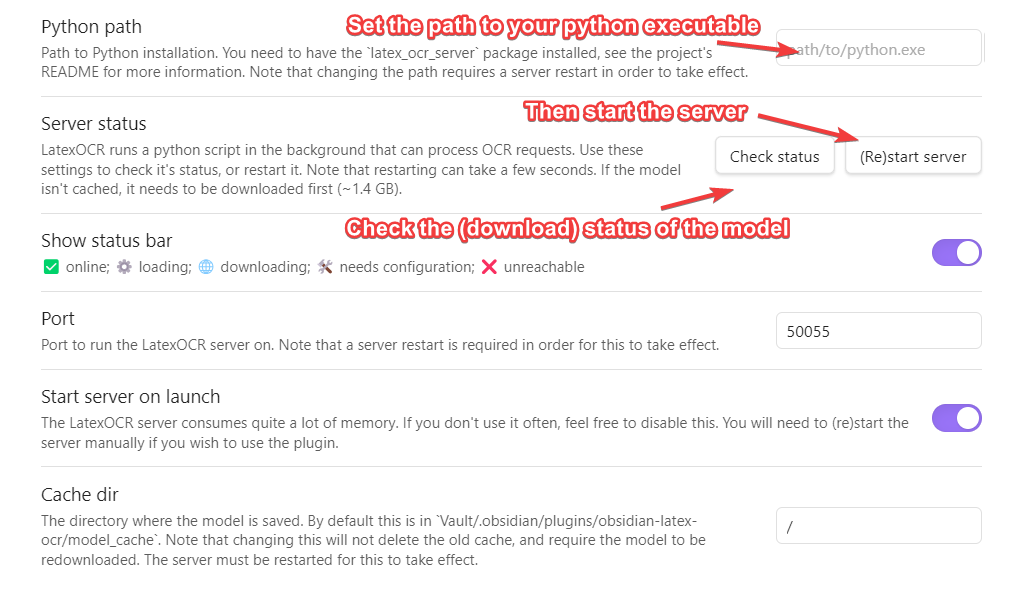
settings

You will first need to set the python path that the plugin will use to run the model in the LatexOCR settings. You can then check if it's working using the button below it. Once this is done, press "(Re)start Server".

Note that the first time you do this, the model needs to be downloaded from huggingface, and is around ~1.4 GB. You can check the status of this download in the LatexOCR settings tab by pressing "Check Status".

The status bar at the bottom will indicate the status of the server.

Status Meaning
LatexOCR ✅ server online
LatexOCR ⚙️ server loading
LatexOCR 🌐 downloading model
LatexOCR ❌ server unreachable

If the server is online but you encounter an error getting a response from the server, ensure that the Cache dir filepath from the plugin settings is pointing to a valid folder and that the model has successfully been saved there.

GPU support

You can check if GPU support is working by running:

python -m latex_ocr_server info --gpu-available

If you want GPU support, follow the instructions at https://pytorch.org/get-started/locally/ to install pytorch with CUDA. Note you may need to uninstall torch first. torchvision and torchaudio is not required.

Attribution

Massive thanks to NormXU for training and releasing the model.

Similar Plugins

info
• Similar plugins are suggested based on the common tags between the plugins.
Completr
4 years ago by tth05
Auto-completion plugin for the obsidian editor.
Obsidian matrix
4 years ago by Jonas Mohr
Latex Suite
4 years ago by artisticat1
Make typesetting LaTeX as fast as handwriting through snippets, text expansion, and editor enhancements
TikZJax
4 years ago by artisticat1
Render LaTeX and TikZ diagrams in your notes
Obsidian asciimath
3 years ago by widcardw
Asciimath support for Obsidian (based on asciimath-parser)
LaTeX Algorithms
3 years ago by SamZhang02
A simple plugin for writing Algorithms and pseudocodes in Obsidian.md
LaTeX to unicode converter
3 years ago by fjdu
Convert LaTeX commands into unicode sequences
Pseudocode
3 years ago by Yaotian Liu
An obsidian plugin that helps to render a LaTeX-style pseudocode inside a code block.
Latex Matrices
3 years ago by Daniele Susino
An obsidian plugin to create latex matrices.
MathLive
3 years ago by Dan Zilberman
The must-have plugin for math in Obsidian
Math Booster
3 years ago by Ryota Ushio
A powerful indexing & referencing system for theorems & equations in your Obsidian vault.
No more flickering inline math
3 years ago by Ryota Ushio
No longer disturbed by flickering inline math in Obsidian.
Calctex
3 years ago by Mike
An Obsidian plugin for automatic calculation of LaTeX formulas.
Image2LaTEX
3 years ago by Hugo Persson
This is a plugin for obsidian that will read your latest copied image from clipboard and generate math latex from it
Auto-\displaystyle Inline Math
2 years ago by Ryota Ushio
An Obsidian.md plugin to automatically make all inline maths \displaystyle.
LaTeX-OCR
2 years ago by Jack Barker
Wypst
2 years ago by 0xpapercut
High quality rendering of Typst in Obsidian, powered by wypst.
SwiftLaTeX Render
2 years ago by gboyd068
MathLive in Editor Mode
2 years ago by MizarZh
MathLive input in editor mode.
Plot Vectors and Graphs
2 years ago by Nicole Tan YiTong
Obsidian Plugin to generate graphs given the function.
Math Indicator Changer
2 years ago by Ori Replication
AI LaTeX Generator
2 years ago by Aayush Shah
An Obsidian plugin that generates latex code from natural language inputs.
Latex Environments
6 years ago by Zach Raines
Quickly insert and change latex environments within math blocks in Obsidian.
Export To TeX
5 years ago by Zach Raines
export obsidian markdown files in a format that can be pasted into a TeX file
Extended MathJax
5 years ago by Xavier Denis & Ng Wei En
Quick LaTeX
5 years ago by joeyuping
Copy as LaTeX
4 years ago by mo-seph
Quick plugin to be able to copy/paste from Obsidian/Markdown into a Latex document
Transfer LaTeX from GPT
2 years ago by Xixia
Latex Exporter
a year ago by Matthew S. Scott
Inkporter
a year ago by Ayush Kumar Saroj
Inkporter is an Obsidian plugin that digitizes handwritten notes with smart ink isolation, adaptive theming, and seamless import workflows.
Vision Recall
a year ago by Travis Van Nimwegen
Transform screenshots into searchable Obsidian notes using AI vision and text analysis
MathType
a year ago by slateblua
Type math faster
LaTeX Math
a year ago by Zarstensen
Integrated CAS (via. Sympy) plugin for Obsidian, with a LaTeX focused workflow.
LaTeX autocomplete
6 months ago by Yanis Gerst
Quick Matrix
5 months ago by Charlie Flowe
Plugin for Obsidian.md that allows for faster interactions with matrices in LaTeX
LaTeX Panel Helper
5 months ago by Luster
A powerful and convenient LaTeX symbol panel for Obsidian to enhance your mathematical and scientific note-taking efficiency.
Typst Mate
3 months ago by azyarashi
Render math expressions with Typst instead of MathJax in Obsidian.
Auto Math
2 months ago by Vladislav Sorokin
Auto-expands LaTeX snippets. External rules with live reload, Custom Rules Editor, and default math pack.