Regex Find and Replace

by Martin Eder
5
4
3
2
1
Score: 36/100

Description

Category: Note Enhancements

The Regex Find and Replace plugin is a powerful tool for Obsidian users who need to perform advanced text searches and replacements. With this plugin, you can use regular expressions to find and replace specific patterns in your notes, making it easy to standardize formatting, extract data, and more. The plugin provides a user-friendly interface that allows you to easily construct and test your regex patterns, ensuring that you get the desired results. Whether you're a power user or just looking for a way to streamline your note-taking workflow, this plugin is sure to be a valuable addition to your Obsidian toolkit.

Reviews

No reviews yet.

Stats

91
stars
63,674
downloads
21
forks
1,607
days
1,561
days
1,561
days
2
total PRs
1
open PRs
1
closed PRs
0
merged PRs
36
total issues
26
open issues
10
closed issues
0
commits

Latest Version

4 years ago

Changelog

Changes in this Release

  • Option to interpret \n in repleace field to insert line-break accordingly
  • Option to pre-fill the find-field with the selected word or phrase
  • Used regex-modifier flags are shown in the dialog
  • If nothing is selected, the "replace only in selection" option is not shown in the dialog

Full Changelog: https://github.com/Gru80/obsidian-regex-replace/compare/1.1.0...1.2.0

Installation Instructions

To manually install this plugin, download obsidian-timestamper.zip into the plugins-directory of your Obsidian vault (usually YourVault/.obsidian/plugins) and unzip it there.

README file from

Github

release downloads

Obsidian Plugin - Regex Find/Replace

Provides a dialog to find and replace text in the currently opened note. In addition to Obsidians on-board find/repace function, this plugin provides options to

  • use regular expressions or just plain text
  • replace found occurances in the currently slected text or in the whole document

Desktop as well as mobile versions of Obsidian are supported.
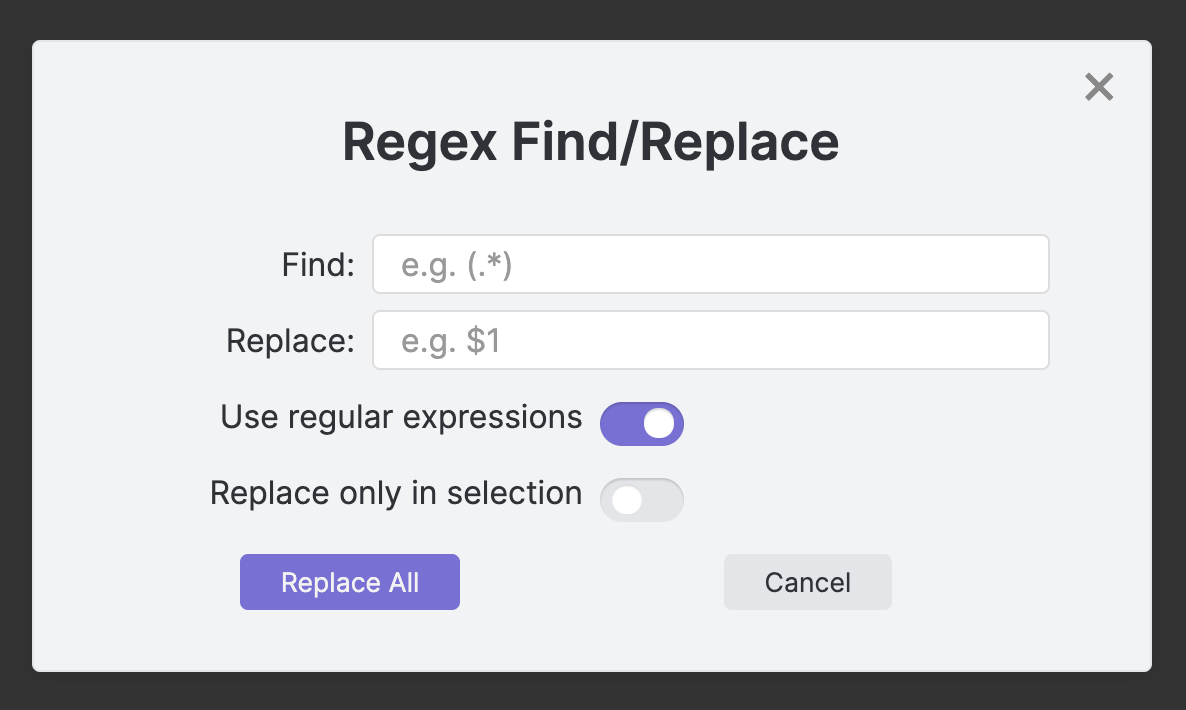
Regex FindReplace Dialog

How to use

  • Run Regex Find/Replace: Find and Replace using regular expressions from the command palette or
  • Assign a shortcut key to this command and use it to open the dialog
  • The plugin will remember the last recent search/replace terms as well as the settings

How to install

From inside Obsidian

This plugin can be installed via the Community Plugins tab in the Obsidian Settings dialog:

  • Disable Safe Mode (to enable community plugins to be installed)
  • Browse the community plugins searching for "regex find/replace"
  • Install the Plugin
  • Enable the plugin after installation

Manual installation

The plugin can also be installed manually from the repository:

  • Create a new directory in your vaults plugins directory, e.g.
    .obsidian/plugins/obsidian-regex-replace

  • Head over to https://github.com/Gru80/obsidian-regex-replace/releases

  • From the latest release, download the files

    • main.js
    • manifest.json
    • styles.css

    to your newly created plugin directory

  • Launch Obsidian and open the Settings dialog

  • Disable Safe Mode in the Community Plugins tab (this enables community plugins to be enabled)

  • Enable the new plugin

Version History

1.0.0

Initial release

1.1.0

  • Case insensitive search can now be enabled in the settings panel of the plugin (regex flag /i)
  • Find-in-selection toggle switch is disabled if no text is selected in the note
  • Performance improvements and bug-fixes

1.2.0

  • Option to interpret \n in repleace field to insert line-break accordingly
  • Option to pre-fill the find-field with the selected word or phrase
  • Used regex-modifier flags are shown in the dialog

Similar Plugins

info
• Similar plugins are suggested based on the common tags between the plugins.
aDHL
a year ago by tine-schreibt
The Dynamic Highlights Plugin, but with hotkeys, more options and sorting; works well with Highlightr.
Auto Replacer
10 months ago by Alecell
A live text replacement plugin that applies automatic formatting, corrections, or custom replacements in real-time. Define your own regex-based rules and transformation logic to modify text dynamically as you type.
AutoMover
a year ago by Al0cam
Move files and notes with specified names into their designated folders according to rules you define.
Blue Star
2 years ago by Wang Guoshi
A plugin for Obsidian that generates Anki flashcards in various ways.
Bulk Rename
4 years ago by Oleg Lustenko
Custom Selected Word Count
a year ago by banisterious
Custom Selected Word Count for Obsidian
Dynamic Highlights
4 years ago by nothingislost
An experimental Obsidian plugin that highlights all occurrences of the word under the cursor
Dynamic Text Concealer
2 years ago by Matt Cole Anderson
Obsidian.md Plugin to conceal or replace user configured text patterns in Live Preview and Read Mode.
File Explorer++
3 years ago by kelszo
A plugin for https://obsidian.md, which enables the ability to hide and pin specific files and folders in the file explorer by applying custom filters.
FileName Styler
a year ago by Marc Feininger
An Obsidian plugin to hide, customize, and decorate file names in the sidebar using regex and customizable profiles.
Find & Replace in Selection
5 years ago by TClark1011
Find and replace in selection
5 years ago by Dmitry Savosh
Obsidian plugin. Find and replace in selection.
Find Orphaned Images
2 years ago by Josmar Cristello
Find Orphaned Images is an Obsidian plugin designed to help you keep your vault clean and organized by identifying and managing images that are not linked anywhere in your notes.
Global Search and Replace
3 years ago by Mahmoud Fawzy Khalil
A plugin to do a global search and replace in all your Obsidian vault files.
Hide Commands in Menu
a year ago by bomian98
Obsidian Plugin, hide different commands in different menus.
Linkify
4 years ago by Matthew Chan
LinkMagic
2 years ago by AndyReifman
R.E.L.A.X.
2 years ago by Syr
Regex Obsidian Plugin
Regex Line Filter
a year ago by 64MM4-KN1F3
A note filtering plugin for Obsidian
Regex Mark
2 years ago by Mara-Li
Regex Pipeline
5 years ago by No3371
An Obsidian plugin that allows users to setup custom regex rules to automatically format notes.
Relative Find
5 years ago by phibr0
Tag Links
2 years ago by Zacchary Dempsey-Plante
A plugin for Obsidian that allows tags to be opened as links using a hotkey.
Text Finder
a year ago by hafuhafu
Provides a find/replace window in edit mode similar to VSCode (supports regular expressions and case sensitivity).
URL Formatter
8 months ago by Thomas Snoeck
Automatically formats specific URLs pasted into Obsidian into clean Markdown links.