File Manager

by Juan Sicilia
5
4
3
2
1
Score: 51/100

Description

Category: File Management

The File Manager Plugin for Obsidian brings powerful file management capabilities directly to your workspace. This plugin supercharges the native File Explorer with keyboard-driven commands, making tasks like creating folders, duplicating files, renaming items, and moving or copying content more intuitive. You can quickly toggle between selecting, inverting, or clearing your selections and handle clipboard operations like copy, cut, and paste seamlessly.

A standout feature is its conflict resolution options when copying or moving files-allowing you to overwrite, skip, or keep duplicate files by renaming them. The plugin also includes a customizable "Open with" function to launch files or folders with external programs, accessible via commands or the context menu.

For those who prefer efficiency and control, this plugin offers an array of commands to streamline your workflow, all within Obsidian's ecosystem. Perfect for users managing complex vaults or who want a more dynamic file-handling experience!

Reviews

No reviews yet.

Stats

32
stars
2,683
downloads
0
forks
535
days
408
days
408
days
0
total PRs
0
open PRs
0
closed PRs
0
merged PRs
7
total issues
1
open issues
6
closed issues
49
commits

Latest Version

a year ago

Changelog

Version 1.4.0

New commands: - Move active note to a new folder. - Go to folder in file explorer.

pathexplorer: - New absolute-path flag to show or not folders as absolute paths. - Use of environment variables in paths (linux/mac format $<var> or windows format %<var>%).

README file from

Github

File Manager Plugin for Obsidian

This plugin enhances the Obsidian File Explorer by introducing essential file management features. It adds several new commands to interact with the File Explorer, allowing users to bind hotkeys for efficient keyboard-only file management.

Version 1.2: Introduces the new pathexplorer codeblock. See details below.

Version 1.3: Introduces the ability to use URL schemas as commands in Open With....

Version 1.4: Introduces move note and go to folder commands. Pathexplorer can show now absolute paths and you can use environment variables in the paths.

Features

  • Open With: Open files or folders using custom commands.
  • Create Subfolder: Create a subfolder within the current folder.
  • Create Folder: Create a sibling folder.
  • Create Note: Create an empty note in the current folder.
  • Duplicate: Duplicate files or folders.
  • Move: Move selected files or folders to a new location.
  • Copy: Copy selected files or folders to a new location.
  • Copy, Cut, Paste: Copy or cut selected files or folders to the clipboard and paste them.
  • Clear Clipboard: Clear the clipboard contents.
  • Toggle Selection: Toggle the selection of a file or folder.
  • Select All: Select all files and folders.
  • Invert Selection: Invert the current selection.
  • Deselect All: Clear all selections.
  • Rename: Rename files or folders.

Version 1.1

  • Go to File/Folder: Locate and focus on a file or folder in the file explorer.
  • Open file/folder with...: Open file or folder in the file explorer with custom program.

Version 1.2

  • pathexplorer codeblock: Display files and folders from specified paths and open them using custom commands.

Version 1.4

  • Move note: Move active note to a new location.
  • Go to Folder: Locate and focus on a folder in the file explorer.

Copy/Move Conflict Resolution

When file conflicts occur, choose from the following resolution methods:

  • Overwrite: Replace the existing file or folder.
  • Skip: Ignore the conflicting file or folder.
  • Keep: Retain both files by renaming the new one.

Usage

File Explorer Commands

NOTE: These commands are available only when the File Explorer panel is focused.

  • File Manager: Create a subfolder within the focused or active file/folder.
  • File Manager: Create a folder as sibling of the focused or active file/folder.
  • File Manager: Create a note within the focused or active folder.
  • File Manager: Duplicate focused or active file/folder,
  • File Manager: Copy selected files/folders to clipboard,
  • File Manager: Cut selected files/folders to clipboard,
  • File Manager: Paste files/folders from clipboard to selected folder,
  • File Manager: Clear clipboard,
  • File Manager: Move selected files/folders to a new folder.
  • File Manager: Copy selected files/folders to a new folder.
  • File Manager: Select all siblings and children of the focused or active file/folder.
  • File Manager: Toggle selection of the focused or active file/folder.
  • File Manager: Clear selection.
  • File Manager: Invert selection.
  • File Manager: Rename focused or active file/folder.

Version 1.1

  • File Manager: Go to file or folder in file explorer.
  • File Manager: Open with <command>.

Version 1.4

  • File Manager: Move active note to a new folder.
  • File Manager: Go to folder in file explorer.
Global Commands

NOTE: The following commands are available if a file explorer exists in Obsidian.

  • File Manager: Go to file or folder in file explorer.
  • File Manager: Go to folder in file explorer.

NOTE: This command is globally available. If the file explorer is active, the focused or selected file/folder will be used for the Open With command. Otherwise, the currently active document will be used.

  • File Manager: Open with ...

Open with...

Create custom Open With commands in the settings tab.
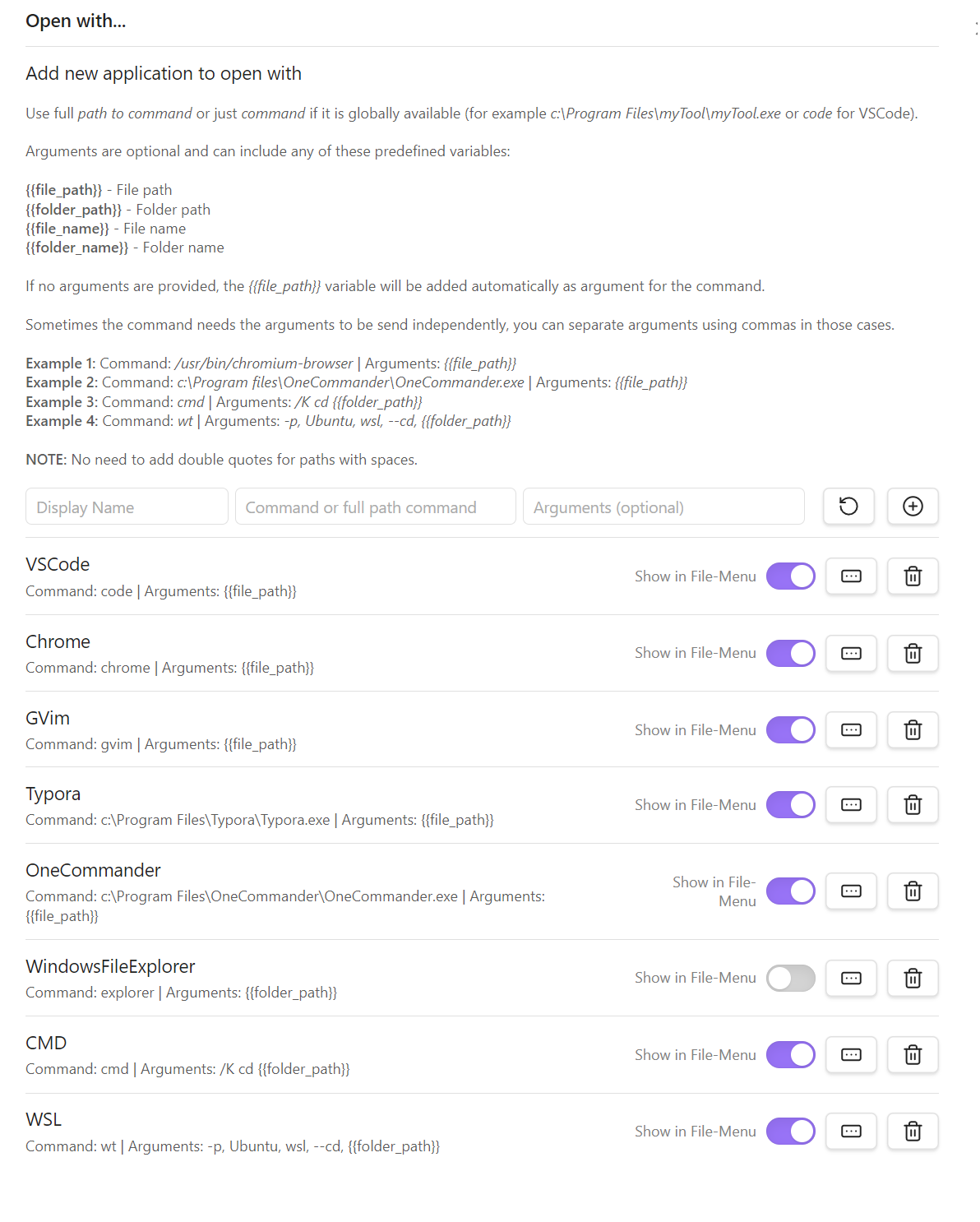
Open With

NEW: Version 1.3.1 allows to define app URL Schemas as commands (for example: ulysses://x-callback-url/open?path={{file_path}}).

The Open With commands are also available in the File Context Menu if enabled in the settings.

pathexplorer codeblock

Version 1.2 introduces the pathexplorer codeblock. For example, adding the following codeblock to a note:

```pathexplorer
# Path or paths to explore.
path $HOME/dev/dump_shortcuts
path c:\tools\obsidian
path %USERPROFILE%\projects

# If present include dump_shortcuts as root of files and folders. 
include-root

# Use .gitignore syntax to ignore files/folders.
ignore .git/
ignore .venv/
ignore old/
ignore build/
ignore dist/
ignore test*/
ignore __pycache__/
ignore .*
ignore *.bat
ignore *.spec

# Define max-depth (default 1)
max-depth 3

# Define max-files (default 100)
max-files 20 
```

Will render the following output in reader mode:

Settings

pathexplorer codeblock syntax.

#

For line comments

path <relative or absolute path>

Version 1.4

Now you can use environment variables in the path. The Linux/Mac format ($<var>) and the Windows format (%<var>%) can be used interchangeably. On Windows, the HOME environment variable will be translated to USERPROFILE if it does not exist.

Specify paths to explore. Multiple paths can be defined, one per line.

include-root

Include the root folder as the parent of its children.

max-depth

Max depth level to explore in the tree.

max-files

Max number of files/folders to display.

ignore

Ignore files/folders using .gitignore patterns. Inverted patterns (!<pattern>) are also supported. Multiple ignore patterns can be defined, one per line.

flat [<none> | hide-files | hide-folders]

Display files and folders as a list without hierarchy. Use optional flags to hide files or folders.

hide-icons

Hide command icons next to files/folders.

Version 1.4

absolute-path [<none> | all | root]

Display absolute path on folders. By default none is used (no absolute paths). all flag shows absolute path in every folder. root flag show absolute path in root folder.

Create custom patterns in the settings tab.
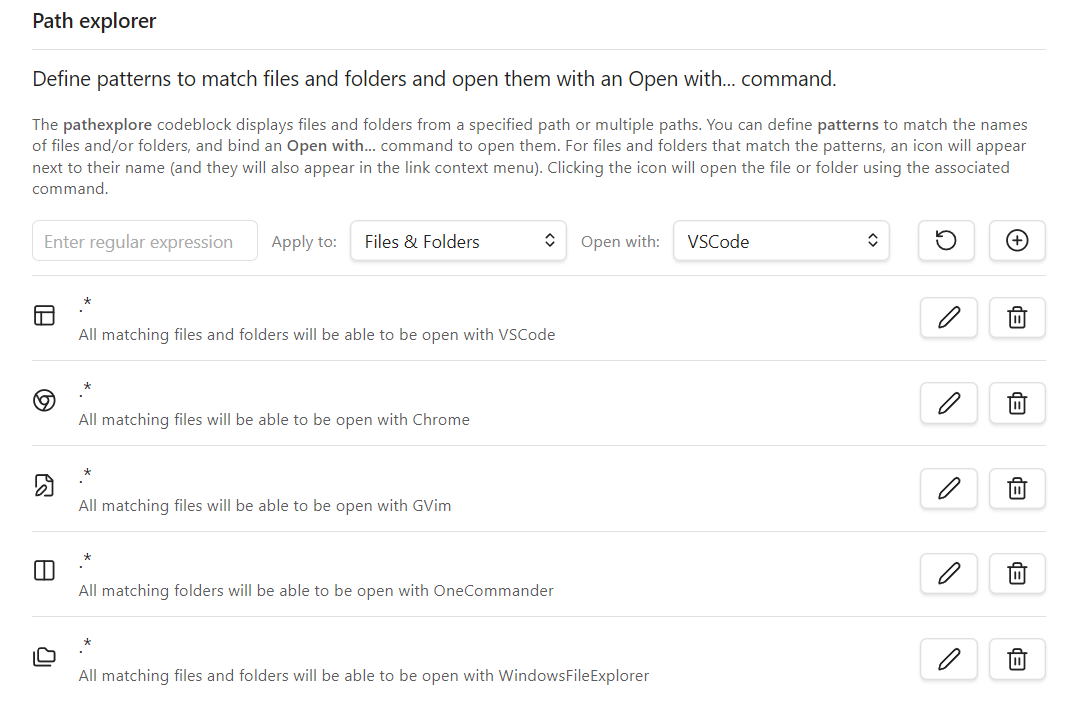
pathexplorer settings

Installation

Install File Manager from the Community Plugins section.

Configuration

Customize plugin behavior using the general settings tab.

NOTE: Refer to the Open With and pathexplorer sections for additional settings.
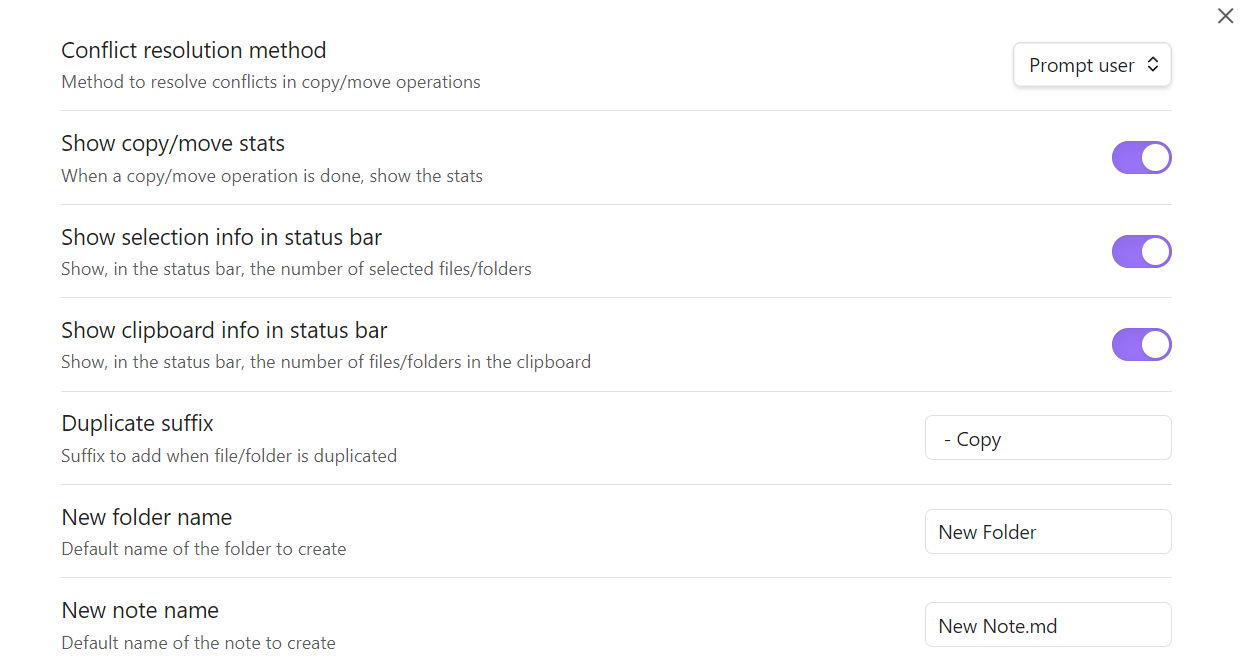
Settings

Development

  1. Clone this repository into the .obsidian/plugins folder of an Obsidian Vault.
  2. Ensure Node.js version is at least v16 (node --version).
  3. Run npm install to install dependencies.
  4. Run npm run dev to start compilation in watch mode.
  5. Enable the File Manager plugin in Obsidian settings.

Support

For issues or feature requests, open an issue on the GitHub repository.

License

This plugin is licensed under the MIT License.

Roadmap

  • Add merge functionality for folder copy/move.
  • Auto-select files in the destination after copying/moving.
  • Add sorting customization to pathexplorer codeblock.

Acknowledgments

This plugin was inspired by the following plugins. Thanks to their developers:

Similar Plugins

info
• Similar plugins are suggested based on the common tags between the plugins.
Advanced New File
5 years ago by Ivan Chernov
Create file in chosen folder
Aggregator
3 years ago by SErAphLi
This plugin helps you gather information from files, and make a summary in the file.
Auto File Organizer
a year ago by mofukuru
Obsidian plugin: Automatically organizes files into folders based on their extensions.
Automatically reveal active file
5 years ago by Matt Sessions
Obsidian plugin to reveal the active file automatically when you open a file
Awesome Image
3 years ago by AwesomeDog
One-stop solution for image management.
Bellboy
4 years ago by Shaked Lokits
Opinionated file structure manager for the Obsidian knowledge base.
Check and Delete
a year ago by Danitiate
An Obsidian plugin that allows you to quickly clean up temporary list-items with the press of a button
Checklist
5 years ago by delashum
Confluence Link
2 years ago by Razvan Bunga
Convert obsidian md file into confluence pages
Course Module Loader
a year ago by Sebastian Kamilli
Downloads and unzips course module zip files from a URL into a specified vault folder, skipping existing files.
Easy Bake
3 years ago by mgmeyers
Compile many Obsidian notes down to one.
Edit Gemini
4 years ago by Basil_Mori
Emo
3 years ago by yaleiyale
Use image/file hosting in Obsidian by clipboard or draging file. Obsidian 图床聚合 & Github上传器
External Link Helper
3 years ago by Jhonghee Park
Obsidian plugin for link suggestion
Ffmpeg Converter
2 years ago by MrAnyx
Convert your assets into other formats. Convert, Compress and Optimize your vault
File Cleaner
4 years ago by Johnson0907
A file cleaner plugin for Obsidian.
File Color
3 years ago by ecustic
An Obsidian plugin for setting colors on folders and files in the file tree.
File Cooker
4 years ago by iuian
An obsidian plugin for moving search files to target folder
File Diff
3 years ago by Till Friebe
View the difference between two files within Obsidian.
File Explorer Note Count
5 years ago by Ozan Tellioglu
Obsidian Plugin for viewing the number of elements under each folder within the file explorer
File Explorer++
3 years ago by kelszo
A plugin for https://obsidian.md, which enables the ability to hide and pin specific files and folders in the file explorer by applying custom filters.
File Ignore
a year ago by Feng
An Obsidian plugin that controls file indexing by managing dot prefixes on files/folders to truly hide/exclude them, providing a .gitignore-like experience.
File path to URI
5 years ago by Michal Bureš
Convert file path to uri for easier use of links to local files outside of Obsidian
File Tree Alternative
5 years ago by Ozan Tellioglu
This Obsidian Plugin allows users to have a different file explorer experience.
File Tree Generator
3 years ago by Unarray
An Obsidian extension to generate a file tree using callouts!
Find orphaned files and broken links
5 years ago by Vinzent
Find files, which are nowhere linked, so they are maybe lost in your vault.
Fold Properties
2 years ago by James Alexandre
Adds Fold/Unfold Properties Function to Folder Context Menu
Folder Tabulation
a year ago by SpeedaRJ
An open source plugin for obsidian that let's you treverse local folder structure via keybindings and commands.
Get Info
4 years ago by Chetachi
A small menu that is tucked inside your status bar and shows helpful information for your chosen file 📄.
Git Url
3 years ago by khuongduy354
Home tab
3 years ago by Renso
A browser-like search tab for your local files in Obsidian.
Image Collector
2 years ago by tdaykin
Import Attachments+
2 years ago by Andrea Alberti
Import attachments by moving them into the vault.
Incomplete files
2 years ago by Hananoshika Yomaru
Rule based incomplete files discovery
Janitor
4 years ago by Gabriele Cannata
Performs various maintenance tasks on the Obsidian vault
koncham workspace
5 years ago by mano
obsidian workspace enhancement [not maintained]
Local File Interface
4 years ago by qawatake
An Obsidian plugin to provide commands for moving files in and out of the vault
Markdoc
3 years ago by Maciej Jur
Basic markdoc support for Obsidian
Metadata Menu
4 years ago by mdelobelle
For data management enthusiasts : type and manage the metadata of your notes.
Modal Opener
2 years ago by Muuxi
Open files and links in modal windows, or create and edit compatible files in modal windows.
Nav Weight
2 years ago by shu307
A simple plugin designed to sort files in navigation based on markdown frontmatter (also known as metadata) for Obsidian.
Neighbouring Files
2 years ago by Fabian Untermoser
Obsidian Plugin to navigate to the next and previous file in the current directory
Nuke Orphans
4 years ago by Sandorex
Obsidian notes plugin that trashes orphaned files and attachments
Open files with commands
3 years ago by Lost Paul
Create commands that only open one file at the time and that can be used with the commander plugin.
Open in GitHub
a year ago by Muurphy Chen
This is an Obsidian plugin designed to open project or files directly in GitHub via your browser.
Open In New Tab
3 years ago by patleeman
Recent Files
5 years ago by Tony Grosinger
Display a list of most recently opened files
Redirect
4 years ago by Jacob Levernier
An Obsidian plugin for adding aliases to any file
Remember File State
4 years ago by Ludovic Chabant
A plugin for Obsidian that remembers cursor position, selection, scrolling, and more for each file.
Review Notes Plugin
3 years ago by tjandy98
Ruled template
3 years ago by YPetremann
An obsidian plugin that check rules to select which template to use.
Settings Management
2 years ago by Huajin
Manage settings options, including show enabled/disabled plugins and css, grid layout, save current plugins/css enable config for quick enable/disable, etc.
Sort Frontmatter
2 years ago by Kanzi
Sort frontmatter automatically
Static File Server
5 years ago by Elias Sundqvist
Serve obsidian vault subfolders with a static web server
Structured Tree
2 years ago by Marius Svarverud
A file explorer for navigating hierarchical notes separated by '.'
Symlink Creator
2 years ago by Tobias Heidler
A plugin for Obsidian that allows the creation of symlinks - for Windows, OS X and Linux only!
SyncFTP
3 years ago by Alex Donnan
An Obsidian.md plugin that allows users to add their own SFTP host and credentials to sync to and from.
Tag Buddy
2 years ago by David Fasullo
Unlock powerful tag editing features in Reading Mode. Add, remove and edit tags across your vault. Use tag inboxes to level up any workflow with a powerful idea assembly line.
Tags Overview
3 years ago by Christian Wannerstedt
Obsidian plugin which adds an extended tags panel where tagged files can be overviewed, filtered and accessed in an easy way.
Task Collector (TC)
5 years ago by ebullient
Manage tasks and logs within an Obsidian note.
Task Director
a year ago by Cybertramp
A plugin that allows you to easily manage tasks in bulk.
Todo sort
3 years ago by Ryan Gomba
A plugin for Obsidian that sorts todos within a note
VARE
2 years ago by 4Source
This is a plugin for Obsidian (https://obsidian.md). Allows you to easily manage your plugins and themes inside Obsidian.
Vault Review
2 years ago by Alexander
This plugin allows you to create a snapshot of your vault and randomly review files from it 1-by-1.
Weekly Review
3 years ago by Brandon Boswell
Workspaces Plus
5 years ago by NothingIsLost
Quickly switch and manage Obsidian workspaces
🪝 Grappling Hook
3 years ago by pseudometa
Obsidian Plugin for blazingly fast file switching. For those who find the Quick Switcher still too slow.