Structured Tree

by Marius Svarverud
5
4
3
2
1
Score: 51/100

Description

Category: File Management

The Structured Tree plugin is a game-changer for Obsidian users who want to manage their hierarchical notes with ease. This plugin allows you to browse and organize your notes using a tree-like structure, making it easy to find and access specific files. With its lookup functionality, you can quickly search for notes by path or fuzzy search. The plugin also supports automatic frontmatter generation, multi-vault support, and custom resolver and renderer options. Additionally, it includes a built-in renaming modal and auto-generate properties feature, making note management more efficient than ever. Whether you're looking to streamline your note-taking process or simply want to explore hierarchical notes in Obsidian, the Structured Tree plugin is definitely worth checking out.

Reviews

No reviews yet.

Stats

26
stars
3,442
downloads
3
forks
628
days
131
days
165
days
1
total PRs
0
open PRs
0
closed PRs
1
merged PRs
15
total issues
6
open issues
9
closed issues
95
commits

Latest Version

5 months ago

Changelog

  • “Open parent note” now walks up the hierarchy automatically and opens the first ancestor with a real file.

README file from

Github

Structured Tree

More documentation can be found on the Wiki.

Structured Tree is a system for exploring, navigating and managing hierarchical notes.

Structured Tree with several open levels of the hiearchy

Features:

  • Browse notes using a hierarchical naming scheme.
    • Select your own separator for the hierarchy
  • Lookup functionality.
  • Automatic frontmatter generation for new files with user-customizable options.
  • Multi-vault support.
  • Custom resolver and renderer for links and embeds.
  • Built-in renaming modal.
  • Exclude certain paths like archive.*
  • Support for all file types supported by Obsidian (Canvas support is experimental).

File Support

Structured Tree supports all file types that Obsidian supports, not limited to just .md files. This allows you to organize and manage a wide range of content within your vault.

Note: Canvas file support is experimental. You can enable Canvas support in the plugin settings, but please be aware that bugs may occur.

File Tree

To view the Structured File Tree, select "Open Structured Tree" in the Application's Ribbon bar.

By default, the hierarchy is separated with the character .. This can be customized in the settings.

A note with an orange circle indicator is a note that does not have a corresponding file.

A note with a missing file

To open a note file, select the note name in the tree. This also expands the note in the tree.

To expand and collapse a note, select the arrow (Note arrow) on the left of the note.

Right-click a note on Desktop or long-press on Mobile to open the note's menu, which includes:

  • "Create Current Note": Creates a file for the selected note (only shown when the note doesn't have a corresponding file).
  • "Create New Note": Opens Lookup with the selected note's path as the initial prompt.
  • "Delete Note": Deletes the selected note file (only shown when the note has a corresponding file).
  • "Rename Note": Opens the renaming modal for the selected note.

Lookup
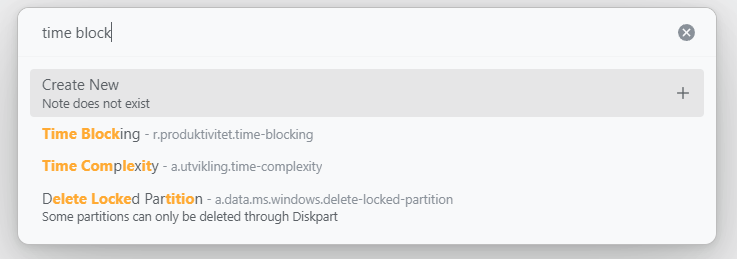
Looking up Readwise with Lookup modal

To lookup a note, run the "Structured Tree: Lookup note" command. This allows you to open or create new notes. This modal supports fuzzy searching. You can tune the fuzzy search variables in the settings.

Create new note with Lookup

Create a note by inputting a path that doesn't exist. You'll see a "Create New" item. Select this to create a new note.

You can also select a note without a corresponding file. An item that creates a new note is indicated by a + icon on the right.

It's recommended to always input the path in the lookup modal.

Excluded Paths

You can make certain paths less noticable in the lookup with excluded paths. Very useful if you for example have an archive.* path.

Multi Vault

Add or remove vaults in Plugin Settings by specifying the vault path and name. Vault can have individual settings for auto-generation of properties, allowing you to fine tune your vault setup.

A vault can also be marked as "secret". This will prevent notes from that vault appearing while doing a lookup search.

Custom Resolver and Renderer (Disabled by Default)

This feature forces all wikilinks and embeds to render using a format similar to Dendron. It also overrides link hover functionality.

Renaming Modal

Renaming Modal

Structured Tree includes a built-in renaming modal for efficient note management. Renaming can be done by either using the command "Structured Tree: Rename note" or by right-clicking a note and selecting "Rename Note" from the context menu.

Auto-generate Properties

alt text

The auto-generate properties feature provides users with options and flexibility when creating new notes. It can auto-generate a unique ID, title field, description field, a "created" field for when the file was created and a tag field.

You can also change the keys being used for title and description if you prefer to use other words.

Export

With the built-in export function, you can avoid lock-in and always rest easy that your notes remain portable!

Report Bugs And Suggestions

If you find a bug or have a suggestion for new features/improvements, please open an issue on GitHub on GitHub.

Attribution

This plugin is based on the work of levirs565 and their plugin Obsidian Dendron Tree. I also want to thank Dobrovolsky Bohdan for his amazing work on Structured, which this plugin gets some inspiration from.

The original plugin became inactive, so it was forked to continue development as it's used daily and continual improvement was desired.

While this plugin maintains some compatibility with Dendron-structured notes, future compatibility is not guaranteed. It is primarily intended for use with notes made in Obsidian, utilizing a Dendron-like structure.

If you appreciate my work on this plugin, please consider supporting me as a sponsor on Github Sponsors

Similar Plugins

info
• Similar plugins are suggested based on the common tags between the plugins.
Advanced New File
5 years ago by Ivan Chernov
Create file in chosen folder
Aggregator
3 years ago by SErAphLi
This plugin helps you gather information from files, and make a summary in the file.
Auto File Organizer
a year ago by mofukuru
Obsidian plugin: Automatically organizes files into folders based on their extensions.
Automatically reveal active file
5 years ago by Matt Sessions
Obsidian plugin to reveal the active file automatically when you open a file
Bellboy
4 years ago by Shaked Lokits
Opinionated file structure manager for the Obsidian knowledge base.
Checklist
5 years ago by delashum
Confluence Link
2 years ago by Razvan Bunga
Convert obsidian md file into confluence pages
Course Module Loader
a year ago by Sebastian Kamilli
Downloads and unzips course module zip files from a URL into a specified vault folder, skipping existing files.
Easy Bake
3 years ago by mgmeyers
Compile many Obsidian notes down to one.
Edit Gemini
4 years ago by Basil_Mori
Emo
3 years ago by yaleiyale
Use image/file hosting in Obsidian by clipboard or draging file. Obsidian 图床聚合 & Github上传器
Explorer Colors
a year ago by Scott Van der Zwet
Set cascading colors for files and folders in Obsidian.
Ffmpeg Converter
2 years ago by MrAnyx
Convert your assets into other formats. Convert, Compress and Optimize your vault
File Cleaner
4 years ago by Johnson0907
A file cleaner plugin for Obsidian.
File Color
3 years ago by ecustic
An Obsidian plugin for setting colors on folders and files in the file tree.
File Cooker
4 years ago by iuian
An obsidian plugin for moving search files to target folder
File Diff
3 years ago by Till Friebe
View the difference between two files within Obsidian.
File Explorer Note Count
5 years ago by Ozan Tellioglu
Obsidian Plugin for viewing the number of elements under each folder within the file explorer
File Explorer++
3 years ago by kelszo
A plugin for https://obsidian.md, which enables the ability to hide and pin specific files and folders in the file explorer by applying custom filters.
File Hider
4 years ago by Oliver Akins
A plugin for https://obsidian.md that allows hiding specific files and folders from the file explorer.
File Ignore
a year ago by Feng
An Obsidian plugin that controls file indexing by managing dot prefixes on files/folders to truly hide/exclude them, providing a .gitignore-like experience.
File Manager
a year ago by Juan Sicilia
A file manager plugin for Obsidian
File path to URI
5 years ago by Michal Bureš
Convert file path to uri for easier use of links to local files outside of Obsidian
File Tree Alternative
5 years ago by Ozan Tellioglu
This Obsidian Plugin allows users to have a different file explorer experience.
File Tree Generator
3 years ago by Unarray
An Obsidian extension to generate a file tree using callouts!
Find orphaned files and broken links
5 years ago by Vinzent
Find files, which are nowhere linked, so they are maybe lost in your vault.
Fold Properties
2 years ago by James Alexandre
Adds Fold/Unfold Properties Function to Folder Context Menu
Folder Tabulation
a year ago by SpeedaRJ
An open source plugin for obsidian that let's you treverse local folder structure via keybindings and commands.
Get Info
4 years ago by Chetachi
A small menu that is tucked inside your status bar and shows helpful information for your chosen file 📄.
Git Url
3 years ago by khuongduy354
Home tab
3 years ago by Renso
A browser-like search tab for your local files in Obsidian.
Image Collector
2 years ago by tdaykin
Import Attachments+
2 years ago by Andrea Alberti
Import attachments by moving them into the vault.
Incomplete files
2 years ago by Hananoshika Yomaru
Rule based incomplete files discovery
Janitor
4 years ago by Gabriele Cannata
Performs various maintenance tasks on the Obsidian vault
Local File Interface
4 years ago by qawatake
An Obsidian plugin to provide commands for moving files in and out of the vault
Markdoc
3 years ago by Maciej Jur
Basic markdoc support for Obsidian
Metadata Menu
4 years ago by mdelobelle
For data management enthusiasts : type and manage the metadata of your notes.
Modal Opener
2 years ago by Muuxi
Open files and links in modal windows, or create and edit compatible files in modal windows.
Nav Weight
2 years ago by shu307
A simple plugin designed to sort files in navigation based on markdown frontmatter (also known as metadata) for Obsidian.
Neighbouring Files
2 years ago by Fabian Untermoser
Obsidian Plugin to navigate to the next and previous file in the current directory
Nuke Orphans
4 years ago by Sandorex
Obsidian notes plugin that trashes orphaned files and attachments
Open files with commands
3 years ago by Lost Paul
Create commands that only open one file at the time and that can be used with the commander plugin.
Open in GitHub
a year ago by Muurphy Chen
This is an Obsidian plugin designed to open project or files directly in GitHub via your browser.
Open In New Tab
3 years ago by patleeman
Quick Explorer
5 years ago by PJ Eby
Perform file explorer operations (and see your current file path) from the Obsidian.md title bar
Recent Files
5 years ago by Tony Grosinger
Display a list of most recently opened files
Redirect
4 years ago by Jacob Levernier
An Obsidian plugin for adding aliases to any file
Remember File State
4 years ago by Ludovic Chabant
A plugin for Obsidian that remembers cursor position, selection, scrolling, and more for each file.
Review Notes Plugin
3 years ago by tjandy98
Ruled template
3 years ago by YPetremann
An obsidian plugin that check rules to select which template to use.
Sort Frontmatter
2 years ago by Kanzi
Sort frontmatter automatically
Static File Server
5 years ago by Elias Sundqvist
Serve obsidian vault subfolders with a static web server
Symlink Creator
2 years ago by Tobias Heidler
A plugin for Obsidian that allows the creation of symlinks - for Windows, OS X and Linux only!
SyncFTP
3 years ago by Alex Donnan
An Obsidian.md plugin that allows users to add their own SFTP host and credentials to sync to and from.
Tags Overview
3 years ago by Christian Wannerstedt
Obsidian plugin which adds an extended tags panel where tagged files can be overviewed, filtered and accessed in an easy way.
Vault Explorer
2 years ago by Trey Wallis
Explore your Obsidian vault in visual format
Weekly Review
3 years ago by Brandon Boswell
🪝 Grappling Hook
3 years ago by pseudometa
Obsidian Plugin for blazingly fast file switching. For those who find the Quick Switcher still too slow.