Quick Explorer

by PJ Eby
5
4
3
2
1
Score: 79/100

Description

The Quick Explorer plugin enhances Obsidian's file navigation by providing a keyboard-friendly, menu-based interface that allows quick access to notes and folders without excessive scrolling or sidebar interactions. It enables users to browse vaults, preview notes rapidly, and perform various file operations using intuitive keyboard shortcuts. The plugin supports folder notes, quick-preview mode, and breadcrumb navigation, making it easy to jump between folders and files efficiently..

Reviews

No reviews yet.

Stats

329
stars
144,695
downloads
20
forks
1,711
days
67
days
67
days
4
total PRs
0
open PRs
4
closed PRs
0
merged PRs
115
total issues
29
open issues
86
closed issues
5
commits

Latest Version

2 months ago

Changelog

Fix compatibility issues w/Obsidian 1.11+

Page preview functionality should now be restored.

README file from

Github

Quick Explorer for Obsidian

New in 0.2.11: Vim-style navigation hotkeys: Mod+h/j/k/l (Mod=Cmd on Mac, Ctrl on PC) New in 0.2.0: If you're using Obsidian 0.16.3 and have tab titlebars turned on, Quick Explorer can use them in addition to (or in place of) the main title bar or status bar. If you want to hide QE's default breadcrumbs, you can turn them off using the Style Settings plugin.

Obsidian's in-app file explorer is pretty flexible, but it's almost 100% mouse-driven and not at all keyboard-friendly. Worse, if you have a lot of folders with lots of files in them, you can spend a lot of time expanding and collapsing folders, and scrolling around to find what you're looking for. This can be especially annoying when all you want is to do something with the "current" folder, or a parent of it... without needing to open a sidebar and close it again afterwards. (And last, but not least, trying to rapidly preview the contents of a lot of notes with the mouse is a giant PITA.)

Enter Quick Explorer. It's menu-based and keyboard-friendly, stays out of your way when you aren't using it, and makes it super-easy to navigate from either the vault root or current folder, without needing to scroll through or collapse a zillion other folders to find what you're looking for. You can even search by name within a folder, just by typing.
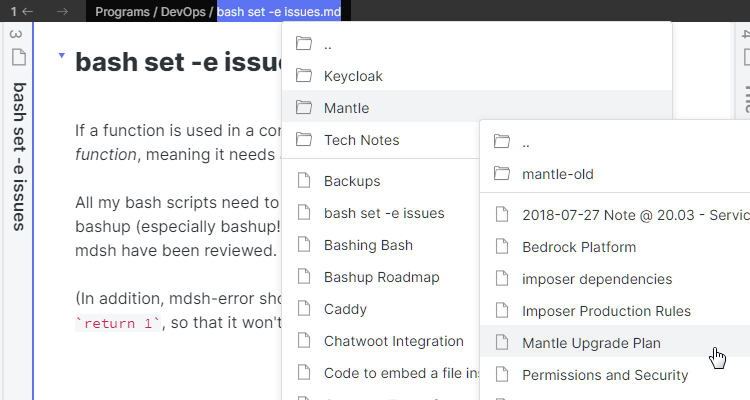


But wait, there's more: a quick-preview mode that makes previewing lots of notes super easy, with no mousing and no popups overhanging the file list: you can just keep hitting the PgDn key to scroll through the full contents of every note in a folder, as quickly as if they were pages in a notebook, or as scrolling through a single giant document:


Folder notes are supported, too: previewing a folder shows the folder note without you first needing to navigate into the folder and find the note, and when you do navigate into the folder its folder note will be automatically selected, if present. (A "folder note" is a note whose name is the same as the name of its enclosing folder: other Obsidian plugins such as Note Folder Autorename can be used to help create or maintain them.)

 

And last, but far from least, you can even see the path of the current note file as a "breadcrumbs bar" in each window's title bar (or status bar if the Obsidian title bar is disabled). Each breadcrumb, when clicked, drops down (or pops up) a list of the the files and folders in the same directory. So if you click on the breadcrumb for the current file, you'll see the items in its folder, and the first breadcrumb will show items in the vault root.
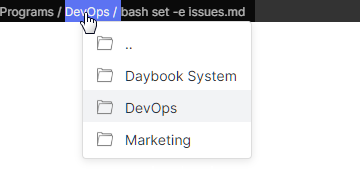
No matter where you click, though, you can then do almost anything that can be done with Obsidian's built-in file explorer:

  • Ctrl/Cmd + Hover to preview files with the mouse (if the built-in Page Preview plugin is enabled)
  • Click to open files (with ctrl or cmd to open in a new pane)
  • Right-click to get a full context menu for any file, folder, or breadcrumb
  • Drag any file, folder, or breadcrumb to drop anywhere that supports dropping (e.g. to stars, into text editors to create links, pane headers to open in the pane, folders in the file explorer to move them, Kanban lanes, etc.)

And an extensive set of keyboard operations is available as well:

  • Typing normal text searches item names within a folder (or context menu), selecting the next matching item
  • Up, Down, Home, and End move within a folder or context menu
  • Left and Right arrows select parent or child folders
  • Vim enjoyer? Use Mod-j/k for up and down, Mod-h/l for left and right (Mod=Cmd on Mac, Ctrl on PC)
  • Enter selects an item to open, Ctrl-or-Cmd + Enter opens a file in a new pane
  • Backslash (\), the "Context Menu" key, or Alt + Enter opens a context menu for the selected file or folder
  • F2 initiates a rename of the current file or folder, Shift+F2 begins a move
  • Tab toggles "quick preview" mode: when active, hovering or arrowing to an item will automatically display a hover preview for it, positioned so that it's always outside the menu (unless you're so deep in subfolders you've reached the edge of your screen). This makes it really easy to browse the contents of a folder just by arrowing down through it.
  • If a page preview is active for the current file or folder, PageUp and PageDown scroll it up and down, with Ctrl-or-Cmd + Home or End jumping to the beginning or end of the note. Scrolling past the end or before the beginning (or using any of these keys without an active preview) advances the selection to the next or previous file/folder in the list.

Like the built-in file explorer, Quick Explorer will either show all files, or only the ones supported by Obsidian, depending upon whether the "Detect all file extensions" setting is enabled in the "Files and Links" options tab.

Quick explorer also includes six hotkeyable commands:

  • Browse vault, which opens the dropdown for the vault root, and
  • Browse current folder, which opens the dropdown for the active file's containing folder
  • Go to next file in folder, which opens the next file in the active file's folder
  • Go to previous file in folder, which opens the previous file in the active file's folder
  • Go to first file in folder, which opens the first file in the active file's folder
  • Go to last file in folder, which opens the last file in the active file's folder

(Note: the "go to" commands navigate using Quick Explorer's menu order, which is to say: folder note first, subfolders second, and files last. Roughly speaking, they're equivalent to issuing the "browse current folder" command and then arrowing up or down (or using Home/End) and hitting enter until a file is opened. So the "first file" is either the folder note (if any) or the first file in any subfolder of the current folder, and the "last file" is either the last actual file, or the last file in any subfolder if the folder only contains a folder note.)

And last, but not least, Quick Explorer also adds a "Show in Quick Explorer" option to all file menus other than its own. That way, you can use it from links, graph views, the Pane Relief history menus, other views (like Stars or Recent Files), etc., so you can use it instead of the File Explorer.

Theme and Plugin Compatibility

While active, Quick Explorer may reformat the title bar so that the standard Obsidian title appears on the right, rather than the center, to make room for Quick Explorer itself. It also removes the name of the current file from the display, but not from the operating system-level window title! This means that if you're using a plugin like Custom Window Title that manipulates the window title directly, it will still be working at the OS level even if the displayed title is shortened, so that automations/scripts/etc. that find the window by its title should still work correctly.

Quick Explorer was initially written using the same color variables as Obsidian itself does for menus. Unfortunately, the vast majority of themes do not set these variables in such a way as to provide adequate contrast for the menu selection in dark mode, and some do not do so in light mode, either. (This is probably because selection contrast in menus isn't terribly important if you have to use the mouse cursor anyway, but it makes keyboard navigation impossible.)

To work around this, Quick Explorer now uses the color variables Obsidian uses to highlight selected mode buttons, which provides adequate contrast on most themes in both dark and light mode, but may be too bright or vivid in some themes. There is unfortunately no easy way to make this perfect for everybody, without basically getting all the theme developers to fix their menu color sets for base Obsidian, at which point Quick Explorer could be changed back to using the same variables as Obsidian does.

Another compatibility issue: some themes attempt to hide or downplay title bar items, making Quick Explorer's UI invisible. Others (or CSS snippets) may color the titlebar in such a way that it becomes unreadable. There is not really anything that Quick Explorer can do to fix these issues, so you may need to add your own CSS snippet workarounds or ask your theme's developer to make adjustments.

Current Limitations

  • Files are always sorted in ascending name order (using the same collation rules as the file-explorer view)
  • You can drag things out of the dropdowns, but you can't drop anything into them
  • There is no way to configure sorting or grouping of files
  • Only "inside same"-style folder notes are supported

Similar Plugins

info
• Similar plugins are suggested based on the common tags between the plugins.
Core Search Assistant
4 years ago by qawatake
An Obsidian plugin to enhance built-in search: keyboard interface, card preview, bigger preview
Auto Note Mover
4 years ago by faru
This is a plugin for Obsidian (https://obsidian.md).
Insert Heading Link
4 years ago by Signynt
Add a Link to a Heading.
Search Everywhere
4 years ago by Mom0
Obsidian Search Everywhere Plugin
Card View Switcher
4 years ago by qawatake
An Obsidian plugin to provide a quick switcher with card view
Waypoint
4 years ago by Idrees Hassan
Obsidian plugin that gives you the power to generate dynamic MOCs in your folder notes. Enables folders to show up in the graph view and removes the need for messy tags!
Scroll Offset
4 years ago by Lijyze
Scroll Offset for Obsidian
Folder Focus Mode
4 years ago by grochowski
Focus file explorer on chosen folder and its files and subdirectories, while hiding all the other elements.
Sequence Hotkeys
4 years ago by Ruan Moolman
Obsidian plugin to support a sequenced of keyboard shortcuts to run commands.
File Hider
4 years ago by Oliver Akins
A plugin for https://obsidian.md that allows hiding specific files and folders from the file explorer.
Open Related Url
4 years ago by Dan Pickett
No Dupe Leaves
4 years ago by Simon Cambier
Automatically switch the focus to open notes instead of reopening them
Quick snippets and navigation
4 years ago by @aciq
Quick snippets and navigation for Obsidian
Keyboard Analyzer
4 years ago by cogscides
Obsidian plugin to display command hotkeys on a visible keyboard layout
obsidian floating toc
4 years ago by curtgrimes modified by Cuman
Hidden Folder
3 years ago by ptrsvltns
obsidian plugin for hidden folder
Crumbs
3 years ago by Tony Grosinger
Breadcrumb navigation in Obsidian.md
Cycle In Sidebar
3 years ago by Houcheng
Cycle through tabs of left/ right sidebar panel
Create Note in Folder
3 years ago by Mara-Li
Set a folder in settings and get directly a command to create a note in it. Use this with QuickAdd/Button to get more pratical things :D
Floating Search
3 years ago by Boninall
A plugin for searching text by using Obsidian default search view.
Advanced Merger
3 years ago by Anto Keinänen
Tab Rotator
3 years ago by Steven Jin
Obsidian Rotate opened tabs with a specified time interval
Quickly
3 years ago by Sparsh Yadav
Quick capture to obsidian note
Link Range
3 years ago by Ryan Mellmer
Add ranged link support to Obsidian
Folder notes
3 years ago by Lost Paul
Create notes within folders that can be accessed without collapsing the folder, similar to the functionality offered in Notion.
Auto Template Trigger
3 years ago by Numeroflip
An obsidian.md plugin, to automatically trigger a template on new file creation
Open Plugin Settings
3 years ago by Mara-Li
Create a command that open the settings tabs of a registered plugin (because I was bored to open the parameters).
Advanced Random Note
3 years ago by Karsten Finderup Pedersen
Create commands from custom queries to open random notes
Hide Folders
3 years ago by JonasDoesThings
Toggle the visibility of folders in the Obsidian.MD file navigator based on name-patterns
Style Importer
3 years ago by Josh Rouwhorst
Obsidian.md plugin to import a stylesheet from a URL to the snippets folder.
Speech To Text Keyboard Helper
3 years ago by mwoz123
File Explorer++
3 years ago by kelszo
A plugin for https://obsidian.md, which enables the ability to hide and pin specific files and folders in the file explorer by applying custom filters.
Potato Indexer
3 years ago by LoyalPotato
Obsidian plugin to generate index based on your selection
URL Display
3 years ago by Stephanie Lin
Extract and display external URLs of the note in Obsidian.
Next Link
3 years ago by Juan Luque
Go To Heading
3 years ago by join
Quickly navigate between your document's headings in Obsidian
Remove Empty Folders
3 years ago by fnya
Remove Empty Folders for Obsidian
Quick Preview
2 years ago by Ryota Ushio
An Obsidian plugin to quickly preview a suggestion before selecting it in link suggestions & quick switcher.
Neighbouring Files
2 years ago by Fabian Untermoser
Obsidian Plugin to navigate to the next and previous file in the current directory
Arrows
2 years ago by artisticat
Draw arrows across different parts of your notes, similar to on paper
Daily Note Navbar
2 years ago by Karsten Finderup Pedersen
Adds a daily note navbar to quickly navigate between sequential daily notes in Obsidian.
Crafty
2 years ago by liolle
Add tooltip to your obsidian canvas's nodes and navigation between nodes
Canvas minimap
2 years ago by ifree
Obsidian canvas minimap
Note Companion Folder
2 years ago by Chris Verbree
A Obsidian Plugin providing a way to associate a folder to a note
Tab Selector
2 years ago by namikaze-40p
This is an Obsidian plugin which can quickly switch tabs in various ways.
Metafolders
2 years ago by Makary Sharoyan
An Obsidian plugin for multidimensional note navigation
Bookmarks Caller
2 years ago by namikaze-40p
This is an Obsidian plugin which can easily open bookmarks.
Tab Navigator
2 years ago by o02c
obsidian-tab-switcher
Folder Periodic Notes
2 years ago by Andrew Heekin
Canvas Keyboard Pan
2 years ago by Nathonius
Vault Explorer
2 years ago by Trey Wallis
Explore your Obsidian vault in visual format
Cursor Jump
2 years ago by Sangwon Jung
Vault Name
2 years ago by @gapmiss
An Obsidian.md plugin for customizing and displaying the vault name (title) in the side navigation file explorer, similar to pre 1.6.0 versions of Obsidian.
Headings in Explorer
2 years ago by Patrick Chiang
This Obsidian plugin makes headings first class concepts in the file explorer and consolidates navigation to a single panel.
Another Sticky Headings
2 years ago by Zhou Hua
Vimium
2 years ago by Karsten Finderup Pedersen
Interact with elements using keyboard shortcuts in the spirit of Vim.
VirtFolder
2 years ago by mr.grogrig
Creating a hierarchical structure like Luhmann's Zettelkasten
Auto Folder Collapse
2 years ago by Dario Casciato
A plugin for Obsidian that automatically collapses all child folders when you collapse a parent folder. This helps keep your file explorer organized and clutter-free.
Quick Open
2 years ago by James Alexandre
Quickly select items in any modal using keyboard shortcuts. Supercharge your workflow with fast, efficient item selection in Obsidian modals.
Recent Tab Switcher
2 years ago by Samuel Ang
Recent Tab Switcher Plugin for Obsidian.
Vertical Tabs
2 years ago by oxdc
An Obsidian plugin that displays open tabs vertically, allowing users to group and organize tabs for a better navigation experience.
Structured Tree
2 years ago by Marius Svarverud
A file explorer for navigating hierarchical notes separated by '.'
Highlight active folder section
2 years ago by Lukas Collier
Gives the folder section with the active note a customizable background color and more.
Print
2 years ago by Marijn Bent
Print your notes directly from Obsidian
Advanced Tables
6 years ago by Tony Grosinger
Improved table navigation, formatting, and manipulation in Obsidian.md
macOS Keyboard Navigation
5 years ago by ryanjamurphy
Automatically reveal active file
5 years ago by Matt Sessions
Obsidian plugin to reveal the active file automatically when you open a file
Folder Note
5 years ago by xpgo
Plugin to add description note to a folder for Obsidian.
Pane Relief
5 years ago by PJ Eby
Obsidian plugin for per-pane history, pane movement/navigation hotkeys, and more
File Explorer Note Count
5 years ago by Ozan Tellioglu
Obsidian Plugin for viewing the number of elements under each folder within the file explorer
Breadcrumbs
5 years ago by SkepticMystic
Add typed-links to your Obsidian notes
Go to Line
5 years ago by phibr0
Enhance Copy Note
5 years ago by kzhovn
Plugin which enhances the copy command for Obsidian.
Another Quick Switcher
5 years ago by tadashi-aikawa
This is an Obsidian plugin which is another choice of Quick switcher.
Reveal Active File Button
4 years ago by Clare Macrae
Obsidian plugin to add a button to the top of the Obsidian File Explorer, to reveal the active file.
Symlink Creator
2 years ago by Tobias Heidler
A plugin for Obsidian that allows the creation of symlinks - for Windows, OS X and Linux only!
Link Navigation
2 years ago by xRyul
Navigate between incoming links (inlinks), outgoing links (outlinks) N levels deep. Links from Canvas are also supported.
Mouse Navigation
2 years ago by HoBeomJeon
Lemons Search
2 years ago by Moritz Jung
An Obsidian plugin that offers a fast fuzzy finder based quick switcher with preview.
Nav Link Header
2 years ago by ahts4962
Display navigation links at the top of the notes in Obsidian
Fold Properties
2 years ago by James Alexandre
Adds Fold/Unfold Properties Function to Folder Context Menu
BookNav
2 years ago by jemberton
A plugin for ObsidianMD that enables book style navigation links in a note.
Hierarchical Backlinks
2 years ago by Jason Motylinski
Plugin which displays backlinks as a tree structure based on file paths
Tree Search
a year ago by catacgc
BlazeJump
a year ago by henryco
Plugin for Obsidian that makes text navigation blazingly fast.
Folder Tabulation
a year ago by SpeedaRJ
An open source plugin for obsidian that let's you treverse local folder structure via keybindings and commands.
Folder Canvas
a year ago by Nancy Lee
Generate a canvas view of your folder structure
Folder Links
a year ago by Stefan Rausch
Obsidian Plugin that enables using links to folders.
create folder notes with dropdown
a year ago by Sturdy Shawn
FastForwardLink
a year ago by Idan Liberman
FastForwardLink Obsidian.md Plugin
Cursor Position on Title Enter
a year ago by Por Chainarong Tangsurakit
Obsidian Plugin: Set the cursor position after pressing Enter on the note title.
Click Hint
a year ago by kbwo
Dynamic Outline
a year ago by theopavlove
Adds a customizable GitHub-like floating table of contents to Obsidian.
Anchor Link Display Text
a year ago by Robert C Arsenault
An Obsidian plugin that makes anchor links look nicer by automatically populating display text.
Current File Tags
a year ago by Trung Tran
Tag Tactician
a year ago by Scott Tomaszewski
Explorer Colors
a year ago by Scott Van der Zwet
Set cascading colors for files and folders in Obsidian.
Folder overview
a year ago by Lost Paul
Provides a dynamic overview of your vault or folders in the format of a code block.
Autofit Tabs
a year ago by Bradley Wyatt
Obsidian Plugin that automatically adjusts tab header widths in real-time to perfectly fit each tab's title content while maintaining a clean, seamless interface that prevents awkward text truncation and ensures optimal readability of your document titles.
FolderFile Splitter
a year ago by Xu Quan
Cursor Position History
a year ago by Florian Gubler
A Plugin to remember (and make accessible) the cursor history in Obsidian. Both within a file and across files.
Reading View j/k Scroll
a year ago by Lukas Korotaj
Scroll in preview mode with j/k keys. Scroll to top with gg and to bottom with G.
Previous Daily Note
a year ago by Marcos Talau
Plugin for Obsidian that opens the previous daily note
Simple Archiver
a year ago by Mike Farr
An Obsidian plugin that enables you to quickly archive a single note or an entire folder of notes.
Backlink Full Path
a year ago by mnaoumov
Obsidian plugin that shows the backlink's full path in the backlinks panel.
Yesterday's note
a year ago by Trevor Tyler Lee
Obsidian plugin to open yesterday's daily note
Wheel Tab Switcher
a year ago by 22-2
Switch between Obsidian Tabs using your mouse wheel when hovering over tab headers.
Quick Nav
a year ago by exoticknight
Enhance your editing experience by unleashing the hidden power of shortcuts.
Generate Timeline
a year ago by Shanshuimei
An obsidian plugin to generate timelines from tags, folders, files or metadata automatically. 根据标签,文件夹,文件或者属性自动生成时间轴的插件。
Smooth Navigator
a year ago by Michael Schrauzer
Smoothly cycle through open files and splits in Obsidian via the keyboard.
Folder Navigator
a year ago by wenlzhang
An Obsidian plugin that allows you to quickly navigate to folders in your vault using fuzzy search.
Open Tab Settings
a year ago by jesse-r-s-hines
Obsidian plugin that adds options to customize how tabs are opened, including open in new tab by default, preventing duplicate tabs, and more
Double row toolbar
a year ago by Lorens Osman
Reveal Folded
a year ago by d7sd6u
Adds a command that reveals current file while collapsing every other tree item
Mark Open Files
a year ago by Michael Schrauzer
Adds a marker to all the File Explorer items that are currently open in the Obsidian workspace.
Tag Index
10 months ago by wenlzhang
An Obsidian plugin that creates a curated list of important tags to serve as meaningful entry points to your knowledge base.
Custom Slides
9 months ago by David V. Kimball
Customize Obsidian's Slides core plugin's navigation, styles, and behavior.
Scrolls To Nav Top
9 months ago by mario
Simply scrolls to nav top
Drag To Scroll
8 months ago by Constantine Sazonov
Adds drag-to-scroll functionality to Obsidian. Hold mouse button and drag - now you can scroll like on touch device!
Note Minimap
8 months ago by Yair Segel
Add a minimap to your Obsidian notes.
Tab File Path
8 months ago by John Burnett
Notebook Navigator
8 months ago by Johan Sanneblad
Replace the default file explorer in Obsidian with a clean two-pane interface featuring folder tree, tag browsing, file previews, keyboard navigation, drag-and-drop, pinned notes, and customizable display options.
HOME key
8 months ago by shichishima
Obsidian Plugin to move cursor to beginning of text, considering Markdown heading characters.
Canvas Link to Group
7 months ago by TGRRRR
Plugin for Obsidian Canvas enabling direct links to specific groups within canvas files for improved navigation
Mobile Sidebar Notes
6 months ago by Chris Kephart
Open notes & new tabs in the sidebar on the Obsidian mobile app.
Daily Notes Tweaks
6 months ago by René Coignard
Open a random daily note and automatically switch past daily notes to reading mode.
SideNote
5 months ago by mofukuru
Obsidian plugin: Add comment on the part of sentence and refer in comment view.
Last Edit Location
4 months ago by Kyoungdeuk
When opening a note, put the cursor at the last edit location.
Remember Scrollposition
4 months ago by s-blu
A plugin that saves the scroll position for each note to return you to where you left off
Better Link Clicker
4 months ago by Eniverz
An Obsidian plugin that modifies the default link click event.
Next TOC
4 months ago by RavenHogWarts
Floating TOC panel
Colorful Note Background
4 months ago by andresgongora
Set note background based on file location or frontmatter metadata
Inline Local Graph
3 months ago by TKOxff
Inline Local Graph of Obsidian
Floating Headings
3 months ago by k0src
Displays a floating, collapsible outline of a note's headings on the right side of the editor. Expands on hover, click to navigate.
Synaptic View
a month ago by Yongmini
A dynamic control center for your vault. Unify hubs, notes, tasks, periodic notes, and web resources with intuitive buttons. Replace new tab for instant access.