Tag Index

by wenlzhang
5
4
3
2
1
Score: 48/100

Description

The Tag Index plugin creates a focused, personalized collection of crucial tags separate from the default tag pane, reducing clutter and improving navigation in your knowledge base. It allows easy addition of tags directly from the editor or tag pane and supports intuitive drag-and-drop for visual organization. Quickly access notes associated with specific tags with just a click and preview note content by hovering. You can also choose whether new tags appear at the top or bottom of your list.

Reviews

No reviews yet.

Stats

16
stars
3,826
downloads
0
forks
313
days
218
days
218
days
0
total PRs
0
open PRs
0
closed PRs
0
merged PRs
4
total issues
1
open issues
3
closed issues
0
commits

Latest Version

7 months ago

Changelog

Feature

  • Add tag sorting options with frequency, name, and added time methods
  • Add flexible note sorting by name, modified time, or created time

README file from

Github

Tag Index

GitHub release (Latest by date) GitHub all releases

An Obsidian plugin that creates a curated list of important tags to serve as meaningful entry points to your knowledge base.
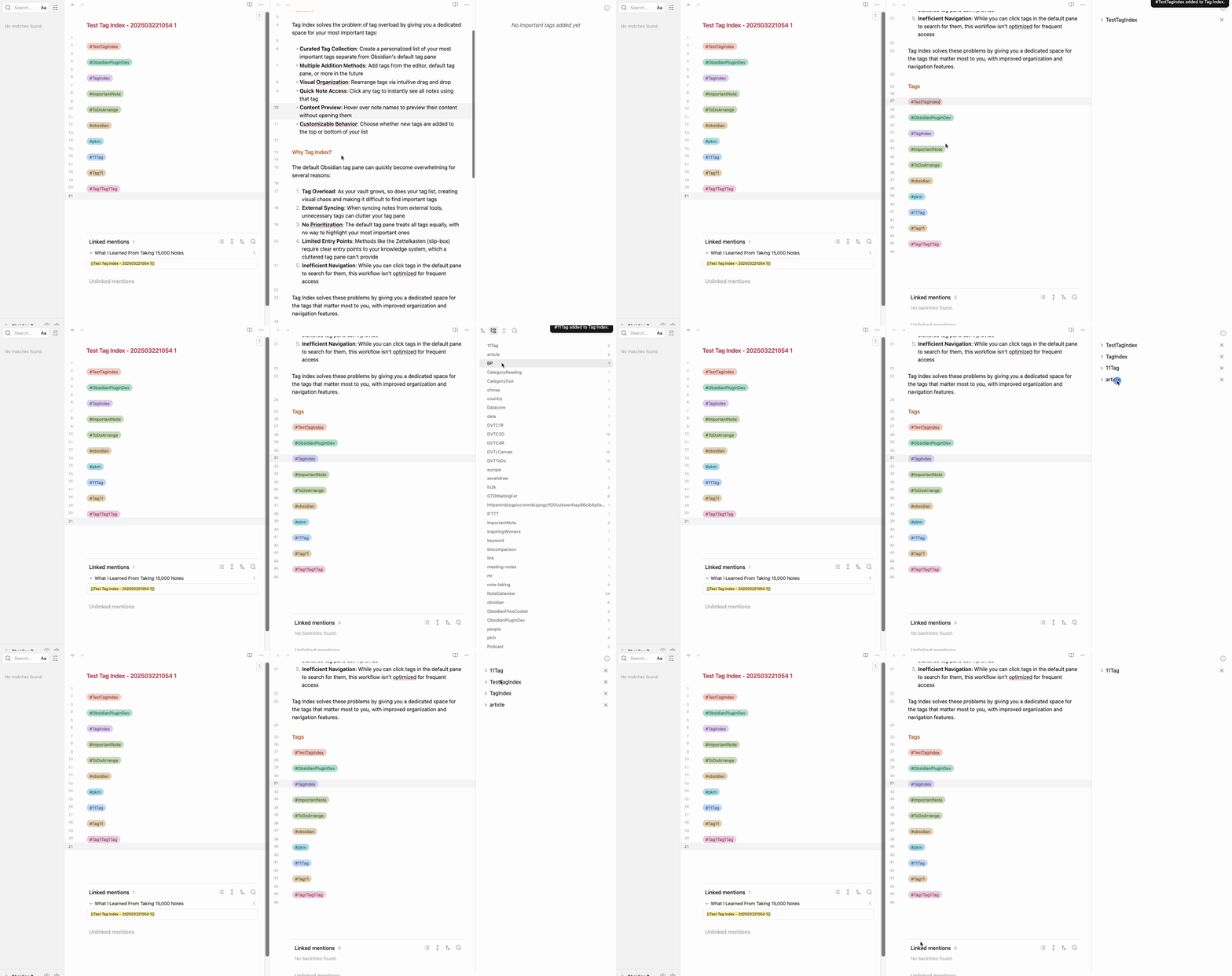
demo

Features

Tag Index solves the problem of tag overload by giving you a dedicated space for your most important tags:

Core Features

  • Curated Tag Collection: Create a personalized list of your most important tags separate from Obsidian's default tag pane
  • Hierarchical Tag Support: Full support for nested tags with automatic tree structure (e.g., #project/dev/feature)
  • Multiple Addition Methods: Add tags from the editor context menu, default tag pane, or command palette
  • Visual Organization: Rearrange tags via intuitive drag and drop in custom sort mode
  • Quick Note Access: Click any tag to instantly see all notes using that tag
  • Dual Sorting System: Independent sorting for tags and notes
    • Tag Sorting: Sort tags by custom order, frequency, name, or added time
    • Note Sorting: Sort notes under each tag by file name, modified time, or created time

Line Content Display

  • See Where Tags Appear: View the actual line content where each tag exists in your notes
  • Clickable Navigation: Click any line content to jump directly to that location in your note

Interactive Navigation

  • Jump to Line: Click line content to open the file at the exact line
  • Jump and Search: Optionally open the search pane to see all tag occurrences across your vault
  • Configurable Cursor: Choose whether the cursor lands at the start or end of the line
  • Hover Preview: Hover over note names to preview their content without opening them

Performance & Customization

  • Configurable Refresh Delay: Set refresh delays from instant to 60 minutes based on vault size
  • Customizable Behavior: Choose whether new tags are added to the top or bottom of your list
  • Persistent Settings: All sort preferences are saved and restored across sessions

Videos and Articles

Videos

Articles

Why Tag Index?

The default Obsidian tag pane can quickly become overwhelming for several reasons:

  1. Tag Overload: As your vault grows, so does your tag list, creating visual chaos and making it difficult to find important tags
  2. External Syncing: When syncing notes from external tools, unnecessary tags can clutter your tag pane
  3. No Prioritization: The default tag pane treats all tags equally, with no way to highlight your most important ones
  4. Limited Entry Points: Methods like the Zettelkasten (slip-box) require clear entry points to your knowledge system, which a cluttered tag pane can't provide
  5. Inefficient Navigation: While you can click tags in the default pane to search for them, this workflow isn't optimized for frequent access

Tag Index solves these problems by giving you a dedicated space for the tags that matter most to you, with improved organization and navigation features.

Getting Started

Adding Tags

You can add tags to your index in multiple ways:

  1. From the Editor: Right-click on any tag in your notes → "Add to tag index"
  2. From Tag Pane: Right-click on any tag in Obsidian's default tag pane → "Add to tag index"
  3. Via Command: Use the command palette (Ctrl/Cmd+P) → "Tag Index: Add to tag index"

Sorting Tags

Organize your tag list with multiple sorting options:

  1. Quick sort: Click the left sort button (list icon) in the tag panel header
  2. Choose from 7 sorting methods:
    • Custom order: Drag and drop tags to arrange them manually (default)
    • Frequency (high to low): Most frequently used tags appear first
    • Frequency (low to high): Least frequently used tags appear first
    • Tag name (A to Z): Alphabetical order ascending
    • Tag name (Z to A): Alphabetical order descending
    • Added time (new to old): Most recently added tags first
    • Added time (old to new): Oldest tags first
  3. Set default: Configure your preferred default in Settings → Tag Index → "Default tag sort method"
  4. Drag and drop: Only available in "Custom order" mode. Other modes will display a notice if you attempt to drag.

Sorting Notes

Change how notes are sorted under each tag:

  1. Quick sort: Click the right sort button (arrow icon) in the tag panel header
  2. Choose from 6 sorting options:
    • File name (A to Z / Z to A): Alphabetical order with natural number sorting
    • Modified time (new to old / old to new): Sort by last modification date
    • Created time (new to old / old to new): Sort by file creation date
  3. Set default: Configure your preferred default in Settings → Tag Index → "Default note sort method"

💡 Note: Tag sorting and note sorting are independent. You can sort tags by frequency while sorting notes by name, for example.

Using Line Content Display

The plugin can show you exactly where tags appear in your files:

  1. Enable "Show line content" in settings
  2. Click on any tag to expand it
  3. See all files containing that tag
  4. View the actual lines where the tag appears
  5. Click any line to jump directly to that location

Configuring Behavior

Access settings via Settings → Tag Index:

General Settings

  • Add new tags to top: Control where new tags appear in your list
  • Auto-open tag index panel: Automatically open the panel when Obsidian starts

Line Content Display

  • Show line content: Toggle the line content display feature
  • Line content click behavior: Choose between "Jump to line" or "Jump to line and search"
  • Cursor position: Set cursor position when jumping (start or end of line)
  • Refresh delay: Configure auto-refresh timing (0-60 minutes) based on your vault size

Sorting Options

  • Default tag sort method: Choose how tags in the index are sorted (custom order, frequency, name, or added time)
    • Custom order allows drag-and-drop rearrangement
    • Other methods automatically organize tags
  • Default note sort method: Choose how notes under each tag are sorted (file name, modified time, or created time)
    • Can be changed on-the-fly using the sort buttons in the panel header

Advanced

  • Debug mode: Enable console logging for troubleshooting

Documentation

📚 View Full Documentation

Visit the documentation site to learn how to make the most of Tag Index in your Obsidian workflow.

Support & Community

This plugin is developed and maintained during my free time. A lot of thought, energy, and care goes into making it reliable and user-friendly.

If you find Tag Index valuable in your daily workflow:

  • If it helps you organize your tags more effectively
  • If it saves you time and mental energy navigating your knowledge base
  • If it provides a better entry point to your notes

Please consider supporting my work. Your support would help me dedicate more time and energy to:

  • Developing new features
  • Maintaining code quality
  • Providing support and documentation
  • Making the plugin even better for everyone

Ways to Support

You can support this project in several ways:

  • ⭐ Star the project on GitHub
  • 💝
  • 💌 Share your success stories and feedback
  • 📢 Spread the word about the plugin
  • 🐛 Report issues to help improve the plugin

Thank you for being part of this journey! 🙏

Similar Plugins

info
• Similar plugins are suggested based on the common tags between the plugins.
Advanced Tables
6 years ago by Tony Grosinger
Improved table navigation, formatting, and manipulation in Obsidian.md
Notebook Navigator
8 months ago by Johan Sanneblad
Replace the default file explorer in Obsidian with a clean two-pane interface featuring folder tree, tag browsing, file previews, keyboard navigation, drag-and-drop, pinned notes, and customizable display options.
Breadcrumbs
5 years ago by SkepticMystic
Add typed-links to your Obsidian notes
Pane Relief
5 years ago by PJ Eby
Obsidian plugin for per-pane history, pane movement/navigation hotkeys, and more
Quick Explorer
5 years ago by PJ Eby
Perform file explorer operations (and see your current file path) from the Obsidian.md title bar
Another Quick Switcher
5 years ago by tadashi-aikawa
This is an Obsidian plugin which is another choice of Quick switcher.
obsidian floating toc
4 years ago by curtgrimes modified by Cuman
Vertical Tabs
2 years ago by oxdc
An Obsidian plugin that displays open tabs vertically, allowing users to group and organize tabs for a better navigation experience.
Floating Search
3 years ago by Boninall
A plugin for searching text by using Obsidian default search view.
Core Search Assistant
4 years ago by qawatake
An Obsidian plugin to enhance built-in search: keyboard interface, card preview, bigger preview
Dynamic Outline
a year ago by theopavlove
Adds a customizable GitHub-like floating table of contents to Obsidian.
Automatically reveal active file
5 years ago by Matt Sessions
Obsidian plugin to reveal the active file automatically when you open a file
Open Tab Settings
a year ago by jesse-r-s-hines
Obsidian plugin that adds options to customize how tabs are opened, including open in new tab by default, preventing duplicate tabs, and more
Folder Focus Mode
4 years ago by grochowski
Focus file explorer on chosen folder and its files and subdirectories, while hiding all the other elements.
Reveal Active File Button
4 years ago by Clare Macrae
Obsidian plugin to add a button to the top of the Obsidian File Explorer, to reveal the active file.
No Dupe Leaves
4 years ago by Simon Cambier
Automatically switch the focus to open notes instead of reopening them
Canvas minimap
2 years ago by ifree
Obsidian canvas minimap
Quick Preview
2 years ago by Ryota Ushio
An Obsidian plugin to quickly preview a suggestion before selecting it in link suggestions & quick switcher.
Scroll Offset
4 years ago by Lijyze
Scroll Offset for Obsidian
Card View Switcher
4 years ago by qawatake
An Obsidian plugin to provide a quick switcher with card view
Arrows
2 years ago by artisticat
Draw arrows across different parts of your notes, similar to on paper
Daily Note Navbar
2 years ago by Karsten Finderup Pedersen
Adds a daily note navbar to quickly navigate between sequential daily notes in Obsidian.
Quick snippets and navigation
4 years ago by @aciq
Quick snippets and navigation for Obsidian
Tab Selector
2 years ago by namikaze-40p
This is an Obsidian plugin which can quickly switch tabs in various ways.
macOS Keyboard Navigation
5 years ago by ryanjamurphy
Next TOC
4 months ago by RavenHogWarts
Floating TOC panel
Search Everywhere
4 years ago by Mom0
Obsidian Search Everywhere Plugin
Banners Reloaded
2 months ago by Dani García
A simple, fast, and lightweight way to add customizable banners to your notes.
Another Sticky Headings
2 years ago by Zhou Hua
Advanced Random Note
3 years ago by Karsten Finderup Pedersen
Create commands from custom queries to open random notes
Open Plugin Settings
3 years ago by Mara-Li
Create a command that open the settings tabs of a registered plugin (because I was bored to open the parameters).
Autofit Tabs
a year ago by Bradley Wyatt
Obsidian Plugin that automatically adjusts tab header widths in real-time to perfectly fit each tab's title content while maintaining a clean, seamless interface that prevents awkward text truncation and ensures optimal readability of your document titles.
Neighbouring Files
2 years ago by Fabian Untermoser
Obsidian Plugin to navigate to the next and previous file in the current directory
Tab Navigator
2 years ago by o02c
obsidian-tab-switcher
Crumbs
3 years ago by Tony Grosinger
Breadcrumb navigation in Obsidian.md
Cycle In Sidebar
3 years ago by Houcheng
Cycle through tabs of left/ right sidebar panel
FolderFile Splitter
a year ago by Xu Quan
VirtFolder
2 years ago by mr.grogrig
Creating a hierarchical structure like Luhmann's Zettelkasten
Insert Heading Link
4 years ago by Signynt
Add a Link to a Heading.
Lemons Search
2 years ago by Moritz Jung
An Obsidian plugin that offers a fast fuzzy finder based quick switcher with preview.
Go to Line
5 years ago by phibr0
URL Display
3 years ago by Stephanie Lin
Extract and display external URLs of the note in Obsidian.
Link Range
3 years ago by Ryan Mellmer
Add ranged link support to Obsidian
Bookmarks Caller
2 years ago by namikaze-40p
This is an Obsidian plugin which can easily open bookmarks.
Tag Group Manager
5 months ago by Stargazer-cc
Tag Group Manager is a plugin designed for Obsidian that helps manage tag groups and quickly insert tags.
Go To Heading
3 years ago by join
Quickly navigate between your document's headings in Obsidian
Highlight active folder section
2 years ago by Lukas Collier
Gives the folder section with the active note a customizable background color and more.
Open Related Url
4 years ago by Dan Pickett
Nav Link Header
2 years ago by ahts4962
Display navigation links at the top of the notes in Obsidian
Floating Headings
3 months ago by k0src
Displays a floating, collapsible outline of a note's headings on the right side of the editor. Expands on hover, click to navigate.
Crafty
2 years ago by liolle
Add tooltip to your obsidian canvas's nodes and navigation between nodes
Potato Indexer
3 years ago by LoyalPotato
Obsidian plugin to generate index based on your selection
Quickly
3 years ago by Sparsh Yadav
Quick capture to obsidian note
Tab Rotator
3 years ago by Steven Jin
Obsidian Rotate opened tabs with a specified time interval
SideNote
5 months ago by mofukuru
Obsidian plugin: Add comment on the part of sentence and refer in comment view.
Next Link
3 years ago by Juan Luque
Note Minimap
8 months ago by Yair Segel
Add a minimap to your Obsidian notes.
Tree Search
a year ago by catacgc
Custom Slides
9 months ago by David V. Kimball
Customize Obsidian's Slides core plugin's navigation, styles, and behavior.
Cursor Position History
a year ago by Florian Gubler
A Plugin to remember (and make accessible) the cursor history in Obsidian. Both within a file and across files.
InsightA
2 years ago by Hongjian Tang
InsightA is an Obsidian plugin, can transform long articles into concise, atomic notes, and create well-organized Map of Content (MOC) for notes using LLM. This tool is ideal for anyone aiming to distill complex information into structured, interconnected notes, drawing inspiration from the Zettelkasten method.
Metafolders
2 years ago by Makary Sharoyan
An Obsidian plugin for multidimensional note navigation
Mobile Sidebar Notes
6 months ago by Chris Kephart
Open notes & new tabs in the sidebar on the Obsidian mobile app.
Link Navigation
2 years ago by xRyul
Navigate between incoming links (inlinks), outgoing links (outlinks) N levels deep. Links from Canvas are also supported.
Folder overview
a year ago by Lost Paul
Provides a dynamic overview of your vault or folders in the format of a code block.
Tag Tactician
a year ago by Scott Tomaszewski
Drag To Scroll
8 months ago by Constantine Sazonov
Adds drag-to-scroll functionality to Obsidian. Hold mouse button and drag - now you can scroll like on touch device!
Backlink Full Path
a year ago by mnaoumov
Obsidian plugin that shows the backlink's full path in the backlinks panel.
Mouse Navigation
2 years ago by HoBeomJeon
Wheel Tab Switcher
a year ago by 22-2
Switch between Obsidian Tabs using your mouse wheel when hovering over tab headers.
Cursor Jump
2 years ago by Sangwon Jung
Mark Open Files
a year ago by Michael Schrauzer
Adds a marker to all the File Explorer items that are currently open in the Obsidian workspace.
Vault Name
2 years ago by @gapmiss
An Obsidian.md plugin for customizing and displaying the vault name (title) in the side navigation file explorer, similar to pre 1.6.0 versions of Obsidian.
Anchor Link Display Text
a year ago by Robert C Arsenault
An Obsidian plugin that makes anchor links look nicer by automatically populating display text.
Headings in Explorer
2 years ago by Patrick Chiang
This Obsidian plugin makes headings first class concepts in the file explorer and consolidates navigation to a single panel.
Reveal Folded
a year ago by d7sd6u
Adds a command that reveals current file while collapsing every other tree item
Canvas Link to Group
7 months ago by TGRRRR
Plugin for Obsidian Canvas enabling direct links to specific groups within canvas files for improved navigation
Scrolls To Nav Top
9 months ago by mario
Simply scrolls to nav top
Inline Local Graph
3 months ago by TKOxff
Inline Local Graph of Obsidian
Smooth Navigator
a year ago by Michael Schrauzer
Smoothly cycle through open files and splits in Obsidian via the keyboard.
Current File Tags
a year ago by Trung Tran
BookNav
2 years ago by jemberton
A plugin for ObsidianMD that enables book style navigation links in a note.
BlazeJump
a year ago by henryco
Plugin for Obsidian that makes text navigation blazingly fast.
Recent Tab Switcher
2 years ago by Samuel Ang
Recent Tab Switcher Plugin for Obsidian.
Reading View j/k Scroll
a year ago by Lukas Korotaj
Scroll in preview mode with j/k keys. Scroll to top with gg and to bottom with G.
Remember Scrollposition
4 months ago by s-blu
A plugin that saves the scroll position for each note to return you to where you left off
Folder Tabulation
a year ago by SpeedaRJ
An open source plugin for obsidian that let's you treverse local folder structure via keybindings and commands.
Tab File Path
8 months ago by John Burnett
Better Link Clicker
4 months ago by Eniverz
An Obsidian plugin that modifies the default link click event.
Cursor Position on Title Enter
a year ago by Por Chainarong Tangsurakit
Obsidian Plugin: Set the cursor position after pressing Enter on the note title.
Last Edit Location
4 months ago by Kyoungdeuk
When opening a note, put the cursor at the last edit location.
Click Hint
a year ago by kbwo
Yesterday's note
a year ago by Trevor Tyler Lee
Obsidian plugin to open yesterday's daily note
FastForwardLink
a year ago by Idan Liberman
FastForwardLink Obsidian.md Plugin
Previous Daily Note
a year ago by Marcos Talau
Plugin for Obsidian that opens the previous daily note
Quick Nav
a year ago by exoticknight
Enhance your editing experience by unleashing the hidden power of shortcuts.
HOME key
8 months ago by shichishima
Obsidian Plugin to move cursor to beginning of text, considering Markdown heading characters.
Daily Notes Tweaks
6 months ago by René Coignard
Open a random daily note and automatically switch past daily notes to reading mode.
