GDScript Syntax Highlighting

by RobTheFiveNine
5
4
3
2
1
Score: 57/100

Description

Category: Coding & Technical Tools

The GDScript Syntax Highlighting plugin delivers immediate visual distinction for GDScript code within Obsidian. By recognizing and color-coding key elements of the language, it helps developers quickly identify variables, functions, and other structures in their notes, making code reading and editing more efficient. Whether you're sketching out scripts for game logic or sharing snippets with collaborators, this plugin ensures your work stands out from regular text and is easy to follow. It's particularly helpful for those who frequently blend documentation with script samples, providing a clear visual separation that aids comprehension. With its dedicated focus on GDScript, the plugin enriches note-taking workflows for anyone working in the Godot ecosystem, streamlining how code is interpreted and maintained.

Reviews

No reviews yet.

Stats

39
stars
4,869
downloads
2
forks
725
days
115
days
115
days
0
total PRs
0
open PRs
0
closed PRs
0
merged PRs
8
total issues
2
open issues
6
closed issues
9
commits

Latest Version

4 months ago

Changelog

Improvements

  • Add highlighting of function calls both as standalone calls and as object members

Fixes

  • Stop highlighting of keywords in variable names (such as or in color)
  • Ensure class names appearing after the is keyword are highlighted as such

Full Changelog: https://github.com/RobTheFiveNine/obsidian-gdscript/compare/1.0.3...1.1.0

README file from

Github

Obsidian GDScript Syntax Highlighting Plugin

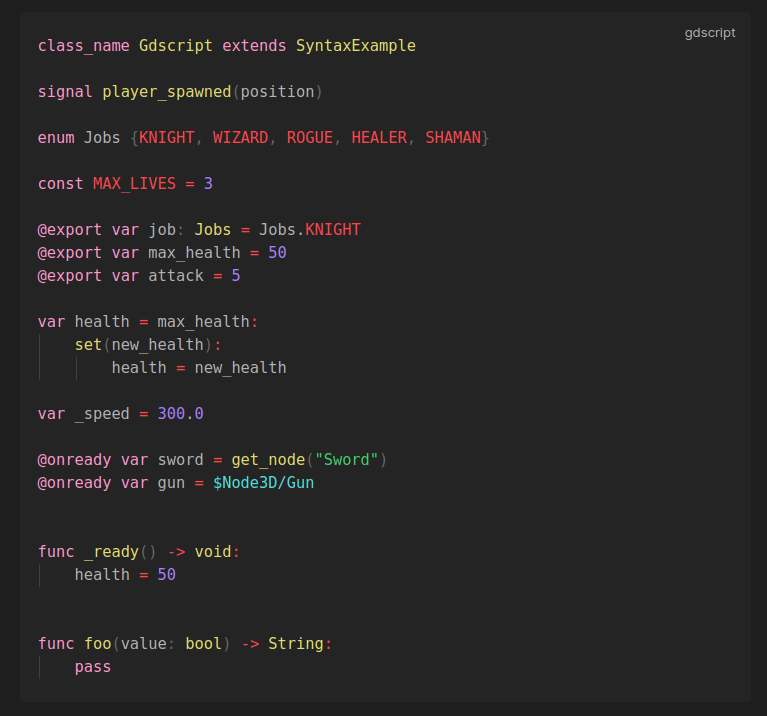
This plugin for Obsidian provides live syntax highlighting for GDScript (the language used in Godot).

To use the plugin, install it, and then add a code block with the word gdscript immediately after the three backticks.

An example of the highlighting can be seen below:
Setup

This plugin is now part of the verified community plugins! To install, just open the community plugins window and search for "GDScript Syntax Highlighting" and hit the install button.

Setup (Manual Method)

If you wish to install the plugin manually:

  1. Navigate to the vault you wish to install it in using your file explorer
  2. Navigate into the .obisidian directory, and in there, go into the plugins directory
  3. Create a new folder in here named gdscript-syntax-highlighting
  4. Head over to the Latest Release and download the main.js and manifest.json files into the newly created folder.
  5. Open the settings window in Obsidian and enable the plugin in the Community plugins section

License

This Source Code Form is subject to the terms of the Mozilla Public License, v. 2.0. If a copy of the MPL was not distributed with this file, You can obtain one at https://mozilla.org/MPL/2.0/.

Similar Plugins

info
• Similar plugins are suggested based on the common tags between the plugins.
Code Preview
3 years ago by Hank
Obsidian code block render by file path
Codeblock Customizer
3 years ago by mugiwara
Codeblock Customizer plugin for Obsidian
Code Styler
3 years ago by Mayuran Visakan
A plugin for Obsidian.md for styling codeblocks and inline code
Keyword Highlighter
2 years ago by Marcel Goldammer
Automatically highlight specified keywords within your Obsidian notes for enhanced visibility and quick reference.
PDF++
2 years ago by Ryota Ushio
PDF++: the most Obsidian-native PDF annotation & viewing tool ever. Comes with optional Vim keybindings.
Annotator
5 years ago by Elias Sundqvist
A plugin for reading and annotating PDFs and EPUBs in obsidian.
Highlightr
4 years ago by Chetachi
A minimal and aesthetically pleasing highlighting menu that makes color-coded highlighting much easier 🎨.
Occura
2 years ago by Alexey Sedoykin
Plugin for https://obsidian.md/ that automatically selected same text occurrences in opened note
Note Annotations
a year ago by Jan Beck
Extended Markdown Syntax
a year ago by Kotaindah55
Extend your Markdown syntax using delimiters instead of HTML tags, such as underlining, superscript, subscript, highlighting, and spoiler.
Sentence Rhythm
a year ago by Adam Fletcher
Obsidian plugin added toggleable colored highlights to sentences based on their length
Long sentence highlighter
8 months ago by Robert Meißner
Always Color Text
8 months ago by Kazi Aidah Haque
Automatically colors texts across the Obsidian Vault!
HiWords
7 months ago by Kai
Effortlessly grow your vocabulary as you read, with automatic highlighting and translation of unfamiliar words.