
README file from
GithubInline Admonitions for Obsidian
This plugin will allow you to format inline codeblocks to better stand out on the page. For example, you may want to have all inline codeblocks that start with "IMPORTANT" to have a red background like this.
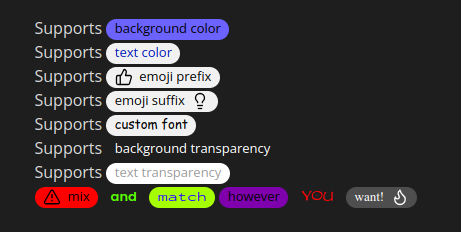
Usage
To add an Inline Admonition to your note, first [create a new Inline Admonition](#Creating a new Inline Admonition) of the desired type.
Then add an
inline codeblock
with the appropriate trigger text. For example, a [Prefix Inline Admonition](#Prefix Type) with a prefix of IMPORTANT will
trigger when an inline codeblock starts with "IMPORTANT", like this:
Normal text `IMPORTANT - dont forget the milk!` and some more normal text
Creating a new Inline Admonition
Open the "Inline Admonition" settings and click "Create New Inline Admonition" at the top to bring up a Modal to configure a new Inline Admonition.
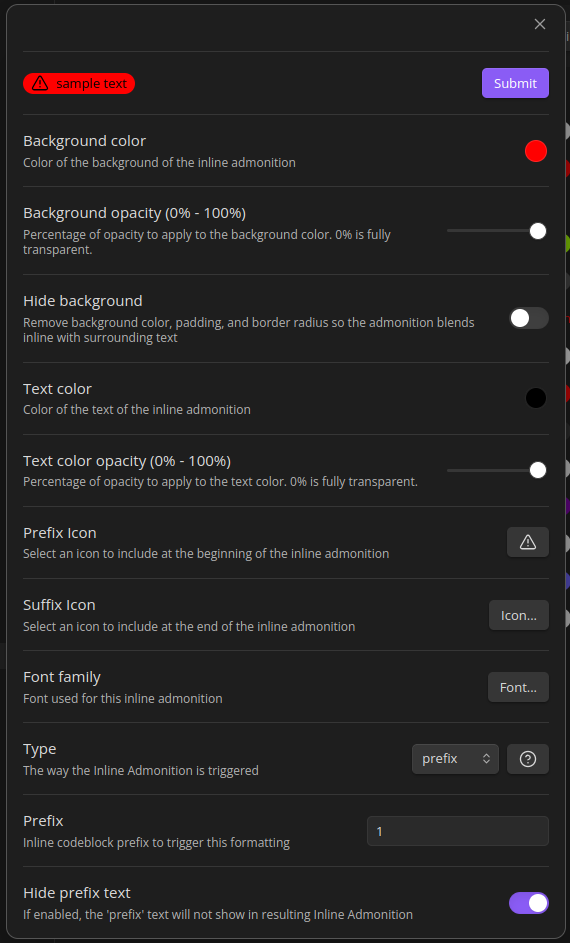
Common settings:
- Background Color is the color of the Inline Admonition "bubble"
- Background Opacity supports transparency of the background
- Hide Background allows the background (including spacing) to be hidden
- Text Color is the text color
- Text Opacity supports transparency of the text
- Type defines how an Inline Admonition is triggered. See the types documentation for more details.
- Prefix Icon allows you to select an icon to include at the beginning of the inline admonition.
- Note: Prefix Icons are not supported in Live Preview mode because it causes cursor navigation issues.
- Suffix Icon allows you to select an icon to include at the end of the inline admonition.
- Note: Suffix Icons are not supported in Live Preview mode because it causes cursor navigation issues.
- Font allows selection of the font
- Border style chooses the border line: Default (theme), None, Solid, Dashed, or Dotted
- Border width sets the border thickness in pixels (applies when a border style is selected)
- Border color sets the border color
- Corner radius rounds the bubble corners (in pixels; 0 is square, higher is rounder)
- Bold, Italic, Underline toggle the text weight, slant, and underline
Types
The Inline Admonition "Type" defines what triggers the codeblock to convert into an Inline Admonition. Current supported Types are:
Prefix Type
Prefix Inline Admonitions trigger when a codeblock starts with specific text.
Settings
Prefixdefines the text at the start of the codeblock to trigger the Inline Admonition.Hide prefix text- if enabled, the triggering prefix text will not show in the Inline Admonition.
Suffix Type
Suffix Inline Admonitions trigger when a codeblock ends with specific text.
Settings
Suffixdefines the text at the end of the codeblock to trigger the Inline Admonition.Hide suffix text- if enabled, the triggering suffix text will not show in the Inline Admonition.
Contains Type
Contains Inline Admonitions trigger when a codeblock contains specific text anywhere within it.
Settings
containsdefines the text within the codeblock to trigger the Inline Admonition.
Regex Type
Regex Inline Admonitions trigger when a codeblock matches a specific regular expression.
Settings
Regexdefines the regular expression to match against the codeblock content to trigger the Inline Admonition.Sample Inputis used to help test your regex and also helps the settings display the sample.
Notes
- The CSS of the Inline Admonitions rides on Obsidian's Tag css. I'll clean this up in a future release.
- Saving settings will trigger a re-render of the markdown views. Its possible to avoid this and is planned for a future release
- Similar to Contexual Typography this plugin will give you some css classes that you can manually manipulate
Future work
- Additional admonition styles
- More comprehensive CSS editing in the settings UI
- Rework the CSS-snippet generation so it no longer relies on Obsidian's private
app.customCssAPI or writing a snippet file into the vault
See FOLLOWUPS.md for the detailed list of remaining work and context.
Known Issues
- Newly created inline admonitions might not render in Live Preview. Reload the app as a workaround
- Prefix/suffix icons are not rendered in Live Preview (they caused cursor-navigation issues)
Development
See the changelog for changes and FOLLOWUPS.md for outstanding work.
Requirements
- Requires Obsidian
1.1.0or newer (seeminAppVersioninmanifest.json)
Linting
npm run lintruns ESLint witheslint-plugin-obsidianmd(flat config ineslint.config.mjs)
Build
npm ito install depsnpm run devto build and watch
Release
Upload the files manifest.json, main.js, styles.css as binary attachments