
README file from
GithubObsidian Columns
Allows you to create columns in Obsidian
This plugin also works on mobile with a column wrapping feature (that you can enable in settings)
There are three main ways to utilize this plugin:
- Callout Syntax (live-preview supported, less settings)
- Codeblock Syntax (live-preview supported, all settings)
- List Syntax (live-preview not supported, less settings)
Callout syntax
The obsidian-columns callout syntax utilizes the Obsidian Callout spec, defined here, which in turn utilizes the markdown blockquote spec defined here
The callout syntax uses no javascript at all, which makes it highly compatible with live preview without the use of codeblocks, this also means that the callout syntax cannot limit the height of the columns without significant performance trade-offs.
The col callout renders every item within the callout as its own column. The col-md callout can be nested within the col callout in order to group items into a column.
To use the col callout, create a callout with the col name:
> [!col]
> A col callout
>
> Second column of the callout
To use the col-md callout, create a col-md callout within the col callout
> [!col]
> A col callout
>
>> [!col-md]
>> The second column of the callout
>>
>> More lines on the second column of the callout
The col-md callout's width can be adjusted by adding the width after the col-md name:
> [!col]
> A col callout
>
>> [!col-md-3]
>> The second column of the callout
>>
>> This column is now 3 times the width of the first column
The width attribute of the col-md callout can only be multiples of 0.5 up to 10, like 1, 1.5, 6.5, etc. due to limitations of live preview and the CSS attr() function.
More columns can be nested within other columns simply by creating a new column within the callout. More examples can be seen below.
Codeblock syntax
The obsidian-columns codeblock syntax utilizes named codeblocks from the Obsidian markdown spec, seen here
Similar to the callout syntax, use a col named codeblock to initiate a column group. All items within the col codeblocks will be rendered as its own column. The col-md codeblock can be nested within the col codeblock to group multiple items together into a single column.
When using codeblock syntax, ensure parent codeblocks have more backticks (`) then their children codeblocks, for example:
````col
```col-md
Column A
```

```col-md
Column B
```
````
Codeblock Settings Block
Both the col and col-md codeblocks optionally have a settings header that is defined as everything above a === delimiter
- col
- height: CSS height or
shortest - textAlign: CSS text-align (
start,end,center)
- height: CSS height or
- col-md
- height: CSS height
- flexGrow: number
- textAlign: CSS text-align (
start,end,center)
For example, to set the flexGrow value in a col-md block:
```col-md
flexGrow=2
===
MD to be rendered
```
The col codeblock
height property
The height property of the col codeblock's setting block sets a limit on how tall the set of columns will be. Any extra text will be able to be viewed with a scrollbar.
The property can be set to any valid CSS value or the value of "shortest", which picks the length of the shortest column within the column group
For example:
````col
height=shortest
===
```col-md
line 1
line 2
line 3
line 4
```

```col-md
line 1
line 2
```
````
textAlign property
The textAlign property sets the default textAlign for the column set. This value can be overridden by the individual column's textAlign setting.
- "start" or "left" would left-align the column
- "end" or "right" would right-align the column
- "center" would center the text in the column
- "justify" justifies the column content
Rows
Use "===" within a col codeblock to denote a new row in the column
Usage of the row delimiter forces the existence of the settings block. If you would not like to change any settings, but use rows, place an "===" at the top of all your content to define an empty settings block
col-md
height property
The height property of the col-md codeblock's setting block sets a limit on how tall this individual column will be. Any extra text will be able to be viewed with a scrollbar.
The property can be set to any valid CSS value.
textAlign property
The textAlign property sets the textAlign for this column. This value overrides the column group's default value.
- "start" or "left" would left-align the column
- "end" or "right" would right-align the column
- "center" would center the text in the column
- "justify" justifies the column content
flexGrow property
The flexGrow property sets the width of a column with respect to the sizes of all the other columns. If a left and right column have a flexGrow of 1, whilst the middle column has a flexGrow of 2, then the center column will be twice as wide as the edge columns individually.
The property can be set to any valid positive number (0.4, 10, 23.62)
border properties
Border properties can be used to configure a border around both either a col or col-md column. These properties
directly match to the available CSS properties as seen here. If any of
the border properties are specified, a border will be created with default values for all non-specified properties. The
available properties are:
- borderColor: (Default:
white) CSS color - borderStyle: (Default:
solid) CSS border-style - borderWidth: (Default:
1px) CSS border-width. If no unit is specified,pxis assumed - borderRadius: (Default:
0) CSS border-radius. If no unit is specified,pxis assumed - borderPadding: (Default:
0) CSS padding. If no unit is specified,pxis assumed
Examples

Produced by the MD below:
```````col
``````col-md
flexGrow=1
===
> [!info] Callouts
>  Stuff inside the callout
>  More stuff inside.
>> [!ERROR] Error description
>>  Nested callout
>>  `````col-md
>>  - example MD code
>>  - more stuff
>>  `````
``````

``````col-md
flexGrow=2.5
===
# Text annotation example:

`````col
````col-md
flexGrow=1
===
1. Function name **a** should be more descriptive

2. Remove **if/else** by using **||**
````

````col-md
flexGrow=2
===
```js
function a(word) {
	if (word != null) {
		console.log(word);
	} else {
		console.log("a");
	}
}
let msg = "Hello, world!";
console.log(msg)
```
````
`````
``````
```````
!!! Dont forget to use additional backticks when using recursive codeblocks! Ex: col has 4 ticks and col-md has 3
or using callout syntax:
> [!col]
>> [!info] Callouts
>> Stuff inside the callout
>> More stuff inside.
>>> [!ERROR] Error description
>>> Nested callout
>>> - example MD code
>>> - more stuff
>
>> [!col-md-2.5]
>> # Text annotation example:
>>> [!col]
>>>> [!col-md]
>>>> 1. Function name **a** should be more descriptive
>>>> 2. Remove **if/else** by using **||**
>>>
>>>> [!col-md-2]
>>>> ```js
>>>> function a(word) {
>>>> 	if (word != null) {
>>>> 			console.log(word);
>>>> 	} else {
>>>> 		console.log("a");
>>>> 	}
>>>> }
>>>> let msg = "Hello, world!";
>>>> console.log(msg)
Border example
Produced by the MD below:
`````col
borderColor=purple
borderPadding=10
===

```col-md
borderColor=red
borderStyle=dashed
===
## Column 0
```
```col-md
borderPadding=5px
===
## Column 1
```

````col
borderColor=#d60da1
borderPadding=20
borderRadius=5em
===

```col-md
borderColor=teal
borderWidth=5px
===
### Nested Column 0
```
```col-md
borderColor=orange
===
### Nested Column 1
```
````

`````
List Structure
You can also create columns by creating a list in the structure shown (not supported in live preview):
- !!!col
- (flex-grow)
- (Text in column 1)
- (flex-grow)
- (Text in column 2)
- (flex-grow)
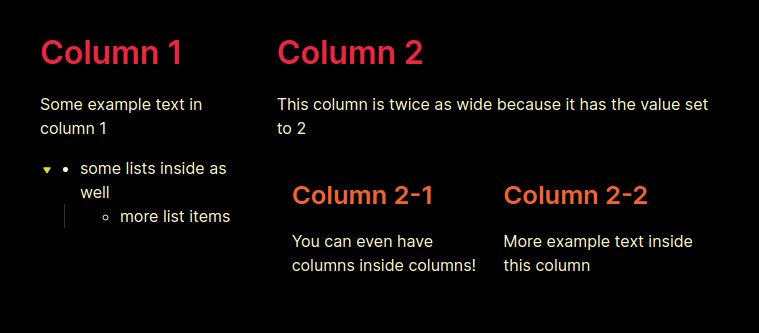
Produced by the MD code below:
- !!!col
	- 1
		# Column 1
		Some example text in column 1
		- some lists inside as well
			- more list items
	- 2
		# Column 2
		This column is twice as wide because it has the value set to 2
		- !!!col
			- 1
			  ## Column 2-1
			  You can even have columns inside columns!
			- 1
			  ## Column 2-2
			  More example text inside this column
Settings
Minimum Width of Column
This setting ensures that columns are a certain width. If not all the columns satisfy this width, extra columns will wrap to below (as rows). Technically, just sets the flex-basis attribute.
Default span
This setting sets the default span value for a column if it is not explicitly specified. For the time being, col codeblocks have each column set to this value and cannot be changed.
Upcoming features
- Enable syntax highlighting for editor.
If you enjoy my plugin, please consider supporting me:
