Modal forms

by Danielo Rodriguez
5
4
3
2
1
Score: 67/100

Description

The Modal forms plugin enhances data entry in Obsidian by enabling users to create and manage customizable forms that can be triggered from various sources, such as templates or automation plugins. It allows for structured data collection with multiple input types, including text, date, and multiple-choice fields. The plugin integrates seamlessly with existing workflows by offering a user-friendly interface for form creation and template management. It supports popular plugins like Templater and QuickAdd, making it easier to capture information and automate note creation efficiently. Users can also define form behaviors, pre-fill default values, and insert collected data directly into their notes.

Reviews

No reviews yet.

Stats

368
stars
53,658
downloads
30
forks
919
days
2
days
10
days
236
total PRs
8
open PRs
56
closed PRs
172
merged PRs
216
total issues
88
open issues
128
closed issues
312
commits

Latest Version

10 days ago

Changelog

Bug Fixes

  • fix: prevent duplicate selections in multiselect notes source (2a95f92)

README file from

Github


GitHub all releases ko-fi

Obsidian Modal Form Plugin

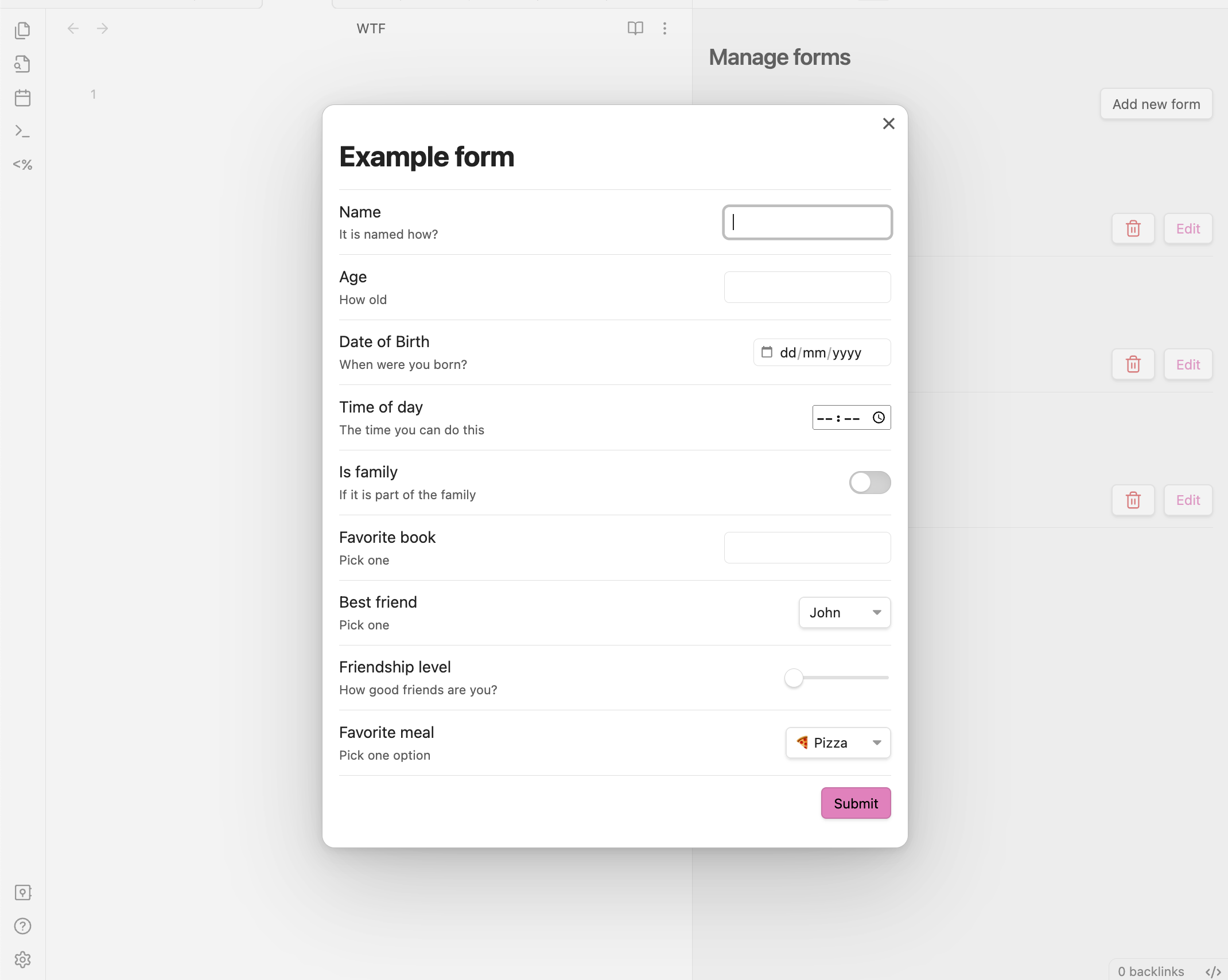
This plugin for Obsidian allows you to define forms that can be opened from anywhere you can run JavaScript, so you can combine it with other plugins like Templater or QuickAdd.

https://github.com/danielo515/obsidian-modal-form/assets/2270425/542974aa-c58b-4733-89ea-9c20ea11bee9

Features

  • Forms open in a modal window and return you the values, so you can trigger it from:
    • Templater templates
    • QuickAdd captures
    • DataviewJS queries
    • Many other places...
  • Define forms using a simple JSON format
  • Create and manage a collection of forms, each identified by a unique name
  • User interface for creating new forms
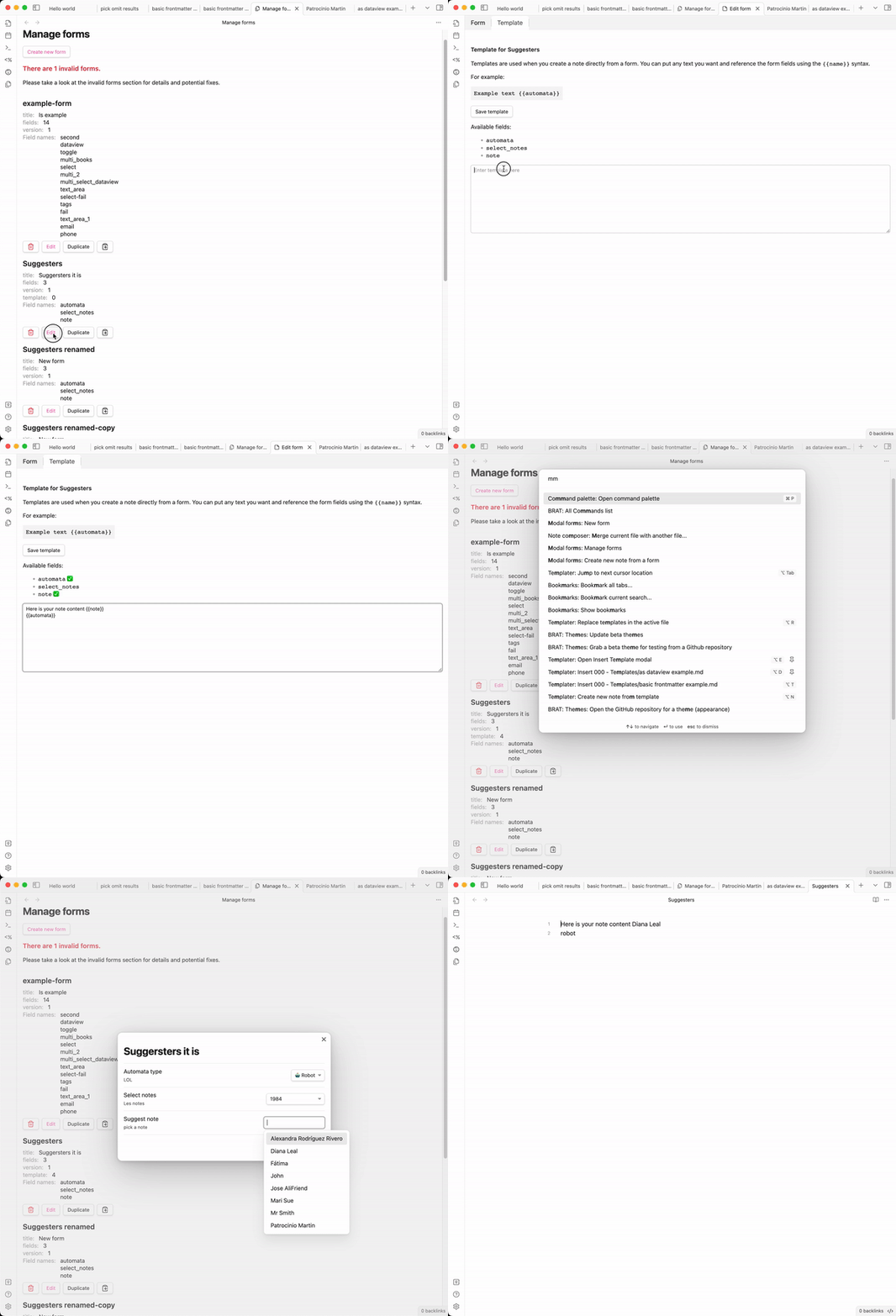
  • Create new notes directly from the form using templates
    • Template editor has a nice UI for creating templates
  • Register commands for your forms: Instantly trigger any form (with a template) from the command palette—no need for QuickAdd or external templates for simple use cases
  • Many input types
    • number
    • date
    • time
    • slider
    • toggle (true/false)
    • free text
    • text with autocompletion for note names (from a folder or root)
    • text with autocompletion from a dataview query (requires dataview plugin)
    • multiple choice input
    • select from a list
      • list of fixed values
      • list of notes from a folder

example form templates

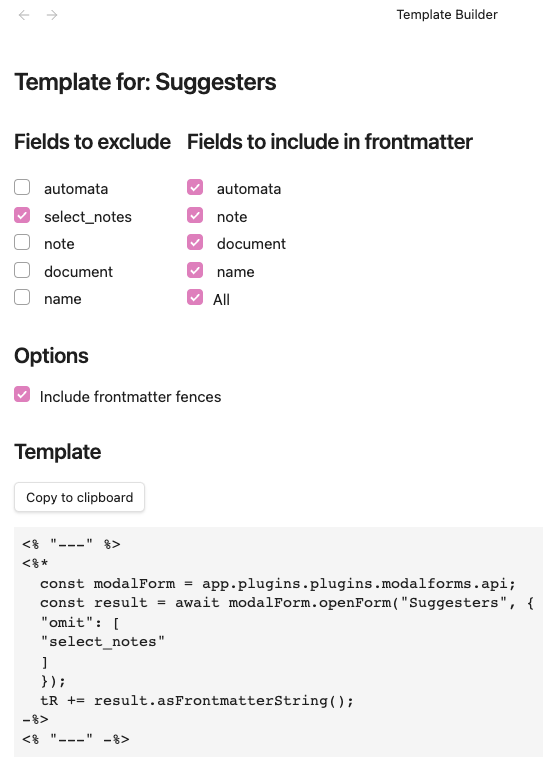
Template builder

We have a nice UI to help you creating the required templates. template builder
Why this plugin?

Obsidian is a great tool for taking notes, but it is also a nice for managing data. However, when it's time to capture structured data it doesn't offer many conveniences. Some plugins like Templater or QuickAdd alleviate this problem with templates/automation that ease the creation of notes with a predefined structure, but then you have to fill the data manually. The mentioned plugins (Templater, QuickAdd) have some little convenience inputs, but they have certain tradeoffs/problems:

  • they are limited to inputting a single value at a time
  • they don't have labels or detailed descriptions about the field you are filling
  • you can't skip fields, you will always be prompted for all of them one by one

All of the mentioned tools are great at their job and unleash super convenient workflows. For that reason, rather than offering an alternative, this plugin is designed as a complement to them, offering some basic building blocks that you can integrate with your existing templates and workflows.

Friends of modal form

Note: With the ability to register commands for your forms, you no longer need QuickAdd just to trigger a form. QuickAdd remains useful for more advanced workflows, but for simple form-triggering, Modal Forms is now a complete solution.

  • Templater to open modals from templates
  • QuickAdd to quickly capture data from a modal
  • dataview to provide values for auto-completion

Scope of this plugin

This plugin is intentionally narrow in scope. As mentioned in the previous section, it is designed as a building block, so you can integrate it with other plugins and workflows. The only features that I will consider adding will be ones about improving the form itself.

Usage

Call the form from JavaScript

Since the main usage of this plugin is opening forms and getting back their data let's start with that. If you want to learn how to create forms, skip to the next section define a form.

The plugin exposes an API that can be accessed from any JavaScript code that has access to the global app object. So, in order to get the API you can do:

const modalForm = app.plugins.plugins.modalforms.api;

From here you can call any of the main methods of the API, openForm which allows you to open a form by name and get back the data. Let's see an example:

const modalForm = app.plugins.plugins.modalforms.api;
const result = await modalForm.openForm("example-form");

The result is a special type of object that contains the data of the form. It also has some convenient methods to help you process the returned data. One of them is asFrontmatterString, which returns the data as a string that can be used in a frontmatter block. Let's see an example using Templater:

Usage with Templater
---
<%*
const modalForm = app.plugins.plugins.modalforms.api;
const result = await modalForm.openForm('example-form');
tR += result.asFrontmatterString();
-%>
---

When you insert this template in a note, it will open the form, and once you submit it, it will insert the data in the note as a frontmatter block.

Usage with QuickAdd

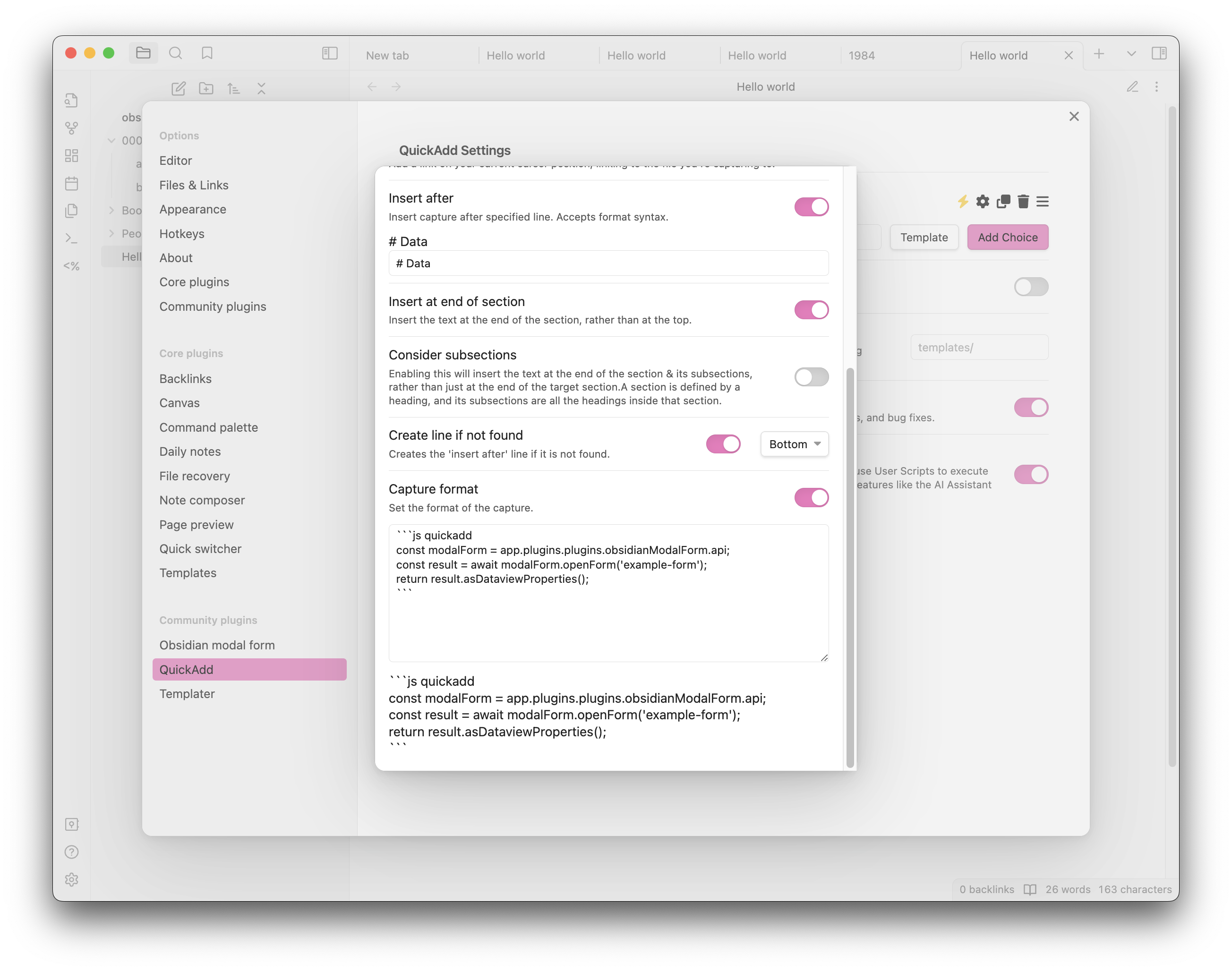
In order to open a form from QuickAdd capture, you need to create a capture and activate the capture format, then in the format text-area you must create a code block with the language defined as js quickadd and copy the code below:

```js quickadd
 const modalForm = app.plugins.plugins.modalforms.api;
 const result = await modalForm.openForm('example-form');
 return result.asDataviewProperties();
```

Here you have an example screenshot of how it should look like: quick capture example
Providing Default Values When Opening a Form

When opening a form you can provide default values for the form fields. This can be done by passing an object to the openForm or limitedForm methods as part of the FormOptions parameter. This object should have the same structure as the form definition, with each key corresponding to a field name and its value being the default value for that field.

Here's an example:

const values = {
    title: "My Default Title",
    description: "This is a default description.",
};

const modalForm = app.plugins.plugins.modalforms.api;
const result = await modalForm.openForm("example-form", { values: values });

In this example, the form will open with the title field pre-filled with My Default Title and the description field pre-filled with This is a default description..

Note: If a field in the default values object does not exist in the form definition, it will be ignored.

FormResult Methods

When you open a form, you get back a FormResult object. This object contains the data of the form and some methods to help you process it. This FormResult object returned by the openForm method has several methods that can be used to process the form data. Here is a brief description of each method:

asFrontmatterString()

This method returns the form data as a string that can be used in a frontmatter block. It formats the data in YAML syntax. Here is an example of how to use it:

asDataviewProperties()

This method returns the form data as a string of dataview properties. Each key-value pair in the form data is converted into a string in the format key:: value. Here is an example of how to use it:

getData()

This method returns a copy of the form data. It can be used when you need to manipulate the form data without affecting the original data.

asString(template: string)

This method returns the form data formatted as a string matching the provided template. The template is a string that can contain placeholders in the format {{key}}, which will be replaced with the corresponding value from the form data. Here is an example of how to use it in a templater template:

<%*
const modalForm = app.plugins.plugins.modalforms.api;
const result = await modalForm.openForm('example-form');
tR += result.asString('{{name}} is {{age}} years old and his/her favorite food is {{favorite_meal}}. Family status: {{is_family}}');
-%>
Advanced usage

For more advanced usage of the FormResult methods please refer to the specific documentation of FormResult here

Define a form

Create a new form

Creating a new form is easy, you just need to open the manage forms view, either by clicking on the ribbon icon or by using the command palette (Obsidian modal form: New form). Once there, click on the + button and you will be presented with a form to create a named form definition. The form is self-explanatory, but here are some key points you need to keep in mind:

  • The name must be unique, and it will be used to identify the form when you open it from JavaScript, case-sensitive
  • The title is what you will see as a header in the modal window when you open the form
  • You will not be able to save the form unless all the fields are valid (which means they have a name and a type)
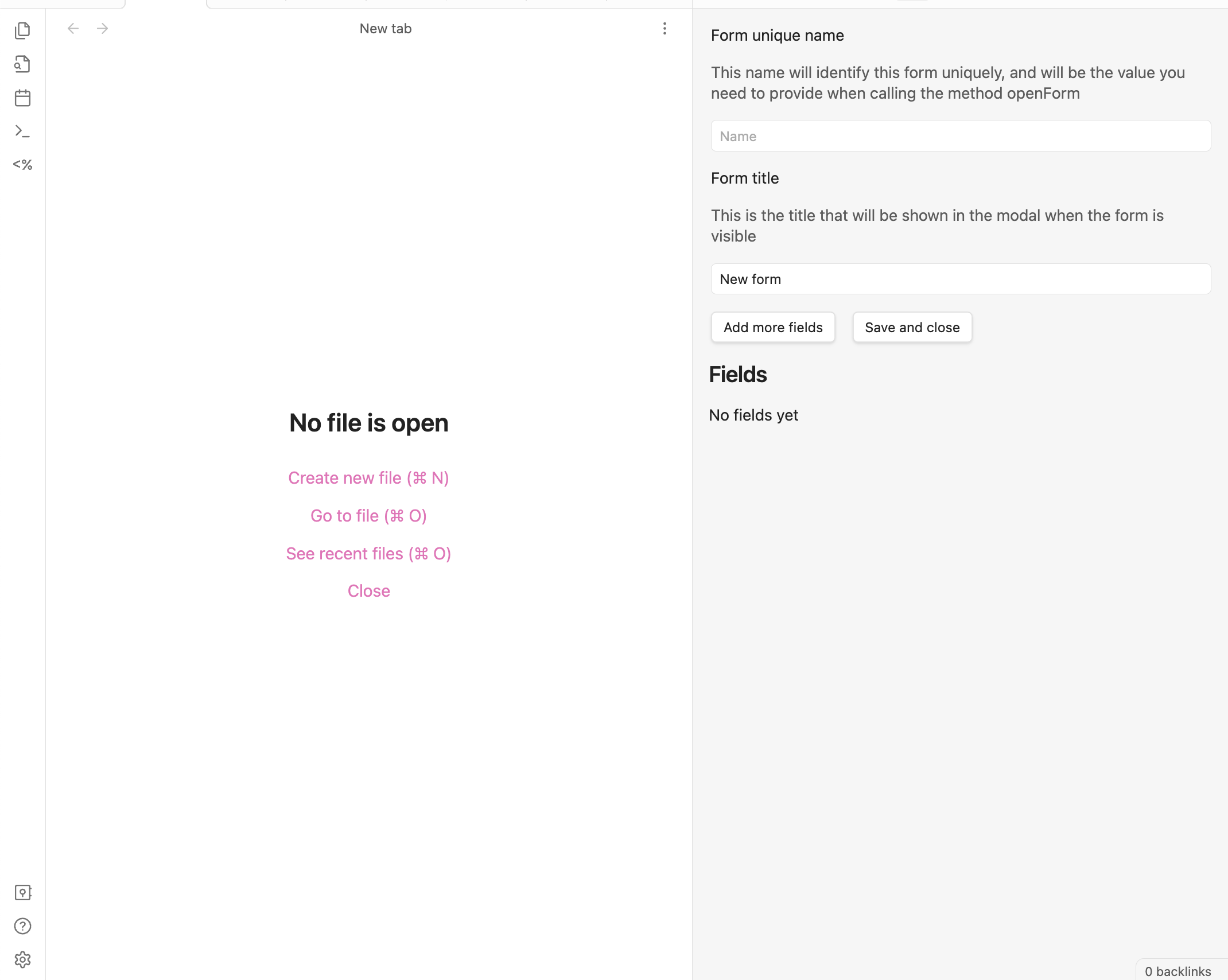
form editor/creator

Dataview integration

Modal Form integrates with Dataview to provide powerful data querying capabilities in your forms. You can use Dataview queries to:

  • Create dynamic input fields with suggestions from your vault
  • Generate dynamic content in document and markdown blocks based on form data
  • Create interactive previews that update as users fill out the form

For detailed documentation and examples, see Dataview Integration.
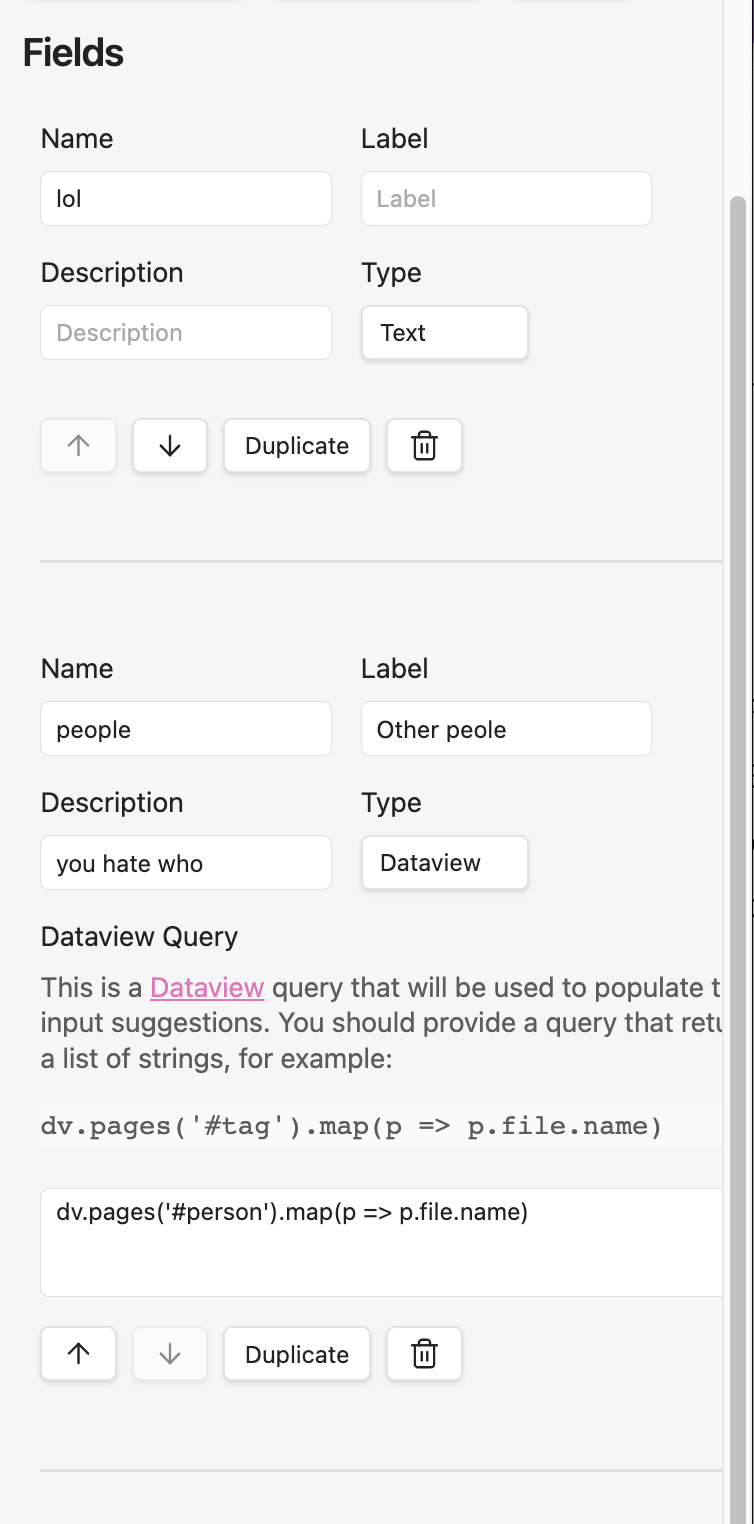
dataview

Inline forms

The plugin also supports inline forms, which are forms that are defined when you call the openForm method. This is useful when you want to create a form that is only used in one place and it is simple enough. However, note the format is a bit verbose for typing it manually and it is error-prone, so unless it is a very small form, you will most likely prefer to use a named form.

Here is an example of how to use it:

const modalForm = app.plugins.plugins.modalforms.api;
const result = await modalForm.openForm({
    title: "Example form",
    fields: [
        {
            name: "name",
            label: "Name",
            description: "Your name",
            input: { type: "text" },
        },
        {
            name: "age",
            label: "Age",
            description: "Your age",
            input: { type: "number" },
        },
        {
            name: "favorite_meal",
            label: "Favorite meal",
            description: "Your favorite meal",
            input: { type: "text" },
        },
        {
            name: "is_family",
            label: "Is family",
            type: "toggle",
            description: "Are you family?",
            required: true,
            input: { type: "toggle" },
        },
    ],
});

You can make it smaller by removing some of the optional fields like description or label, but I really encourage you to define them all.

Using Templates and Triggering Forms via Commands

You can enhance your forms with templates, allowing you to generate dynamic note content or insert text based on form responses. When you add a template to a form, you can also register dedicated commands to trigger that form directly from Obsidian's command palette—no extra plugins or scripting needed.

How it works:

  • Edit a form and go to the Template tab.
  • Create or edit your template.
  • Enable one or both command options:
    • "Create command to insert template": lets you insert the template output into the current note after submitting the form.
    • "Create command to create note from template": lets you create a new note from the template after form submission.
  • Save the template. The commands will be registered and available in the command palette as:
    • Modal Forms: Insert template: [Form Name]
    • Modal Forms: Create note from template: [Form Name]

This makes it easy to trigger forms and use their templates anywhere with just a command—perfect for quick note creation or structured data capture.

For details on template syntax and advanced features, see the Templates documentation.

Tips and tricks

Installing the plugin

You can install the plugin directly from the Obsidian plugin store or through BRAT

Installing with BRAT

  1. Install the BRAT plugin (GitHub page) and enable it.
  2. Open the command palette and run the command BRAT: Add a beta plugin for testing.
  3. Enter https://github.com/danielo515/obsidian-modal-form into the modal and press the Add Plugin button.
  4. Return to the settings and navigate to the Community plugins tab.
  5. Enable the plugin.

Manually installing the plugin

  • Copy over main.js, styles.css, manifest.json to your vault VaultFolder/.obsidian/plugins/modalForm/.

How to develop

  • Clone this repo.
  • Make sure your NodeJS is at least v16 (node --version).
  • npm i or yarn to install dependencies.
  • npm run dev to start compilation in watch mode.

Releasing new releases

  • run npm version patch, npm version minor, or npm version major after updating minAppVersion manually in manifest.json.
  • Upload the files manifest.json, main.js, styles.css as binary attachments. Note: The manifest.json file must be in two places, first the root path of your repository and also in the release.
  • Publish the release.

The command npm version whatever will bump version in manifest.json and package.json, and add the entry for the new version to versions.json

Publish docs

We use mkdocs to generate the documentation. To publish the docs, run:

./build-docs.sh

Similar Plugins

info
• Similar plugins are suggested based on the common tags between the plugins.
Shortcut Launcher
4 years ago by MacStories
Trigger shortcuts in Apple's Shortcuts app from Obsidian with custom commands.
AidenLx's Folder Note - folderv Component
4 years ago by AidenLx
Things Link
4 years ago by @gavmn
Marjdown shortcuts
4 years ago by Jules Guesnon
🪨 Obsidian plugin that allows to write markdown from commands
Key Sequence Shortcut
4 years ago by anselmwang
Execute obsidian commands with short key sequences. For example, 'tp' for 'Toggle Preview' and 'tb' for 'Toggle Sidebar'. Easier to remember.
Navigate Cursor History
4 years ago by heycalmdown
Daily notes opener
4 years ago by Reorx
Easily open daily notes and periodic notes in new pane; customize periodic notes background; quick append new line to daily notes.
Doubleshift
4 years ago by Qwyntex
Obsidian Plugin to open the command palette by pressing shift twice
Execute Code
4 years ago by twibiral
Obsidian Plugin to execute code in a note.
Enveloppe
4 years ago by Mara-Li
Enveloppe helps you to publish your notes on a GitHub repository from your Obsidian Vault, for free!
Filename Emoji Remover
4 years ago by Yüksel Tolun
A simple plugin for the note taking app Obsidian that will rename your files to remove emojis in their names.
Packrat
4 years ago by Thomas Herden
Process completed instances of recurring items created by the Obsidian Tasks plugin
Linkify
4 years ago by Matthew Chan
Text Expander JS
4 years ago by Jonathan Heard
Obsidian plugin: Type text shortcuts that expand into javascript generated text.
Open File by Magic Date
4 years ago by simplgy
Heading Shifter
4 years ago by kasahala
Easily Shift and Change markdown headings.
Note Linker
4 years ago by Alexander Weichart
🔗 Automatically link your Obsidian notes.
Day and Night
4 years ago by Kevin Patel
An Obsidian plugin to automatically switch between day and night themes based on a set schedule
Quick snippets and navigation
4 years ago by @aciq
Quick snippets and navigation for Obsidian
Super Simple Time Tracker
4 years ago by Ellpeck
Multi-purpose time trackers for your notes!
Blockquote Levels
4 years ago by Carlo Zottmann
A plugin for Obsidian (https://obsidian.md) that adds commands for increasing/decreasing the blockquote level of the current line or selection(s).
Week Planner
4 years ago by Ralf Wirdemann
Obsidian Handlebars Template Plugin
3 years ago by Sean Quinlan
This is a plugin for Obsidian adding support for the Handlebars template engine in Obsidian notes
Rapid Notes
3 years ago by valteriomon
Keyshots
3 years ago by KrazyManJ
🔮📝 Obsidian plugin that adds classic hotkey/shortcuts commands from popular IDEs like Visual Studio Code or JetBrains Family.
Audio Notes
3 years ago by Jason Maldonis
Easily take notes on podcasts and other audio files using Obsidian Audio Notes.
Boost Link Suggestions
3 years ago by Jacob Levernier
An Obsidian (https://obsidian.md) plugin for altering the order of inline link suggestions by link count and manual boosts.
Weekly Review
3 years ago by Brandon Boswell
Khoj
3 years ago by Debanjum Singh Solanky
Your AI second brain. Self-hostable. Get answers from the web or your docs. Build custom agents, schedule automations, do deep research. Turn any online or local LLM into your personal, autonomous AI (gpt, claude, gemini, llama, qwen, mistral). Get started - free.
Habit Calendar
3 years ago by Hedonihilist
Monthly Habit Calendar for DataviewJS. This plugin helps you render a calendar inside DataviewJS code block, showing your habit status within a month.
Babashka
3 years ago by Filipe Silva
Run Obsidian Clojure(Script) codeblocks in Babashka.
Tasks Calendar Wrapper
3 years ago by zhuwenq
This plugin currently provides a timeline view to display your tasks from your obsidian valut, with customizable filters and renderring options.
Journal Review
3 years ago by Kageetai
Review your daily notes on their anniversaries, like "what happened today last year"
Brainframe
3 years ago by pedersen
Gemmy
3 years ago by Obsidian
Floating Search
3 years ago by Boninall
A plugin for searching text by using Obsidian default search view.
Tab Rotator
3 years ago by Steven Jin
Obsidian Rotate opened tabs with a specified time interval
Cron
3 years ago by Callum Loh
Obsidian cron / schedular plugin to schedule automatic execution of commands
GPT-LiteInquirer
3 years ago by ittuann
💬 Experience OpenAI ChatGPT assistance directly within Obsidian, drafting content without interrupting your creative flow.
Personal Assistant
3 years ago by edony
A plugin that harnesses AI agents and streamlining techniques to help you automatically manage Obsidian.
Auto Template Trigger
3 years ago by Numeroflip
An obsidian.md plugin, to automatically trigger a template on new file creation
Plugin Manager
3 years ago by ohm-en
Allows better management of Obsidian.md plugins.
Pieces for Developers
3 years ago by Pieces For Developers
Pieces' powerful extension for Obsidian-MD that allows users to access their code snippets directly within the Obsidian workspace
Arcana
3 years ago by A-F-V
Supercharge your Obsidian note-taking through AI-powered insights and suggestions
Link with alias
3 years ago by Pavel Vojtechovsky
Obsidian plugin for handy creation of links and alias in front matter of target document
Recipe Grabber
3 years ago by seethroughdev
Auto Front Matter
3 years ago by conorzhong
Due When
3 years ago by Andy Baxter
An Obsidian plugin which gives shortcuts to insert set due dates
Auto Hyperlink
3 years ago by take6
Mini Toolbar
3 years ago by AidenLx & Boninall
mini context toolbar in editor for Obsidian
Syncthing Integration
3 years ago by LBF38
Obsidian plugin for Syncthing integration
RunJS
3 years ago by eoureo
Let's run JavaScript easily and simply in Obsidian.
Copy Inline Code
3 years ago by Ondrej Zavodny
Waka time box
3 years ago by complexzeng
Codename
3 years ago by dstack
Uncheck All
3 years ago by Shahar Har-Shuv
Obsidian plugin to uncheck all checkboxes in a file with one action
Harpoon
3 years ago by mask(developermask)
Data Entry
3 years ago by Wayne Van Son
Create forms that modify data in existing notes; the dataview plugin for data entry.
Attachment Manager
3 years ago by chenfeicqq
Attachment folder name binding note name, automatically rename, automatically delete, show/hide.
YouVersion Linker
3 years ago by Jaanonim
Obsidian plugin that automatically link bible verses to YouVersion bible.
Gnome Terminal Loader
3 years ago by David Carmichael
Local Backup
3 years ago by GC Chen
Automatically creates a local backup of the vault.
Postfix
3 years ago by Bhagya Nirmaan Silva (@bhagyas)
A postfix plugin for Obsidian
Typing Assistant
3 years ago by Jambo
Typing Assistant is a plugin that improves writing efficiency and provides a user experience similar to that of【Notion】
Auto Journal
3 years ago by Evan Bonsignori
Opinionated journaling automation like daily notes but with backfills for the days that you didn't open Obsidian.
Codeblock Template
3 years ago by Super10
A template plugin that allows for the reuse of content within Code Blocks!一个可以把Code Block的内容重复利用模板插件!
Search Templates Library
3 years ago by Pentchaff
Obsidian plugin that allows to store searches templates for later use, and displays search results both in the search view and graph view.
Swiss army knife
3 years ago by mwoz123
Timer
3 years ago by Marius Wörfel
Obsidian plugin, which allows you to measure time.
Tag Breakdown Generator
3 years ago by Hananoshika Yomaru
Break down nested tags into multiple parent tags
Typing
3 years ago by Nikita Konodyuk
Programmatic customizations for groups of notes
RescueTime
3 years ago by Tatsuya Hayashi
A RescueTime integration plugin to view your activity logs in Obsidian.
Auto Filename
3 years ago by rcsaquino
Auto Filename is an Obsidian.md plugin that automatically renames files in Obsidian based on the first x characters of the file, saving you time and effort.
Frontmatter generator
3 years ago by Hananoshika Yomaru
A plugin for Obsidian that generates frontmatter for notes
Editor Autofocus
2 years ago by Mgussekloo
Run
2 years ago by Hananoshika Yomaru
Generate markdown from dataview query and javascript.
Random Number Generator
2 years ago by iRewiewer
Gives you a random number
Time Things
2 years ago by Nick Winters
Show clock, track time spent editing a note, and track the last time a note has been edited.
Formatto
2 years ago by Deca
Simple, fast, and easy-to-use Obsidian Markdown formatter.
Autocorrect Formatter
2 years ago by b-yp
A plugin running on Obsidian that utilizes autocorrect to format Markdown content.
R.E.L.A.X.
2 years ago by Syr
Regex Obsidian Plugin
Ctrl-XA cycle various items
2 years ago by nbossard
The equivalent in Obsidian of Vim Ctrl X-A. But supercharged with lists of various items : days, months, ...
RSS Copyist
2 years ago by aoout
Get the RSS articles as notes.
Daily note creator
2 years ago by Mario Holubar
Automatically creates missing daily notes.
Contribution Graph
2 years ago by vran
generate interactive gitxxx style contribution graph for obsidian, use it to track your goals, habits, or anything else you want to track.
Task list
2 years ago by Ted Marozzi
A simple obsidian plugin enabling better task management via lists.
WordWise
2 years ago by ckt1031
Writing companion for AI content generation.
AI Tagger
2 years ago by Luca Grippa
Simplify tagging in Obsidian. Instantly analyze and tag your document with one click for efficient note organization.
Ego Rock
2 years ago by Ashton Eby
An obsidian plugin that implements a basic taskwarrior UI for listing and modifying tasks.
Prompt ChatGPT
2 years ago by Coduhuey
MantouAI
2 years ago by Morino Pan
MantouAI—— 让Obsidian变身智能助手
Pomodoro Planner
2 years ago by Onur Nesvat
Mxmind Mindmap
2 years ago by mxmind
mxmind for obsidian plugin
Differential ZIP Backup
2 years ago by vorotamoroz
Contextual note templating
2 years ago by Roman Kubiv
Contextual note templating with value input prompts configured in frontmatter.
Note Toolbar
2 years ago by Chris Gurney
Flexible, context-aware toolbars for your notes in Obsidian.
Automation
2 years ago by Benature
Grind Manager
2 years ago by dromse
Gamify your task management with rewards system, craft your tasks by tags.
Target Word Count
2 years ago by TwoFive Labs
Target Word Count Plugin for Obsidian
Daily Prompt
2 years ago by Erl-koenig
Personal OS
2 years ago by A.Buot
Bookmarks Caller
2 years ago by namikaze-40p
This is an Obsidian plugin which can easily open bookmarks.
LinkMagic
2 years ago by AndyReifman
Timekeep
2 years ago by Jacobtread
Obsidian task time tracking
Select word
2 years ago by Connor Espino
Note Chain
2 years ago by ZigHolding
Package my frequently used tools, highly personal plugins.
Notes 2 Tweets
2 years ago by Tejas Sharma
Generate and schedule tweets automatically from your notes on Obsidian
Focus Tracker
2 years ago by Jeet Sukumaran
Rapid AI
2 years ago by Rapid AI
AI Assistant for selected text and generating content with Markdown. Shortcuts and quick action buttons provide instant AI assistance. It provides a high availability API for unlimited Chat GPT request rates, so you can ensure smooth work for any workload.
Substitutions
2 years ago by BambusControl
Automatic text replacer for Obsidian.md
Watched-Metadata
2 years ago by Nail Ahmed
Watches for changes in metadata and updates the note content accordingly.
doing
2 years ago by rooyca
What was I doing?
Daily Note Structure
2 years ago by db-developer
This obsidian plugin creates a structure for your daily notes
PopKit
2 years ago by Zhou Hua
Note Linker with Previewer
2 years ago by Nick Allison
Obsidian Plugin to find and Link notes
Paste as Embed
2 years ago by Matt Laporte
Obsidian plugin to paste contents of clipboard into a new note, and embed it in the active note.
Note 2 Tag Generator
2 years ago by Augustin
Fast Image Auto Uploader
2 years ago by Longtao Wu
upload images from your clipboard by gopic
Daily Statistics
2 years ago by yefengr
obsidian daily statistics
Current File
2 years ago by Mark Fowler
An Obsidian plugin to allows external applications to know what file Obsidian is currently viewing
Snippets Manager
2 years ago by Venkatraman Dhamodaran
Snippets Manager (Text Expander) For Obsidian
Auto Periodic Notes
2 years ago by Jamie Hurst
Obsidian plugin to create new periodic notes automatically in the background and allow these to be pinned in your open tabs. Requires the "Periodic Notes" plugin.
Hotkeys++
6 years ago by Argentina Ortega Sainz
Adds hotkeys to toggle todos, ordered/unordered lists and blockquotes in Obsidian
Shortcuts extender
6 years ago by kitchenrunner
Plugin for Obsidian: Use shortcuts for input special symbols and changing level of headings without language switching
Search++
6 years ago by Noureddine Haouari
Allow inserting text context search results on the active note.
Workbench
6 years ago by ryanjamurphy
A plugin to help you collect working materials.
Tab Switcher
5 years ago by Vinzent & phibr0
Tab Switcher - Obsidian Plugin
Snippets
5 years ago by Pelao
Temple
5 years ago by garyng
A plugin for templating in Obsidian, powered by Nunjucks.
Autocomplete
5 years ago by Yeboster
Obsidian plugin to provide text autocomplete
Daily Stats
5 years ago by Dhruvik Parikh
Plugin to view your daily word count across all notes in your Obsidian.md vault.
TODO | Text-based GTD
5 years ago by Lars Lockefeer
DEVONlink
5 years ago by ryanjamurphy
Open notes indexed in DEVONthink in, well, DEVONthink
Hotkeys for templates
5 years ago by Vinzent
Regex Pipeline
5 years ago by No3371
An Obsidian plugin that allows users to setup custom regex rules to automatically format notes.
Stopwatch
5 years ago by Tokuhiro Matsuno
Pomodoro
5 years ago by Tokuhiro Matsuno
Zoottelkeeper
5 years ago by Akos Balasko
Obsidian plugin of Zoottelkeeper: An automated folder-level index file generator and maintainer.
Amazing Marvin
5 years ago by Shirayuki Nekomata
Simple plugin for Amazing Marvin
Multi-line Formatting
5 years ago by nmady
Format Obsidian text over an entire selection, even if that selection has paragraph breaks in the middle!
Apply Patterns
5 years ago by Jacob Levernier
An Obsidian plugin for applying patterns of find and replace in succession.
Activity Logger
5 years ago by Creling
Go to Line
5 years ago by phibr0
Editor Commands Remap
5 years ago by cactus5
Obsidian plugin to map hotkeys to editor commands
Command Alias
5 years ago by @Yajamon
Obsidianのコマンドに対してエイリアスを設定するプラグイン
Shell commands
5 years ago by Jarkko Linnanvirta
Execute system commands via hotkeys or command palette in Obsidian (https://obsidian.md). Some automated events are also supported, and execution via URI links.
CustomJS
5 years ago by Sam Lewis
An Obsidian plugin to allow users to reuse code blocks across all devices and OSes
JavaScript Init
5 years ago by ryanpcmcquen
Run custom JavaScript in Obsidian.
Key Promoter
5 years ago by Johannes Theiner
Learn keyboard shortcuts by showing them when using the mouse
Webhooks
5 years ago by Stephen Solka
Connect obsidian to the internet of things via webhooks
Habitica Sync
5 years ago by Leoh and Ran
This is a under-development Obsidian Plugin for Habitica
Word Sprint
4 years ago by Andrew Lombardi
Obsidian Word Sprint plugin
Flexible Pomodoro
4 years ago by grassbl8d
Crackboard
2 years ago by Franklin
Obsidian plugin for crackboard.dev
Lemons Search
2 years ago by Moritz Jung
An Obsidian plugin that offers a fast fuzzy finder based quick switcher with preview.
Flow
2 years ago by Ben Phillips
Implements key processes in David Allen's Getting Things Done (GTD) methodology
Copy Section
2 years ago by skztr
Obsidian.md plugin adding a Copy button to the top of Headed sections
Jura Links
2 years ago by Lukas Collier & Emi Le
Verlinke deine Normangaben, Aktenzeichen oder Fundstellen in deiner Obsidian Notiz mit Gesetzesanbietern.
Metadata Auto Classifier
2 years ago by Beomsu Koh
AI-powered Obsidian plugin that automatically classifies and generates metadata (tags, frontmatter) for your notes.
Another Simple Todoist Sync
2 years ago by eudennis
Obsidian.md plugin to integrate with Todoist app.
Occura
2 years ago by Alexey Sedoykin
Plugin for https://obsidian.md/ that automatically selected same text occurrences in opened note
Smart Composer
2 years ago by Heesu Suh
AI chat assistant for Obsidian with contextual awareness, smart writing assistance, and one-click edits. Features vault-aware conversations, semantic search, and local model support.
Superstition
a year ago by Jeffry
An Obsidian plugin for routine management.
NeuroVox
a year ago by Synaptic Labs
Obsidian plugin for transcription and generation
Todos sort
a year ago by Jiri Sifalda
A plugin for Obsidian that sorts todos within a note
Activity Heatmap
a year ago by Zak Hijaouy
Brain Dump Mode
a year ago by yesjinu
Obsidian plugin - DISABLE your delete key and eliminate hesitation!
Daily Random Note
a year ago by Alexandre Silva
Daily Random Notes in Obsidian.
Typezen
a year ago by Ilgam Gabdullin
Plugin for obsidian which lets you turn zen mode instantly
Gemini Scribe
a year ago by Allen Hutchison
An obsidian plugin to interact with Google Gemini
Task Director
a year ago by Cybertramp
A plugin that allows you to easily manage tasks in bulk.
Proletarian Wizard Task Manager
a year ago by Charles Feval
Obsidian plugin ot manage todos and projects directly from your notes.
Simple Todo
a year ago by elliotxx
A minimalist text-based todo manager (Text-Based GTD) for efficient task management in Obsidian.
Weekly Goal Tracker
a year ago by George Gorman
Tab Limiter
a year ago by Henry Gustafson
Limits the number of tabs that can be opened in Obsidian
Focus Time
a year ago by AstraDev
Focus Time is a plugin that helps you track how much time you spend on each note.
Unit Converter
a year ago by Ruslan Zabarov
Unit conversion plugin for Obsidian
Note From Form
a year ago by Sergei Kosivchenko
Obsidian plugin that adds support to define input form and generate notes based on it
Insert Multiple Attachments
a year ago by mnaoumov
Obsidian Plugin that allows to insert multiple attachments at a time
pycalc
a year ago by pycalc
Hanko
a year ago by Telehakke
Obsidian plugin.
Sentinel
a year ago by Giorgos Sarigiannidis
A plugin for Obsidian that allows you to update properties or run commands based on document visibility changes.
Missing Link File Creator
a year ago by Lemon695
The plugin creates both missing links and the corresponding files.
Goal Tracker
a year ago by Ben Rotholtz
AI Revisionist
a year ago by Synaptic Labs
Kikijiki Habit Tracker
a year ago by KIKIJIKI
Kikijiki Habit Tracker Plugin for Obsidian
Dataview Autocompletion
a year ago by Daniel Bauer
Plugin REPL
a year ago by readwithai
An in-note Read Evaluate Print Loop to execute JavaScript within Obsidian
InlineAI
a year ago by FBarrca
Spacekeys
a year ago by Jared Lumpe
Obsidian plugin to define hotkeys based on sequences of keypresses.
MCP Tools
a year ago by Jack Steam
Add Obsidian integrations like semantic search and custom Templater prompts to Claude or any MCP client.
AI Providers
a year ago by Pavel Frankov
This plugin is a hub for setting AI providers (OpenAI-like, Ollama and more) in one place.
Folder overview
a year ago by Lost Paul
Provides a dynamic overview of your vault or folders in the format of a code block.
Enhanced Canvas
a year ago by RobertttBS
When editing on Canvas, properties and Markdown links to notes are automatically updated, enabling backlinks in Canvas.
Varinote
a year ago by Giorgos Sarigiannidis
A plugin for Obsidian that allows you to add variables in Templates and set their values during the Note creation.
Mastodon Threading
a year ago by El Pamplina de Cai
Obsidian plugin to compose and post threads to Mastodon
AI integration Hub
a year ago by Hishmat Salehi
A modular AI integration hub for Obsidian
CAO
a year ago by Godot
Claude AI for Obsidian
Organized daily notes
a year ago by duchangkim
Automatically organizes your daily notes into customizable folder structures for better organization and easier navigation.
Hotstrings
a year ago by wakywayne
Inline Checkbox Groups
a year ago by Bradley Wyatt
Obsidian Plugin that creates multiple checkboxes on a single line, separated by a customizable separator character (default '|'), with the option to automatically cross out text when all checkboxes in the line are checked.
Runsh
a year ago by Ddone
A simple plugin that allows to run shell commands from obsidian.
EUpload
a year ago by Appleex
Obsidian 插件,专用于上传文件到存储仓库。目前支持 Lskypro(兰空图床),后续有需求会引入其它存储方式,如:Github/Gitee等等。
Inkporter
a year ago by Ayush Kumar Saroj
Inkporter is an Obsidian plugin that digitizes handwritten notes with smart ink isolation, adaptive theming, and seamless import workflows.
Forms
a year ago by Sorin Mircea
Automatic Linker
a year ago by Kodai Nakamura
Last Position
a year ago by saktawdi
Automatically scroll to the last viewed position when opening the markdown document.
PDF Paste
a year ago by Cormac
Vault File Renamer
a year ago by Louan Fontenele
Vault File Renamer: Automatically standardizes file names to GitHub style (lowercase, no accents, only -, ., _) while preserving folder structure and file contents.
Daily Routine
a year ago by sechan100
new version of daily-routine obsidian plugin
Rsync
a year ago by Ganapathy Raman
An Obsidian plugin to perform sync files between machines using Rsync
Task Mover
a year ago by Mariia Nebesnaia
A plugin for obsidian to move unfinished tasks to the daily note automatically
Title As Link Text
a year ago by Lex Toumbourou
An Obsidian plugin to set the Link Text using the document title
Cursor Position History
a year ago by Florian Gubler
A Plugin to remember (and make accessible) the cursor history in Obsidian. Both within a file and across files.
Asana
a year ago by Ryan Bantz
Obsidan plugin that creates tasks in Asana for highlighted text or the current line
KOI Sync
a year ago by Luke Miller
AI Tagger Universe
a year ago by Hu Nie
An intelligent Obsidian plugin that leverages AI to automatically analyze note content and suggest relevant tags, supporting both local and cloud-based LLM services.
Memos AI Sync
a year ago by leoleelxh
obsidian-memos-sync-plugin,将 Memos 内容同步到 Obsidian 的插件,提供无缝集成体验。
Blog AI Generator
a year ago by Gareth Ng
Obsidian Plugin: generate blog via AI based on the current note.
tidit
a year ago by codingthings.com
tidit is an Obsidian - https://obsidian.md - plugin that adds timestamps to your document as you type — when you want it, how you want it, where you want it.
Copy Local Graph Paths
a year ago by Amy Z
copy-local-graph-paths is a simple Obsidian plugin that copies the paths of notes linked to your current page.
IMSwitch in Math Block
a year ago by XXM
One Step Wiki Link
a year ago by Busyo
用于 Obsidian 一步插入当前界面匹配到的所有外链(维基链接)
Pinned Daily Notes
a year ago by Jeremy Neiman
Dynamically update a pinned tab with today's daily note
AI Note Tagger
a year ago by Jasper Mayone
Auto tagging obsidian notes w/ AI
Auto Daily Note
a year ago by John Dolittle
Daily Notes Automater
a year ago by David Pedrero
Tick Tones
a year ago by DontBlameMe
A plugin for Obsidian which makes checkboxes satisfying
Tasks Cleaner
a year ago by lowit
🧹 Tasks Cleaner is a plugin for Obsidian that helps you automatically remove old completed tasks from your Markdown notes
JIRA links shortener
a year ago by Ruslans Platonovs
Obsidian JIRA links shortener plugin
Wakatime / Wakapi
a year ago by Kevin Woblick
Connect your Obsidian to Wakatime or Wakapi to track the time spent while browsing or writing notes.
SolidTime Integration
a year ago by proniclabs
Obsidian SolidTime Integration Plugin
Markwhen File Sync
a year ago by rouvenjahnke
Synchronize properties from your Obsidian notes with a Markwhen timeline file.
NoteMover shortcut
a year ago by Lars Bücker
Quickly and easily move notes to predefined folders. Perfect for organizing your notes.
Template Filename
a year ago by Callum Alpass
Obsidian plugin for creating notes with templatable filenames
Note UID Generator
a year ago by Valentin Pelletier
Allow you to automatically generate UID for the notes in your vault.
Discord Message Sender
10 months ago by okawak
Obsidian Plugin: Send messages from a Discord channel to your Vault
Auto Replacer
10 months ago by Alecell
A live text replacement plugin that applies automatic formatting, corrections, or custom replacements in real-time. Define your own regex-based rules and transformation logic to modify text dynamically as you type.
Current View
10 months ago by Lucas Ostmann
Automatically set the view mode (Reading, Live Preview, Source) for notes in Obsidian using folder rules, file patterns, or frontmatter.
Replace Pencil
10 months ago by penyt
🐧 An obsidian plugin that can easily replace the custom variable in the code block.
Timeline Canvas Creator
10 months ago by chris-codes1
Quickly create timeline structured canvases in Obsidian.
Dataview (to) Properties
10 months ago by Mara-Li
Sync inline Dataview to properties (YAML frontmatter)
Random Wikipedia Article
10 months ago by SpencerF718
An Obsidian plugin to generate a note of a random Wikipedia article.
Sonkil
9 months ago by ohyoungpark
Note Companion AI
8 months ago by Benjamin Ashgan Shafii
Note Companion: AI assistant for Obsidian that goes beyond just a chat. (prev File Organizer 2000)
Content OS
8 months ago by eharris128
Post to LinkedIn from within Obsidian
VaultAI
8 months ago by Tharushka Dinujaya
An AI chatbot plugin for Obsidian using the Gemini API for note summarization, content generation, and more. Enhance your workflow with AI assistance like the Notion AI bot.
Note Minimap
8 months ago by Yair Segel
Add a minimap to your Obsidian notes.
NotePix
8 months ago by Ayush Parkara
NotePix automatically uploads images, screenshots from your Obsidian vault to a designated GitHub repository. It then seamlessly replaces the local link with a fast URL, keeping your vault lightweight and portable.
URL Formatter
8 months ago by Thomas Snoeck
Automatically formats specific URLs pasted into Obsidian into clean Markdown links.
Move Cursor On Startup
8 months ago by Jared Kelnhofer
Obsidian plugin to move the cursor to the right and back to the left when starting up. Why? To keep DataView expressions from not running on the first load of, say, your Home file.
Google Calendar Importer
7 months ago by Fan Li
A simple and light-weighted google calendar importer, allow injecting the events / tasks of a day automatically to your daily notes, or import it to anywhere with a command.
Open or Create File
7 months ago by Ilya Paripsa
Set up Obsidian commands that create or open files based on predefined patterns.
Canvas Link to Group
7 months ago by TGRRRR
Plugin for Obsidian Canvas enabling direct links to specific groups within canvas files for improved navigation
Steward
6 months ago by Dang Nguyen
A vault-specific agent equipped with agentic capacity, fast search, flexible commands, vault management, and terminals to "jump" into other CLI agents, such as Claude, Gemini, etc.
Tag Timer
4 months ago by quantavil
The Tag Timer is a versatile plugin for Obsidian that allows you to seamlessly track the time you spend on specific tasks or sections within your notes.
Handlebars Dynamic Templating
3 months ago by Hide_D
Handlebars dynamic templating. Define template files and use them dynamically via hb blocks. Template recursion is also possible.
Blueprint
3 months ago by François Vaux
Repeatable templates plugin for Obsidian
Note Progressbar
a month ago by Ryoma Kawahara
Displays a live progress bar summarizing checkbox completion in the active note.