Plugin REPL

by readwithai
5
4
3
2
1
Score: 52/100

Description

The Plugin REPL plugin enables users to execute JavaScript code directly within Obsidian, providing an interactive scripting environment for automating tasks and developing custom commands. It allows access to Obsidian's plugin API, making it possible to manipulate files, control the editor, and create new commands without developing a full plugin. Inspired by Emacs, it includes convenience functions for interacting with the vault, executing scripts, and modifying content dynamically. Users can define persistent commands, run startup scripts, and explore Obsidian's internal API, making it a powerful tool for developers and advanced users seeking greater automation and control over their workspace.

Reviews

No reviews yet.

Stats

24
stars
518
downloads
0
forks
450
days
381
days
443
days
0
total PRs
0
open PRs
0
closed PRs
0
merged PRs
0
total issues
0
open issues
0
closed issues
0
commits

Latest Version

a year ago

Changelog

1.2.0 Add title variable, forwardRegexp, atRegexp. Fix bug in wordAtPoint if at end of line. Support some european languages in word at point

README file from

Github

Plugin REPL - In Editor JavaScript Scripting for Automation

readwithai - X -🦋 - blog - machine-aided reading - stars

Rapidly automate tasks from within notes. Rapidly test and iterate on code for plugins without needing to reload.

Plugin REPL adds an Emacs-like read evaluate print loop (REPL) to Obsidian. This lets you execute JavaScript directly in a document with a single key-press and see the result. It lets you interact with Obsidian's plugin API to make Obsidian do things (move the cursor, insert text, open files, etc). Once you have working code you define new commands directly in JavaScript.

Plugin REPL can be useful when developing plugins or for "light-weight" scripting without having to develop a full plugin.

A range of convenience functions, partly inspired by emacs, is provided to speed up development of straight-forward features.

I am in no way affiliated with Obsidian. This is a third-party plugin.

Downloads   Plugin REPL Documentation  

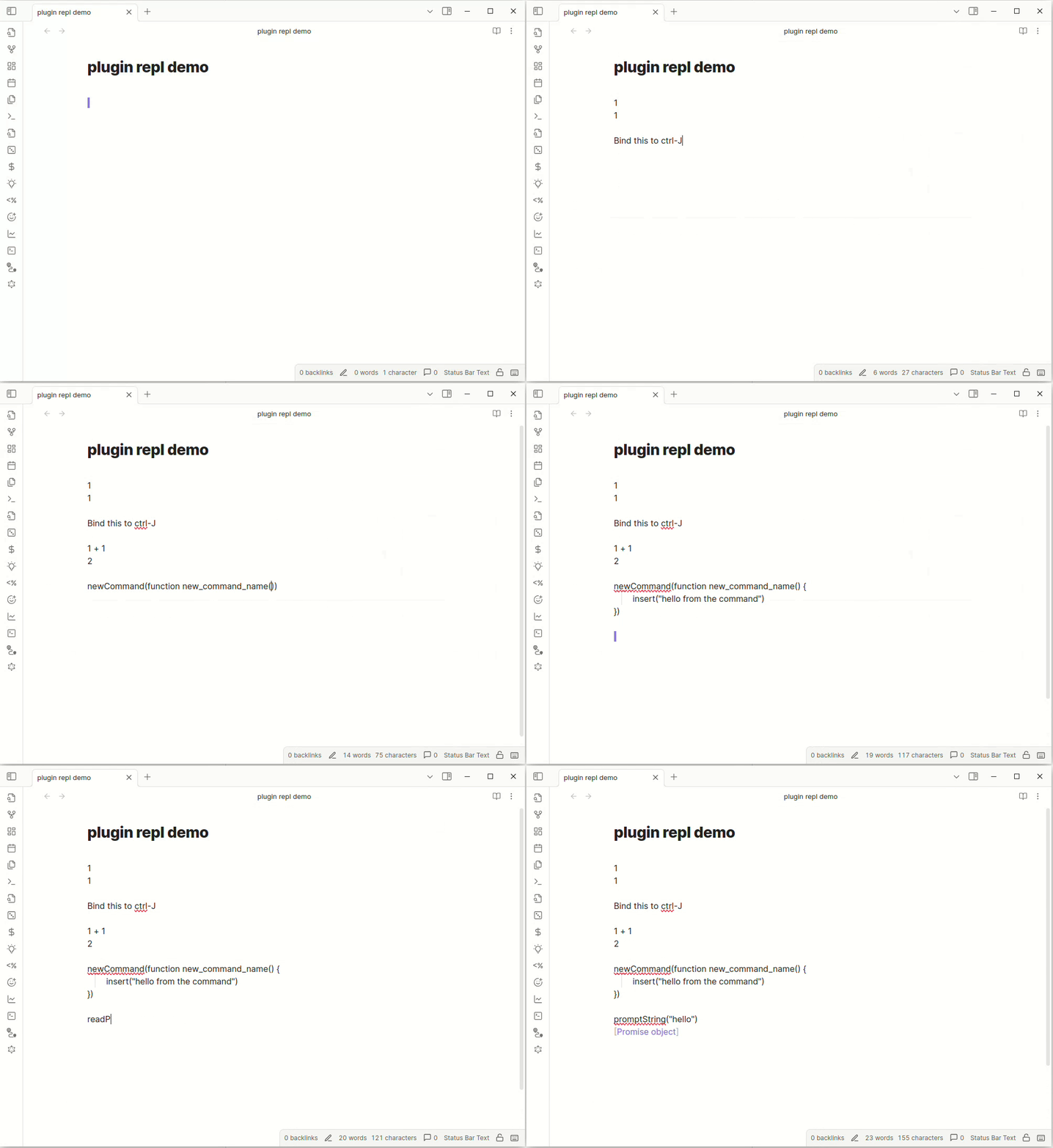
Demo

demo

Installation

Plugin REPL is available from within Obsidian as a community plugin.

Alternatively, you can manually install Plugin REPL:

In your vault, there should be a .obsidian/plugins directory. You can clone this repo into that directory and then run the following to build the plugin:

npm install
npm run dev

You should then be able to enable the plugin in the "Community Plugins" section of Obsidian's settings.

Using

For basic usage, write a JavaScript expression on a line, then run the command "Execute the current line or selection" in the Command Palette. You can also select a region and run this command. I would advise making CTRL-J run this command with a hotkey.

Some other commands are provided. You can find them in the Command Palette by typing "Plugin REPL". These let you to execute a region of JavaScript without inserting the result, or read JavaScript to run from a popup window.

To define a command (run via the Command Palette or a hotkey) use the newCommand function.

The code you write can make use of the convenience functions and variables. This may well provide all the functionality you need for basic scripts, but Plugin REPL also gives you access to much of Obsidian's plugin API through the app, editor and repl (plugin) objects.

The dir and fuzzyDir methods can help explore these objects allong with the API documentation.

If you want functionality, such as defined commands, to rerun each time Obsidian loads you can put this functionality in a repl.md file in your vault.

IMPORTANT LIMITATION. Functions that you define are not shared between different invocations of plugin repl. To share them, you must instead define them as variables like so: var f = function f() {

Documentation

This page provides an overview of functionality. You might like to look at the Obsidian and Plugin Repl Cookbook, which provides various practical examples of how Plugin REPL can be used.

Convenience functions provided

Various convenience functions are provided:

  • functions() - List the convenience functions and methods provided

  • source(f:string) - Open the markdown file called f and execute the code in it

  • command(id:string) - Run a command

  • commands() - Return all the ids for commands. You may want to call fuzzySelect(commands())

  • newCommand(function name_with_underscores { ...) - Create a new command with name "new name" which runs the function new_name

  • dir(o:Object) - List the property in an object

  • fuzzyDir(o: Object) - Explore the properties of an object with a fuzzy selector

User interface

  • message(s:string) - Print a notification message to the corner of the screen
  • popup(s: string) - Popup a dialog displaying a message
  • await promptString(prompt: string) - Read a string from a popup
  • await fuzzySelect(choices: Array<string>, prompt?: string) - Select from an Array of strings
  • openFile(f:string) - Open a file in the current pane
  • openUrl(url:string) - Open a url

Settings

  • openSetting(name: string) - Open settings and display the tab (see left hand side) with the given name.
  • vaultPath is the absolute path of the current vault

Editor commands

  • path is the path of the current note

  • lineNumber() - return the line number of the current line

  • point() - Return the current cursor position

  • mark() - Return the cursor position at the beginning of the selection

  • pointMin() - Return the minimum cursor in the buffer

  • pointMax() - Return the maximun cursor in the buffer

  • atEndOfBuffer() - Return true if the cursor is at the end of the buffer.

  • jump(p: CursorPoint) - Jump to this point

  • forwardChar(count?: number) - Move count (or one) character forward

  • endOfLine() - Move to the end of the line

  • selection() - Get the text contained in the selection

  • bufferString() - Return a string containing the entire text of the buffer

  • bufferString(start, end) - Return the string between these two cursor positions (see point() and editor.getCursor())

  • insert(s:string) - Insert a string into the buffer

  • kill(start?: cursor, end?: cursor) - Delete a region (defaults to the selection)

  • await clipboardPut(s: string) - Put a string on the clipboard

  • await clipboardGet() - Get the contents of the clipboard

  • wordAtPoint(p?:string) - Returns the word at the cursor position. Default to current postion.

  • lineAtPoint(p?:string) - Retunrs the line at the cursor position. Default to current positiong.

Reading and files

  • await readFile(name: string) - Read the markup file with the title name.
  • await writeFile(name: string) - Overwrite the markdown file with the title name with the given string
  • await appendToFile(name: string) - Append the given string to the markdown with the title name

Processes

  • runProc(s: string) - Parse the bash-style command string s (e.g "ls /home") and call runProc on it
  • runProc([command, arg1, arg2, ...]) - Run a command and return what it writes to standard out. Raise and error on error. See require('child_process') for more advanced usage.

Plugins and Modules

  • plugin(s:string) - Get the object for a plugin. You may be able to reuse features from another plugin with this.
  • plugins() '- Get a list of all the string IDs of plugins used by Obsidian.
  • getDv() - Get the dataview object
  • replRequire(s: string) - Import the node module installed using Plugin Repl Imports

API access

  • repl is the Obsidian plugin object for Plugin REPL. You can use this to define commands and register extensions.
  • editor is the Editor object. You can use this to edit to the current note
  • app is the global application object.

Defining commands

The function newCommand will create a new command which calls a function. Once you have defined a command, you can define a hotkey to run this command and so call this function.

newCommand(function new_command_name() {
...
})

creates a command with the name "new command name" (and the id new_command_name).

You can use all Plugin REPL's extra functions and variables (app, editor etc) within this function.

If you want to test this funtion by hand, you can do the following:

var f = newCommand(function new_command_name() {
...
})

You can then call f() by executing code to test it.

Running code at startup

If you want code to run at startup, such as for defining commands, then you can place this code in a special file called repl.md. If this file exists, it is read when Obsidian starts (or is reloaded) and the code in it is executed.

Asynchronous code

For convenience, if you call an asynchronous function, Plugin REPL will store the result in the variable _. If there was an error, the error is stored in _error.

Images and Graphs

In order to output images and graphs, you can use code-blocks. These give you access to an el HTML object you can use to store arbitrary HTML. Note that all JavaScript executes in a single global scope by design.

```plugin-repl
el.appendText("hello")
```

Dataview support

The dataview plugin provides functionality to query your obsidian vault. For example, it can return pages or bullet points that match a particular query.

If you have installed the dataview plugin, Plugin REPL gives you access to a dataview object dv which can be used to query all notes.

The following code returns the first list of the page called templates/daily.md.

dv = getDv()
dv.pages().filter((x) => x.file.path == "templates/daily.md")[0].file.lists[0]

Templater support

The Templater library provides functionality to insert templates with some parts of the template derived from JavaScript code. If you have installed Templater, you can use the async templater_expand function to expand template strings.

This creates a command that inserts a files tags using a template:

newCommand(async function templater_example() {
    insert(await templater_expand("The files tags: <% tp.file.tags %>"))
})

If you want to expand a template for a file, you can use readFile:

newCommand(async function templater_from_file() {
    insert(await templater_expand(await readFile("myTemplate")))
})

Importing modules

Modules in Obsidian work in an interesting way that makes installing from NPM a little tricky. There is a technical explanation here.

Plugin REPL has a system to let you import npm modules provided by this repository. To use it, you have to checkout a repository into your vault, update a text file, run a make command and then you can use the replRequire function within Obsidian

Some questions and answers about Plugin REPL

Questions and answers

Alternatives and prior work

  • You can use plugins to do the same things that you can do with Plugin REPL but this tends to mean more code.
  • js-engine lets you evaulate JavaScript code in code blocks. Execute code gives you code blocks in multiple programming languages. Neither give you access to Obsidian API objects to let you do scripting.
  • js-engine lets you evaulate JavaScript code in code blocks. Execute code gives you code blocks in multiple programming languages. Neither give you access to Obsidian api objects to let you do scripting.
  • dataview similarly lets you execute JavaScript in code blocks. It gives you access to the app object.
  • Templater defines a template language with JavaScript code blocks. It's API gives you access to the app object and people have used "Templates" that when run script Obsidian.
  • Obsidian runjs is quite similar in that it allows you to run code from within Obsidian. There is a special syntax for blocks that then show up in a side bar. Plugin REPL is easier to use in my opinion since you can just run code and use the command interface.

Many plugins can create commands at run time from within Obsidian - but they tend to be for more specific uses. I was influenced by obsidian-open-settings for this, as well as for the openSettings command.

Both dataview and Templater implement provide APIs that wrap and simplify aspects of the Obsidian API, Templater's is rather more complete

Attribution

This plugin was based on the Obsidian sample plugin from Obsidian.

It uses the shell-quote library by ljharb and the source code for this is compiled into distribited main.js. This is under an MIT license.

At runtime, it binds against dataview by blacksmith, should you use dataview functionality. This is under an MIT license.

This plugin is highly influenced by Emacs (as are most text editors and a lot of software).

This code exposes and wraps the Obsidian plugin API - as all plugins do - but Plugin REPL does this in a rather more direct / turing-complete way.

About me

I make productivity tools and AI tools related to reading and research.

If that sounds interesting you can follow me on twitter or bluesky. I also write about these topics on substack.

If you find this piece of software useful. Maybe give me money (like $10 dollars?) on my kofi.

Similar Plugins

info
• Similar plugins are suggested based on the common tags between the plugins.
Mermaid Tools
3 years ago by dartungar
Tools for improved Mermaid.js experience in Obsidian.md
Terminal
3 years ago by polyipseity
Integrate consoles, shells, and terminals.
Note Toolbar
2 years ago by Chris Gurney
Flexible, context-aware toolbars for your notes in Obsidian.
Smart Composer
2 years ago by Heesu Suh
AI chat assistant for Obsidian with contextual awareness, smart writing assistance, and one-click edits. Features vault-aware conversations, semantic search, and local model support.
Execute Code
4 years ago by twibiral
Obsidian Plugin to execute code in a note.
MCP Tools
a year ago by Jack Steam
Add Obsidian integrations like semantic search and custom Templater prompts to Claude or any MCP client.
Zoottelkeeper
5 years ago by Akos Balasko
Obsidian plugin of Zoottelkeeper: An automated folder-level index file generator and maintainer.
Shell commands
5 years ago by Jarkko Linnanvirta
Execute system commands via hotkeys or command palette in Obsidian (https://obsidian.md). Some automated events are also supported, and execution via URI links.
Local Backup
3 years ago by GC Chen
Automatically creates a local backup of the vault.
Khoj
3 years ago by Debanjum Singh Solanky
Your AI second brain. Self-hostable. Get answers from the web or your docs. Build custom agents, schedule automations, do deep research. Turn any online or local LLM into your personal, autonomous AI (gpt, claude, gemini, llama, qwen, mistral). Get started - free.
CustomJS
5 years ago by Sam Lewis
An Obsidian plugin to allow users to reuse code blocks across all devices and OSes
Modal forms
3 years ago by Danielo Rodriguez
Define forms for filling data that you will be able to open from anywhere you can run JS
Enveloppe
4 years ago by Mara-Li
Enveloppe helps you to publish your notes on a GitHub repository from your Obsidian Vault, for free!
Note Linker
4 years ago by Alexander Weichart
🔗 Automatically link your Obsidian notes.
AI Providers
a year ago by Pavel Frankov
This plugin is a hub for setting AI providers (OpenAI-like, Ollama and more) in one place.
Syncthing Integration
3 years ago by LBF38
Obsidian plugin for Syncthing integration
Note Companion AI
8 months ago by Benjamin Ashgan Shafii
Note Companion: AI assistant for Obsidian that goes beyond just a chat. (prev File Organizer 2000)
Auto Template Trigger
3 years ago by Numeroflip
An obsidian.md plugin, to automatically trigger a template on new file creation
Pieces for Developers
3 years ago by Pieces For Developers
Pieces' powerful extension for Obsidian-MD that allows users to access their code snippets directly within the Obsidian workspace
Open in Terminal
4 months ago by ChenFeng
Open your vault in a new terminal window or launch Claude Code, Codex CLI, or Gemini CLI from Obsidian
Regex Pipeline
5 years ago by No3371
An Obsidian plugin that allows users to setup custom regex rules to automatically format notes.
Prompt ChatGPT
2 years ago by Coduhuey
Personal Assistant
3 years ago by edony
A plugin that harnesses AI agents and streamlining techniques to help you automatically manage Obsidian.
Shortcut Launcher
4 years ago by MacStories
Trigger shortcuts in Apple's Shortcuts app from Obsidian with custom commands.
Text Expander JS
4 years ago by Jonathan Heard
Obsidian plugin: Type text shortcuts that expand into javascript generated text.
AI Tagger
2 years ago by Luca Grippa
Simplify tagging in Obsidian. Instantly analyze and tag your document with one click for efficient note organization.
Fix Require Modules
2 years ago by mnaoumov
Plugin for Obsidian that allows to do a lot of things with JavaScript/TypeScript scripts from inside the Obsidian itself
Apply Patterns
5 years ago by Jacob Levernier
An Obsidian plugin for applying patterns of find and replace in succession.
Attachment Manager
3 years ago by chenfeicqq
Attachment folder name binding note name, automatically rename, automatically delete, show/hide.
YouVersion Linker
3 years ago by Jaanonim
Obsidian plugin that automatically link bible verses to YouVersion bible.
Enhanced Canvas
a year ago by RobertttBS
When editing on Canvas, properties and Markdown links to notes are automatically updated, enabling backlinks in Canvas.
AI Tagger Universe
a year ago by Hu Nie
An intelligent Obsidian plugin that leverages AI to automatically analyze note content and suggest relevant tags, supporting both local and cloud-based LLM services.
Differential ZIP Backup
2 years ago by vorotamoroz
Dataview (to) Properties
10 months ago by Mara-Li
Sync inline Dataview to properties (YAML frontmatter)
HK Code Block
3 years ago by Heekang Park
Obsidian plugin developed by Heekang Park; Make code block looking good on reading view
Webhooks
5 years ago by Stephen Solka
Connect obsidian to the internet of things via webhooks
Day and Night
4 years ago by Kevin Patel
An Obsidian plugin to automatically switch between day and night themes based on a set schedule
Linkify
4 years ago by Matthew Chan
Arcana
3 years ago by A-F-V
Supercharge your Obsidian note-taking through AI-powered insights and suggestions
RunJS
3 years ago by eoureo
Let's run JavaScript easily and simply in Obsidian.
Automatic Linker
a year ago by Kodai Nakamura
Weekly Review
3 years ago by Brandon Boswell
Auto Filename
3 years ago by rcsaquino
Auto Filename is an Obsidian.md plugin that automatically renames files in Obsidian based on the first x characters of the file, saving you time and effort.
Substitutions
2 years ago by BambusControl
Automatic text replacer for Obsidian.md
InlineAI
a year ago by FBarrca
Modules
3 years ago by polyipseity
Load JavaScript and related languages like TypeScript modules from the vault and the Internet.
Snippets
5 years ago by Pelao
JavaScript Init
5 years ago by ryanpcmcquen
Run custom JavaScript in Obsidian.
Packrat
4 years ago by Thomas Herden
Process completed instances of recurring items created by the Obsidian Tasks plugin
User Plugins
4 years ago by mnowotnik
Allows user scripts to use plugin API
Metadata Auto Classifier
2 years ago by Beomsu Koh
AI-powered Obsidian plugin that automatically classifies and generates metadata (tags, frontmatter) for your notes.
Cron
3 years ago by Callum Loh
Obsidian cron / schedular plugin to schedule automatic execution of commands
Gnome Terminal Loader
3 years ago by David Carmichael
Auto Periodic Notes
2 years ago by Jamie Hurst
Obsidian plugin to create new periodic notes automatically in the background and allow these to be pinned in your open tabs. Requires the "Periodic Notes" plugin.
Auto Hyperlink
3 years ago by take6
Meld Build
3 years ago by meld-cp
Write and execute (sandboxed) JavaScript to render templates, query DataView and create dynamic notes.
Automation
2 years ago by Benature
Auto Front Matter
3 years ago by conorzhong
NoteMover shortcut
a year ago by Lars Bücker
Quickly and easily move notes to predefined folders. Perfect for organizing your notes.
Frontmatter generator
3 years ago by Hananoshika Yomaru
A plugin for Obsidian that generates frontmatter for notes
Open File by Magic Date
4 years ago by simplgy
R.E.L.A.X.
2 years ago by Syr
Regex Obsidian Plugin
Advanced Debug Mode
a year ago by mnaoumov
Obsidian plugin that enhances debugging experience.
Tab Rotator
3 years ago by Steven Jin
Obsidian Rotate opened tabs with a specified time interval
Babashka
3 years ago by Filipe Silva
Run Obsidian Clojure(Script) codeblocks in Babashka.
NeuroVox
a year ago by Synaptic Labs
Obsidian plugin for transcription and generation
Run
2 years ago by Hananoshika Yomaru
Generate markdown from dataview query and javascript.
Codeblock Template
3 years ago by Super10
A template plugin that allows for the reuse of content within Code Blocks!一个可以把Code Block的内容重复利用模板插件!
Current View
10 months ago by Lucas Ostmann
Automatically set the view mode (Reading, Live Preview, Source) for notes in Obsidian using folder rules, file patterns, or frontmatter.
Snippets Manager
2 years ago by Venkatraman Dhamodaran
Snippets Manager (Text Expander) For Obsidian
Title As Link Text
a year ago by Lex Toumbourou
An Obsidian plugin to set the Link Text using the document title
Blueprint
3 months ago by François Vaux
Repeatable templates plugin for Obsidian
Steward
6 months ago by Dang Nguyen
A vault-specific agent equipped with agentic capacity, fast search, flexible commands, vault management, and terminals to "jump" into other CLI agents, such as Claude, Gemini, etc.
RSS Copyist
2 years ago by aoout
Get the RSS articles as notes.
Tag Breakdown Generator
3 years ago by Hananoshika Yomaru
Break down nested tags into multiple parent tags
Note 2 Tag Generator
2 years ago by Augustin
Daily note creator
2 years ago by Mario Holubar
Automatically creates missing daily notes.
Personal OS
2 years ago by A.Buot
Note UID Generator
a year ago by Valentin Pelletier
Allow you to automatically generate UID for the notes in your vault.
Todos sort
a year ago by Jiri Sifalda
A plugin for Obsidian that sorts todos within a note
GitHub Integration
a year ago by Kirill Zhuravlev
Plugin that fetch your github stars into notes
Google Calendar Importer
7 months ago by Fan Li
A simple and light-weighted google calendar importer, allow injecting the events / tasks of a day automatically to your daily notes, or import it to anywhere with a command.
Auto Replacer
10 months ago by Alecell
A live text replacement plugin that applies automatic formatting, corrections, or custom replacements in real-time. Define your own regex-based rules and transformation logic to modify text dynamically as you type.
Timeline Canvas Creator
10 months ago by chris-codes1
Quickly create timeline structured canvases in Obsidian.
Inkporter
a year ago by Ayush Kumar Saroj
Inkporter is an Obsidian plugin that digitizes handwritten notes with smart ink isolation, adaptive theming, and seamless import workflows.
Missing Link File Creator
a year ago by Lemon695
The plugin creates both missing links and the corresponding files.
Last Position
a year ago by saktawdi
Automatically scroll to the last viewed position when opening the markdown document.
Vault File Renamer
a year ago by Louan Fontenele
Vault File Renamer: Automatically standardizes file names to GitHub style (lowercase, no accents, only -, ., _) while preserving folder structure and file contents.
pycalc
a year ago by pycalc
LinkMagic
2 years ago by AndyReifman
AI integration Hub
a year ago by Hishmat Salehi
A modular AI integration hub for Obsidian
Template Filename
a year ago by Callum Alpass
Obsidian plugin for creating notes with templatable filenames
Note Linker with Previewer
2 years ago by Nick Allison
Obsidian Plugin to find and Link notes
Sentinel
a year ago by Giorgos Sarigiannidis
A plugin for Obsidian that allows you to update properties or run commands based on document visibility changes.
tidit
a year ago by codingthings.com
tidit is an Obsidian - https://obsidian.md - plugin that adds timestamps to your document as you type — when you want it, how you want it, where you want it.
Organized daily notes
a year ago by duchangkim
Automatically organizes your daily notes into customizable folder structures for better organization and easier navigation.
Task Mover
a year ago by Mariia Nebesnaia
A plugin for obsidian to move unfinished tasks to the daily note automatically
URL Formatter
8 months ago by Thomas Snoeck
Automatically formats specific URLs pasted into Obsidian into clean Markdown links.
AI Note Tagger
a year ago by Jasper Mayone
Auto tagging obsidian notes w/ AI
Rapid AI
2 years ago by Rapid AI
AI Assistant for selected text and generating content with Markdown. Shortcuts and quick action buttons provide instant AI assistance. It provides a high availability API for unlimited Chat GPT request rates, so you can ensure smooth work for any workload.
Hotstrings
a year ago by wakywayne
Runsh
a year ago by Ddone
A simple plugin that allows to run shell commands from obsidian.
Tasks Cleaner
a year ago by lowit
🧹 Tasks Cleaner is a plugin for Obsidian that helps you automatically remove old completed tasks from your Markdown notes
Varinote
a year ago by Giorgos Sarigiannidis
A plugin for Obsidian that allows you to add variables in Templates and set their values during the Note creation.
Rsync
a year ago by Ganapathy Raman
An Obsidian plugin to perform sync files between machines using Rsync
Memos AI Sync
a year ago by leoleelxh
obsidian-memos-sync-plugin,将 Memos 内容同步到 Obsidian 的插件,提供无缝集成体验。
Watched-Metadata
2 years ago by Nail Ahmed
Watches for changes in metadata and updates the note content accordingly.
Jura Links
2 years ago by Lukas Collier & Emi Le
Verlinke deine Normangaben, Aktenzeichen oder Fundstellen in deiner Obsidian Notiz mit Gesetzesanbietern.
Mastodon Threading
a year ago by El Pamplina de Cai
Obsidian plugin to compose and post threads to Mastodon
NotePix
8 months ago by Ayush Parkara
NotePix automatically uploads images, screenshots from your Obsidian vault to a designated GitHub repository. It then seamlessly replaces the local link with a fast URL, keeping your vault lightweight and portable.
Discord Message Sender
10 months ago by okawak
Obsidian Plugin: Send messages from a Discord channel to your Vault
Daily Note Structure
2 years ago by db-developer
This obsidian plugin creates a structure for your daily notes
Note From Form
a year ago by Sergei Kosivchenko
Obsidian plugin that adds support to define input form and generate notes based on it
Auto Daily Note
a year ago by John Dolittle
Fast Image Auto Uploader
2 years ago by Longtao Wu
upload images from your clipboard by gopic
Daily Notes Automater
a year ago by David Pedrero
Copy Local Graph Paths
a year ago by Amy Z
copy-local-graph-paths is a simple Obsidian plugin that copies the paths of notes linked to your current page.
Open or Create File
7 months ago by Ilya Paripsa
Set up Obsidian commands that create or open files based on predefined patterns.
Blog AI Generator
a year ago by Gareth Ng
Obsidian Plugin: generate blog via AI based on the current note.
Paste as Embed
2 years ago by Matt Laporte
Obsidian plugin to paste contents of clipboard into a new note, and embed it in the active note.
Current File
2 years ago by Mark Fowler
An Obsidian plugin to allows external applications to know what file Obsidian is currently viewing
YouTrack Fetcher
a year ago by Forketyfork
Obsidian plugin for creating notes out of YouTrack issues
IMSwitch in Math Block
a year ago by XXM
Notes 2 Tweets
2 years ago by Tejas Sharma
Generate and schedule tweets automatically from your notes on Obsidian
Random Wikipedia Article
10 months ago by SpencerF718
An Obsidian plugin to generate a note of a random Wikipedia article.
GH Links Shortener
6 months ago by David Barnett
Obsidian plugin to set shortened link text for pasted GitHub URLs
Hanko
a year ago by Telehakke
Obsidian plugin.
Handlebars Dynamic Templating
3 months ago by Hide_D
Handlebars dynamic templating. Define template files and use them dynamically via hb blocks. Template recursion is also possible.
KOI Sync
a year ago by Luke Miller
Content OS
8 months ago by eharris128
Post to LinkedIn from within Obsidian
Move Cursor On Startup
8 months ago by Jared Kelnhofer
Obsidian plugin to move the cursor to the right and back to the left when starting up. Why? To keep DataView expressions from not running on the first load of, say, your Home file.
One Step Wiki Link
a year ago by Busyo
用于 Obsidian 一步插入当前界面匹配到的所有外链(维基链接)
EUpload
a year ago by Appleex
Obsidian 插件,专用于上传文件到存储仓库。目前支持 Lskypro(兰空图床),后续有需求会引入其它存储方式,如:Github/Gitee等等。