Note Refactor

by James Lynch
5
4
3
2
1
Score: 56/100

Description

Category: Note Enhancements

The Note Refactor plugin for Obsidian provides various features to streamline your note-taking workflow. With this plugin, you can extract specific sections of notes into new files, normalize heading levels, and customize file names with date and time formats. You can also include the first line of the selected text as a heading in the new note. Additionally, the plugin allows for transclusion by default and provides customizable templates for note links and refactored content. With its robust feature set, Note Refactor helps you create organized and easily searchable notes.

Reviews

No reviews yet.

Stats

627
stars
323,784
downloads
55
forks
2,019
days
838
days
964
days
16
total PRs
7
open PRs
2
closed PRs
7
merged PRs
117
total issues
84
open issues
33
closed issues
0
commits

Latest Version

3 years ago

Changelog

Release of note-refactor-obsidian v1.8.2 auto-created by release.yml

README file from

Github

Note Refactor

GitHub Workflow Status GitHub release (latest SemVer)

This repository contains a plugin for Obsidian for extracting the selected portion of a notes into new note.

The default hotkeys are:

Hotkey Action
Ctrl/Cmd + Shift + N Extract selection to new note - first line as filename: Copy selection into new note with the first line as the file name and replace with a link.
Ctrl/Cmd + Shift + C Extract selection to new note - content only: Copy selection into new note, prompt for a file name and replace with a link.

:warning: Hotkey defaults are deliberately not set for note splitting commands to avoid unwanted accidents.

The new note file is created at the root of the vault with the filename as the first line of the selected text and the content as the rest of the selected text.

Heading characters (#) and other illegal characters for filenames are removed including :, \, /.

Usage

This table shows the different use cases for this plugin and how commands and settings can be used in each case.

Extracting

Use case Command Plugin Settings
1 1. Extract a selection into a new note exactly as it is.2. File name for new note provided by the user. Extract selection to new note - content only Include HeadingFalse
2 1. Extract a selection into a new note exactly as it is.2. File name for new note set from the first line of the selection Extract selection to new note - first line as file name Exclude First LineFalse Include HeadingFalse
3 1. Extract a selection into a new note.2. File name for new note set from the first line of the selection.3. First line included in the new note as a heading. Extract selection to new note - first line as file name Exclude First LineFalse Include HeadingTrue
4 1. Extract a selection into a new note2. File name for new note set from the first line of the selection.3. First line not included in the new note. Extract selection to new note - first line as file name Exclude First LineTrue
5 1. Extract a selection into a new note exactly as it is.2. File name for new note is generated from the File name prefix setting. Extract selection to new note - only prefix as file name

Splitting

Use case Command Plugin Settings
1 1. Split a note from the current line of the cursor into new note exactly as it is.2. File name for new note provided by the user. Split note here - content only Include HeadingFalse
2 1. Split a note from the current line of the cursor into new note.2. File name for new note provided by the user.3. First line included in the new note as a heading. Split note here - content only Include HeadingTrue
3 1. Split a note from the current line of the cursor into new note exactly as it is.2. File name for new note set from the first line of the selection. Split note here - first line as file name Include HeadingFalse
4 1. Split a note from the current line of the cursor into a new note.2. File name for new note set from the first line of the selection.3. First line included in the new note as a heading. Split note here - first line as file name Exclude First LineFalse Include HeadingTrue
5 1. Split a note with content under a heading going into a new note for each heading.2. File name for each new note set from the heading. Split note by headings - H1 Split note by headings - H2 Split note by headings - H3

Commands

Note Splitting

Splitting the current note from the current line into a new note or append to an existing one.

Split note here - current line as note file name

This command splits the current note into a new note from the current line using the current line as the file name for the new note.

Split note here - content only

This command splits the current note into a new note, or append to an existing one, from the current line. The user is prompted to enter a file name for the new note.

Split note by headings - H1, H2, H3

This command splits the current note into a new note for every heading at the level selected (H1, H2 or H3) using the heading as the file name for each new note.
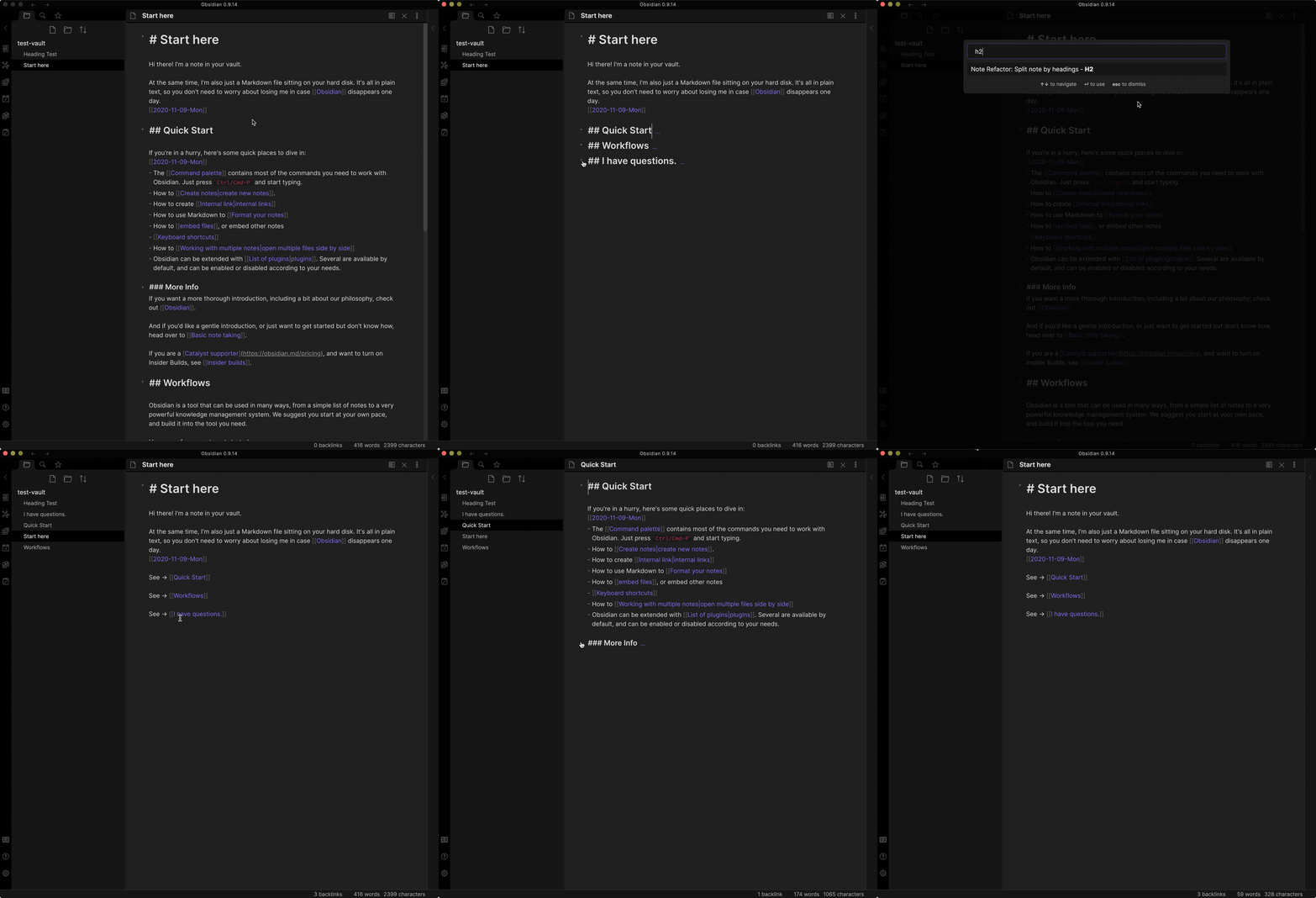
split by headings demo

Extract Selection

Extracting the current selection into a new note or append to an existing one.

Extract selection to new note or append to existing note - first line as filename

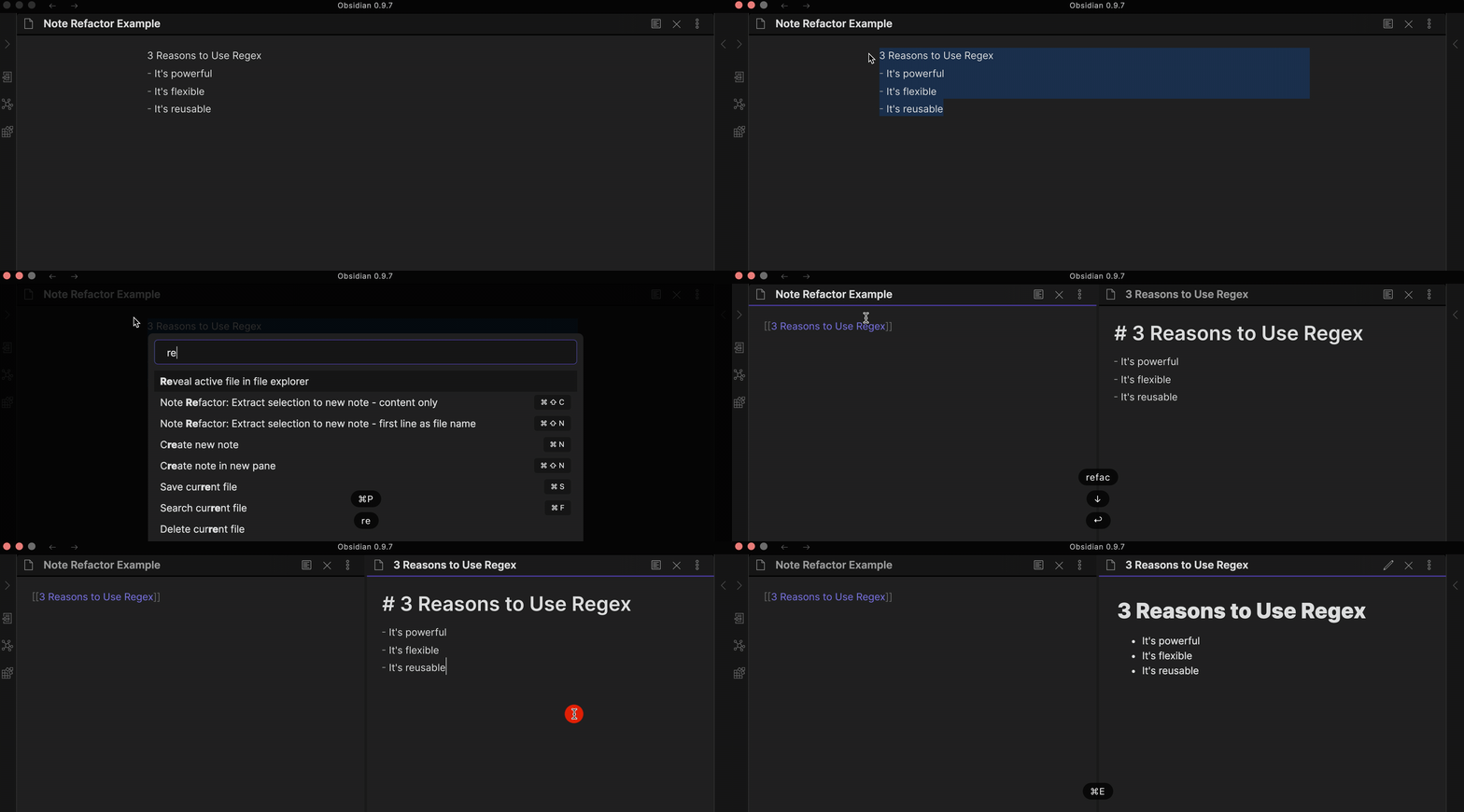
This command copies the selected text into the content of a new note using the first line as the file name for the new note or append to an existing one. first line file name demo
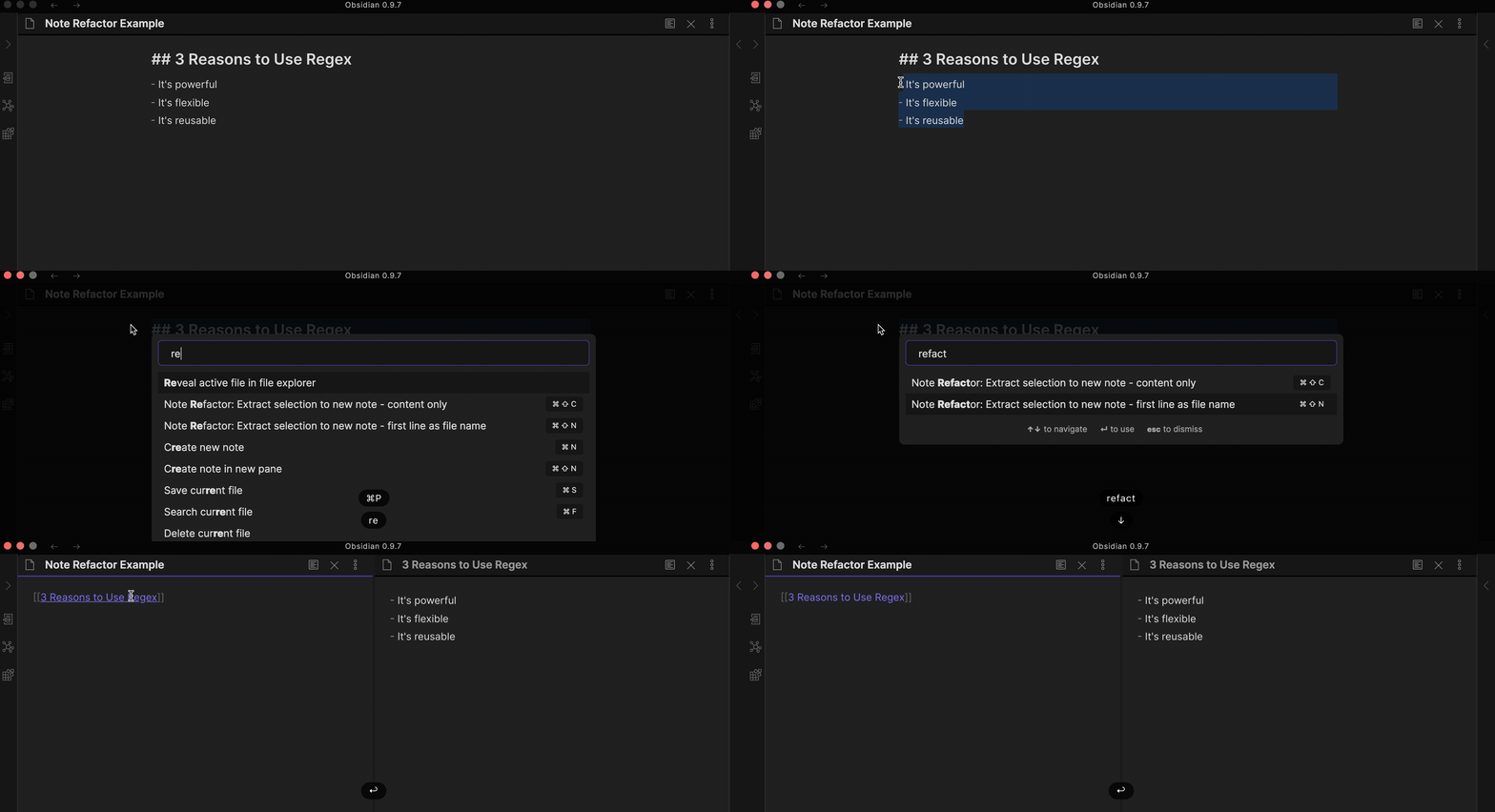
Extract selection to new note or append to existing note - content only

This command only copies the selected text into the content of a new note or append to an existing one. The user is prompted to enter a file name for the new note.
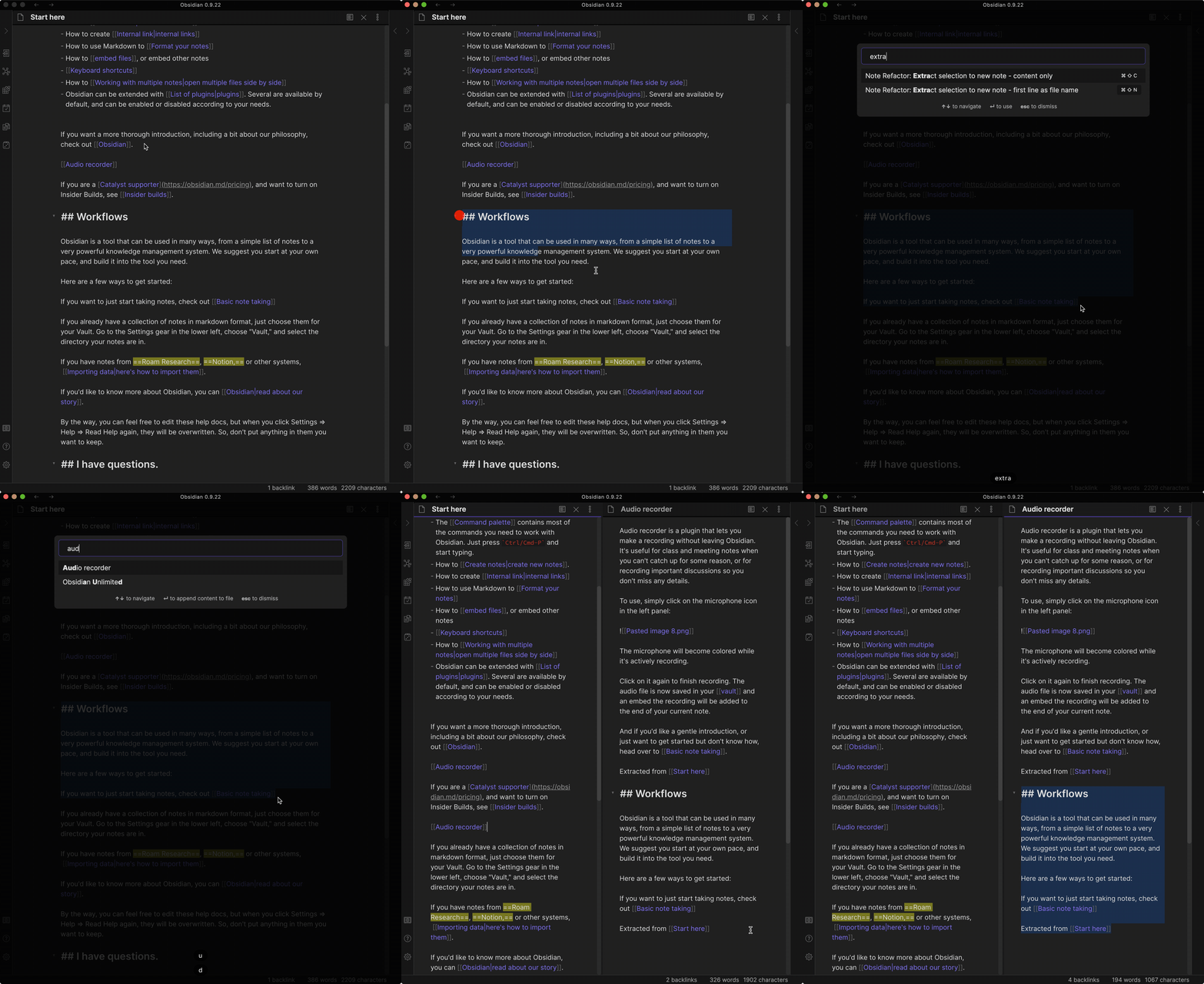
content only demo

Extract selection to new note - prefix only as file name

This command only copies the selected text into the content of a new note or append to an existing one. The filename is automatically generated based on the value of File name prefix setting. New note is created silently and will not be shown in a new pane.

Configuration
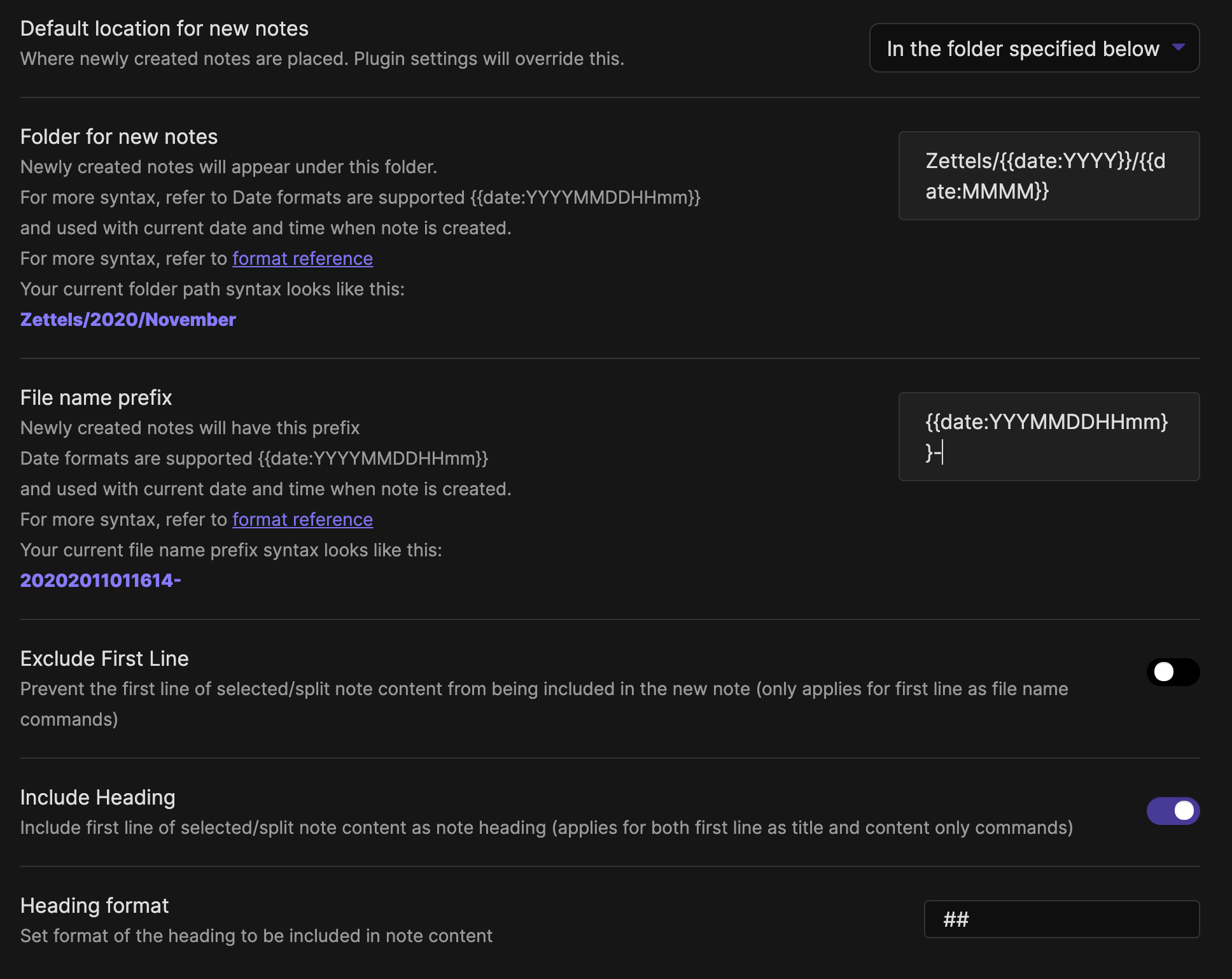
plugin settings

Default location for new notes

The location for new notes to be saved as a plugin config setting in line with the Obsidian core Default location for new notes setting.

3 options available:

  1. Vault folder
  2. Same folder as current file
  3. Specified folder

The specified folder option allows you to specify a folder path for new notes which can include multiple datetime formats.

Example

A folder path set as Zettels/{{date:YYYY}}/{{date:MMMM}} will add a new file to the following folder structure:

  • [Vault]
    • Zettels
      • 2020
        • October

File Name Prefix

The file name prefix option allows you to specify a prefix for new notes which can include multiple datetime formats.

Example

A prefix set as {{date:YYYYMMDDHHmm}}- will add a new file with the following file name:

202010311425-My New Note

Transclude by Default

This config settings means that all inserted internal links to new notes created by any of the extraction or note splitting commands will be added as a transclusion/note embed ![[new note]] rather than a link [[new note]].

First Line included as Note Heading

This config setting allows for the first line of the selected text to be included in the new note content as a heading with a configurable heading format #, ##, ###, etc.

This setting is applied for either the First Line filename or Content Only commands. note heading demo
This setting sets the template used to generate the content to link to the extracted note. This overrides the Transclude by Default setting.

The following placeholders are supported and will be replaced with dynamic values when the plugin command is exectuted:

  • {{date}} the current date, this also supports date and time formats such as YYYYMMDD and HH:mm.
  • {{title}} the title of the original note.
  • {{new_note_title}} the title of the new note.
  • {{new_note_content}} the refactored content for the new note.

Refactored Note Template

This setting sets the template used to generate the content for the refactored note.

The following placeholders are supported and will be replaced with dynamic values when the plugin command is exectuted:

  • {{date}} the current date, this also supports date and time formats such as YYYYMMDD and HH:mm.
  • {{title}} the title of the original note.
  • {{new_note_title}} the title of the new note.
  • {{new_note_content}} the refactored content for the new note.

Normalize Heading Levels

This setting normalizes the levels of the headings in an extracted note.

For example,

## Heading 2
### Heading 3

becomes

# Heading 2
## Heading 3

Compatibility

Custom plugins are only available for Obsidian v0.9.7+.

The current API of this repo targets Obsidian v0.9.10.

Installing

As of version 0.9.7 of Obsidian, this plugin is available to be installed directly from within the app. The plugin can be found in the Community Plugins directory which can be accessed from the Settings pane under Third Party Plugins.

Manual installation

  1. Download the latest release
  2. Extract the note-refactor-obsidian folder from the zip to your vault's plugins folder: <vault>/.obsidian/plugins/
    Note: On some machines the .obsidian folder may be hidden. On MacOS you should be able to press Command+Shift+Dot to show the folder in Finder.
  3. Reload Obsidian
  4. If prompted about Safe Mode, you can disable safe mode and enable the plugin.

A check is done to avoid overwriting of existing files but...

💥 PLEASE TRY IN A TEST VAULT FIRST..AND MAKE SURE TO BACKUP! 💥

Credits

Credit to MrJackphil, this plugin is based on the code snippet he created.

For developers

Pull requests are both welcomed and appreciated. 😀

If you would like to contribute to the development of this plugin, please follow the guidelines provided in CONTRIBUTING.md.

Donating

This plugin is provided free of charge. If you would like to donate something to me, you can via PayPal. Thank you!

Similar Plugins

info
• Similar plugins are suggested based on the common tags between the plugins.
QuickAdd
5 years ago by Christian B. B. Houmann
QuickAdd for Obsidian
Admonition
5 years ago by Jeremy Valentine
Adds admonition block-styled content to Obsidian.md
Periodic Notes
5 years ago by Liam Cain
Create/manage your daily, weekly, and monthly notes in Obsidian
Zotero Desktop Connector
4 years ago by mgmeyers
Insert and import citations, bibliographies, notes, and PDF annotations from Zotero into Obsidian.
Tracker
5 years ago by pyrochlore
A plugin tracks occurrences and numbers in your notes
Folder notes
3 years ago by Lost Paul
Create notes within folders that can be accessed without collapsing the folder, similar to the functionality offered in Notion.
Dice Roller
5 years ago by Jeremy Valentine
Inline dice rolling for Obsidian.md
File Explorer Note Count
5 years ago by Ozan Tellioglu
Obsidian Plugin for viewing the number of elements under each folder within the file explorer
Book Search
4 years ago by anpigon
Obsidian plugin that automatically creates notes by searching for books
Weread Plugin
4 years ago by hank zhao
Obsidian Weread Plugin is a plugin to sync Weread(微信读书) hightlights and annotations into your Obsidian Vault.
Folder Note
5 years ago by xpgo
Plugin to add description note to a folder for Obsidian.
Icons
5 years ago by Camillo Visini
Add icons to your Obsidian notes – Experimental Obsidian Plugin
Auto Note Mover
4 years ago by faru
This is a plugin for Obsidian (https://obsidian.md).
Multi Properties
3 years ago by fez-github
Plugin for Obsidian that allows user to add properties to multiple notes at once.
Smart Random Note
5 years ago by Eric Hall
A smart random note plugin for Obsidian
Digital Garden
4 years ago by Ole Eskild Steensen
Focus Mode
5 years ago by ryanpcmcquen
Add focus mode to Obsidian.
PodNotes
4 years ago by Christian B. B. Houmann
PodNotes is a plugin for Obsidian that helps the user write notes on podcasts.
Bible Reference
4 years ago by tim-hub
Take Bible Study notes easily in the popular note-taking app Obsidian, with automatic verse and reference suggestions.
Daily Notes Editor
3 years ago by boninall
A plugin for you to edit a bunch of daily notes in one page(inline), which works similar to Roam Research's default daily note view.
Print
2 years ago by Marijn Bent
Print your notes directly from Obsidian
Widgets
2 years ago by Rafael Veiga
Add cool widgets to your notes or your dashboard in Obsidian
Voice
3 years ago by Chris Oguntolu
🔊 The Obsidian Voice plugin lets you listen to your written content being read aloud—mobile-friendly audiobook-like experience. 🎧
Wikipedia
5 years ago by Jonathan Miller
Grabs information from Wikipedia for a topic and brings it into Obsidian notes
Audio Notes
3 years ago by Jason Maldonis
Easily take notes on podcasts and other audio files using Obsidian Audio Notes.
Slurp
2 years ago by inhumantsar
Slurps webpages and saves them as clean, uncluttered Markdown. Think Pocket, but better.
OZ Calendar
3 years ago by Ozan Tellioglu
Advanced Merger
3 years ago by Anto Keinänen
Prettier Format
5 years ago by Andrew Lisowski
Format obsidian.md notes using prettier
Card View Mode
5 years ago by PADAone
Obsidian Card View Mode Plugin
Colorful Note Borders
3 years ago by rusi
Create Note in Folder
3 years ago by Mara-Li
Set a folder in settings and get directly a command to create a note in it. Use this with QuickAdd/Button to get more pratical things :D
Custom Note Width
2 years ago by 0skater0
Set the line width for each note individually in Obsidian. Works with a slider, pill presets, YAML frontmatter and hotkeys.
From Template
4 years ago by mo-seph
Simple plugin to create Notes from a template, and fill in fields defined there
Merge Notes
3 years ago by fnya
Merge Notes is Plugin for Obsidian
Smart Rename
3 years ago by mnaoumov
Obsidian Plugin that helps to rename notes keeping previous title in existing links
Awesome Reader
3 years ago by AwesomeDog
Make Obsidian a proper Reader.
Sets
3 years ago by Gabriele Cannata
Ollama Chat
2 years ago by Brumik
A plugin for chatting with you obsidian notes trough local Ollama LLM instead of Chat GTP.
Easy Bake
3 years ago by mgmeyers
Compile many Obsidian notes down to one.
Apple Books - Import Highlights
2 years ago by bandantonio
Import highlights and notes from your Apple Books to Obsidian
Timeline View
3 years ago by b.camphart
Obsidian plugin for viewing your notes linearly based on a given property
Podcast Note
5 years ago by Marc Julian Schwarz
A plugin for the note taking app Obsidian that lets you add podcast meta data to your notes.
Protected Note
2 years ago by Mikail Gadzhikhanov
Plugin for Obsidian
2Hop Links
5 years ago by Tokuhiro Matsuno
YouTube Template
2 years ago by sundevista
📺 A plugin that would help you to fetch YouTube videos data into your vault.
Journaling
2 years ago by Ordeeper
View daily notes in a journal-like format, similar to Logseq. It enhances note organization and facilitates better reflection by consolidating daily notes into a continuous journaling view.
Instapaper
2 years ago by Instapaper
Official Instapaper plugin for Obsidian
Enhance Copy Note
5 years ago by kzhovn
Plugin which enhances the copy command for Obsidian.
Spotify Link
2 years ago by Studio Webux
Obsidian.md Plugin to include the song or episode you're currently listening to in your note.
Highlight Public Notes
5 years ago by dennis seidel
Live Variables
2 years ago by Hamza Ben Yazid
Define variables in your note's properties and reuse them throughout your content.
Structured
4 years ago by dobrovolsky
Onyx Boox Annotation & Highlight Extractor
4 years ago by Akos Balasko
This tool extracts the highlights and the annotations from OnyxBoox Reading Notes txt files, and converts them to linked zettelkasten literature and permanent notes
Sticky Notes
a year ago by NoPoint
Obsidian Sticky Notes Plugin
Note archiver
3 years ago by thenomadlad
Air Quotes
3 years ago by Alan Grainger
Plugin for Obsidian. Search and insert quotes from a source text as you type. This is great for reading a physical book or eReader while taking notes on a separate laptop or phone.
Kindle Highlights Importer
2 years ago by MovingMillennial
Power Search
4 years ago by Aviral Batra
Notes Sync Share
3 years ago by Alt-er
Sync and share (publish) your notes in your own private service.
Pinned Notes
2 years ago by vasilcoin002
AI Tools
3 years ago by solderneer
Adding powerful semantic search, generative answers, and other AI tools to Obsidian, using Supabase + OpenAI.
Dynbedded
3 years ago by Marcus Breiden
Embed snippets, templates and any linkable by delegating the current scope to the embedded file either by using a direct reference or as reference with date naming format relative from today.
KOReader Sync
4 years ago by Federico "Edo" Granata
Obsidian.md plugin to sync highlights/notes from koreader
ZettelGPT
3 years ago by Overraddit
Turbocharge Your Note-taking with AI Assistance
Old Note Admonitor
3 years ago by tadashi-aikawa
Quick note
3 years ago by James Greenhalgh MBCS
Create New note from right-clicking app icon
iCloud Contacts
2 years ago by Truls Aagaard
Obsidian plugin that imports contacts from iCloud and manages a note for each contact.
BibTeX Manager
2 years ago by Akop Kesheshyan
Create literature notes in Obsidian from BibTeX entries, display formatted reference lists, and instantly generate citations.
New Note Content Pusher
4 years ago by Henry Gustafson
An Obsidian plugin to add (prepend or append) specified content to a note (existing or new) without opening another pane.
R.E.L.A.X.
2 years ago by Syr
Regex Obsidian Plugin
Zettelkasten Outliner
2 years ago by Tyler Suzuki Nelson
Source Code Note
3 years ago by Waiting
The obsidian plugin can help you organize source code note easily.
Desk
2 years ago by David Landry
A desk for obsidian
Quickly
3 years ago by Sparsh Yadav
Quick capture to obsidian note
Tolino notes Importer
3 years ago by juergenbr
Obsidian plugin to import notes from a Tolino E-Reader
Tab Shifter
2 years ago by Joshua Rozner
my anime list text exporter
2 years ago by XmoncocoX
a plugin who create an obsidian page for an anime with the data from my anime list.
Moulinette Search for TTRPG
2 years ago by Moulinette
Plugin for Obsidian
Note Splitter
2 years ago by Trey Wallis
Split a note into individual notes based on a delimiter
iDoRecall
3 years ago by dbhandel
iDoRecall Obsidian plugin
Xiaohongshu Importer
a year ago by bnchiang96
An Obsidian plugin to import Xiaohongshu (小红书) notes into your vault. Extract titles, content, images, videos, and tags from share links, with customizable categories and optional local media downloads.
Asciidoctor editor
2 years ago by dzruyk
Obsidian asciidoc editor plugin
Confluence Sync
2 years ago by Prateek Grover
Obsidian plugin for obsidian confluence sync
Are.na unofficial
2 years ago by 0xroko
Unofficial Are.na plugin for Obsidian
Current Folder Notes
2 years ago by Pamela Wang
Shows notes in the current folder, useful for writing novels
Note Companion Folder
2 years ago by Chris Verbree
A Obsidian Plugin providing a way to associate a folder to a note
Title renamer
2 years ago by Peter Strøiman
Obsidian plugin to keep title in markdown synced with tile name
Folder Periodic Notes
2 years ago by Andrew Heekin
Kinopoisk search
2 years ago by Alintor
Obsidian Kinopoisk plugin
Unearthed (Kindle Sync)
a year ago by CheersCal
Create List of Notes
2 years ago by Andrew Heekin
Auto Note Importer
a year ago by uppinote
Obsidian plugin that automatically creates notes from external database
Autogen
2 years ago by Aidan Tilgner
A plugin to use a language model to fill in parts of notes.
Quick File Name
2 years ago by Wapply
This Obsidian plugin generates a note with an random string as file name.
Beautiful Contact Cards
a year ago by Seth Tenembaum
A plugin for the Obsidian text editor which renders "contact" code blocks with tappable links for phone, social media, etc.
Quarto Exporter
2 years ago by Andreas Varotsis
Export Obsidian notes to Quarto-compatible QMD files.
Share as ZIP
a year ago by Till Friebe
MOC Link Helper
2 years ago by Bogdan Codreanu
This obsidian plugins allows you to quickly see which notes you need to include in your MOC.
Daily Summary
a year ago by Luke
Daily Random Note
a year ago by Alexandre Silva
Daily Random Notes in Obsidian.
Truth Table+
2 years ago by Maximilian Schulten
This is the repository of an Obsidian.md plugin that allows users to create truth tables via the command palette.
Session Notes
2 years ago by tabibyte
A plugin for Obsidian to create temporary & session notes that will be deleted when session ends
Instant Above Divider
a year ago by SedationH
create folder notes with dropdown
a year ago by Sturdy Shawn
Sync Cnblog
a year ago by zhanglei
同步文章到博客园
Abbrlink
a year ago by Q78KG
Chat clips
a year ago by sleepingraven
Record chat in ordinary markdown list.
Quick Notes
2 years ago by Sean McOwen
Vault Review
2 years ago by Alexander
This plugin allows you to create a snapshot of your vault and randomly review files from it 1-by-1.
Arweave Uploader
2 years ago by makesimple
random-retrieval
2 years ago by Rachninomav

