Icon Shortcodes

by AidenLx
5
4
3
2
1
Score: 33/100

Description

Category: Customization & UI

The Icon Shortcodes plugin allows users to quickly insert emoji and custom icons into their Obsidian notes using intuitive shortcodes. It supports popular icon libraries like Unicode Emoji, Lucide, Font Awesome, and Remixicon, along with user-uploaded custom icons in formats such as PNG, JPG, SVG, and GIF. Icons can be inserted via a simple search-based suggester, with optional fuzzy search for better discovery. Users can manage their custom icon collections, rename, delete, or back up icon packs as needed. Custom CSS can be used to style icons, enabling changes to color, size, and appearance. The plugin also features an API, allowing developers to integrate its functionality into other plugins.

Reviews

No reviews yet.

Stats

170
stars
59,171
downloads
17
forks
1,601
days
949
days
1,303
days
1
total PRs
1
open PRs
0
closed PRs
0
merged PRs
86
total issues
53
open issues
33
closed issues
0
commits

Latest Version

4 years ago

Changelog

0.9.7 (2022-10-15)

Bug Fixes

  • update styles for obsidian v1.0.0 (5d168f0)

README file from

Github

Icon Shortcodes

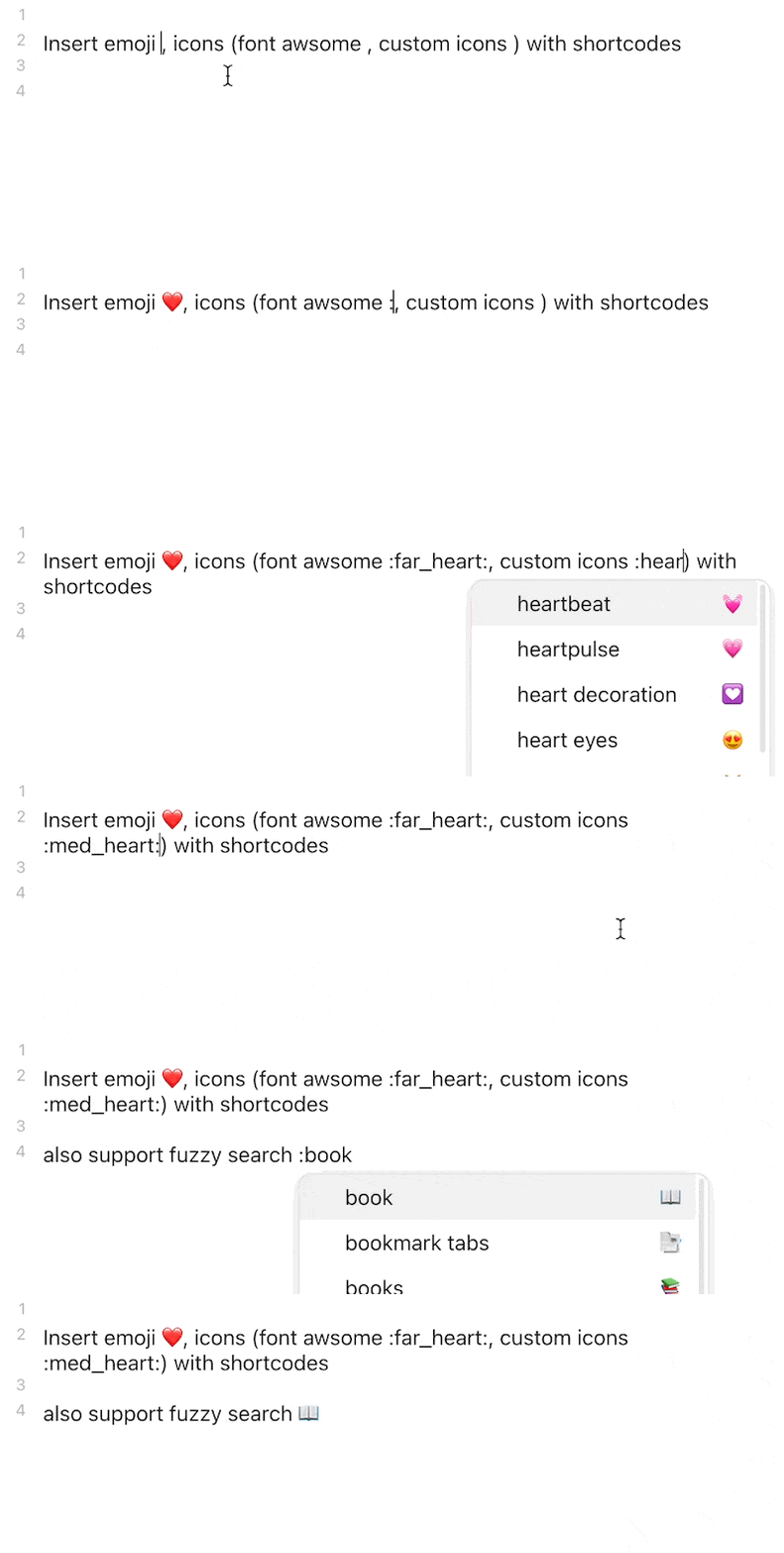
demo

Insert emoji and custom icons with shortcodes

  • Easily import and manage custom icons (support .bmp, .png, .jpg, .jpeg, .gif, .svg, and .webp)
  • Render custom icons in editor (Legacy editor supported by Codemirror Options
  • Built-in Unicode 13.1 Emoji, Lucide support
  • Font Awesome, and Remixicon available via download
  • API ready to be intergated by other plugins
  • Fuzzy search: type in :book to find 📖(:open_book:) and 📗(:green_book:)

Inspired by obsidian-emoji-shortcodes, obsidian-icon-folder, obsidian-icons and remark-emoji.

NOTE: since v0.7.0, Font Awesome and RemixIcon are no longer bundled as bulti-in icon packs to reduce bundle size and speed up the loading. Go to the setting tab to download them.

Note: this plugin may conflicts with obsidian-emoji-shortcodes, disable it before using this plugin

How to use

Insert Icon

This plugins support GitHub favored emoji shortcodes, the full list of which can be found here: Emoji Cheat Sheet

  • To insert icon in editor, type in :/:: followed by the search query to get suggester, for example :book
    • for multiple keywords, add + between words, for example :open+book
    • You can disable suggester in the setting tab
  • The emoji, by default, is inserted in character in favor of shortcodes, which is visible in both editor and preview, you can change this behavior in the setting tab

Add Custom Icons

https://user-images.githubusercontent.com/31102694/141667026-cbb0e668-ecbd-493e-9648-27ca7dfaa118.mp4

support icon format: .bmp, .png, .jpg, .jpeg, .gif, .svg, .webp

  1. Go to setting tab
  2. At the Custom Icons section, type in a name for new icon pack and click add button (better be short, it's acting as the id of icon pack and prefix of all icon shortcodes in this pack)
  3. Add the new icon pack entry, drag supported file in or select them by click on select file to import button to import custom icons
  4. You can access icon manager by clicking manage icon. each icon has the following button
    • star: remove _1 suffix, useful when there are multiple alternative icons
    • delete, rename

Backup & Restore Custom Icons

v0.6.0+ required

Since v0.6.0, all custom icons are stored in icons folder under config directory (.obsidian/icons normally), you can:

  • open folder (Desktop only)
  • Backup all icons / selected icon pack to zip file (will be stored in the root vault directory)
  • Restore icons from zip file

custom-icon-buttons

custom-icon-backup-pack-button

Styling Icons

In order to customize the icons in order to change their color, size, etc, you should make a CSS snippet.

  1. Go to Settings -> Appearance -> CSS Snippets
  2. Turn on the CSS Snippets option and then click the folder to navigate to it's folder.
  3. Make a new file called icons.css
  4. Open icons.css in your preferred text editor
  5. Add the following:
    .isc-icon > *:first-child {
      /** changes for all icons. */
    }
    .isc-icon.icon-emoji-icon > *:first-child {
      /** changes for emoji icons. */
    }
    .isc-icon.isc-fas > *:first-child {
      /* changes for icons in the specific icon pack */
      /* (font awesome soild in this example) */
    }
    
  6. Go Back to Settings -> Appearance -> CSS Snippets
  7. Click the reload button
  8. A button with the title "icons" should appear, turn it on.

Your changes will now be applied and you can edit the file when you want.

For Developer

Use API

  1. run npm i -D @aidenlx/obsidian-icon-shortcodes in your plugin dir
  2. import the api (add import { getApi } from "@aidenlx/obsidian-icon-shortcodes")
  3. use api
    1. check if enabled: getApi() !== undefined or getApi(YourPluginInstance) !== undefined
    2. access api: getApi() / getApi(YourPluginInstance)

For all exposed API method, check api.ts

Compatibility

The required API feature is only available for Obsidian v1.0.0+.

Installation

From BRAT

To install a pre-release, download and enable the Obsidian42 BRAT plugin, add the beta repository aidenlx/obsidian-icon-shortcodes, and then have BRAT check for updates.

From GitHub

  1. Download the Latest Release from the Releases section of the GitHub Repository
  2. Put files to your vault's plugins folder: <vault>/.obsidian/plugins/obsidian-icon-shortcodes
  3. Reload Obsidian
  4. If prompted about Safe Mode, you can disable safe mode and enable the plugin. Otherwise, head to Settings, third-party plugins, make sure safe mode is off and enable the plugin from there.

Note: The .obsidian folder may be hidden. On macOS, you should be able to press Command+Shift+Dot to show the folder in Finder.

From Obsidian

Not yet available

  1. Open Settings > Third-party plugin
  2. Make sure Safe mode is off
  3. Click Browse community plugins
  4. Search for this plugin
  5. Click Install
  6. Once installed, close the community plugins window and the plugin is ready to use.

Similar Plugins

info
• Similar plugins are suggested based on the common tags between the plugins.
Command Palette--
4 years ago by qawatake
An Obsidian plugin to provide a command palette without unwanted commands
Ninja Cursor
4 years ago by vorotamoroz
Obsidian Stylist
3 years ago by ixth
Obsidian plugin that allows to add classes and styles on markdown blocks
Text Progress Bar
3 years ago by Michael Adams
Low-fi text-based progress bar for Obsidian
Material Symbols
3 years ago by Cristoph Berane
Callout Manager
3 years ago by eth-p
An Obsidian.md plugin that makes creating and configuring callouts easy.
Emoji Magic
3 years ago by simplgy
Makes it easier to add emojis using an improved keyword search
Emoji Titler
3 years ago by Hyeonseo Nam
Auto Hide Cursor
3 years ago by Mo Ismat
A simple plugin for https://obsidian.md
Blur
3 years ago by @gapmiss
A plugin for creating obfuscated blocks of text in Obsidian.md
Iconoir Icons
3 years ago by @gapmiss
A plugin for creating customized icons in Obsidian.md
Background Image
3 years ago by shmolf
Editor Width Slider
3 years ago by @MugishoMp
With this plugin you can set the line width of the editor in obsidian.
EmoTagsTitler
3 years ago by Cyfine
Pathfinder 2E Action Icons
3 years ago by Thiago Coutinho
Obsidian plugin for easily insertind the Pathfinder 2E Action icons
CSS Editor
3 years ago by Zachatoo
Edit CSS snippets in Obsidian.
Tokei
3 years ago by HiroMike
A simple clock for Obsidian
Auto Reading Mode
3 years ago by Kelvin Cao
Emoji Autocomplete
2 years ago by KraXen72
Emoji Shortcodes Autocomplete for Obsidian
Canvas Card Background Remover
2 years ago by luxmargos
This Obsidian plugin allows you to make the background of cards transparent in the Canvas for specific embed types, including Image (png), Canvas, and even Markdown.
Additional Icons
2 years ago by Matthew Turk
Add additional iconsets to Obsidian
Full Screen Toggle
2 years ago by Donkey Pacific
Fullscreen toggle plugin across all platforms for Obsidian.
Font Size Adjuster
2 years ago by Ryota Ushio
An Obsidian.md plugin to adjust font size via commands.
Beautitab
2 years ago by Andrew McGivery
A plugin for Obsidian.MD that creates a customizable new tab view with beautiful backgrounds, quotes, search, and more.
Status Bar Organizer
2 years ago by Kacper Darowski
Arrange and hide status bar elements.
Tag Formatter
2 years ago by snsvrno
Configurable Obsidian plugin that hides parent tags.
Metadata Icon
2 years ago by Benature
change metadata entry icon
Color cycler
2 years ago by Taylor Brennan
Plugin for Obsidian to dynamically change the accent color
Custom Sidebar Icons
2 years ago by RavenHogWarts
Custom Icons
Fontsource
2 years ago by Ayuhito
A plugin to load custom fonts from Fontsource into Obsidian.
Close Window When Empty
2 years ago by Taylor Jadin
Node Auto Resize
2 years ago by Boninall
Shrink pinned tabs
2 years ago by Nicolas Lœuillet
Obsidian plugin to shrink pinned tabs in order to save screen space
Iconic
2 years ago by Holo
Customize your icons and colors directly from the Obsidian UI, including tabs, files & folders, bookmarks, tags, properties, and ribbon commands.
Tokenz
2 years ago by Ferenc Moricz
Use any kind of short codes in Obsidian! Comes with a map for smileys (:), ;), ...) and one for emojis (:smile:, :wink:, ...).
Hider
5 years ago by @kepano
Hide Obsidian UI elements such as tooltips, status, titlebar and more
Emoji Toolbar
5 years ago by oliveryh
An Obsidian plugin to quickly add emojis into your notes
Icons
5 years ago by Camillo Visini
Add icons to your Obsidian notes – Experimental Obsidian Plugin
Icon Swapper
5 years ago by mgmeyers
Allows swapping out Obsidian's icons
Homepage
5 years ago by mirnovov
An Obsidian plugin that opens a specified note, canvas, or workspace on startup, instead of the most recent one.
File Explorer Markdown Titles
5 years ago by Dylan Elliott
Obsidian Plugin that adds the the markdown title within your notes to the file explorer
Emoji Shortcodes
5 years ago by phibr0
Emoji Shortcodes - Obsidian Plugin | Adds Support for Emoji Shortcodes to Obsidian
Iconize
5 years ago by FlorianWoelki
Simply add icons to anything you want in Obsidian.
Zen Mode
a year ago by paperbenni
CalloutX
a year ago by br4in
An Obsidian plugin that allows you to view, manage, and customise callout icons in your vault.
Theme Controller
a year ago by Binaris
Set when and how the themes will be displayed
Syncthing status icon
a year ago by Diego Viero
Backgroundset
a year ago by daonali
similar as vscode background
Image Preview on Icon Hover
a year ago by rama1997
Plugin for Obsidian that add image popups when hovering over various icons in the user interface
Context Command Hider
a year ago by Mara-Li
This plugin allows you to hide every command from the Obsidian's right-click context menu.
Explorer Colors
a year ago by Scott Van der Zwet
Set cascading colors for files and folders in Obsidian.
NerdFont Icon Picker
a year ago by Xaver Wenhart
a simple nerdfont icon picker for obsidian
Emoji Picker
a year ago by Ali Faraji
An up-to-date Emoji Picker for obisian.md, using emoji-mart.
Hide Commands in Menu
a year ago by bomian98
Obsidian Plugin, hide different commands in different menus.
Note Favicon
a year ago by mdklab
Obsidian plugin – Show Favicon from Metadata
Smooth Cursor
a year ago by Busyo
Obsidian光标美化插件
TG Emoji Search
a year ago by MarsBatya
Wheel Tab Switcher
a year ago by 22-2
Switch between Obsidian Tabs using your mouse wheel when hovering over tab headers.
Collapsible Code Blocks
a year ago by Bradley Wyatt
Obsidian Plugin that makes code blocks collapsible in reading and edit view as well as enabling scroll-able code blocks.
Theme toggle
a year ago by @gapmiss
Obsidian.md plugin … adds a ribbon icon and command for toggling between dark & light theme modes.
Inline Callouts
a year ago by @gapmiss
An Obsidian.md plugin for displaying inline "callouts" badges & icons.
Theme by Folder
a year ago by Jinmu Go
Automatically switch Obsidian themes based on the folder of the opened note
PDF Emojis
10 months ago by Marcel Marusiak
Obsidian plugin that allows you to export your notes as PDFs while retaining emojis in headings, bold texts, and anywhere else in your notes! 🎉
Emoji selector
7 months ago by summer
Insert custom emojis with quick search, auto-suggestions, and customizable templates.
My SVGs
4 months ago by Omar Badawy
An Obsidian plugin that Registers your own SVGs into Obsidian's global icon library for use with other plugins or however you want.
Mermaid Icons
3 months ago by toshs
Obsidian plugin enabling the use of icons in Mermaid diagrams.
Post To Bluesky
2 months ago by Rie Tamura
Post selected text or entire note to Bluesky.
Hide Traffic Lights
a month ago by Ben Phillips
Hides macOS traffic light buttons for a distraction-free experience. Hover over the top-left corner to reveal them.