
README file from
Github


Obsidian Strava Sync
This plugin synchronizes activities from Strava into Obsidian.
- 🗄️ Import Strava bulk export CSV files for historical activities
- 📅 Sync recent activities from Strava via the Strava API
- 📝 Handlebars.js templates for imported activities
- 💿 Customizable properties / front matter allowing for Obsidian Dataview integration
- 🏃 Per-sport icons for use with Iconize
The purpose of this plugin is not to provide a data backup, or to replace the functionality of the Strava apps. It's simply to allow activities to be more easily referenced, tracked and visualized within Obsidian, especially through integration with existing plugins like Obsidian Dataview.
Examples
These are some examples of what can be achieved along with the Dataview, Charts and Contribution Graph plugins. See the Dataview Integration section below for more ideas.
Installation
- Open Obsidian settings
- Go to Community plugins and turn off Restricted mode
- Under Community plugins, click "Browse" and search for "Strava Sync"
- Click Install, then Enable
It's also possible to install an unreleased (beta) version using the BRAT plugin:
- Install BRAT from the Community plugins in Obsidian
- Open the command palette and run the command "BRAT: Add a beta plugin for testing"
- Paste
https://github.com/watsonbox/obsidian-strava-syncinto the modal that opens up - Click on Add Plugin 🎉
Manually installing the plugin
Alternatively you can install the plugin manually:
- Download the latest release from the releases page.
- Copy
main.js,styles.css, andmanifest.jsonto your vault'sVaultFolder/.obsidian/plugins/obsidian-strava-sync/directory.
Sync Configuration
In order to configure the plugin, you will need to obtain an access token from Strava. You can do this by going to "My API Applications" here and creating a new application as follows:
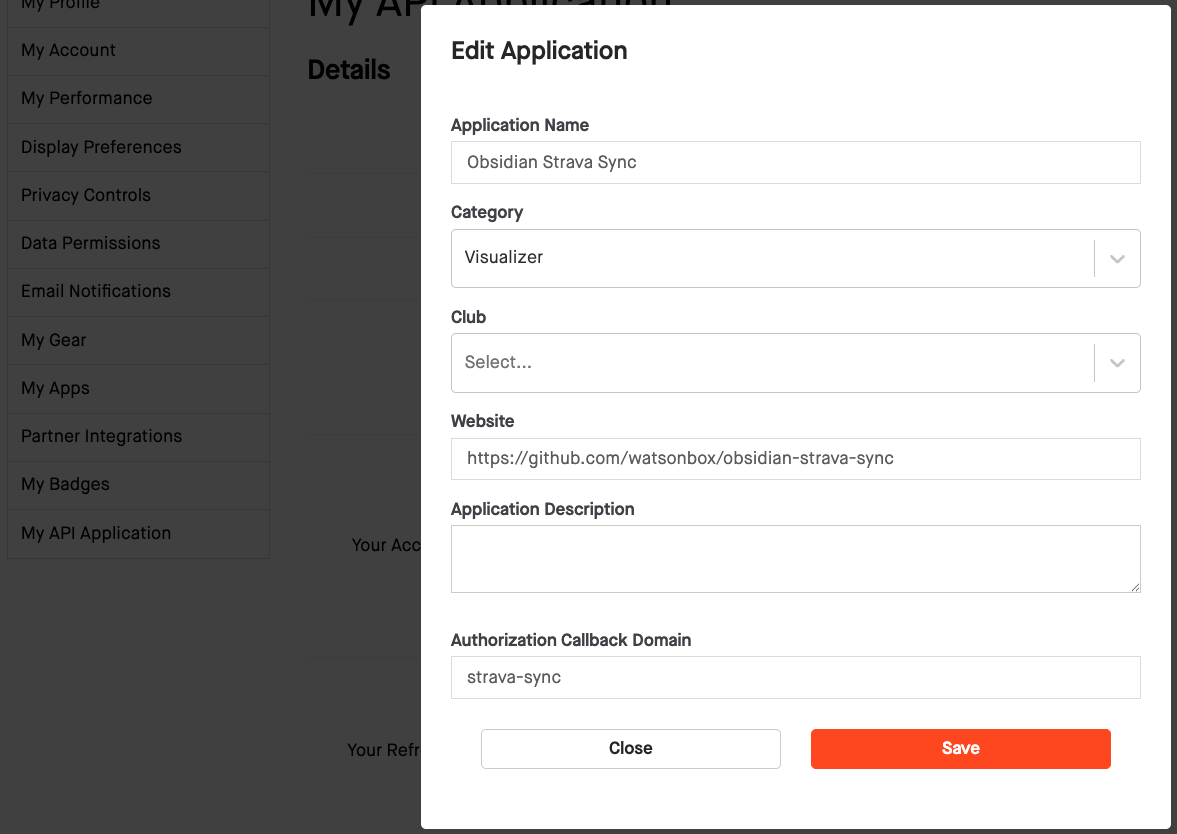
Once that's done, copy the Client ID and Client Secret into the plugin settings, and click "Connect with Strava". You will be redirected to Strava to login and authorize access. After successful authorization, you will be redirected back to your Obsidian vault and can close the browser window.
Basic Usage
Typically, once the plugin is enabled and configured, you'll want to set up templates for the activities as you import them. This can be done for the file path, the content itself, and the properties to be added.
Templating
Templates can be set up in the plugin settings.
The default file path template is Strava/{{start_date}}/{{id}} {{name}}, which will create a folder for each day, and a file for each activity within that folder for example Strava/2024-02-20/1234567890 Running with the bears.md.
The date formats themselves can also be adjusted in the plugin settings.
[!TIP] If you prefer to group files differently, that's possible too. For example, create a folder structure like
2024/09-September(with all September's activities inside) by setting the folder date format toyyyy/MM-MMMM.
Content
The default content template is:
# {{name}}

[https://www.strava.com/activities/{{id}}](https://www.strava.com/activities/{{id}})
{{#if description}}

Description: {{description}}
{{/if}}
{{#if private_note}}

> [!NOTE] Private note
> {{private_note}}
{{/if}}

#Strava
This will produce a file similar to the following:
# Running with the bears

[https://www.strava.com/activities/1234567890](https://www.strava.com/activities/1234567890)

Description: This is a description

> [!NOTE] Private note
> This is a private note
The templating language used is Handlebars.js. The available fields are as follows (more info here):
| Field | Example(s) | Description |
|---|---|---|
id |
1218940553 | Unique identifier for the activity |
start_date |
"2024-08-28 05:07:43" | Start date and time of the activity |
name |
"Dynamo Challenge 2024" | Name of the activity |
sport_type |
"Ride", "Run", "Swim", etc. | Type of sport |
description |
"Great weather and company" | Description of the activity |
private_note |
"Take two inner tubes next time" | Private note for the activity |
elapsed_time |
38846 | Total elapsed time in seconds |
moving_time |
26010 | Moving time in seconds |
distance |
154081.0 | Distance in meters |
max_heart_rate |
180 | Maximum heart rate |
max_speed |
18.8 | Maximum speed in meters per second |
average_speed |
11.1 | Average speed in meters per second |
total_elevation_gain |
1338.0 | Total elevation gain in meters |
elev_low |
50.7 | Lowest elevation in meters |
elev_high |
60.2 | Highest elevation in meters |
calories |
1234 | Calories burned |
icon |
🚴♂️🏃🏊⛷️🏸🛶🏋️🚶🚵⛳🦽🥾⛸️🛼🏄🏓🧘🧗🚣⛵🛹🏂⚽🎾 | Activity icon |
Properties
Finally, you can also specify any of these fields to be added to the properties / front matter of each imported activity. By default the properties are name, start_date, sport_type, description, private_note, elapsed_time, moving_time, distance, and icon, for example:
---
id: 1014355555
name: Evening Run
start_date: 2024-06-02T18:31:27.000Z
sport_type: Run
distance: 4372.5
elapsed_time: 1651
moving_time: 1511
description: "Great run"
private_note: "Push it to 10km next time"
icon: 🏃
---
The property id is always added.
Importing Recent Activities
Next, either by clicking the Strava icon in the ribbon or using the command "Import new activities from Strava", the plugin will fetch and import your 30 most recent activities from Strava using the API.
Each time new activities are imported, the start date of the last imported activity is saved. Next time you import new activities, only activities after that date will be imported.
Importing a Strava Bulk Export
Strava allows you to download your activities as a bulk export as described here. This export contains all historical activities. Either in the plugin settings, or by using the "Import Strava activities from bulk export CSV" command directly, you can select the activities.csv file from the bulk export to import the entire history.
[!NOTE] Note that the Strava bulk export CSV format is not the same as the Web API activity format (JSON). This plugin allows both formats to be imported, but some fields that are not common to both formats are not imported.
[!TIP] You may prefer to exclude imported activities from the Obsidian search and graph views by adding the sync folder to "Options -> Files and links -> Excluded files" in the settings.
Dataview Integration
Once you've selected the activity attributes you'd like to include as properties, the real power of this plugin comes from the Dataview integration. You can install it through the Community Plugins tab in Obsidian, and then refer to the detailed documentation to learn how to use it.
The following are some examples of what you can do with Dataview and the Strava plugin.
List all activities with "knee" in private note
```dataview
TABLE WITHOUT id name, dateformat(start_date, "yyyy-MM-dd") AS date, private_note
FROM "Apps/Strava"
WHERE icontains(private_note, "knee")
```
List all activities for the current month in a callout
> [!EXAMPLE] This Month's Activities
>
> ```dataview
> TABLE WITHOUT id
>   link(file.path, name) AS Activity,
>   dateformat(localtime(start_date), "yyyy-MM-dd") AS Date,
>   dur(round(elapsed_time/60) + "m") as Duration,
>   choice(length(private_note) > 0, "📝", "") AS "📝",
>   choice(icontains(private_note, "pain"), "🤕", "") AS "🤕"
> FROM "Strava"
> WHERE dateformat(start_date, "yyyy-MM") = dateformat(date(now),"yyyy-MM")
> ```
Show a chart of total distance per year by activity type
Using DataviewJS gives us much more flexibility, for example the ability to use the Charts plugin to visualize historical activity data.
```dataviewjs
const pages = dv.pages('#Strava')
const dates = pages.map(p => p.start_date).values
const yearData = {};

pages.forEach(page => {
  const year = moment(page.start_date.ts).startOf('week').format('YYYY');
  const ridingDistance = page.sport_type === 'Ride' ? page.distance : 0;
  const runningDistance = page.sport_type === 'Run' ? page.distance : 0;

  if (!yearData.hasOwnProperty(year)) {
    yearData[year] = {
      ridingDistance: 0,
      runningDistance: 0
    };
  }

  yearData[year].ridingDistance += ridingDistance;
  yearData[year].runningDistance += runningDistance;
});

const years = Object.keys(yearData);
const ridingDistance = Object.values(yearData).map(data => data.ridingDistance);
const runningDistance = Object.values(yearData).map(data => data.runningDistance);

const chartData = {
  type: 'bar',
  data: {
    labels: years,
    datasets: [
      {
        label: '🚴 Riding distance',
        data: ridingDistance,
        backgroundColor: [ 'rgba(255, 99, 132, 0.2)' ],
        borderColor: [ 'rgba(255, 99, 132, 1)' ],
        borderWidth: 1
      },
      {
        label: '🏃 Running distance',
        data: runningDistance,
        backgroundColor: [ 'rgba(54, 162, 235, 0.2)' ],
    borderColor: [ 'rgba(54, 162, 235, 1)' ],
        borderWidth: 1
      }
    ]
  }
}
window.renderChart(chartData, this.container)
```
Display a contribution heat map with Contribution Graph
Not technically a Dataview integration. This example requires that the Contribution Graph plugin first be installed and enabled.
```contributionGraph
graphType: default
dateRangeValue: 365
dateRangeType: LATEST_DAYS
startOfWeek: "1"
showCellRuleIndicators: true
titleStyle:
  textAlign: left
  fontSize: 15px
  fontWeight: normal
dataSource:
  type: PAGE
  value: "#Strava"
  dateField:
    type: PAGE_PROPERTY
    value: start_date
  countField:
    type: PAGE_PROPERTY
    value: elapsed_time
fillTheScreen: false
enableMainContainerShadow: false
cellStyleRules:
  - id: Ocean_a
    color: "#8dd1e2"
    min: 1
    max: 3600
  - id: Ocean_b
    color: "#63a1be"
    min: 3600
    max: 7800
  - id: Ocean_c
    color: "#376d93"
    min: 7800
    max: 21600
  - id: Ocean_d
    color: "#012f60"
    min: 21600
    max: 100000
cellStyle:
  minWidth: 10px
  minHeight: 10px
```
Development Guidelines
- Clone this repo to a local development folder. For convenience, you can place this folder in your
.obsidian/plugins/obsidian-strava-syncfolder. - Install NodeJS, then run
yarn installin the command line under the repo folder. - Run
yarn devto compile the plugin tomain.js. Changes should be automatically compiled intomain.js. - Reload Obsidian to load the new version of the plugin.
- Enable the plugin in the settings window.
Live Reloading
In order to avoid reloading Obsidian every time you make a change, you can use the Hot-Reload plugin as they suggest.
Releasing
Run yarn version after updating minAppVersion manually in manifest.json. The command will bump version in manifest.json and package.json, and add the entry for the new version to versions.json
Run yarn version, enter a new version number, then push to build and prepare a draft release on GitHub.
[!NOTE] You may need to run
yarn config set version-tag-prefix ""before runningyarn versionto ensure the version tag is created correctly.
Resources
- Strava Developers - Authentication
- Strava Developers - API Reference
- Strava Developers - Getting Started + Auth
- Strava Developers - Rate limiting
- Challenges when Testing Plugins | Obsidian Collection
- Obsidian Dataview
