
README file from
GithubWorkout Planner Plugin



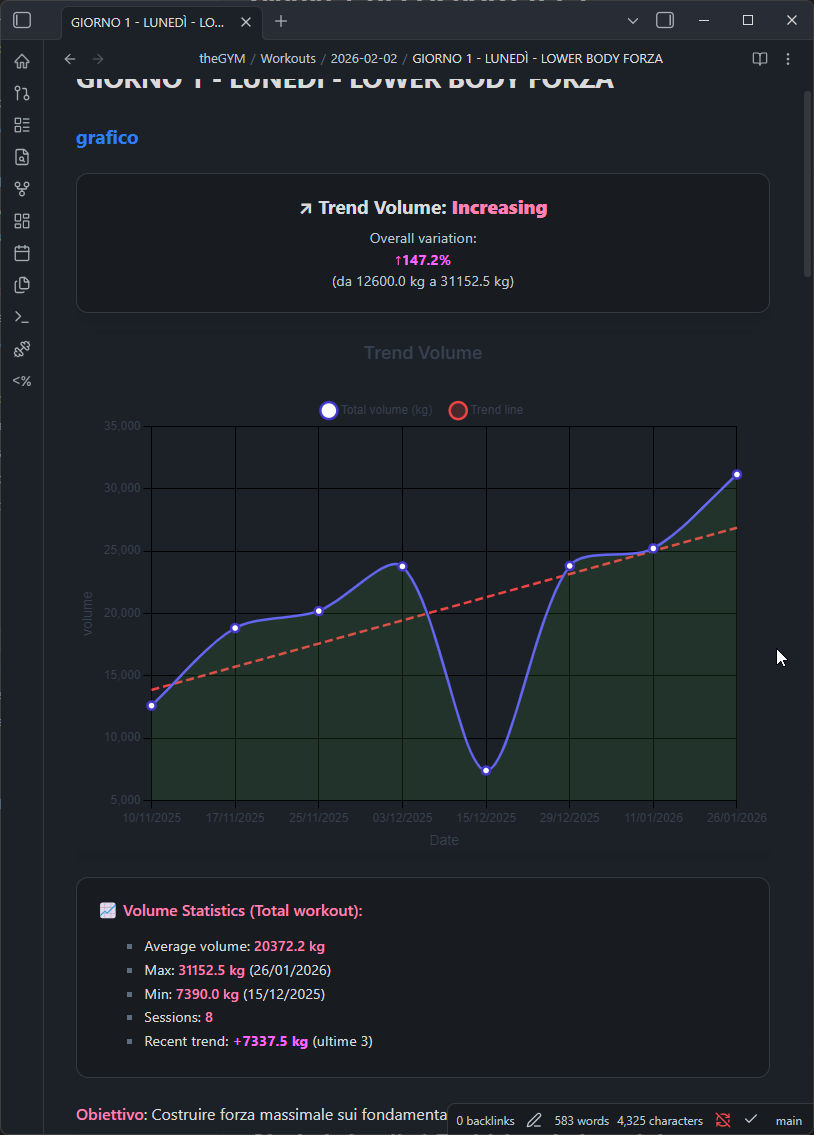
A comprehensive plugin for Obsidian that visualizes workout data with interactive charts, tables, and timers. Store your logs in a single CSV file and get beautiful visualizations, progress tracking, and duration estimation directly inside your notes.
Quick Start
Go to Settings → Workout Planner and click Create examples to generate a demo folder with sample workout data and notes showcasing all plugin features — charts, tables, timers, and dashboards.
Features
- Interactive Charts — Volume, weight, reps, duration, distance, pace, heart rate via Chart.js
- Smart formatting: duration as
1h 30m, pace as5:30 min/km - Trend lines with inverted logic for pace (lower = faster = improving)
- Smart formatting: duration as
- Data Tables — Sortable logs with edit/delete, protocol badges, progressive overload targets
- Workout Timers — Countdown, interval, and stopwatch with presets and audio notifications
- Workout Dashboard — Stats, muscle heat map, recent workouts, volume analytics, protocol effectiveness
- Quick Log — Touch-friendly modal for fast logging with recent exercises and weight adjustment buttons
- Protocol Tracking — Custom training techniques (drop sets, supersets, myo-reps, etc.) with badge display
- Duration Estimation — Compare actual vs. estimated workout duration
- Canvas Export — Visualize workout structure on Obsidian Canvas
- Dynamic Exercise Types — Strength, Cardio, Flexibility with custom field definitions
- Exercise Conversion — Convert exercises between types with field mapping
- Custom Muscle Tags — Map tags in any language to canonical muscle groups
- Dataview Integration — Public API for querying logs and stats from Dataview queries
- Templater Integration — Use workout data in templates
- Responsive Design — Works on desktop and mobile
Usage
Commands
Access via Command Palette (Ctrl/Cmd + P):
| Command | Description |
|---|---|
| Create CSV log file | Initialize the CSV file for storing workout logs |
| Insert workout chart | Insert a workout-chart code block |
| Insert workout table | Insert a workout-log code block |
| Insert workout timer | Insert a workout-timer code block |
| Insert workout dashboard | Insert a workout-dashboard code block |
| Insert workout duration | Insert a workout duration estimator code block |
| Create exercise page | Create a new exercise page |
| Create exercise section | Add an exercise block to a note |
| Add exercise block | Insert an exercise block with autocomplete |
| Export workout to canvas | Export workout data to Obsidian Canvas |
| Convert exercise | Convert exercise logs from one type to another |
| Manage muscle tags | Open the muscle tag manager |
| Generate tag reference | Create a reference note for all available muscle tags |
| Audit exercise names | Scan vault for exercise name inconsistencies |
Code Blocks
Embed charts, tables, timers, and dashboards directly in your notes using code blocks.
workout-chart
exercise: Squat
type: volume
dateRange: 30
showTrendLine: true
showStats: true
height: 400
Parameters:
| Parameter | Type | Default | Description |
|---|---|---|---|
exercise |
string | — | Exercise name to filter |
type |
string | volume |
volume, weight, reps, duration, distance, pace, heartRate |
chartType |
string | exercise |
Group by: exercise, workout, combined, all |
dateRange |
number | 30 |
Days to include |
showTrendLine |
boolean | true |
Display trend line |
showStats |
boolean | false |
Show avg/max/min stats box |
exactMatch |
boolean | false |
Exact vs. fuzzy exercise name matching |
height |
number | 400 |
Chart height in pixels |
title |
string | — | Custom chart title |
limit |
number | — | Maximum number of data points |
Pace charts: trend logic is inverted — decreasing pace (faster) = Improving (green), increasing pace (slower) = Declining (red).
workout-log
exercise: Bench Press
exactMatch: false
dateRange: 14
sortBy: date
sortOrder: desc
limit: 50
Parameters:
| Parameter | Type | Default | Description |
|---|---|---|---|
exercise |
string | — | Exercise name to filter |
exactMatch |
boolean | true |
Exact vs. fuzzy matching |
dateRange |
number | — | Days to include |
sortBy |
string | date |
date, exercise, weight, reps, volume |
sortOrder |
string | desc |
asc or desc |
limit |
number | 50 |
Maximum rows to display |
columns |
array | all | Visible columns, e.g. ["date","reps","weight"] |
workout-timer
type: countdown
duration: 90
rounds: 3
sound: true
preset: rest
Parameters:
| Parameter | Type | Default | Description |
|---|---|---|---|
type |
string | countdown |
Timer mode: countdown, interval, stopwatch |
duration |
number | 30 |
Duration in seconds (countdown/interval) |
rounds |
number | 1 |
Number of rounds (interval mode) |
sound |
boolean | false |
Play audio on completion |
showControls |
boolean | true |
Show play/pause/reset buttons |
preset |
string | — | Use a saved preset by name (overridden by explicit params) |
workout-dashboard
No parameters — renders the full dashboard with all widgets.
Settings
Setup & data
| Setting | Description |
|---|---|
| CSV log file path | Folder where workout_logs.csv and muscle-tags.csv are stored |
| Exercise folder path | Path to the folder containing exercise pages |
| Weight unit | kg or lb — affects all views and new log defaults |
| Setup CSV files | Creates both CSV files in the configured folder |
| Generate example data | Creates a demo folder with sample workouts |
Mobile logging
| Setting | Description |
|---|---|
| Default exact match | When enabled, exercise filtering uses exact name matching by default |
| Quick weight increment | Weight step for +/- buttons in create/edit log modals (e.g., 2.5) |
Timer presets
Save reusable timer configurations (countdown, interval, stopwatch) with name, duration, rounds, sound, and controls settings. Set a default preset for new timers.
Custom protocols
Define custom training techniques beyond the built-in ones. Each protocol has a name, abbreviation (max 3 chars), and badge color. Protocols appear as badges in tables and dashboard widgets.
Training parameters
| Setting | Description |
|---|---|
| Weight increment | Default weight step for progressive overload suggestions |
| Duration per repetition | Seconds per rep — used when rep count is known |
| Default reps per set | Assumed reps when not specified (0 = use fallback set duration) |
| Fallback set duration | Seconds per set when reps are not available (default: 45s) |
Advanced
| Setting | Description |
|---|---|
| Exercise block template | Template inserted when creating exercise blocks via modal |
| Run all maintenance | Runs migration tasks (block IDs, exercise type upgrades) |
Custom Muscle Tags
Map custom tags (in any language) to canonical muscle groups for the heatmap and exercise categorization.
Tag Manager
Open via Command Palette → Workout: Manage muscle tags. Supports add, edit, delete, search, and fuzzy duplicate detection.
CSV Format
Tags are stored in muscle-tags.csv alongside your workout log:
tag,muscleGroup
petto,chest
schiena,back
spalle,shoulders
Canonical Muscle Groups
chest, back, shoulders, biceps, triceps, quads, hamstrings, glutes, calves, abs, core, forearms, traps, rear_delts
Data Format
All workout logs are stored in a single CSV file:
date,exercise,reps,weight,volume,origine,workout,timestamp,notes,protocol
| Column | Description |
|---|---|
date |
ISO 8601 datetime (YYYY-MM-DDTHH:mm:ss.sssZ) |
exercise |
Exercise name |
reps |
Repetitions |
weight |
Weight used |
volume |
Calculated volume (reps × weight) |
origine |
Source or workout routine (supports Obsidian links) |
workout |
Workout name |
timestamp |
Unique entry identifier (ms since epoch) |
notes |
Optional notes |
protocol |
Training protocol (e.g., drop_set, standard) |
Custom exercise types add extra columns automatically (e.g., duration, distance, pace).
Example
date,exercise,reps,weight,volume,origine,workout,timestamp,notes,protocol
2025-01-17T10:30:00.000Z,Bench Press,8,100,800,[[Push Day]],Workout A,1737138600000,,standard
2025-01-17T10:35:00.000Z,Squat,10,80,800,[[Leg Day]],Workout A,1737138900000,,standard
Dataview Integration
The plugin exposes window.WorkoutPlannerAPI for use in Dataview queries and other plugins.
Methods
getWorkoutLogs(filter?)
const logs = await WorkoutPlannerAPI.getWorkoutLogs({
  exercise: "Squat", // partial match, case-insensitive
  workout: "Push Day",
  dateRange: { start: "2025-01-01", end: "2025-01-31" },
  protocol: "drop_set",
  exactMatch: false,
});
Returns: date, exercise, reps, weight, volume, workout, notes, timestamp, protocol
getExerciseStats(exercise)
const stats = await WorkoutPlannerAPI.getExerciseStats("Bench Press");
// { totalVolume, maxWeight, prWeight, prReps, prDate, totalSets,
//   averageWeight, averageReps, lastWorkoutDate, trend }
getExercises(filter?)
const exercises = await WorkoutPlannerAPI.getExercises({
  tag: "chest",
});
Examples
Recent logs table:
const logs = await WorkoutPlannerAPI.getWorkoutLogs({
  exercise: "Squat",
  dateRange: { start: "2025-01-01" }
});
dv.table(
  ["Date", "Reps", "Weight", "Volume"],
  logs.map(l => [l.date.split("T")[0], l.reps, l.weight + " kg", l.volume])
);
Exercise PR:
const stats = await WorkoutPlannerAPI.getExerciseStats("Bench Press");
dv.paragraph(`**PR:** ${stats.prWeight} kg × ${stats.prReps} reps (${stats.prDate})`);
Weekly volume:
const logs = await WorkoutPlannerAPI.getWorkoutLogs({
  dateRange: {
    start: moment().subtract(7, "days").format("YYYY-MM-DD"),
    end: moment().format("YYYY-MM-DD")
  }
});
const volume = logs.reduce((sum, l) => sum + l.volume, 0);
dv.paragraph(`**This week:** ${volume.toLocaleString()} kg total volume`);
The API is available after the plugin loads. Access as
WorkoutPlannerAPIorwindow.WorkoutPlannerAPI.
Translations
⚠️ All translations except English are generated via AI (LLM-based machine translation). Some may contain errors or unnatural phrasing. Feel free to open an issue or PR with corrections.
Third-Party Libraries
- Chart.js v4.4.0 — MIT — github.com/chartjs/Chart.js
License
MIT License — see LICENSE for details.