CSV All-in-One

by hihangeol
5
4
3
2
1
Score: 33/100

Description

Category: File Management

The CSV All-in-One plugin offers a comprehensive solution for managing CSV files directly within Obsidian. Designed to integrate smoothly with DataviewJS and optionally the Buttons plugin, it enables users to create, view, modify, and append data to CSV files through both command palette interactions and JavaScript snippets. Each CSV file is accompanied by a metadata file to store column-specific attributes, allowing for future extensibility.

Reviews

No reviews yet.

Stats

11
stars
1,935
downloads
0
forks
418
days
322
days
322
days
17
total PRs
0
open PRs
0
closed PRs
17
merged PRs
3
total issues
3
open issues
0
closed issues
2
commits

Latest Version

a year ago

Changelog

What's Changed

  • csv 파일 여러개를 동시에 읽어오는 기능 추가.
  • csv Explorer에서 csv파일을 지우는 버튼 추가.
  • modal을 거치지 않고 csv 파일에 row를 추가하는 api 추가

Full Changelog: https://github.com/Hangeol-Chang/obsidian-csv-allinone/compare/0.1.4...0.1.5

README file from

Github

CSV All-in-One

A plugin for creating .csv files, modifying their data, saving them, and performing various CSV-related operations.


Other Language Docs

Brief Notice & Description

This plugin is built with the assumption that you are using DataviewJS. The main purpose of this plugin is to create CSV files and add data to them.


Examples

With Obsidian Command

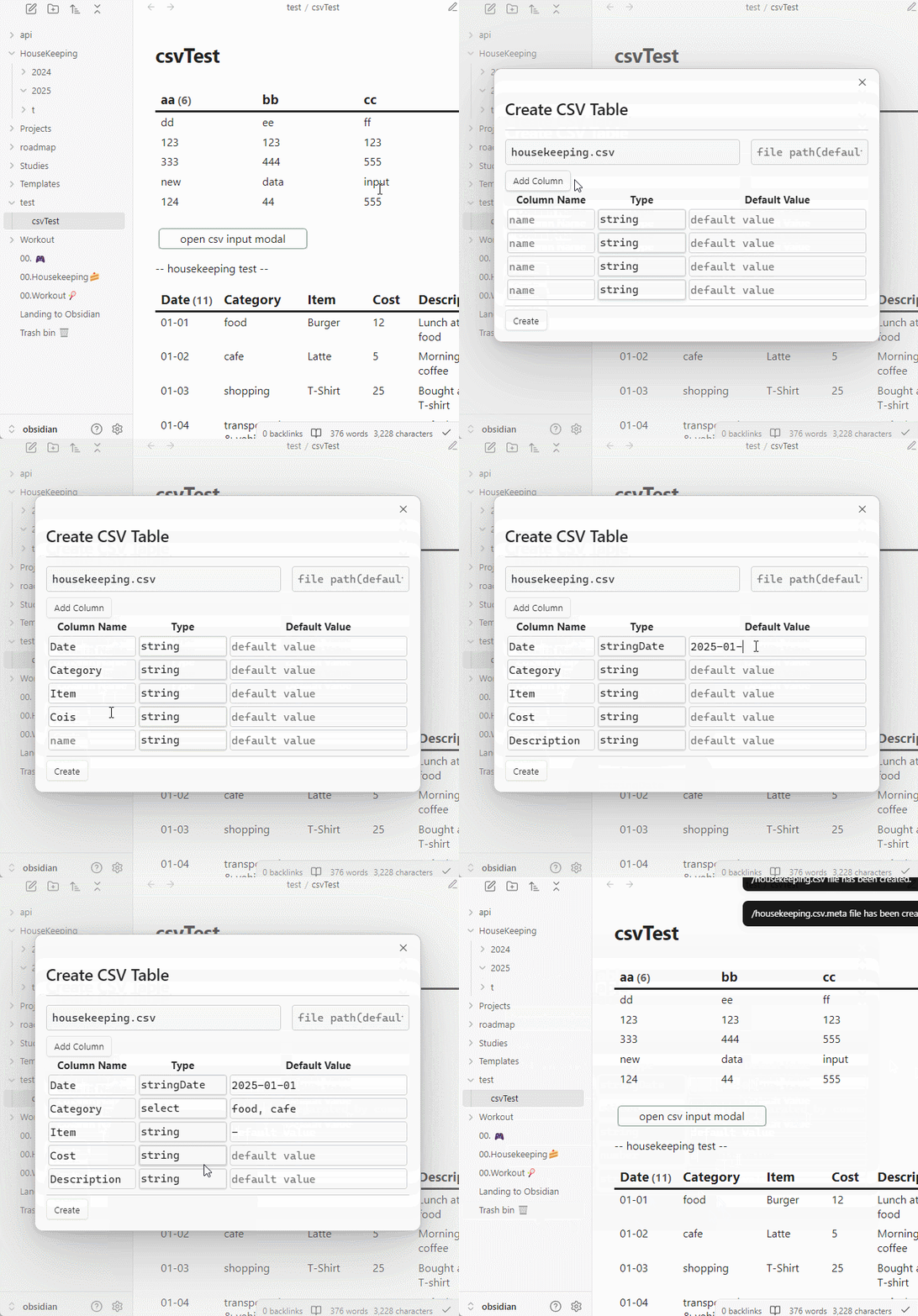
Creating a CSV File
  • Ctrl + P -> search for 'Create CSV Table' Enter the required data and click Submit as shown below: create_CSV_table
Search CSV Files
  • UI modifications are planned
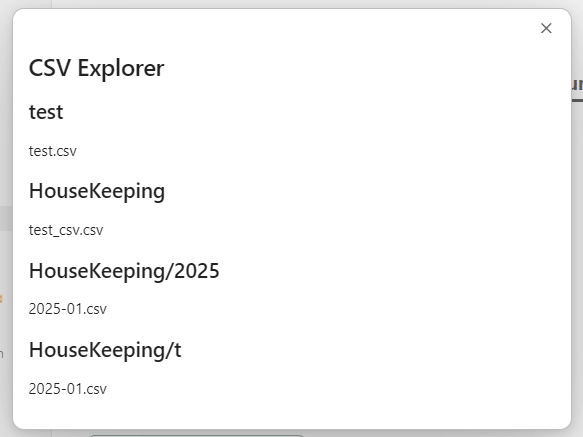
  • Ctrl + P -> search for 'Open CSV Explorer'
  • You can move or delete CSV files.

CSV_explorer

With DataviewJS

- View as table
  • Source Code
const CSVPlugin = app.plugins.plugins['CSV-allinone'];

const fileName = "HouseKeeping/t/2025-01.csv"; 

CSVPlugin.readCSV(app, fileName).then(res => {
	let headers = []
	let defaultValues = {}
	for(const [key, value] of Object.entries(res.headers)) {
		headers.push(key)
		defaultValues[key] = ""
	}
	const columnLength = headers.length;

	let rows = []
	for(const row of res.rows) {
		const newRow = [row[0].slice(5), ...row.slice(1)]
		rows.push(newRow);
	}
	dv.table(headers, rows);
})
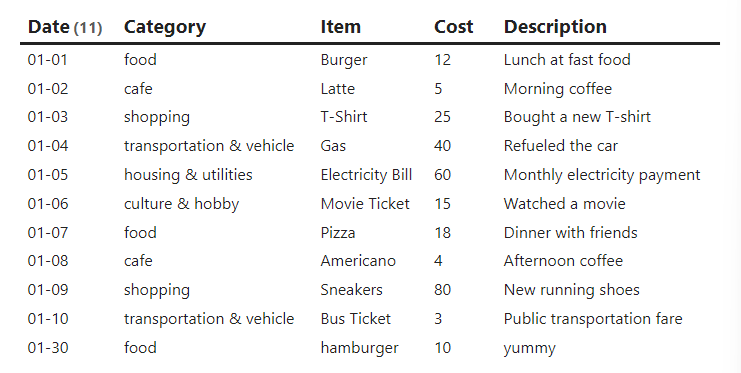
  • Result view_CSV_table
- Add new data (row)

This feature uses the Buttons plugin.

  • Feature Description

    • Adds a row to a specific CSV file.
    • The data is not processed once read. If real-time updates are needed, you must wait for the file to update and read it again separately.
    • Default values can be entered.
  • Source Code

const CSVPlugin = app.plugins.plugins['CSV-allinone'];
const { createButton } = app.plugins.plugins["buttons"];

const fileName = "HouseKeeping/t/2025-01.csv"; 
const openCSVAppendModal = async(app, headers, f, defaults) => {
	 CSVPlugin.openCSVInputModal(app, headers, f, defaults)
}

CSVPlugin.readCSV(app, fileName).then(res => {
	let headers = []
	let defaultValues = {}
	for(const [key, value] of Object.entries(res.headers)) {
		headers.push(key)
		defaultValues[key] = ""
	}
	const columnLength = headers.length;

	let rows = []
	for(const row of res.rows) {
		const newRow = [row[0].slice(5), ...row.slice(1)]
		rows.push(newRow);
	}

	dv.table(headers, rows);
	// default values
	defaultValues['Date'] = moment(Date.now()).format('YYYY-MM-DD');
	defaultValues['Category'] = res.headers['Category'].options[0];
	defaultValues['Description'] = '-' ;

	dv.span(
	    createButton({
			app, el: this.container, 
			args: {
				name: "open CSV input modal",
				class: ""
			},
			clickOverride: {
				click: openCSVAppendModal, 
				params: [app, res.headers, fileName, defaultValues]
			}
		})
	)
})
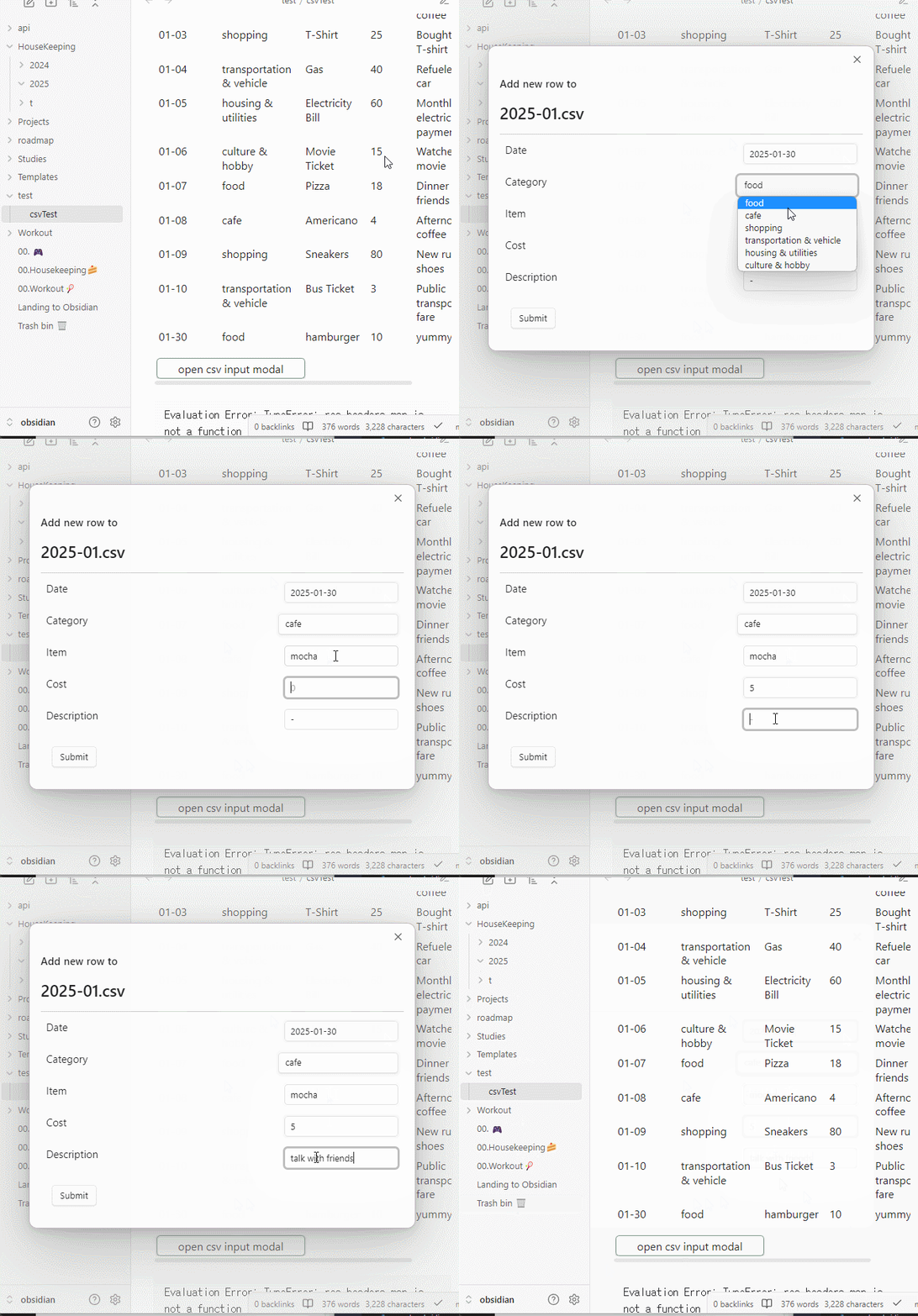
  • Result add_row_to_table
- Add new column
- Delete existing column

With Templater

  • I am not familiar with Templater, so I can't provide much detail. Apologies.

Usage/Features


APIs

Handle File

  • readCSV

    • Parameters (app: App, fileName: string)
    • Return: Promise<CSVTable | null>

    Takes a filename and returns the corresponding CSVTable.

  • saveCSV

    • Parameters (app: App, fileName: string, table: CSVTable)
    • Return: void

    Saves the CSVTable data into the given file.

CSVTable (class)

-- Functions available within the class will be documented here.

Header (type)
CSVRow (type)
CSVCellType (type)

How it Works

When you create a CSV file using this plugin, two files are generated: .csv and .csv.meta. If you load an existing CSV file, a .csv.meta file is generated automatically.

The CSV file contains basic table data, while the .meta file contains information about each column's attributes. Currently (v0.1.0), the .meta file only stores column types, but in the future, it will include additional data, such as select values or validity checks.

Contributing

Feel free to contribute however you'd like. Contributions are always welcome!

License

  • MIT

Similar Plugins

info
• Similar plugins are suggested based on the common tags between the plugins.
JSON Importer
4 years ago by farling42
Plug-in for Obsidian.md which will create Notes from JSON files
Excel to Markdown Table
4 years ago by Ganessh Kumar R P
An Obsidian plugin to paste data from Microsoft Excel, Google Sheets, Apple Numbers and LibreOffice Calc as Markdown tables in Obsidian editor.
Heatmap Calendar
4 years ago by Richard Slettevoll
An Obsidian plugin for displaying data in a calendar similar to the github activity calendar
AsciiDoc Blocks Plugin
4 years ago by Juracy Filho
A plugin to render asciidoc blocks in Obsidian, initially asciidoc tables
Release Timeline
4 years ago by cakechaser
Table to CSV Exporter
4 years ago by Stefan Wolfrum
An Obsidian Plugin that allows to export tables from a pane in reading mode to CSV files.
Habit Tracker
4 years ago by David Moeller
A Plugin to display a Habit Tracker in Obsidian.
Simple Note Review
4 years ago by dartungar
Simple, customizable plugin for easy note review, resurfacing & repetition in Obsidian.md.
Better Inline Fields
4 years ago by David Sarman
Obsidian plugin to enhance Dataview style inline fields
Table Generator
4 years ago by Boninall
A plugin for generate markdown table quickly like Typora.
Page Gallery
3 years ago by Nathan Clark
Generates a gallery based on selected page contents.
Double Colon Conceal
3 years ago by Michal Srch
Obsidian plugin to display double colon (i.e. Dataview inline fields) as a single colon for more natural reading experience.
Habit Calendar
3 years ago by Hedonihilist
Monthly Habit Calendar for DataviewJS. This plugin helps you render a calendar inside DataviewJS code block, showing your habit status within a month.
Meld Build
3 years ago by meld-cp
Write and execute (sandboxed) JavaScript to render templates, query DataView and create dynamic notes.
Any Block
3 years ago by LincZero
You can flexibility to create a 'Block' by many means. It also provides many useful features, like `list to table`. (obsidian/markdown-it/vuepress plugin/app)
HackerOne
3 years ago by neolex
A plugin to get our hackerone reports data into obsidian
Financial Doc
3 years ago by Studio Webux
Financial Documentation and Tracking using CSV format and Chart.js directly in Obsidian
Query all the things
3 years ago by Sytone
Query all your data stored in Obsidian, this plugin allows SQL based queries against the data collections available in Obsidian and Dataview. Output can then be rendered by Handlebars
Bulk Exporter
3 years ago by symunona
Bulk export Markdown filtered, renamed and sorted by front matter metadata into a new structure.
Link Tree
3 years ago by Joshua Tazman Reinier
A sidebar foldable list of Obsidian link hierarchies.
Sheets Extended
3 years ago by NicoNekoru
Plugin that adds features to tables in obsidian including merging, vertical headers, and custom css
moviegrabber
3 years ago by Leon Holtmeier
obsidian.md plugin to grab data from public movie Databases and make them into a note that can be used with dataview querries
Markdown table checkboxes
3 years ago by DylanGiesberts
Obsidian plugin. Allows for the usage of checkboxes inside markdown tables.
CSV Codeblock
3 years ago by elrindir
Plugin for obsidian to render csv syntax in codeblocks.
JSON table
3 years ago by Dario Baumberger
Simply switch between JSON and tables in your Obsidian notes.
Run
2 years ago by Hananoshika Yomaru
Generate markdown from dataview query and javascript.
Feeds
2 years ago by LukeMT, pashashocky, madx
Magic feeds dataview query for obsidian
Reason
2 years ago by Joshua Pham
Digest your Obsidian notes
Enhanced tables
2 years ago by pistacchio
A plugin for Obsidian to add advanced controls (like sorting and filtering) to standard markup tables
View Count
2 years ago by Trey Wallis
Add view count tracking to your Obsidian vault
Markmap to CSV
2 years ago by maxlee
obsidian plugin for conversion from markmap to csv
SQLSeal
2 years ago by hypersphere
Query your files using SQL directly from your Obsidian Vault
Dataview Serializer
2 years ago by Sébastien Dubois
Obsidian plugin that gives you the power of Dataview, but generates Markdown, making it compatible with Obsidian Publish, and making the links appear on the Graph.
Dataview Publisher
2 years ago by UD
Output markdown from your Dataview queries and keep them up to date. You can also be able to publish them.
Account Viewer
2 years ago by Muaz Yediyüzkırkiki
Obsidian Plugin that automatically generate accounting tables from Markdown code blocks tagged with "accounting" alias.
Pug Templates
2 years ago by Nicholas Wilcox
An Obsidian plugin that enables the usage of Pug templates.
Advanced Tables
6 years ago by Tony Grosinger
Improved table navigation, formatting, and manipulation in Obsidian.md
Dataview
5 years ago by Michael Brenan
A data index and query language over Markdown files, for https://obsidian.md/.
CSV Editor
5 years ago by death_au
Edit CSV Files in Obsidian
Table of Contents
5 years ago by hipstersmoothie
Create a tables of contents for a note.
Table Extended
5 years ago by AidenLx
Extend basic table in Obsidian with MultiMarkdown table syntax
Charts View
5 years ago by caronchen
Data visualization solution in Obsidian, support plots and graphs.
CSV Table
5 years ago by Adam Coddington
Have a CSV file you want to render some or all of the data from? This plugin allows you to display that data in your obsidian preview.
MOC Link Helper
2 years ago by Bogdan Codreanu
This obsidian plugins allows you to quickly see which notes you need to include in your MOC.
Dataview Autocompletion
a year ago by Daniel Bauer
Every Day Calendar
a year ago by QuBe
Obsidian plugin to create calendars inspired by Simone Giertz's Every Day Calendar
HTML checkboxes
a year ago by Anareaty
Tier List
a year ago by Mox Alehin
Obsidian plugin for visual ranking and organizing content into customizable Tier Lists.
Tagvis
a year ago by Mason Bryant
Smart ChatGPT
a year ago by 🌴 Brian
Kanban Status Updater
a year ago by Ankit Kapur
Obsidian plugin that automatically updates the note property when card is moved to a column.
DataCards
a year ago by Sophokles187
Obsidian Plugin that transforms dataview tables into visually appealing and customizable card layouts.
Virtual Footer
a year ago by Signynt
Display markdown text (including dataview queries or Obsidian bases) at the bottom or top of all notes which match a specified rule, without modifying them.
Log Keeper
a year ago by James Sonneveld
Generates times stamps automatically as changes are made to a note.
Slash snippets
10 months ago by echo-saurav
Insert snippet of text with slash command
Dataview (to) Properties
10 months ago by Mara-Li
Sync inline Dataview to properties (YAML frontmatter)
Sortable Tables
9 months ago by filippov112
A plugin for Obsidian that adds the ability to interactively sort Markdown tables in preview mode.
Move Cursor On Startup
8 months ago by Jared Kelnhofer
Obsidian plugin to move the cursor to the right and back to the left when starting up. Why? To keep DataView expressions from not running on the first load of, say, your Home file.
Tasks Map
7 months ago by NicoKNL
A graph view of your tasks.
List to table converter
6 months ago by paddomanno
Table Checkbox Renderer
5 months ago by Daniel Aguerrevere
Interactive checkboxes for Markdown tables in Obsidian. Toggle checkboxes in Reading Mode and instantly update your Markdown file. Supports multiple checkboxes per cell and any table layout.
Workout Planner
4 months ago by Rares Spatariu
Table Line Break Mobile
3 months ago by marcelflymark
Obsidian plugin: Insert a new line break inside a table cell using the <br> HTML element
TikToker
2 months ago by ameyxd
Save TikTok videos as markdown notes with embedded content and metadata extraction.