Dataview

by Michael Brenan
5
4
3
2
1
Score: 77/100

Description

Category: Data Visualization

The Dataview plugin is a powerful tool that helps you visualize and navigate your Obsidian notes in a whole new way. With Dataview, you can create customizable views of your notes, filtering by tags, dates, and more. Imagine being able to see all your tasks due today, or all your notes related to a specific project, with just a glance. This plugin streamlines your note-taking experience, making it easier to find what you need, when you need it. Perfect for those who like to stay organized and focused!

Dataview Query Wizard

A custom GPT that helps Obsidian users write, understand, and debug Dataview queries.

Great for creating tables, tracking tasks, filtering notes, and exploring metadata in your vault.

Supports YAML, inline fields, and DataviewJS.

Reviews

  • B Caesar
    Reviewed on Mar 22nd, 2026
    No review text provided.
  • Ganessh Kumar R P
    Reviewed on Dec 4th, 2025
    No review text provided.
  • Uwe Wennmann
    Reviewed on Nov 25th, 2025
    No review text provided.

Stats

8904
stars
4,127,298
downloads
517
forks
1,920
days
173
days
397
days
296
total PRs
24
open PRs
39
closed PRs
233
merged PRs
1,465
total issues
633
open issues
832
closed issues
34
commits

Latest Version

a year ago

Changelog

0.5.70 (Beta)

Still attempting to fix #2557, github is acting up.

README file from

Github

Obsidian Dataview

Treat your Obsidian Vault as a database which you can query from. Provides a JavaScript API and pipeline-based query language for filtering, sorting, and extracting data from Markdown pages. See the Examples section below for some quick examples, or the full reference for all the details.

Examples

Show all games in the game folder, sorted by rating, with some metadata:

```dataview
table time-played, length, rating
from "games"
sort rating desc
```
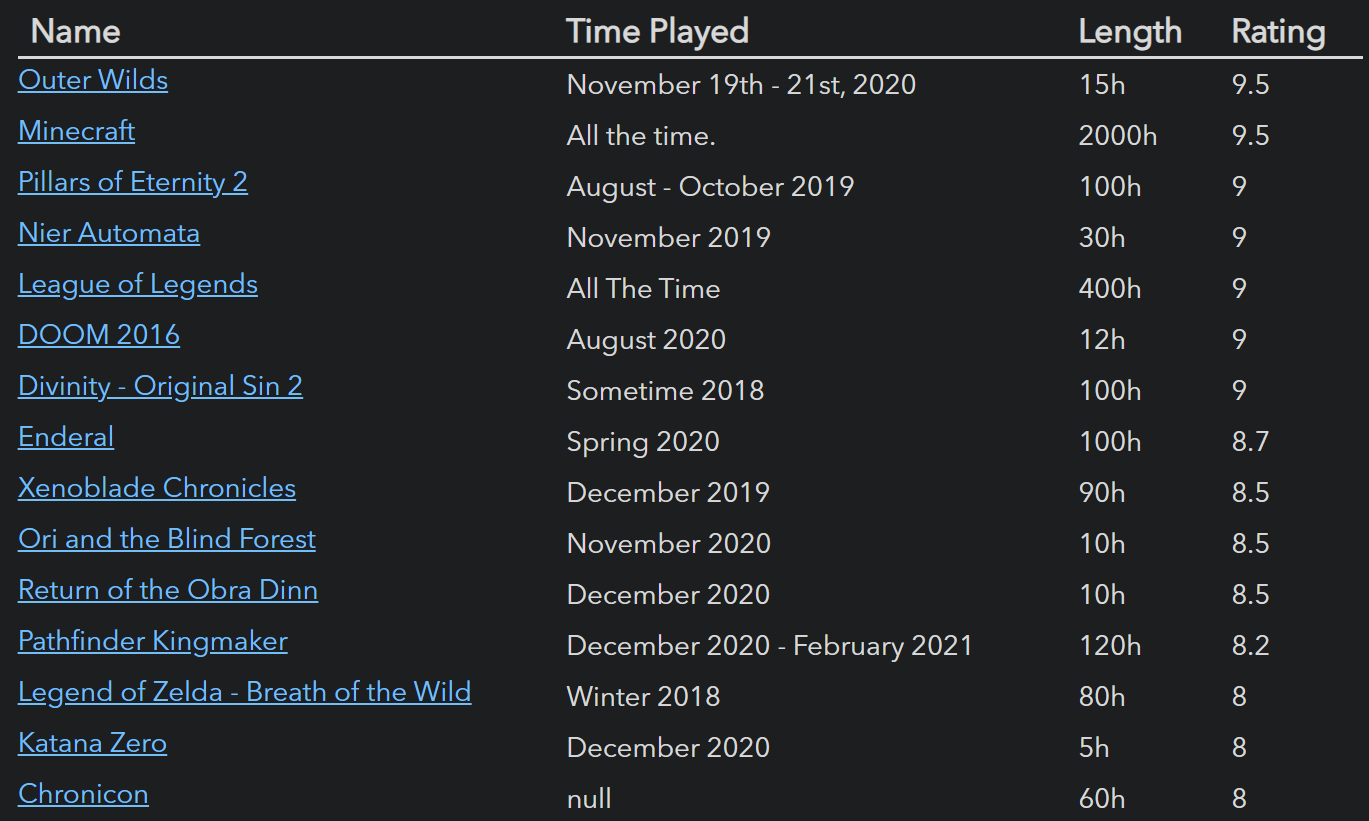
Game Example


List games which are MOBAs or CRPGs.

```dataview
list from #game/moba or #game/crpg
```

Game List


List all markdown tasks in un-completed projects:

```dataview
task from #projects/active
```
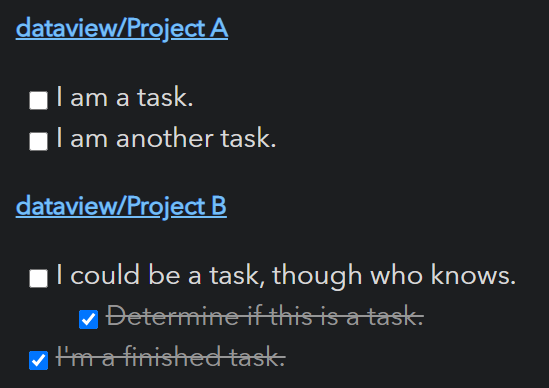
Task List


Show all files in the books folder that you read in 2021, grouped by genre and sorted by rating:

```dataviewjs
for (let group of dv.pages("#book").where(p => p["time-read"].year == 2021).groupBy(p => p.genre)) {
	dv.header(3, group.key);
	dv.table(["Name", "Time Read", "Rating"],
		group.rows
			.sort(k => k.rating, 'desc')
			.map(k => [k.file.link, k["time-read"], k.rating]))
}
```
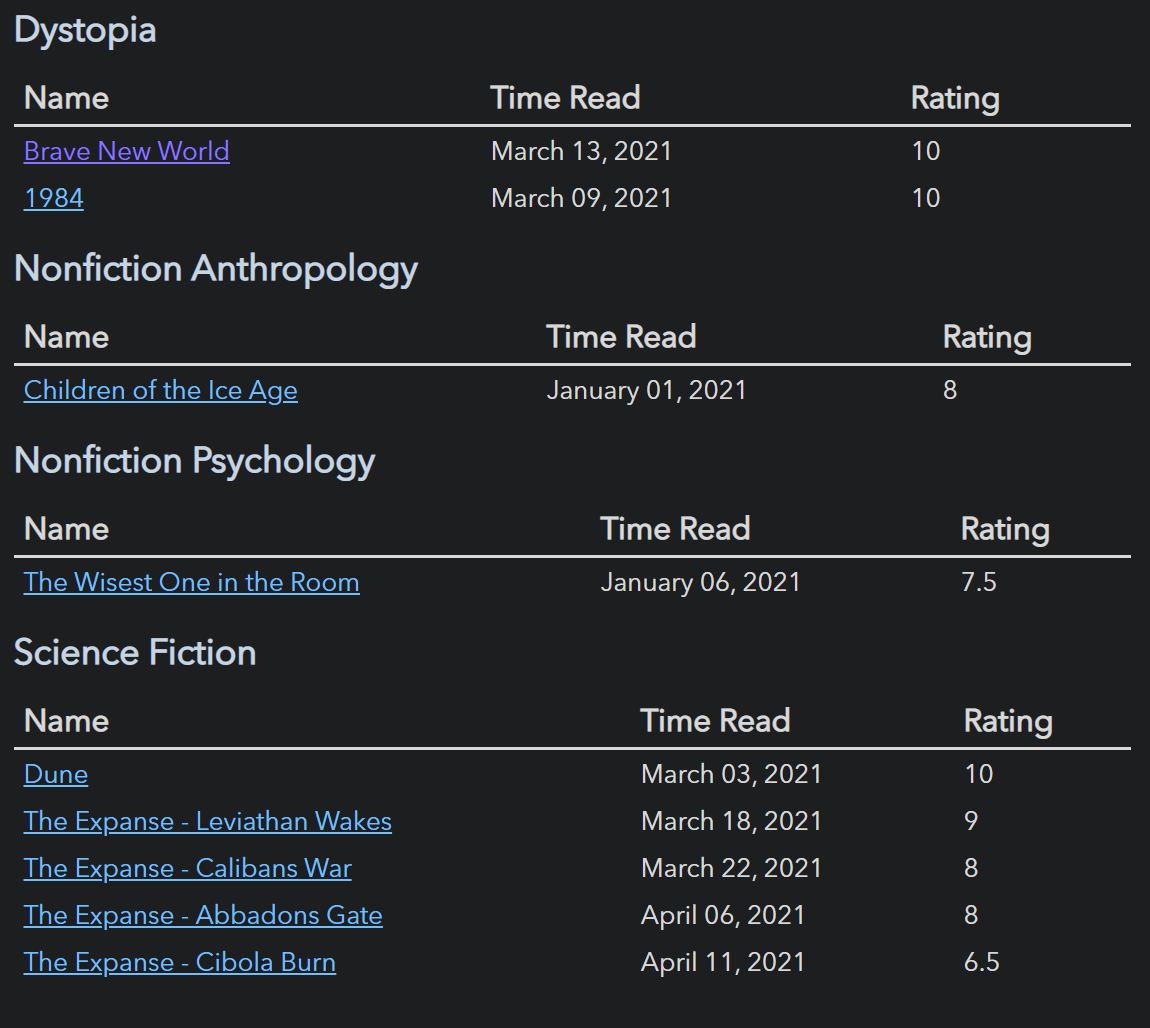
Books By Genre

Usage

For a full description of all features, instructions, and examples, see the reference. For a more brief outline, let us examine the two major aspects of Dataview: data and querying.

Data

Dataview generates data from your vault by pulling information from Markdown frontmatter and Inline fields.

  • Markdown frontmatter is arbitrary YAML enclosed by --- at the top of a markdown document which can store metadata about that document.
  • Inline fields are a Dataview feature which allow you to write metadata directly inline in your markdown document via Key:: Value syntax.

Examples of both are shown below:

---
alias: "document"
last-reviewed: 2021-08-17
thoughts:
  rating: 8
  reviewable: false
---
# Markdown Page

Basic Field:: Value
**Bold Field**:: Nice!
You can also write [field:: inline fields]; multiple [field2:: on the same line].
If you want to hide the (field3:: key), you can do that too.
Querying

Once you've annotated documents and the like with metadata, you can then query it using any of Dataview's four query modes:

  1. Dataview Query Language (DQL): A pipeline-based, vaguely SQL-looking expression language which can support basic use cases. See the documentation for details.

    ```dataview
    TABLE file.name AS "File", rating AS "Rating" FROM #book
    ```
    
  2. Inline Expressions: DQL expressions which you can embed directly inside markdown and which will be evaluated in preview mode. See the documentation for allowable queries.

    We are on page `= this.file.name`.
    
  3. DataviewJS: A high-powered JavaScript API which gives full access to the Dataview index and some convenient rendering utilities. Highly recommended if you know JavaScript, since this is far more powerful than the query language. Check the documentation for more details.

    ```dataviewjs
    dv.taskList(dv.pages().file.tasks.where(t => !t.completed));
    ```
    
  4. Inline JS Expressions: The JavaScript equivalent to inline expressions, which allow you to execute arbitrary JS inline:

    This page was last modified at `$= dv.current().file.mtime`.
    
JavaScript Queries: Security Note

JavaScript queries are very powerful, but they run at the same level of access as any other Obsidian plugin. This means they can potentially rewrite, create, or delete files, as well as make network calls. You should generally write JavaScript queries yourself or use scripts that you understand or that come from reputable sources. Regular Dataview queries are sandboxed and cannot make negative changes to your vault (in exchange for being much more limited).

Contributing

Contributions via bug reports, bug fixes, documentation, and general improvements are always welcome. For more major feature work, make an issue about the feature idea / reach out to me so we can judge feasibility and how best to implement it.

Local Development

The codebase is written in TypeScript and uses rollup / node for compilation; for a first time set up, all you should need to do is pull, install, and build:

foo@bar:~$ git clone [email protected]:blacksmithgu/obsidian-dataview.git
foo@bar:~$ cd obsidian-dataview
foo@bar:~/obsidian-dataview$ npm install
foo@bar:~/obsidian-dataview$ npm run dev

This will install libraries, build dataview, and deploy it to test-vault, which you can then open in Obsidian. This will also put rollup in watch mode, so any changes to the code will be re-compiled and the test vault will automatically reload itself.

Preparing for creating pull requests

If you plan on doing pull request, we would also recommend to do the following in advance of creating the pull request:

foo@bar:~$ npm run dev
foo@bar:~$ npm run check-format
foo@bar:~$ npm run format
foo@bar:~$ npm run test

The third step of npm run format is only needed if the format check reports some issue.

Installing to Other Vaults

If you want to dogfood dataview in your real vault, you can build and install manually. Dataview is predominantly a read-only store, so this should be safe, but watch out if you are adjusting functionality that performs file edits!

foo@bar:~/obsidian-dataview$ npm run build
foo@bar:~/obsidian-dataview$ ./scripts/install-built path/to/your/vault
Building Documentation

We use MkDocs for documentation (found in docs/). You'll need to have python and pip to run it locally:

foo@bar:~/obsidian-dataview$ pip3 install mkdocs mkdocs-material mkdocs-redirects
foo@bar:~/obsidian-dataview$ cd docs
foo@bar:~/obsidian-dataview/docs$ mkdocs serve

This will start a local web server rendering the documentation in docs/docs, which will live-reload on change. Documentation changes are automatically pushed to blacksmithgu.github.io/obsidian-dataview once they are merged to the main branch.

Using Dataview Types In Your Own Plugin

Dataview publishes TypeScript typings for all of its APIs onto NPM (as blacksmithgu/obsidian-dataview). For instructions on how to set up development using Dataview, see setup instructions.

Support

Have you found the Dataview plugin helpful, and want to support it? I accept donations which go towards future development efforts. I generally do not accept payment for bug bounties/feature requests, as financial incentives add stress/expectations which I want to avoid for a hobby project!

Support @blacksmithgu:

paypal

Support @holroy:

Similar Plugins

info
• Similar plugins are suggested based on the common tags between the plugins.
Heatmap Calendar
4 years ago by Richard Slettevoll
An Obsidian plugin for displaying data in a calendar similar to the github activity calendar
Charts View
5 years ago by caronchen
Data visualization solution in Obsidian, support plots and graphs.
Smart ChatGPT
a year ago by 🌴 Brian
DataCards
a year ago by Sophokles187
Obsidian Plugin that transforms dataview tables into visually appealing and customizable card layouts.
Table to CSV Exporter
4 years ago by Stefan Wolfrum
An Obsidian Plugin that allows to export tables from a pane in reading mode to CSV files.
Page Gallery
3 years ago by Nathan Clark
Generates a gallery based on selected page contents.
Link Tree
3 years ago by Joshua Tazman Reinier
A sidebar foldable list of Obsidian link hierarchies.
Simple Note Review
4 years ago by dartungar
Simple, customizable plugin for easy note review, resurfacing & repetition in Obsidian.md.
Dataview Serializer
2 years ago by Sébastien Dubois
Obsidian plugin that gives you the power of Dataview, but generates Markdown, making it compatible with Obsidian Publish, and making the links appear on the Graph.
Better Inline Fields
4 years ago by David Sarman
Obsidian plugin to enhance Dataview style inline fields
Habit Calendar
3 years ago by Hedonihilist
Monthly Habit Calendar for DataviewJS. This plugin helps you render a calendar inside DataviewJS code block, showing your habit status within a month.
Dataview Publisher
2 years ago by UD
Output markdown from your Dataview queries and keep them up to date. You can also be able to publish them.
Release Timeline
4 years ago by cakechaser
Habit Tracker
4 years ago by David Moeller
A Plugin to display a Habit Tracker in Obsidian.
Dataview (to) Properties
10 months ago by Mara-Li
Sync inline Dataview to properties (YAML frontmatter)
Tasks Map
7 months ago by NicoKNL
A graph view of your tasks.
Slash snippets
10 months ago by echo-saurav
Insert snippet of text with slash command
Query all the things
3 years ago by Sytone
Query all your data stored in Obsidian, this plugin allows SQL based queries against the data collections available in Obsidian and Dataview. Output can then be rendered by Handlebars
moviegrabber
3 years ago by Leon Holtmeier
obsidian.md plugin to grab data from public movie Databases and make them into a note that can be used with dataview querries
Double Colon Conceal
3 years ago by Michal Srch
Obsidian plugin to display double colon (i.e. Dataview inline fields) as a single colon for more natural reading experience.
Virtual Footer
a year ago by Signynt
Display markdown text (including dataview queries or Obsidian bases) at the bottom or top of all notes which match a specified rule, without modifying them.
Bulk Exporter
3 years ago by symunona
Bulk export Markdown filtered, renamed and sorted by front matter metadata into a new structure.
Kanban Status Updater
a year ago by Ankit Kapur
Obsidian plugin that automatically updates the note property when card is moved to a column.
View Count
2 years ago by Trey Wallis
Add view count tracking to your Obsidian vault
Meld Build
3 years ago by meld-cp
Write and execute (sandboxed) JavaScript to render templates, query DataView and create dynamic notes.
HackerOne
3 years ago by neolex
A plugin to get our hackerone reports data into obsidian
Run
2 years ago by Hananoshika Yomaru
Generate markdown from dataview query and javascript.
Feeds
2 years ago by LukeMT, pashashocky, madx
Magic feeds dataview query for obsidian
Reason
2 years ago by Joshua Pham
Digest your Obsidian notes
Tier List
a year ago by Mox Alehin
Obsidian plugin for visual ranking and organizing content into customizable Tier Lists.
Dataview Autocompletion
a year ago by Daniel Bauer
CSV All-in-One
a year ago by hihangeol
Tagvis
a year ago by Mason Bryant
Every Day Calendar
a year ago by QuBe
Obsidian plugin to create calendars inspired by Simone Giertz's Every Day Calendar
TikToker
2 months ago by ameyxd
Save TikTok videos as markdown notes with embedded content and metadata extraction.
MOC Link Helper
2 years ago by Bogdan Codreanu
This obsidian plugins allows you to quickly see which notes you need to include in your MOC.
Log Keeper
a year ago by James Sonneveld
Generates times stamps automatically as changes are made to a note.
Pug Templates
2 years ago by Nicholas Wilcox
An Obsidian plugin that enables the usage of Pug templates.
Move Cursor On Startup
8 months ago by Jared Kelnhofer
Obsidian plugin to move the cursor to the right and back to the left when starting up. Why? To keep DataView expressions from not running on the first load of, say, your Home file.