Description
Note Enhancements Plugin
Category: Note Enhancements
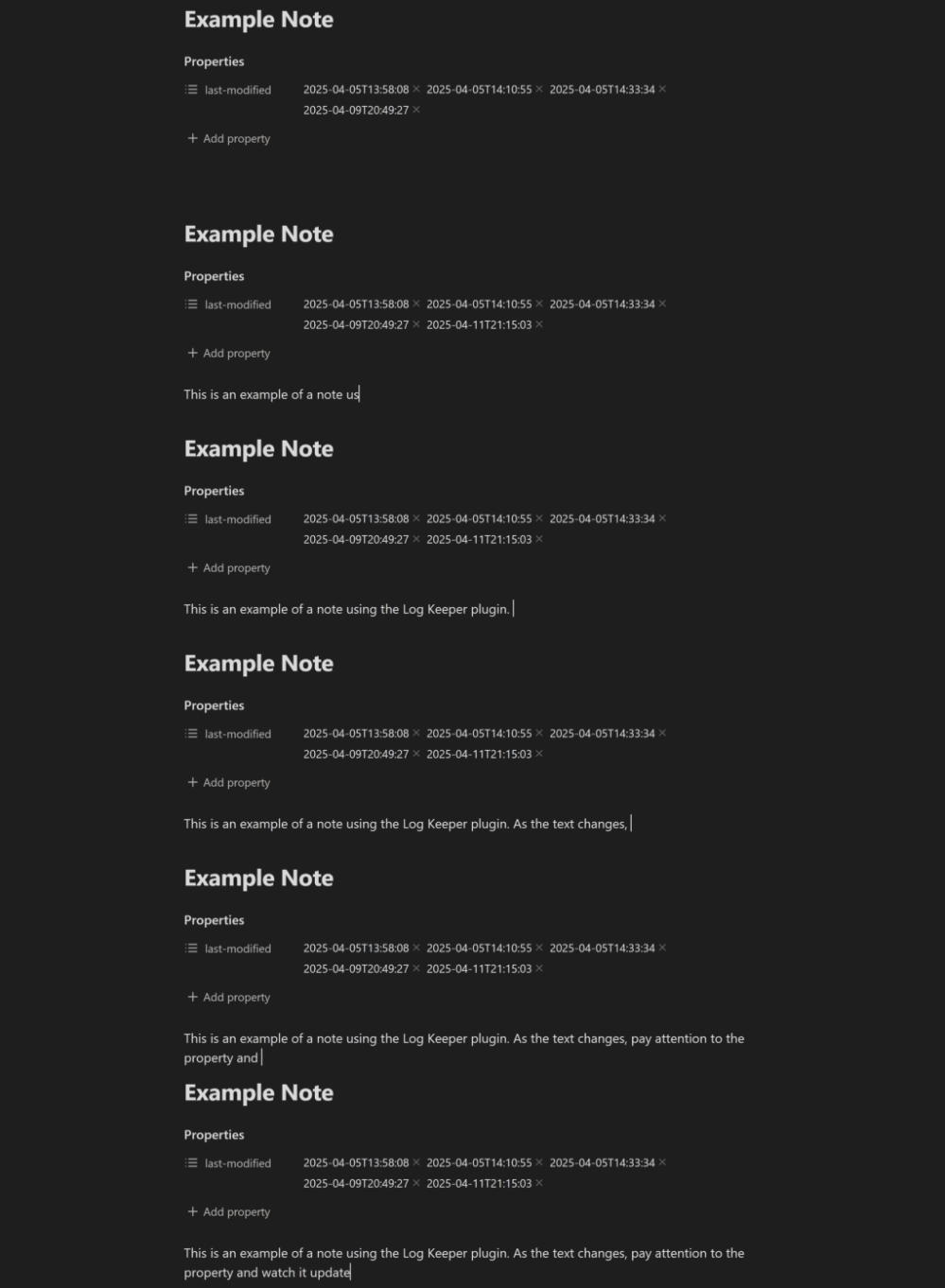
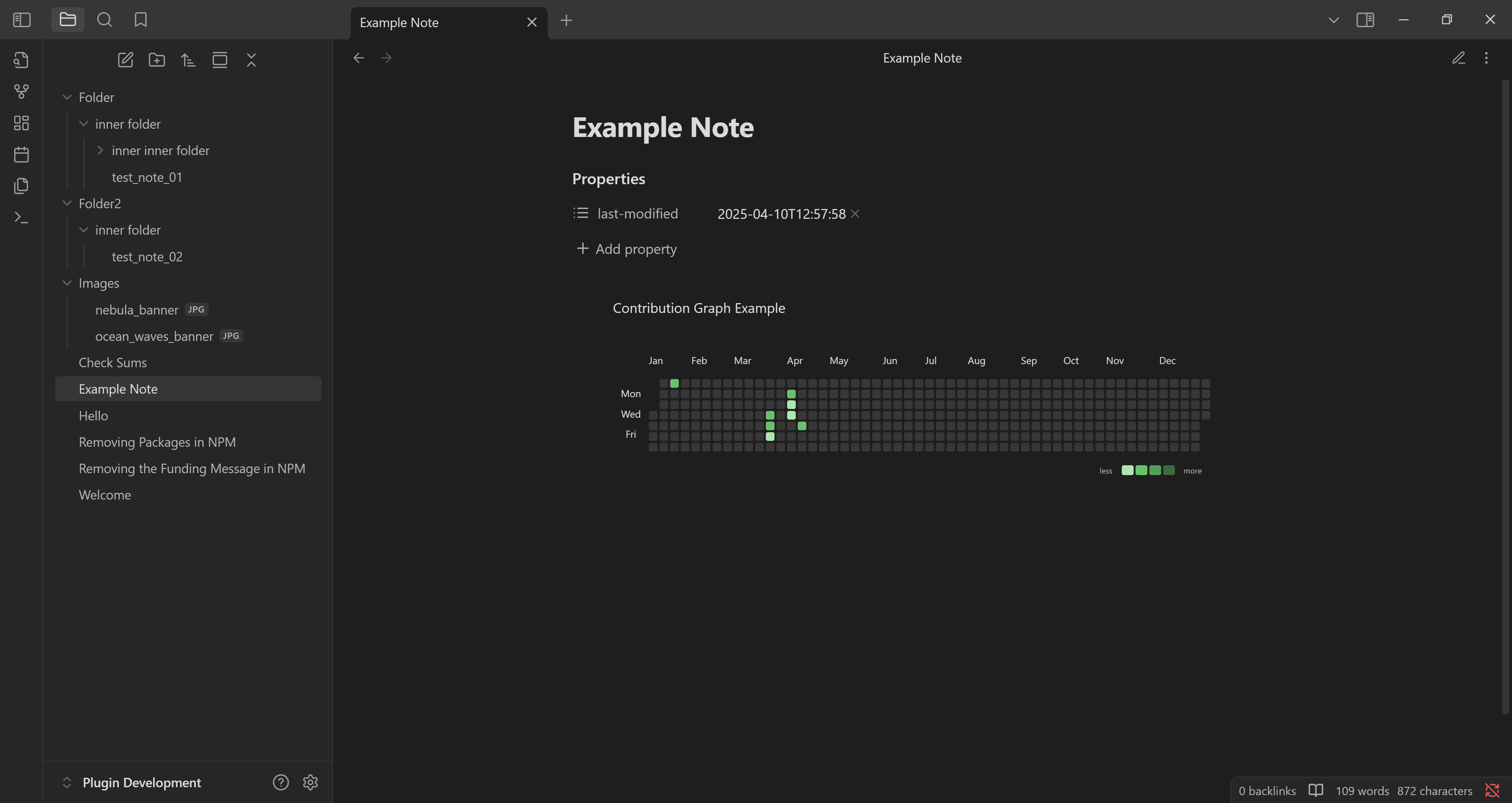
The Log Keeper plugin tracks and records the last modification time of notes by updating a timestamp in the YAML frontmatter whenever content changes. The timestamps follow the ISO 8601 format and get updated automatically as you type, ensuring precise and consistent metadata for each note. This metadata can be used with plugins like Dataview and Contribution Graph to visualise your editing habits over time, much like a GitHub contribution calendar. The plugin is designed to work silently in the background.
Reviews
No reviews yet.
Stats
4
stars
4 stargazers
318
downloads
318 downloads
0
forks
0 forks
169
days
169 days since creation
177
days
177 days since last commit
176
days
176 days since last release
11
total PRs
11 total pull requests
0
open PRs
0 open pull requests
4
closed PRs
4 closed pull requests
7
merged PRs
7 merged pull requests
10
total issues
10 total issues
1
open issues
1 open issues
9
closed issues
9 closed issues
0
commits
0 total commits in last one year
Latest Version
6 months ago
Changelog
3.1.0 release for Log Keeper plugin for Obsidian.
Changed
- Changed descriptions in plugin settings to match sentence case (see: https://docs.obsidian.md/Plugins/Releasing/Plugin+guidelines#Use+sentence+case+in+UI).
- Changed descriptions for plugins settings to be more concise.
- Updated class names in styles.css to make them unique to the plugin to avoid possible conflicts with styles from Obsidian or other plugins.
- Changed the style of the plugin settings to closely match Obsidian's default style.
- Changed the Remove button in the Ignored folders setting to a cross icon for a simpler design.
Removed
- (For Developer Tools Window) Removed logging to the console to comply with Obsidian Plugin Guidelines.
README file from
Similar Plugins
info
• Similar plugins are suggested based on the common tags between the plugins.
Dataview
5 years ago by Michael Brenan
A data index and query language over Markdown files, for https://obsidian.md/.
Heatmap Calendar
4 years ago by Richard Slettevoll
An Obsidian plugin for displaying data in a calendar similar to the github activity calendar
Charts View
5 years ago by caronchen
Data visualization solution in Obsidian, support plots and graphs.
Update time on edit
4 years ago by beaussan
TimeStamper
4 years ago by Martin Eder
A plugin for Obsidian to quickly insert customized date- and time-stamps to the currently active note
Timestamp Notes
3 years ago by Julian Grunauer
This plugin allows side-by-side notetaking with videos. Annotate your notes with timestamps to directly control the video and remember where each note comes from.
DataCards
7 months ago by Sophokles187
Obsidian Plugin that transforms dataview tables into visually appealing and customizable card layouts.
Table to CSV Exporter
3 years ago by Stefan Wolfrum
An Obsidian Plugin that allows to export tables from a pane in reading mode to CSV files.
Page Gallery
3 years ago by Nathan Clark
Generates a gallery based on selected page contents.
Task Marker
3 years ago by wenlzhang
An Obsidian plugin to change task status and append text with hotkeys and right-click context menu.
Simple Note Review
3 years ago by dartungar
Simple, customizable plugin for easy note review, resurfacing & repetition in Obsidian.md.
Link Tree
2 years ago by Joshua Tazman Reinier
A sidebar foldable list of Obsidian link hierarchies.
Better Inline Fields
3 years ago by David Sarman
Obsidian plugin to enhance Dataview style inline fields
Habit Calendar
3 years ago by Hedonihilist
Monthly Habit Calendar for DataviewJS. This plugin helps you render a calendar inside DataviewJS code block, showing your habit status within a month.
Release Timeline
4 years ago by cakechaser
Habit Tracker
3 years ago by David Moeller
A Plugin to display a Habit Tracker in Obsidian.
Smart ChatGPT
8 months ago by 🌴 Brian
Last Modified Timestamp in Status Bar
3 years ago by Yustynn
Query all the things
2 years ago by Sytone
Query all your data stored in Obsidian, this plugin allows SQL based queries against the data collections available in Obsidian and Dataview. Output can then be rendered by Handlebars
Dataview Publisher
a year ago by UD
Output markdown from your Dataview queries and keep them up to date. You can also be able to publish them.
Front Matter Timestamps
a year ago by LighthouseDino
Dataview Serializer
a year ago by Sébastien Dubois
Obsidian plugin that gives you the power of Dataview, but generates Markdown, making it compatible with Obsidian Publish, and making the links appear on the Graph.
Double Colon Conceal
3 years ago by Michal Srch
Obsidian plugin to display double colon (i.e. Dataview inline fields) as a single colon for more natural reading experience.
moviegrabber
2 years ago by Leon Holtmeier
obsidian.md plugin to grab data from public movie Databases and make them into a note that can be used with dataview querries
Bulk Exporter
2 years ago by symunona
Bulk export Markdown filtered, renamed and sorted by front matter metadata into a new structure.
Slash snippets
5 months ago by echo-saurav
Insert snippet of text with slash command
Dataview (to) Properties
4 months ago by Mara-Li
Sync inline Dataview to properties (YAML frontmatter)
Meld Build
3 years ago by meld-cp
Write and execute (sandboxed) JavaScript to render templates, query DataView and create dynamic notes.
View Count
2 years ago by Trey Wallis
Add view count tracking to your Obsidian vault
HackerOne
2 years ago by neolex
A plugin to get our hackerone reports data into obsidian
Virtual Footer
7 months ago by Signynt
Display markdown text (including dataview queries or Obsidian bases) at the bottom or top of all notes which match a specified rule, without modifying them.
Kanban Status Updater
8 months ago by Ankit Kapur
Obsidian plugin that automatically updates the note property when card is moved to a column.
Run
2 years ago by Hananoshika Yomaru
Generate markdown from dataview query and javascript.
Copy Metadata
2 years ago by wenlzhang
An Obsidian plugin to copy metadata to clipboard and insert it into file name.
Feeds
2 years ago by LukeMT, pashashocky, madx
Magic feeds dataview query for obsidian
Timestamp Link
2 years ago by wenlzhang
An Obsidian plugin to copy timestamped links to blocks, headings and notes.
Reason
2 years ago by Joshua Pham
Digest your Obsidian notes
Youtube Iframe Timestamps
a year ago by Nils Leo
Update Time
2 years ago by Sébastien Dubois
Obsidian plugin that updates front matter to include creation and last update times
Tasks Map
2 months ago by NicoKNL
A graph view of your tasks.
Tier List
9 months ago by Mox Alehin
Obsidian plugin for visual ranking and organizing content into customizable Tier Lists.
Dataview Autocompletion
10 months ago by Daniel Bauer
CSV All-in-One
9 months ago by hihangeol
Tagvis
9 months ago by Mason Bryant
Every Day Calendar
10 months ago by QuBe
Obsidian plugin to create calendars inspired by Simone Giertz's Every Day Calendar
MOC Link Helper
a year ago by Bogdan Codreanu
This obsidian plugins allows you to quickly see which notes you need to include in your MOC.
Time Bullet
9 months ago by pedrogdn
Relative Timestamps
a year ago by Charles Young
Auto Note Importer
6 months ago by uppinote
Obsidian plugin that automatically creates notes from external database
tidit
9 months ago by codingthings.com
tidit is an Obsidian - https://obsidian.md - plugin that adds timestamps to your document as you type — when you want it, how you want it, where you want it.
Discord Timestamps
a year ago by Erika Gozar
Displays discord timestamps in read mode as they would appear in Discord.
Korean Book Search
5 months ago by lazerfit
도서 메타데이터 자동 입력 플러그인
Timecodes
9 months ago by Kirill Gavrilov
Makes timecodes clickable, if there was a video URL mentioned earlier in Obsidian note
Pug Templates
a year ago by Nicholas Wilcox
An Obsidian plugin that enables the usage of Pug templates.
Time Inserter
2 months ago by heycalmdown
Obsidian plugin to insert current time at cursor position with exact or rounded formats
Move Cursor On Startup
3 months ago by Jared Kelnhofer
Obsidian plugin to move the cursor to the right and back to the left when starting up. Why? To keep DataView expressions from not running on the first load of, say, your Home file.
Timestamper
23 days ago by René Coignard
Insert the current timestamp into your notes.