Page Gallery

by Nathan Clark
5
4
3
2
1
Score: 52/100

Description

Category: Note Enhancements

The Page Gallery plugin allows users to generate a gallery view of selected pages in Obsidian, showcasing images or content based on specific queries. The gallery is customizable, supporting different layouts, columns, and orientations. It relies on the 'obsidian-dataview' plugin for querying metadata and pages. Users can define views that filter pages based on tags, metadata, and other criteria, and display those pages with a customizable layout, including options like portrait or landscape orientation. The plugin offers additional settings for fine-tuning image display, such as gutter size, image scaling, and positioning.

Reviews

No reviews yet.

Stats

83
stars
14,545
downloads
2
forks
1,272
days
253
days
810
days
6
total PRs
0
open PRs
0
closed PRs
6
merged PRs
72
total issues
26
open issues
46
closed issues
6
commits

Latest Version

2 years ago

Changelog

Changelog

[0.8.4] - 2024-02-19

Fixed

  • Pages without content no longer show undefined in auto or content modes (#67).
  • The page counts now update properly when pages are added/removed, without requiring a full re-render of the code block (#60).

README file from

Github

Generates a gallery view of selected pages based on images found in them.

[!CAUTION] Obsidian now has a built-in Bases feature that accomplishes what this plugin was intended to do. While it's still somewhat limited (e.g. only displays images in page properties, not from page content), I doubt it will remain that way for long. As a result, I am unlikely to extend or enhance the Page Gallery plugin beyond its current capabilities, and encourage current users to switch to Bases if they're able to. I will continue to make bug fixes to this plugin in its current state for the time being, but don't expect any major changes or new functionality.

Warning: This plugin is in development and should be considered unstable! Always make a backup of your vault before testing out a new plugin.

Prereqs

Depends on obsidian-dataview to list pages and page metadata.

Usage

Create a code block with type page-gallery:

```page-gallery
# Any options given at the root level of the configuration
# will be used as defaults for all views (but can be overridden
# in any individual view).
fields: [file.name]
columns: 3
orientation: landscape

# If you don't include an explicit `views` option (which needs
# to be an array), then page-gallery will just use all the root
# level options as a single unnamed view.
views:
  - name: Yosemite
    from: '"Images" AND #yosemite'
  - name: Yellowstone
    from: '"Images" AND #yellowstone'
    columns: 4
    orientation: portrait
```
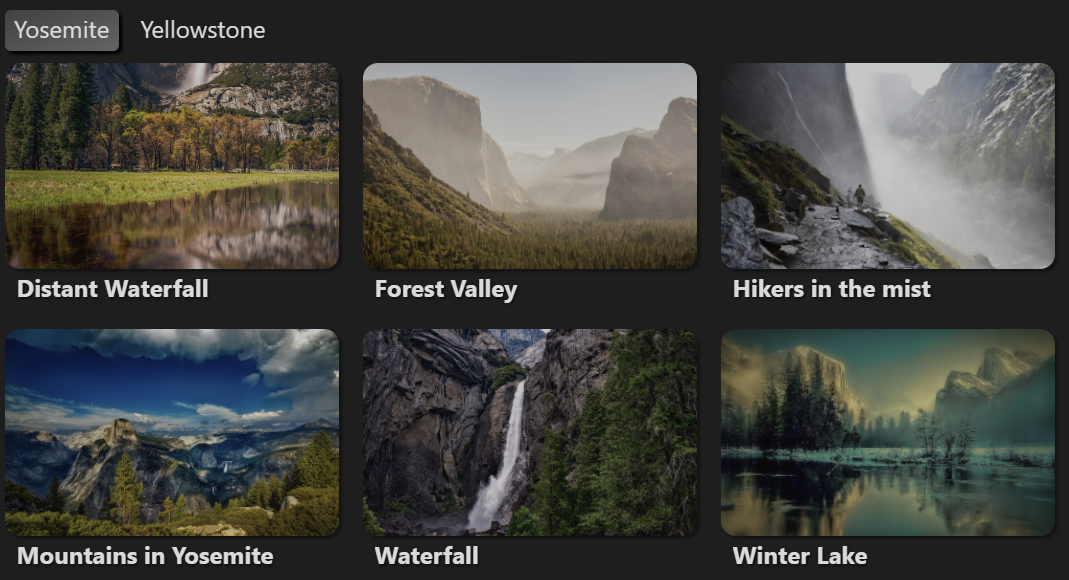
Example of the page-gallery plugin in use

Photos from Unsplash and Pixabay

Settings

Options in the page-gallery block are parsed using YAML.

Option Type Default Description
title string null An optional title for the page gallery.
filter boolean true Whether or not to show the filter bar.
count boolean true Whether to show view and group counts.
debug boolean false Whether or not to display debug information. Useful primarily for development.
views ViewConfig[] [] A list of individual view configuration blocks (see below).

View Settings

A page gallery consists of a list of views (or tabs), each with its own view settings. Valid view settings are listed below. Any of this view settings can be set in the root of the configuration as well, in which case they act as defaults for all defined views.

If no views are defined, the page gallery will have a single view, based on the values defined in the root configuration.

Option Type Default Description
name string "View #" Optional name or title for the view.
mode "auto","image","content" "auto" Whether to show the first image found in the page ("image"), the rendered markdown content of the page ("content"), or automatically fall back to content only if an image isn't found ("auto").
from string - Query for pages to include in the gallery. Uses the same query syntax as obsidian-dataview.
where string - Additional expression to filter out pages that you want to omit from the gallery.
fields string[] [] List of fields to display in the gallery, under the image. Supports both frontmatter and inline fields.
limit number 100 Limit on the number of pages that will be displayed in the gallery. Set this to null to display all of the pages matched by the from query.
groupBy string - Groups pages by a particular field (or obsidian-dataview expression).
sortBy string[] ['file.path'] One or more fields/expressions to sort the pages by. Prefix with a - sign (e.g. -file.path) to reverse the sort order.
columns number 4 Number of columns to display at full width.
orientation "portrait","landscape","square" "portrait" Whether to display tiles in portrait, landscape, or square mode.
Advanced View Settings

The following settings directly modify the CSS style attributes that are generated for the page gallery in order to allow fine-tuning of image sizes and positioning (overriding the "orientation" and "columns" settings). They should be used with caution, as they will likely conflict or overlap with other applied styles; and may be removed in the future in order to simplify gallery styles and make it easier to keep things working across devices with different screen sizes (requiring you to use custom CSS snippets instead if you want to customize the page gallery styling to this degree).

Option Type Default Description
gutterSize string "0.5em" Size of the gutter between images.
radius string "10px" Radius of the corners of each tile.
width string Calculated from columns. Display width of each image in the gallery. Overrides columns.
height string Calculated from columns and selected orientation. Display height of each image in the gallery.
size string cover How the image should be scaled to fit within the gallery tile. See CSS background-size for available options.
position string center Positioning of each image in the gallery. Try top, center, or bottom (etc) to change what parts of the images are visible. See CSS background-position for available options.
repeat string no-repeat Whether to repeat (i.e. tile) the image in each gallery item. See CSS background-repeat for available options.

Additionally, the size, position, repeat and imageSrc values can be overridden on a specific page via YAML frontmatter:

---
pageGallery:
  size: contain
  position: left
  repeat: repeat-x
  imageSrc: different-image.png
---

Caution: This will override those settings for any page gallery that the page appears in.

Similar Plugins

info
• Similar plugins are suggested based on the common tags between the plugins.
Better Inline Fields
4 years ago by David Sarman
Obsidian plugin to enhance Dataview style inline fields
Bulk Exporter
3 years ago by symunona
Bulk export Markdown filtered, renamed and sorted by front matter metadata into a new structure.
Charts View
5 years ago by caronchen
Data visualization solution in Obsidian, support plots and graphs.
CSV All-in-One
a year ago by hihangeol
DataCards
a year ago by Sophokles187
Obsidian Plugin that transforms dataview tables into visually appealing and customizable card layouts.
Dataview
5 years ago by Michael Brenan
A data index and query language over Markdown files, for https://obsidian.md/.
Dataview (to) Properties
10 months ago by Mara-Li
Sync inline Dataview to properties (YAML frontmatter)
Dataview Autocompletion
a year ago by Daniel Bauer
Dataview Publisher
2 years ago by UD
Output markdown from your Dataview queries and keep them up to date. You can also be able to publish them.
Dataview Serializer
2 years ago by Sébastien Dubois
Obsidian plugin that gives you the power of Dataview, but generates Markdown, making it compatible with Obsidian Publish, and making the links appear on the Graph.
Double Colon Conceal
3 years ago by Michal Srch
Obsidian plugin to display double colon (i.e. Dataview inline fields) as a single colon for more natural reading experience.
Every Day Calendar
a year ago by QuBe
Obsidian plugin to create calendars inspired by Simone Giertz's Every Day Calendar
Feeds
2 years ago by LukeMT, pashashocky, madx
Magic feeds dataview query for obsidian
Habit Calendar
3 years ago by Hedonihilist
Monthly Habit Calendar for DataviewJS. This plugin helps you render a calendar inside DataviewJS code block, showing your habit status within a month.
Habit Tracker
4 years ago by David Moeller
A Plugin to display a Habit Tracker in Obsidian.
HackerOne
3 years ago by neolex
A plugin to get our hackerone reports data into obsidian
Heatmap Calendar
4 years ago by Richard Slettevoll
An Obsidian plugin for displaying data in a calendar similar to the github activity calendar
Image Gallery
4 years ago by Luca Orio
A zero setup masonry image gallery for Obsidian
Kanban Status Updater
a year ago by Ankit Kapur
Obsidian plugin that automatically updates the note property when card is moved to a column.
Link Tree
3 years ago by Joshua Tazman Reinier
A sidebar foldable list of Obsidian link hierarchies.
Lite Gallery
2 years ago by Jordan Poles
Log Keeper
a year ago by James Sonneveld
Generates times stamps automatically as changes are made to a note.
Media Companion
a year ago by Nick de Bruin
Media Viewer
a year ago by Devon22
View and manage media files within your notes.
Meld Build
3 years ago by meld-cp
Write and execute (sandboxed) JavaScript to render templates, query DataView and create dynamic notes.
Memories
3 months ago by DIMFLIX
Plugin to display a gallery directly in a note.
MOC Link Helper
2 years ago by Bogdan Codreanu
This obsidian plugins allows you to quickly see which notes you need to include in your MOC.
Move Cursor On Startup
8 months ago by Jared Kelnhofer
Obsidian plugin to move the cursor to the right and back to the left when starting up. Why? To keep DataView expressions from not running on the first load of, say, your Home file.
moviegrabber
3 years ago by Leon Holtmeier
obsidian.md plugin to grab data from public movie Databases and make them into a note that can be used with dataview querries
Pug Templates
2 years ago by Nicholas Wilcox
An Obsidian plugin that enables the usage of Pug templates.
Query all the things
3 years ago by Sytone
Query all your data stored in Obsidian, this plugin allows SQL based queries against the data collections available in Obsidian and Dataview. Output can then be rendered by Handlebars
Reason
2 years ago by Joshua Pham
Digest your Obsidian notes
Release Timeline
4 years ago by cakechaser
Run
2 years ago by Hananoshika Yomaru
Generate markdown from dataview query and javascript.
Simple Note Review
4 years ago by dartungar
Simple, customizable plugin for easy note review, resurfacing & repetition in Obsidian.md.
Slash snippets
10 months ago by echo-saurav
Insert snippet of text with slash command
Smart ChatGPT
a year ago by 🌴 Brian
Storyteller Suite
10 months ago by Maws
Table to CSV Exporter
4 years ago by Stefan Wolfrum
An Obsidian Plugin that allows to export tables from a pane in reading mode to CSV files.
Tagvis
a year ago by Mason Bryant
Tasks Map
7 months ago by NicoKNL
A graph view of your tasks.
Tier List
a year ago by Mox Alehin
Obsidian plugin for visual ranking and organizing content into customizable Tier Lists.
TikToker
2 months ago by ameyxd
Save TikTok videos as markdown notes with embedded content and metadata extraction.
View Count
2 years ago by Trey Wallis
Add view count tracking to your Obsidian vault
Virtual Footer
a year ago by Signynt
Display markdown text (including dataview queries or Obsidian bases) at the bottom or top of all notes which match a specified rule, without modifying them.