
README file from
GithubVisual Crossing Weather
Table of Contents
- Introduction
- Features
- Template Macros
- Daily Notes Template Macros
- The Current Weather Display Modal
- The Statusbar Weather Display & Templates
- The Weather Templates
- Obsidian Templates Support
- Plugin Commands
- Settings
- Dynamic Weather Using DIV's
Introduction
This is a replacement for my OpenWeather plugin. Open Weather has discontinued its version 2.5 API on which that plugin is based. They do have a 3.0 API, but that requires a credit card to subscribe to and a lot of people, myself included, are not willing to do that.
Quite a while ago a user requested a feature that was not available in the Open Weather API but mentioned it was available in the Visual Crossing API. After looking closer at the API I saw many advantages in switching to over to it. The only thing that had stopped me is it meant a complete re-wite of the plugin as the differences in the API's was far to great and having to maintain 2 plugins that did the same thing seemed pointless. Now that Open Weather has discontinued API 2.5 I am free to develop this new plugin.
This new plugin uses the Visual Crossing API.
You can get your free API key here. It is free and does not require a credit card.
Features
- Get weather data from 5 locations (OpenWeather plugin only had 1)
- Display current weather in the statusbar
- The statusbar text strings are customizable
- The statusbar text can be customized using CSS
- Has 2 statusbar template strings which can be displayed alternating every 30 seconds
- Default has todays weather info for the first one, tomorrows weather for the second
- Clicking on the weather data in the statusbar will open a modal with detailed info on todays weather
- Insert current weather into your documents
- Can be previewed before insertion when using the insert weather template modal
- Eight customizable weather templates available (OpenWeather plugin only had 4)
- Template support for automatic weather insertion into your new documents
- DIV support for dynamic weather
- 14 Day forecast data available from the API
- Several thousand (currently around 4000) macro text replacements with more to come
- Daily notes special macros can get the weather data for any of 14 future/past days
- Includes all core elements of my OpenWeather plugin, auto replace templates, etc.
- Templates are now named. The first line is used as the name in the menus and is not included in the output of the template
- Many overall improvements to much of the code
- Many new features planned for the future
Template Macros
The text macros are used to represent a weather data object and will be expanded to display that particular weather data item at runtime. All macros are contained within 2 percent signs. For an example, %temp% represents the current temperature and will be replaced by eg. 24. %humidity% represents the current humidity and will be replaced with eg. 80%. For a detailed complete list of available macros in table form see Macros.md
Daily Notes Template Macros
These special macros are specifically used in your daily notes template. They allow for the expansion of the macros weather data in any one of 14 future/past days. In order for this to work your daily notes file name must be in the format YYYY-MM-DD (This is the default in Obsidian). For a detailed complete list of available macros in table form see Macros.md
The Current Weather Display Modal
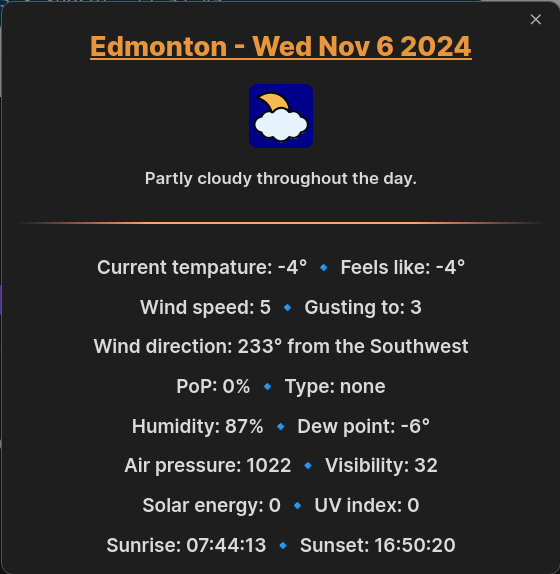
Clicking on the weather information in the statusbar will display a modal with the current weather information. It can also be displayed from the command palette by entering View current weather information.
For example...
The Statusbar Weather Display & Templates
Note: this feature is not available in the mobile version
The current Weather
The current weather is displayed in the statusbar. This is optional and can be disabled in the settings if you would like to remove it. The string itself is completely customizable and can be defined to display whatevever information you would like to see. There is also a second statusbar template string available. By default both strings are displayed in the statusbar, alternating every 30 seconds. This behavior can also be disabled in the settings if you wish. Disabling this would result in only the first string being displayed. The default strings display the current weather information for the first one and the second displays weather information for tommorow.
The default first string 🔸%address%: %dow2-today% %month3-today% %date1-today%🔸High: %tempmax-today%° Low: %tempmin-today%°🔸Currently: %conditions% Temperature: %temp%° Feels Like: %feelslike%°🔸 displays...

The default second string 🔸%address%: %dow2-in1day% %month3-in1day% %date1-in1day%🔸High: %tempmax-in1day%° Low: %tempmin-in1day%° 🔸 Clouds: %cloudcover-in1day% Probabilty of precipitation: %precipprob-in1day% (%preciptype-in1day%)🔸 displays...

The statusbar cycling...

Weather Alerts
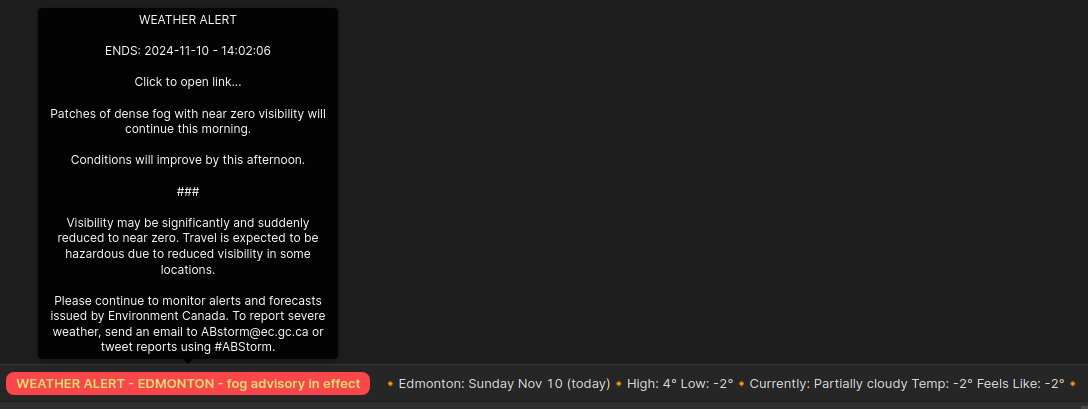
If a weather alert is active it will be displayed in the statusbar in red. Only one alert is displayed at a time with your primary location taking the highest precedence, then your additional locations in the order that they are entered in the settings. Mouse over the statusbars weather alert to see a description of the alert. Click the statusbars weather alert text to open in your default browser the web page associated with the alert.
Example of a weather alert...
Customizing the statusbar
You can customize the way the weather information is displayed in the statusbar using CSS. To do so create a css file in your vaults .obsidian/snippets folder Eg. vcWeather.css and add the following text...
.statusbar-vc {
  background-color: var(--status-bar-background);
  color: var(--color-base-100);
  font-size: small;
  font-weight: 500;
}

.statusbar-alert-vc {
  background-color: var(--color-red);
  color: var(--color-yellow);
  border-radius: 10px;
  font-size: small;
  font-weight: 600;
}
Note that the .obsidian folder is a hidden folder so you may need to enable show hidden files in your file manager. The snippets folder may need to be created if it does not already exist in your vault.
Then enable the CSS snippet in Obsidians settings under appearance/CSS snippets (at the bottom).
The example CSS text above is the default settings. Feel free to customize it to your preferences. .statusbar-vc is the class name for the weather information in the statusbar. .statusbar-alert-vc is the class name used for weather alerts displayed in the status bar.
For more information, see Obsidian CSS variables and CSS variables for the Status bar
For more detailed information on the statusbar templates see Statusbar Templates.md
The Weather Templates
The weather templates are used to insert weather information into your documents
Note: The first line of these templates is the text string used in the command palette and and insert template modal. This first line is not inserted with the rest of the template. You should use short meaningful descriptions on the first line when defining your own templates.
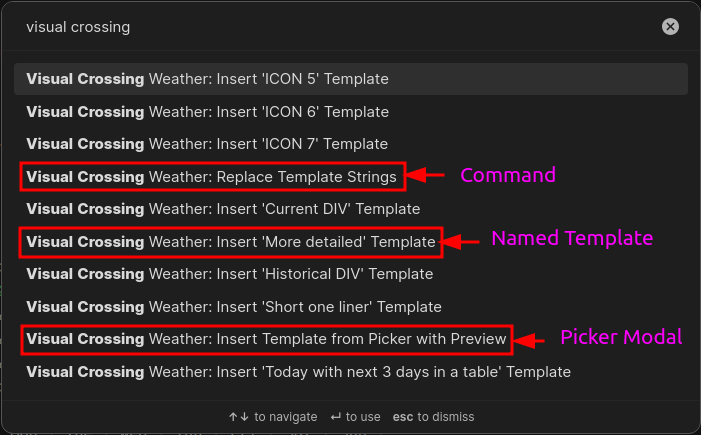
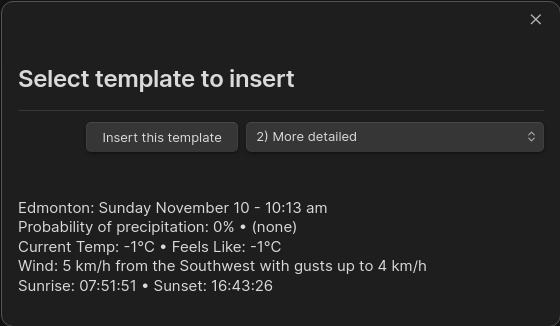
There are 8 available templates that can be inserted into your documents. These are completely customizable and can be used to display the weather in any format you wish to see. These templates can be inserted either from the command palette or from the insert weather template modal. The insert weather template modal can be displayed either from the command pallete or by selecting the thermometer icon in Obsidians ribbon bar.
Command palette...
Insert weather template modal...
For a screenshots and a much more detailed overview of the weather templates see Weather Templates.md
Obsidian Templates Support
Insertion of the weather templates can be automated by using Obsidian or Templater plugin templates. Simply add the following to your templates.
%weather1%- Inserts weather template One%weather2%- Inserts weather template Two%weather3%- Inserts weather template Three%weather4%- Inserts weather template Four%weather5%- Inserts weather template Five%weather6%- Inserts weather template Six%weather7%- Inserts weather template Seven%weather8%- Inserts weather template Eight
The strings above will autmatically be replaced with the templates data when a new file is created with the template or when you insert the macros into an existing document. Note that the Templater plugin is not required to expand the weather string templates, that is handled by this plugin itself. Remember to exclude your templates folder in the plugins settings. If you do not exclude the folder the weather templates will be expanded in your template file which you do not want to happen.
Plugin Commands
All these commands are available from the command palette
Visual Crossing Weather: Insert 'template title' Template- Inserts the named weather template into the current document.- Each of the 8 templates will appear here, but only when the template is actually defined
- The title of the template is taken from the first line of the template See Weather Templates.md for more info
Visual Crossing Weather: Insert template from Picker with Preview- Displays a modal allowing you see a preveiw of the selected template before insertion-
Visual Crossing Weather: View current weather information- Displays a modal with the current weather information
Visual Crossing Weather: Replace template strings- This will replace all occurences of the weather template strings,%weather1%to%weather8%with the corresponding defined weather templates data. This should normally not be required as the plugin should automatically do this for you. This command is available in case you wish to do the replacements in an excluded folder.
Settings
Visual Crossing API authentification Key
Enter your Visual Crossing API Key here (Required)
Go here to get your Visual Crossing API key or use this direct link to the sign up page for your free API key
Primary location
You must add at least your primary location here, the additional locations are optional
Additional locations 1 to 4
If you wish to get weather information for any additional locations you may define them here (optional)
Units of measurement
Select from the dropdown United States, Metric, United Kingdom, or Base
Note: Base returns temperatures in degrees Kelvin, not very useful in this application
Language
Select from the dropdown list your prefered language
Available languages - Arabic, Bulgarian, Chinese, Czech, Danish, Dutch, English, Farsi, Finnish, French, German, Greek Modern, Hebrew, Hungarian, Italian, Japanese, Korean, Polish, Portuguese, Russian, Serbian, Slovakian, Spanish, Swedish, Turkish, Ukrainian, Vietnamese
Note: This only changes the text returned by the API. You will need to change the default templates text to your desired language.
Exclude template folder
You must add your templates folder here. Not doing so would result in all defined weather templates in that folder being replaced with weather data. There is an optional second exclude folder which could be useful for your scripts folder or a secondary templates folder location.
Update frequency
Time interval for updating the current weather information that is displayed in the statusbar and DIV's (10, 15, 20, 30 or 60 minutes). How often the weather data is actually updated is dependent on the weather stations near your location. I Recommend setting this to 10 to 30 minutes. The weather stations near you are not likely to update in a shorter time than that.
Show weather in the statusbar
Toggles the weather display in the statusbar on or off
Cycle statusbar display
Toggles cycling the statusbar weather display between the 2 statusbar templates on or off. The templates are alternated every 30 seconds
Show weather alerts in the statusbar
Toggles the weather alerts display in the statusbar on or off
Primary statusbar template
This template will always be displayed in the statusbar when enabled
Secondary statusbar template
This template will only be displayed when statubar cycling is enabled. Each template will be displayed every 30 seconds
Weather templates
These are the 8 weather templates used to insert weather data into your documents
Note: The first line is used in the command palette menu and insert template modal to identify the template by name
This line is not inserted into your document, see the default templates for examples
For a much more detailed overview of the templates see Weather Templates.md
Dynamic Weather Using DIV's
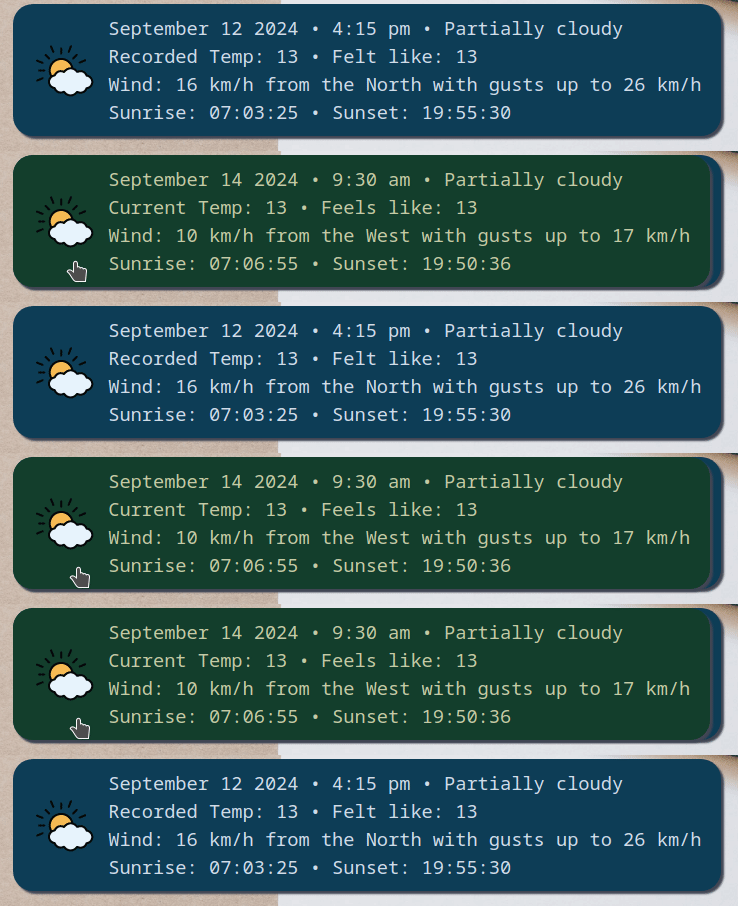
You can insert the following DIV's inside your documents to provide dynamic weather which is updated at the frequency set in the settings Update Frequency setting. The weather_historical_3 is the weather information recorded at the time the document is created and the weather_current_4 is dynamic current weather information.
<div class="weather_historical_3">%weather3%</div>
<div class="weather_current_4"></div>
For example this is what I use in my daily template...
You can use the following class's to insert the corresponding weather templates
- "weather_current_1" Inserts dynamic weather template One
- "weather_current_2" Inserts dynamic weather template Two
- "weather_current_3" Inserts dynamic weather template Three
- "weather_current_4" Inserts dynamic weather template Four
- "weather_current_5" Inserts dynamic weather template Five
- "weather_current_6" Inserts dynamic weather template Six
- "weather_current_7" Inserts dynamic weather template Seven
- "weather_current_8" Inserts dynamic weather template Eight
and...
- "weather_historical_1" Inserts static weather template One
- "weather_historical_2" Inserts static weather template Two
- "weather_historical_3" Inserts static weather template Three
- "weather_historical_4" Inserts static weather template Four
- "weather_historical_5" Inserts static weather template Five
- "weather_historical_6" Inserts static weather template Six
- "weather_historical_7" Inserts static weather template Seven
- "weather_historical_8" Inserts static weather template Eight
Note: I will be adding an example vault explaing how to accomplish this very soon
It is a very involved process which can not be summarized in this short document