Workona To Obsidian

by Holmes555
5
4
3
2
1
Score: 56/100

Description

Category: 3rd Party Integrations

The Workona To Obsidian plugin facilitates the import of resources, tabs, notes, and tasks from Workona to Obsidian, preserving your workspace structure. It generates markdown files for each item using customizable Handlebars templates, allowing for a personalized organization of the data. Users can define how the imported files are formatted, including variables like title, description, and attachments. The plugin supports importing different sections such as resources, tabs, notes, and tasks into corresponding folders within Obsidian. It also includes a feature for comparing Workona JSON files to avoid duplicates when updating Obsidian. This plugin is ideal for users who wish to sync their Workona workspace with Obsidian, offering flexibility in data organization and presentation.

Reviews

No reviews yet.

Stats

13
stars
4,109
downloads
2
forks
1,277
days
594
days
817
days
41
total PRs
6
open PRs
25
closed PRs
10
merged PRs
3
total issues
0
open issues
3
closed issues
37
commits

Latest Version

2 years ago

Changelog

Fixed empty files field.

README file from

Github

Workona To Obsidian Plugin

ko-fi paypal Latest Release Download Count GitHub License

Instructions

This plugin allow you to import all the resources, tabs, notes and tasks from you Workona generated JSON file. It will create the same folder structure as in your workspaces, having resource, tab, note and task sections.
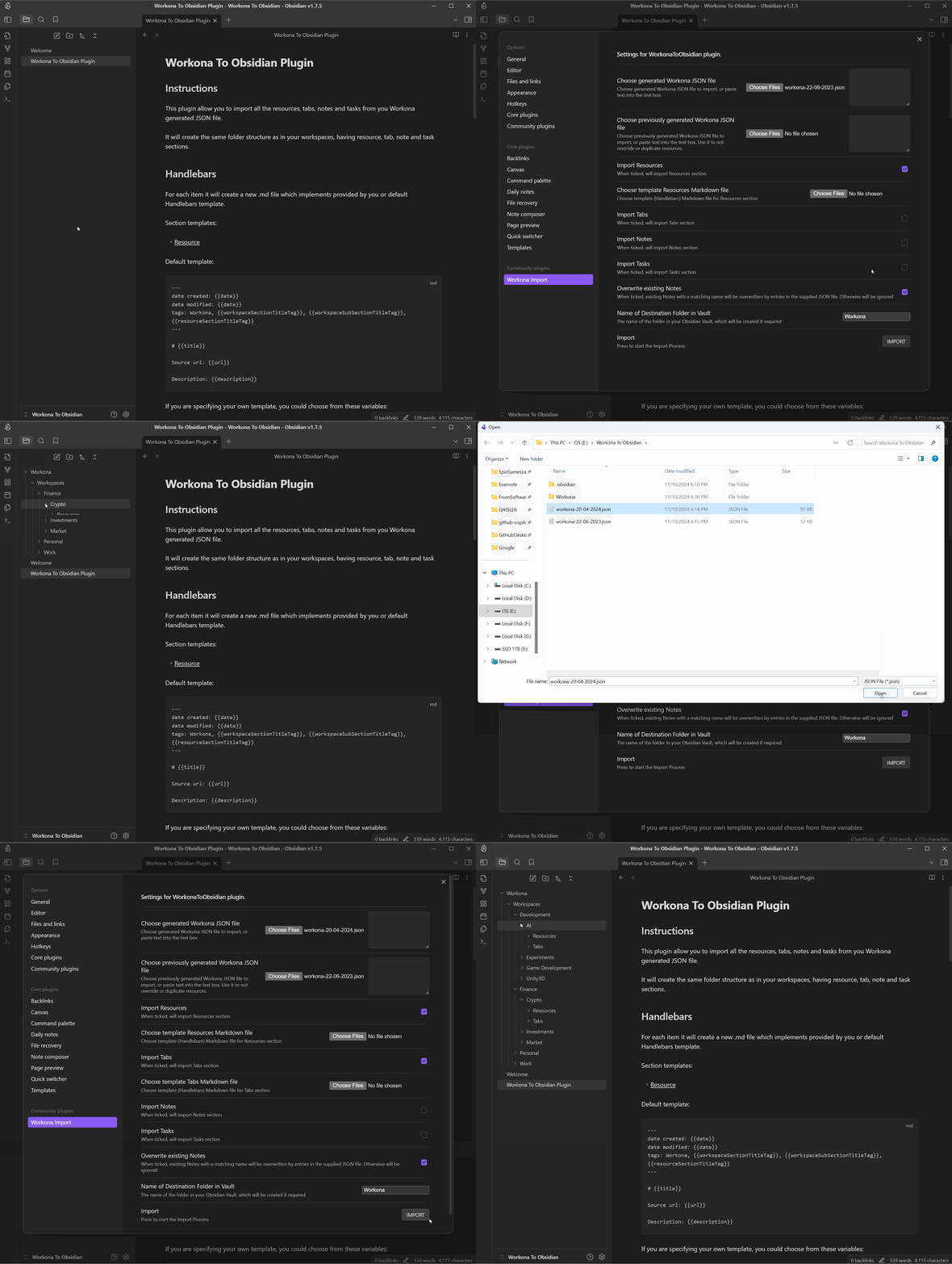
workona-to-obsidian.gif

Handlebars

For each item it will create a new .md file which implements provided by you or default Handlebars template.

Section templates:

Default template:

---
date created: {{date}}
date modified: {{date}}
tags: Workona, {{workspaceSectionTitleTag}}, {{workspaceSubSectionTitleTag}}, {{resourceSectionTitleTag}}
---

# {{title}}

Source url: {{url}}

Description: {{description}}

If you are specifying your own template, you could choose from these variables:

[title, date, workspaceSectionTitleTag, workspaceSubSectionTitleTag, resourceSectionTitleTag, url, description]

Default template:

---
date created: {{date}}
date modified: {{date}}
tags: Workona, {{workspaceSectionTitleTag}}, {{workspaceSubSectionTitleTag}}
---

# {{title}}

Source url: {{url}}

If you are specifying your own template, you could choose from these variables:

[title, date, workspaceSectionTitleTag, workspaceSubSectionTitleTag, url]

Default template:

---
date created: {{date}}
date modified: {{date}}
tags: Workona, {{workspaceSectionTitleTag}}, {{workspaceSubSectionTitleTag}}, {{noteSectionTitleTag}}
---

# {{title}}

{{description}}

---
Attachments:
{{#each attachments}}
- [{{title}}]({{url}})

{{/each}}

If you are specifying your own template, you could choose from these variables:

[title, date, workspaceSectionTitleTag, workspaceSubSectionTitleTag, noteSectionTitleTag, description, attachments]

Note: attachments is an array of objects with title and url components

Default template:

---
date created: {{date}}
date modified: {{date}}
tags: Workona, {{workspaceSectionTitleTag}}, {{workspaceSubSectionTitleTag}}, {{taskSectionTitleTag}}
---

# {{title}}

{{description}}

---
Attachments:
{{#each attachments}}
- [{{title}}]({{url}})

{{/each}}

If you are specifying your own template, you could choose from these variables:

[title, date, workspaceSectionTitleTag, workspaceSubSectionTitleTag, taskSectionTitleTag, description, attachments]

Note: attachments is an array of objects with title and url components

How to use

  • Install it through community plugins
  • Go to Workona to generate JSON file with all your data
  • In Workona To Obsidian plugin's settings choose JSON file or copy/paste the file data into the text area
  • You could choose template .md file, which should be a Handlebars template file.
  • Choose if you want to override old files with the same name
  • Specify the root folder for imported files
  • Run the import
  • You are breathtaking!

Changelog

[0.1.0] - Initial release.
[0.1.3] - Added ability to use custom template .md file for importing with your formatting.
[0.1.4] - Format default template, to make proper tags. Replace "|" in the file name.
[0.2.0] - Added ability to compare Workona JSON files and export only new resources, that way you could update Obsidian without duplicates.
[0.2.1] - Updated name to "Workona Import" due to Obsidian developer policies issue.
[0.2.2] - Prettify code with linter.
[0.3.0] - Added ability to import Tabs. Refactored folder structure. Now resources are under Resources folder, tabs - under Tabs.
[0.3.1] - Added ability to import Notes under Notes folder.
[0.3.2] - Added ability to import Tasks under Tasks folder.
[0.3.3] - Fixed empty files field.

Note

Workona To Obsidian plugin is still evolving as I'm doing it on my free time for my use.

If you want to support me: ko-fi or directly to PayPal

Feel free to open an issue or contribute.
https://github.com/Holmes555/workona-to-obsidian

Similar Plugins

info
• Similar plugins are suggested based on the common tags between the plugins.
Advanced Copy
2 years ago by leschuster
An Obsidian plugin to copy Markdown and transform it into HTML, Anki, or any custom format. Create custom profiles with versatile templates tailored to your workflow.
Archivist Importer
3 months ago by Archivist AI
Import selected vault files into Archivist campaigns.
Auto Template Trigger
3 years ago by Numeroflip
An obsidian.md plugin, to automatically trigger a template on new file creation
Blueprint
5 months ago by François Vaux
Repeatable templates plugin for Obsidian
Book Clipper
7 months ago by Hossein Fardmohammadi
Save book details from websites into your notes
Buttons
5 years ago by Sam Morrison
Buttons in Obsidian
Character Sheets
a year ago by Grayvox
📝Create character sheets for your very own traumatized little guys with Obsidian.
Codeblock Template
3 years ago by Super10
A template plugin that allows for the reuse of content within Code Blocks!一个可以把Code Block的内容重复利用模板插件!
Custom Comments
10 months ago by Jack Chronicle
Adds a method to create custom methods to enclose comments
Daily Named Folder
5 years ago by Nemo Andrea
Like daily note, but nested in a daily folder and some more improvements
Daily Notes Automater
a year ago by David Pedrero
Day One Importer
2 years ago by Marc Donald
Easily convert your Day One journals into Obsidian markdown.
Default Template
6 months ago by raeperd
obsidian plugin to set default template for new notes
Emoji selector
8 months ago by summer
Insert custom emojis with quick search, auto-suggestions, and customizable templates.
Floccus Bookmarks to Markdown
3 years ago by mddevils
From Template
5 years ago by mo-seph
Simple plugin to create Notes from a template, and fill in fields defined there
Frontmatter generator
3 years ago by Hananoshika Yomaru
A plugin for Obsidian that generates frontmatter for notes
Fuzzy Note Creator
2 years ago by HaloGamer33
An Obisidan plugin for quickly creating notes with the help of a fuzzy finder. Now with templates!
Google Keep Import
3 years ago by Dale de Silva
Imports Google Keep backup files
Handlebars Dynamic Templating
5 months ago by Hide_D
Handlebars dynamic templating. Define template files and use them dynamically via hb blocks. Template recursion is also possible.
Hotkeys for templates
5 years ago by Vinzent
Importer
3 years ago by Obsidian
Convert your data to Markdown files you can use in Obsidian. Works with Apple Notes, OneNote, Evernote, Notion, Google Keep, and many other formats.
Kobo Highlights Importer
4 years ago by Flavio Cordari
KoReader Highlight Importer
a year ago by Tahsin Kocaman
Imports highlights and metadata from KoReader into Obsidian notes
Liquid Templates
5 years ago by Diomede Tripicchio
Define your templates with LiquidJS tags support
LongtimeDiary
3 months ago by sawamaru
Show past Daily notes on the same day in previous years.
Medium Importer
2 years ago by David Zachariae
Meld Build
3 years ago by meld-cp
Write and execute (sandboxed) JavaScript to render templates, query DataView and create dynamic notes.
Micro templates
3 years ago by epszaw
Flexible embedded micro templates powered by javascript functions
Note Auto Creator
4 years ago by Simon T. Clement
An Obsidian plugin for automatically creating notes when linking to non-existing notes
Note to RED
a year ago by Yeban
一键将 Obsidian 笔记转换为小红书图片进行导出
Obsidian Dynamic Embed
4 years ago by Ivaylo Dimitrov Dabravin
Paper Importer
2 years ago by Zhe Chen
An Obsidian plugin to facilitate importing papers from arXiv
Pug Templates
2 years ago by Nicholas Wilcox
An Obsidian plugin that enables the usage of Pug templates.
Ruled template
3 years ago by YPetremann
An obsidian plugin that check rules to select which template to use.
Search Templates Library
3 years ago by Pentchaff
Obsidian plugin that allows to store searches templates for later use, and displays search results both in the search view and graph view.
Simple Vault Importer
a year ago by WebInspectInc
Smart Export
3 months ago by Iván Sotillo
Plugin that follows wikilinks to a configurable depth, joining the notes into a single export.
Smart Templates
2 years ago by 🌴 Brian Petro
Smart Templates is an AI powered templates for generating structured content in Obsidian. Works with Local Models, Anthropic Claude, Gemini, OpenAI and more.
Style Importer
3 years ago by Josh Rouwhorst
Obsidian.md plugin to import a stylesheet from a URL to the snippets folder.
Template by Note Name
2 years ago by Jacob Learned
A simple Obsidian plugin to automatically template notes based on their title
Template Filename
a year ago by Callum Alpass
Obsidian plugin for creating notes with templatable filenames
Templated daily notes
2 years ago by digitorum
Allow to create templayted daily note in specific folder
Templater
6 years ago by SilentVoid
A template plugin for obsidian
Templify
2 years ago by Boninall
A releases repo for custom editable template in Obsidian.
TimeSaver
2 years ago by tommy.li
Varinote
a year ago by Giorgos Sarigiannidis
A plugin for Obsidian that allows you to add variables in Templates and set their values during the Note creation.
Visual Crossing Weather
2 years ago by willasm
Xiaohongshu Importer
a year ago by bnchiang96
An Obsidian plugin to import Xiaohongshu (小红书) notes into your vault. Extract titles, content, images, videos, and tags from share links, with customizable categories and optional local media downloads.
YouTube Template
2 years ago by sundevista
📺 A plugin that would help you to fetch YouTube videos data into your vault.


