You and Your Research

by Neo Zhang
5
4
3
2
1
Score: 44/100

Description

Category: 3rd Party Integrations

The You and Your Research plugin consolidates tools for research and information retrieval into an integrated interface within Obsidian. It allows users to streamline tasks such as extracting web content and generating research notes using OpenAI models. The plugin supports inputting URLs for content extraction, linking local files for deeper research, and saving notes directly into your vault. Users can customize settings, including OpenAI API keys, preferred file locations, and tag management. By centralizing research tasks, it reduces the need for context switching and enhances focus. This plugin is ideal for knowledge workers and individuals conducting intensive research or planning activities.

Reviews

No reviews yet.

Stats

20
stars
769
downloads
1
forks
688
days
661
days
661
days
1
total PRs
0
open PRs
0
closed PRs
1
merged PRs
4
total issues
2
open issues
2
closed issues
93
commits

Latest Version

2 years ago

Changelog

Added support for GPT-4o-mini.

README file from

Github

Research is an essential task performed by 1 billion knowledge workers. Many people also do research in their daily lives, such as travel planning.

Research requires intensive information retrieval, usually from long-form materials. This requires focus and attention. However, the current toolset for researchers usually requires them switch among many contexts: search engines, AI chats, file explorers, etc. This is very inefficient. Consolidating these tools into a single, integrated interface, like Obsidian, can greatly improve research efficiency. This allows for seamless transitions between tasks without disrupting focus, creating a flow just for You and Your Research.

The name of the plugin was obviously inspired by the infamous speech by Dr. Richard W. Hamming in 1986. You can retrieve the text at https://www.cs.virginia.edu/~robins/YouAndYourResearch.html.

Get Started

Install and enable the plugin from Obsidian's Community Plugins platform.
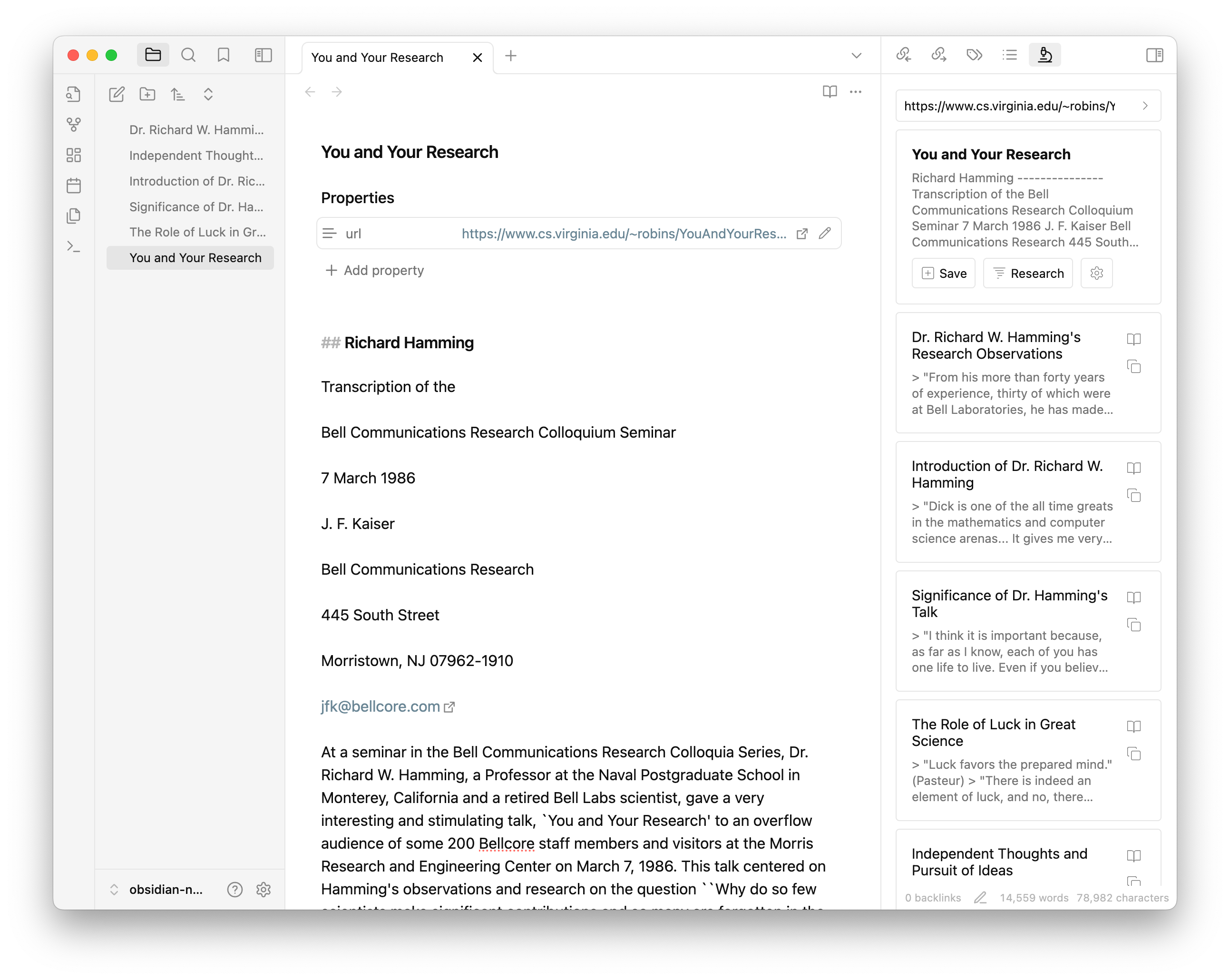
Main UI

Setup

REQUIRED You will need to bring your own API key for using OpenAI. You can get it from the OpenAI Dashboard. Add it in the plugin settings.

You can also provide a custom endpoint for OpenAI API. This is useful if you are using a self-hosted version of OpenAI or compatible API.

You can choose gpt-3.5-turbo or gpt-4o as your model of choice. You can also use a custom model name such as llama3-70b-8192. Refer to the API documentation for available model names.

OPTIONAL The plugin also uses Jina AI to extract the content of the web pages you read. You can also bring your own API key for using Jina AI. You can get it from the Jina website. Add it in the plugin settings.

OPTIONAL You can also set your preferred location and tag for saved files. The default location will be the root of your vault.
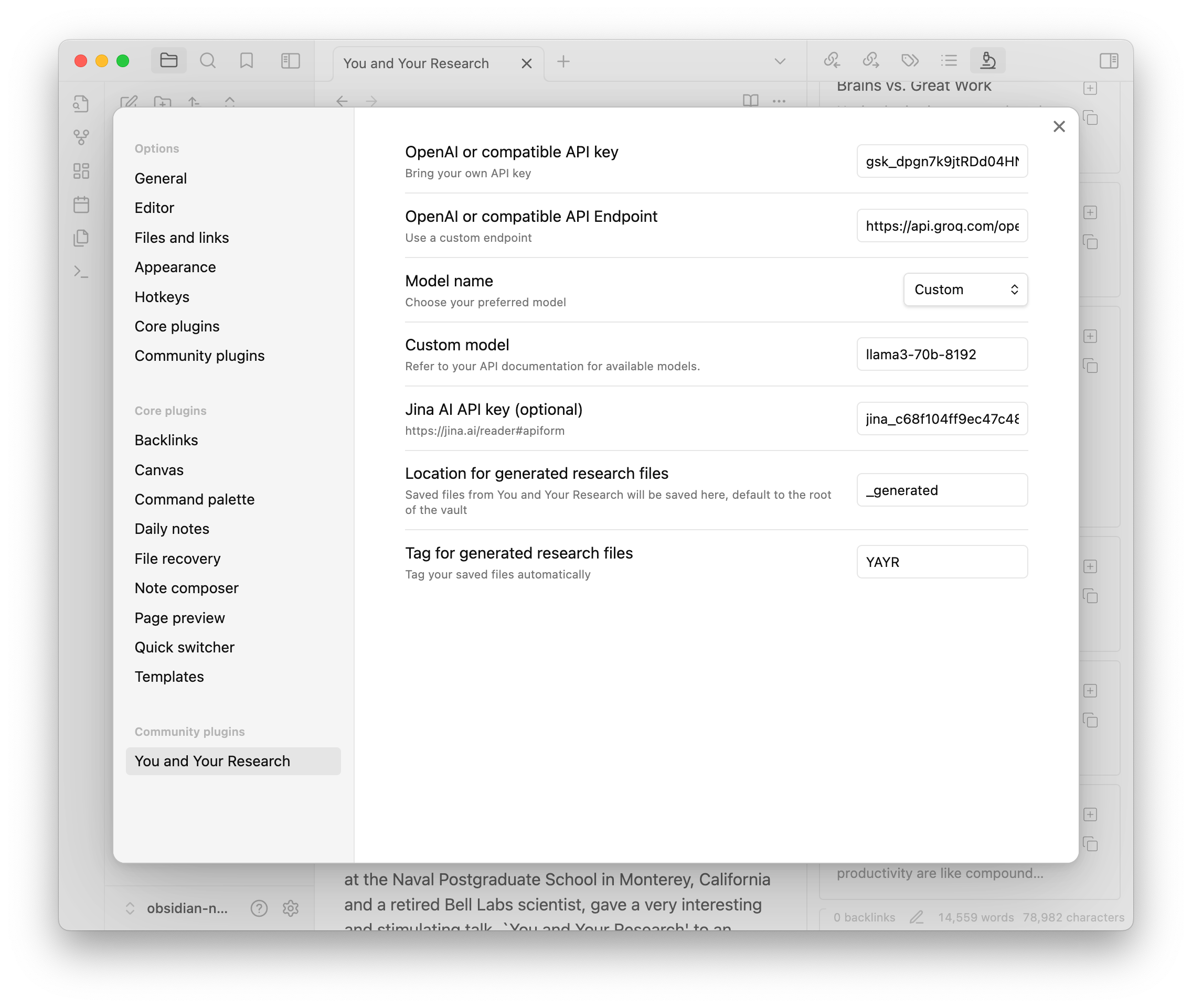
Settings

Research at Work

You will see the plugin in the right sidebar, with an icon of microscope. Here is what you can do with it:

  1. Web content
    • You can input any URLs in the search box and press Enter (or click the search button). The plugin will then use Jina AI to extract the content of the web page and display it as a card.
    • You can save the card to your vault by clicking the "Save" button, which will turn to an "Open" button to open the saved note. Saved card will have a "URL" property.
    • Or you can click "Research" button to use OpenAI to generated research notes.
  2. Local content
    • You can input double bracket "[[" (just like you do in the Obsidian editor). The plugin will start to search your vault for files.
    • Choose the one you want to resarch on and click "Research" button.
  3. Research
    • The research notes will also be displayed as cards. You can click them to see in full details.
    • You can click the "Copy" button to copy them to your clipboard.
    • Click the "Save" button to save them to your vault, which will turn to an "Open" button to open the saved note.
    • Saved research notes will have a "URL" property, backlinking to its original note.

Future Development

This is an opinionated software. I created it to help with my own work. And it did work for me. For future develpoment, I do have some ideas on mind:

  • Importing YouTube videos and podcasts
  • Better integration with the Obsidian editor
  • Searching the web (?)
  • Streaming the output (?)

Please show your support if you find it helpful:

Similar Plugins

info
• Similar plugins are suggested based on the common tags between the plugins.
AI Commander
3 years ago by Simon Yang
AI Companion
5 months ago by Kowshik
An Obsidian plugin that provides AI assistance using OpenAI's API, triggered by the `/ai` slash command.
AI for Templater
2 years ago by TfTHacker
Extends Templater with AI Chat commands using the OpenAI Client Library
AI Helper
a year ago by David Connolly
AI Image OCR
8 months ago by Rootiest
Obsidian plugin for AI-powered text extraction from images
AI Notes Summary
3 years ago by R. Ian Bull (irbull)
An Obsidian plugin that uses ChatGPT to generate a summary of referenced notes
AI Transcriber
4 months ago by Musashino Software
AI-powered speech-to-text transcription using OpenAI GPT-4o and Whisper APIs
AI-AnkiSync
a year ago by goev
ai-writer
2 years ago by Donovan Ye
A plugin for Obsidian that uses AI to help you write better and faster.
Aloud
2 years ago by Adrian Lyjak
Obsidian TTS Plugin
Atomizer
a year ago by Zac Bagley
An AI-Driven Obsidian plugin designed to turn lengthy text into insightful atomic notes. Perfect for turning source notes into ideas in a Zettelkasten workflow.
Auto Tag
3 years ago by Control Alt
Easily generate relevant tags for your Obsidian notes.
brAIn
3 years ago by lusob
Canvas LLM Extender
3 years ago by Pasi Saarinen
Let the OpenAI LLM add nodes to your Obsidian canvas
CoCo AskAI
2 years ago by Yukee
CoCo-AskAI is an Obsidian plugin that enables AI-powered note assistance, enhancing the writing experience with customizable functions.
Entity Linker
2 years ago by Ankush-Chander
Automatically link text to corresponding entities
Explain Selection With AI
2 years ago by Ben Wurster
This is my first go at making an Obsidian plugin to elaborate on and describe selected bits of information and their context.
Gene 🧬
3 years ago by Matiss Jurevics
An AI assistant plugin for Obsidian
Glasp
a year ago by Glasp
Obsidian plugin to import highlights and notes from Glasp
Hydrate
5 months ago by hydrateagent
Intelligence
2 years ago by John Mavrick
Jura Links
2 years ago by Lukas Collier & Emi Le
Verlinke deine Normangaben, Aktenzeichen oder Fundstellen in deiner Obsidian Notiz mit Gesetzesanbietern.
Large Language Models
a year ago by eharris128, r-mahoney, & jsmorabito
The LLM plugin gives Obsidian users access to local and web-based, large language models via several chat interfaces: modal, widget, FAB window, and commands.
LLM docs
a year ago by Shane Lamb
Chat with LLM in regular markdown files in Obsidian
Notes Refresher
2 years ago by Connor Park
Obsidian plugin for AI-generated note refreshers
NoteSmith
8 months ago by csteamengine
Papers
8 months ago by William Liang
An obsidian plugin to retrieve and import research papers.
Quadro
2 years ago by Chris Grieser (aka pseudometa)
Obsidian Plugin for social-scientific Qualitative Data Analysis (QDA). An open alternative to MAXQDA and atlas.ti, using Markdown to store data and research codes.
Reference Map
3 years ago by Anoop K. Chandran
Reference and citation map for literature review and discovery
Research Quest
a year ago by Nathan Arthur
Scholar
3 years ago by Shannon Shen
Streamline Research Workflow in Obsidian
Semantic Search
3 years ago by bbawj
Semantic search for Obsidian.md
Silicon AI
3 years ago by deepfates
Add some intelligence to your notes with Silicon AI for Obsidian
Text Generator
4 years ago by Noureddine Haouari
Text Generator is a versatile plugin for Obsidian that allows you to generate text content using various AI providers, including OpenAI, Anthropic, Google and local models.
text2anki-openai
3 years ago by Mani Batra
Topic Linking
4 years ago by Liam Magee
An Obsidian plugin for finding and linking topics in a vault.
Vault LLM Assistant
a year ago by Brians Tjipto
An obsidian notebook plugin that uses LLM (OpenAI or Gemini) to answer questions and create new notes about your vault