BibDesk Integration

by Andrea Alberti
5
4
3
2
1
Score: 50/100

Description

The BibDesk Integration plugin connects Obsidian with the macOS BibDesk application, allowing users to manage and open PDFs linked to BibTeX entries. It works with external BibTeX files and uses BibDesk's macOS bookmark system, ensuring seamless file access even if files are moved or renamed. The plugin features an optimized BibTeX parser designed for speed and efficiency, processing data on a separate thread to minimize performance impact. It integrates with the PDF++ plugin, enabling users to open PDFs stored outside their vault. The plugin also provides a fuzzy search modal for selecting papers and supports large external libraries without requiring them to be stored in the Obsidian vault.

Reviews

No reviews yet.

Stats

6
stars
873
downloads
0
forks
451
days
52
days
77
days
0
total PRs
0
open PRs
0
closed PRs
0
merged PRs
5
total issues
2
open issues
3
closed issues
132
commits

Latest Version

3 months ago

Changelog

Release notes

New features

  • A new Bookmark Resolver section is now available in the plugin settings (macOS only), giving you direct control over how PDF links from your BibDesk library are opened.
  • The bookmark resolver is now fully notarized by Apple.

Full changelog: https://github.com/alberti42/obsidian-bibdesk-integration/compare/1.2.0...1.2.1

README file from

Github

BibDesk Integration Plugin for Obsidian

This plugin integrates BibTeX libraries with the PDF++ plugin in Obsidian, enabling you to manage and open PDFs associated with bibliography entries directly from Obsidian. It works with external BibTeX files, parsing them in the background for a seamless experience.

[!NOTE] This plugin works with any standard BibTeX library. However, some features are designed specifically for libraries maintained with BibDesk on macOS, such as resolving bdsk-file-<NUMBER> fields — macOS bookmarks that allow seamless file access even if files are renamed or moved.

Unlike most BibTeX plugins for Obsidian, this plugin is designed to handle large libraries with 10,000+ papers:

  • parsing runs on a dedicated background thread to keep the UI responsive (no freezing, not even for an instant)
  • using a custom high-performance parser built with Peggy makes parsing large BibTex files faster than any TypeScript-based BibTeX parsers I could test, and even BibDesk's own parser.

Additional Features

  • Automatic reloading: The BibTeX library is also watched for changes and re-parsed automatically in the background whenever the bib file is updated
  • External Library Support: Your BibDesk library does not need to reside within your Obsidian vault, making it ideal for large libraries (several GBs).
  • Integration with PDF++: Opens PDFs stored outside your Obsidian vault via the PDF++ plugin.

Screenshots

Configuration Pane
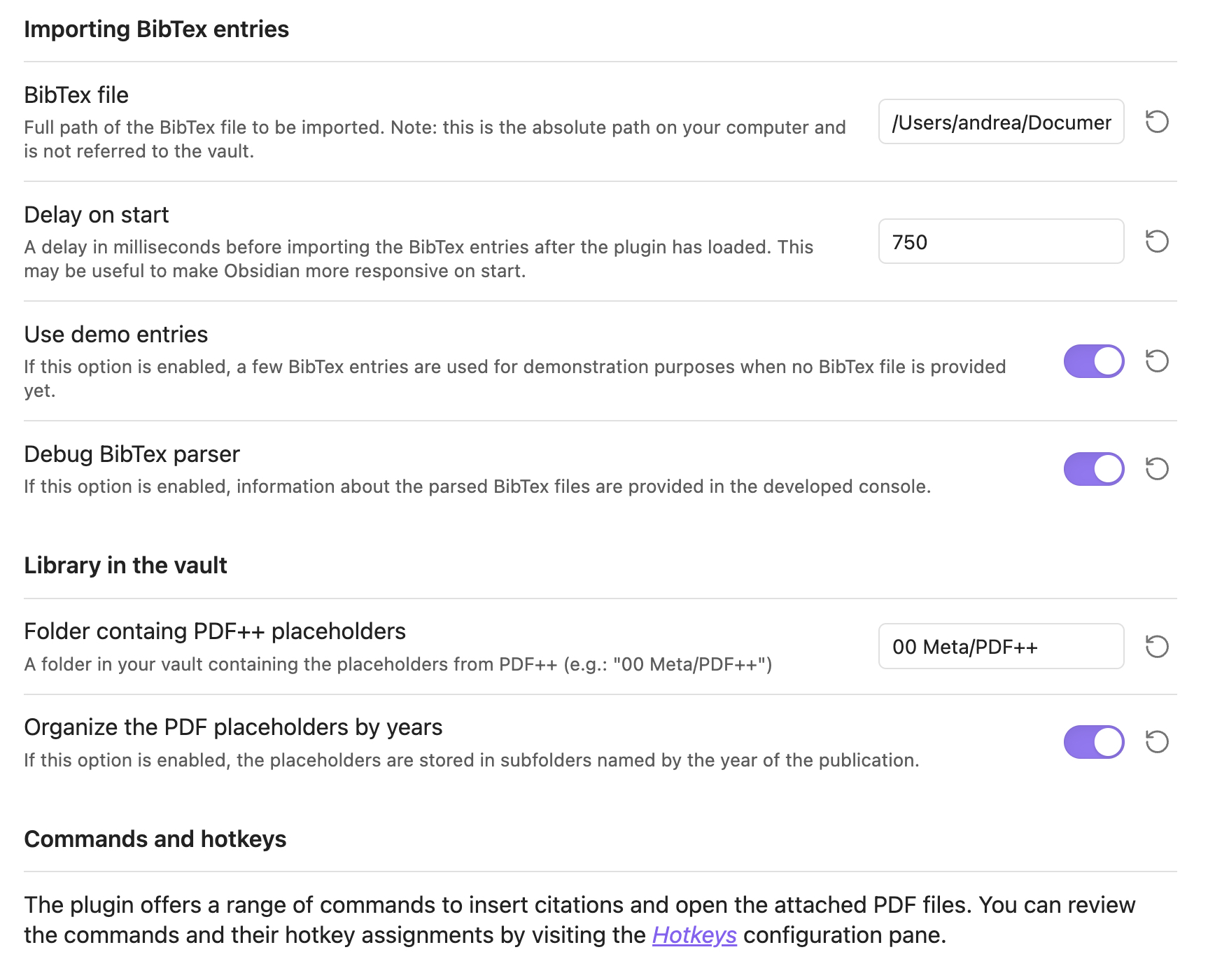
Configuration Pane

Fuzzy Search Modal for Paper Selection
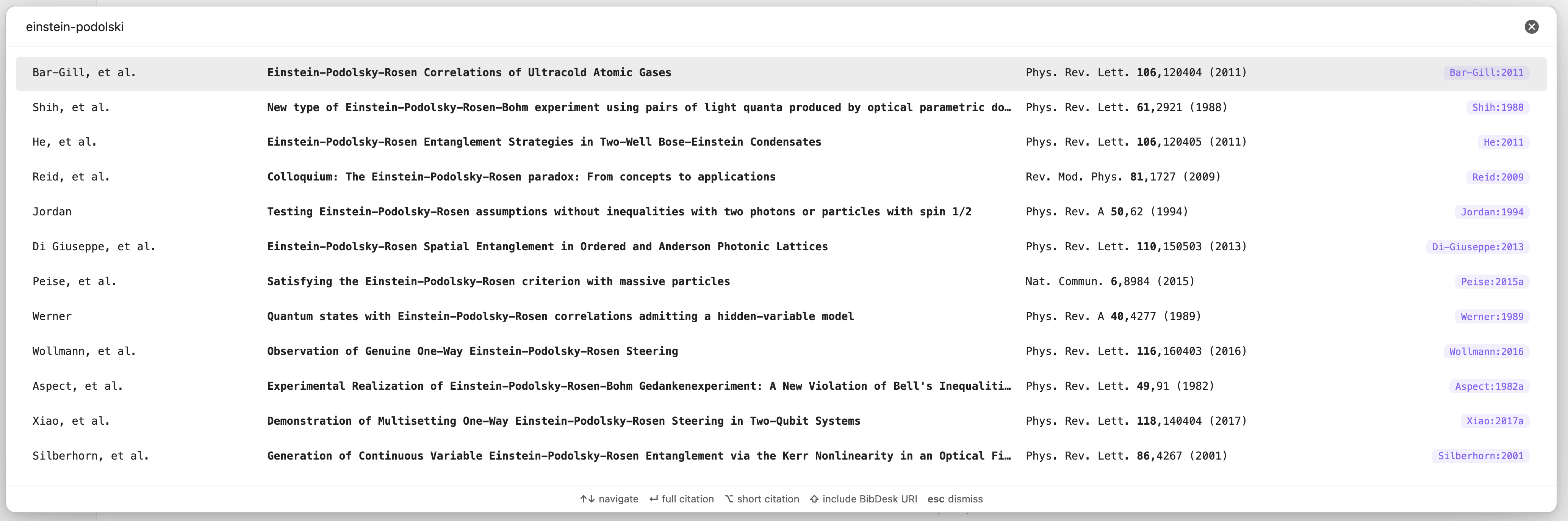
Fuzzy Search

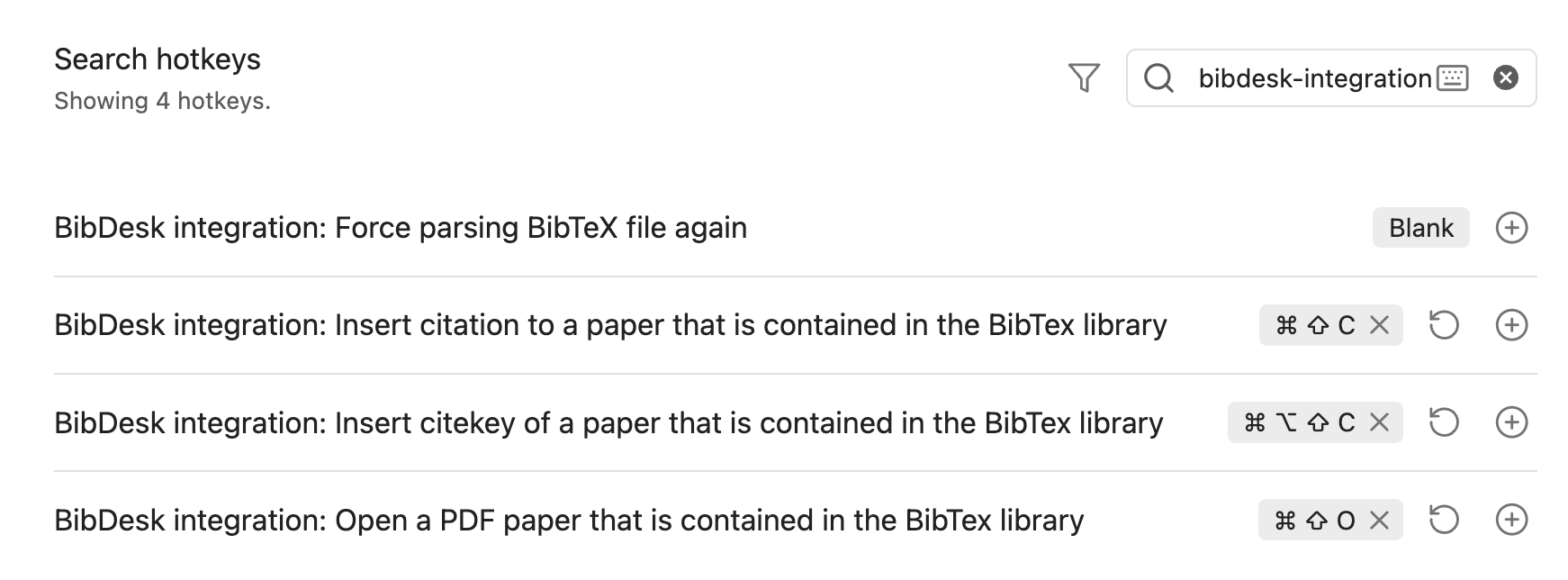
Recommended Hotkeys
Hotkeys

Installation

To install the plugin manually, follow these steps:

  1. Clone the Repository:

    git clone https://github.com/alberti42/obsidian-bibdesk-integration.git
    
  2. Install Node.js Packages:

    npm install
    
  3. Generate the Parser for BibTeX Files:

    npm run grammar
    
  4. Build the macOS Bookmark Resolver:

    npm run bookmark_resolver
    

    Ensure you have the swiftc compiler available via the command line. Refer to Xcode’s documentation if needed.

  5. Transpile the Plugin:

    npm run build
    
  6. Verify Output: Ensure that the dist folder contains styles.css, bookmark_resolver, main.js, and manifest.json.

  7. Copy or Link Plugin Files to Obsidian:

    • Create the plugin folder in your vault:
      mkdir -p <YOUR_VAULT_FOLDER>/.obsidian/plugins/bibdesk-integration
      
    • Copy or create symbolic links from the dist folder to the plugin folder created in step 7. This is helpful if you plan to further develop the plugin.

Support the Project

If you find this plugin helpful, consider supporting its development:

About the Author

  • Author: Andrea Alberti
  • GitHub: alberti42
  • Donations: Buy Me a Coffee

Please feel free to contribute or report any issues in the GitHub repository.

Similar Plugins

info
• Similar plugins are suggested based on the common tags between the plugins.
Omnisearch
4 years ago by Simon Cambier
A search engine that "just works" for Obsidian. Supports OCR and PDF indexing.
Annotator
5 years ago by Elias Sundqvist
A plugin for reading and annotating PDFs and EPUBs in obsidian.
PDF++
2 years ago by Ryota Ushio
PDF++: the most Obsidian-native PDF annotation & viewing tool ever. Comes with optional Vim keybindings.
Markmind
5 years ago by Mark
A mind map, outline for obsidian,It support mobile and desktop
Pandoc
5 years ago by Oliver Balfour
Pandoc document export plugin for Obsidian (https://obsidian.md)
Obsidian Enhancing Export
4 years ago by YISH
This is an enhancing export plugin base on Pandoc for Obsidian (https://obsidian.md/ ). It's allow you to export to formats like Markdown、Markdown (Hugo https://gohugo.io/ )、Html、docx、Latex etc.
Text Extractor
3 years ago by Simon Cambier
A (companion) plugin to facilitate the extraction of text from images (OCR) and PDFs.
Better Export PDF
2 years ago by l1xnan
Obsidian PDF export enhancement plugin
PDF Highlights
5 years ago by Alexis Rondeau
Extract highlights, underlines and annotations from your PDFs into Obsidian
Better PDF
5 years ago by MSzturc
Goal of this Plugin in to implement a native PDF handling workflow in Obsidian
Extract PDF Annotations
4 years ago by Franz Achermann
This is a plugin for https://obsidian.md. It extracts Annotations from PDF Files.
Marker PDF to MD
2 years ago by L3N0X
Make use of different AI models to convert your pdfs into markdown with perfect ocr, latex formulas, tables, images and more! Supports Mistral AI OCR (free) and self hosted variants!
PDF break page
2 years ago by CG
Plugin for obsidian that adding shortcuts to create breakpages for pdf exports.
Awesome Reader
3 years ago by AwesomeDog
Make Obsidian a proper Reader.
Slide Note
3 years ago by Jinyan Xu
Pretty BibTeX
4 years ago by Sandro Figo
A plugin for Obsidian that shows raw BibTeX bibliography entries in a prettier way. (https://obsidian.md)
LLM Summary
2 years ago by QSun
wip
SwiftLaTeX Render
2 years ago by gboyd068
PDF Folder to Markdowns
a year ago by CrisHood
Convert a folder of PDFs into a folder of Markdown files with embedded PDFs. This plugin is useful for users who want to migrate their PDF notes from different apps (e.g., Boox) or organize their reference materials inside Obsidian.
BibTeX Manager
2 years ago by Akop Kesheshyan
Create literature notes in Obsidian from BibTeX entries, display formatted reference lists, and instantly generate citations.
PDF Paste
a year ago by Cormac
Paperless
a year ago by Talal Abou Haiba
PDF2Image
2 years ago by RasmusAChr
Handwriting OCR
9 months ago by ikmolbo
Transform handwritten documents and scanned images into editable text with Handwriting OCR's AI-powered handwriting to text conversion.
Deep Sit
5 months ago by Ahmed Bassiouni
downloadPDF
2 years ago by Frieda
BibTeX Scholar
7 months ago by Qilong Liu
Make your literature review and writing contextual and frictionless—right inside your Obsidian vault!
logos-refs
a year ago by Joey Kilgore
Easily take refs from Logos into Obsidian
LiteCite
8 months ago by ras0q
A lightweight Obsidian plugin that creates citation notes from a BibTeX / BibLaTeX file
Paste Quote
a year ago by Jacob Williams
Helps with formatting and citing quotes when pasting into Obsidian.
Bibtex Entry View
9 months ago by Kyoungdeuk
Load the bibtex entry of a given bibkey from a given bib file and show the entry in the code block of bibkey.