Bibtex Entry View

by Kyoungdeuk
5
4
3
2
1
Score: 51/100

Description

Category: Note Enhancements

The Bibtex Entry View plugin renders formatted bibliographic entries from a .bib file directly in your notes by replacing bibkey code blocks with detailed reference information. It detects the matching entry, displaying the citation key, author or editor names, and other fields in a customisable order defined in the settings. If the key is not found, it highlights the block in red with a strike-through to signal an invalid reference. While typing a bibkey, the plugin suggests matches based on partial keyword searches of selected fields, improving speed and accuracy when adding citations. Users can select or import a .bib file into their vault, set preferred display fields, and have the plugin sort and present them neatly.

Reviews

No reviews yet.

Stats

1
stars
223
downloads
0
forks
274
days
274
days
281
days
0
total PRs
0
open PRs
0
closed PRs
0
merged PRs
0
total issues
0
open issues
0
closed issues
0
commits

RequirementsExperimental

  • .bib file stored or linked in the vault

Latest Version

9 months ago

Changelog

0.2.4.1 minor fix for coding style consistency update for the community plugin

README file from

Github

bibtex entry view, a plugin for obsidian

what it carries out

renders bibkey codeblock
sample.png

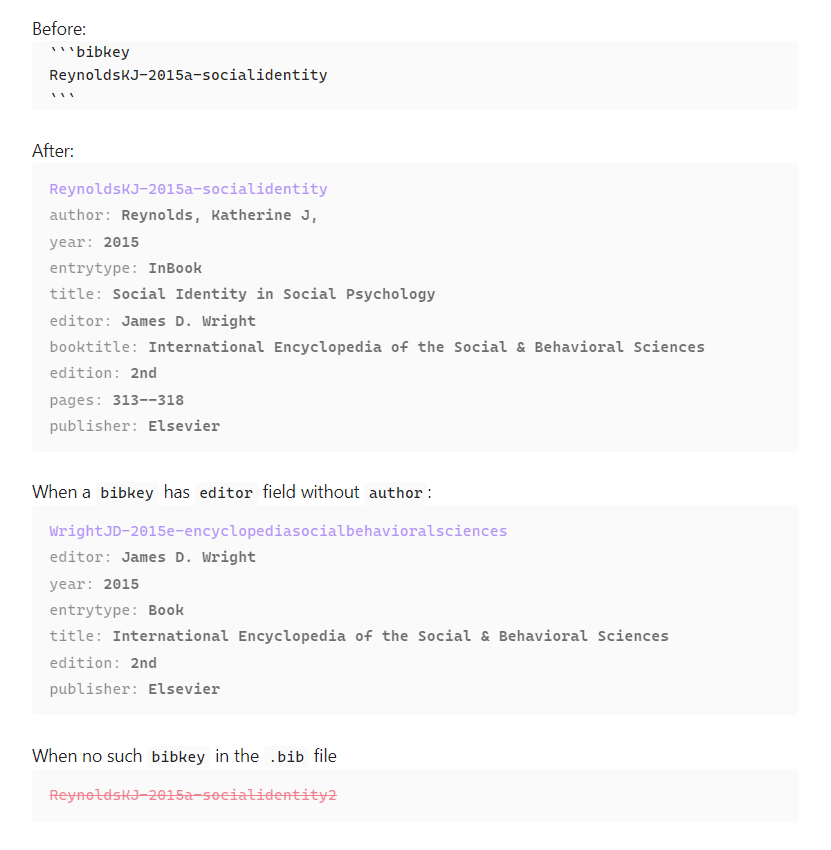
  • If the plugin find the bibkey in the .bib file, the codeblock (first codeblock above) is replaced with the entry view of the bibkey (second codeblock).
  • If the plugin cannot find the bibkey in the .bib file, the codeblock is rendered in red colored text and canceled line (fourth codeblock).

suggests the match
suggestion-article.png suggestion-book.png

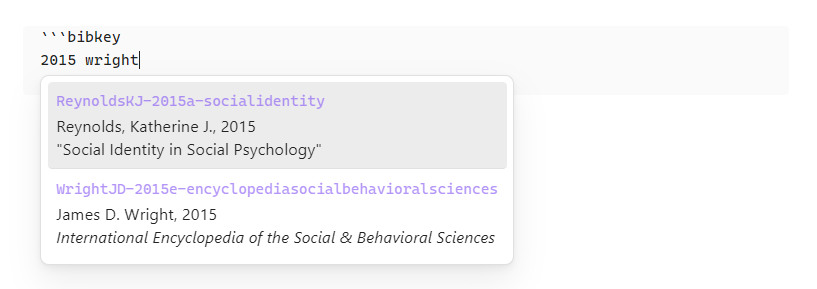
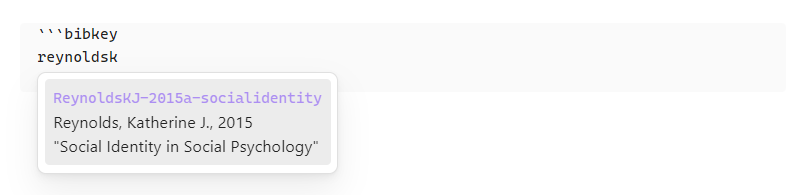
  • Suggested list will be shown while typing {bibkey} as follows. (v. 0.2.0)
  • each keyword should be at least two letters long.
  • The keywords for suggestion should be partial value of any fields to display and sort in the settings. (v. 0.2.1)

What's in the .bib file which is generated by jabref.

@InBook{ReynoldsKJ-2015a-socialidentity,
  author           = {Reynolds, Katherine J,},
  booktitle        = {International Encyclopedia of the Social & Behavioral Sciences},
  citationkey      = {ReynoldsKJ-2015a-socialidentity},
  edition          = {2nd},
  editor           = {James D. Wright},
  pages            = {313--318},
  publisher        = {Elsevier},
  title            = {Social Identity in Social Psychology},
  year             = {2015},
  abstract         = { ... },
  creationdate     = {2024-07-22T13:12:48},
  doi              = {10.1016/B978-0-08-097086-8.24064-6},
  modificationdate = {2025-06-23T21:48:18},
}

@Book{WrightJD-2015e-encyclopediasocialbehavioralsciences,
  citationkey      = {WrightJD-2015e-encyclopediasocialbehavioralsciences},
  edition          = {2nd},
  editor           = {James D. Wright},
  publisher        = {Elsevier},
  title            = {International Encyclopedia of the Social & Behavioral Sciences},
  year             = {2015},
  creationdate     = {2025-06-23T18:01:38},
  modificationdate = {2025-06-23T21:48:59},
}

what the plugin renders in the codeblock

  • In the first line,
    • it shows the bibkey in the accent color of obsidian.
  • In the second line,
    • If the bibtexentry has author field, it shows the author field name and its value right after the bibkey.
    • If the bibtexentry does not have author field but an editor field, it shows the editor field name and its value right after the bibkey.
    • All kinds of name are in "last, first ..." format. (v. 0.2.2)
  • In the third line and so on,
    • it sorts all the other field names and their values by the order of fields to display and sort in the settings and shows them.

so, how a user can use it

before use it

  • Put the .bib file in the root of the vault.
  • Or, import one in the settings.
  • Or, make a symbolic link to user's own .bib file in the root of the vault.

settings tab example
settings.png

choose a .bib file

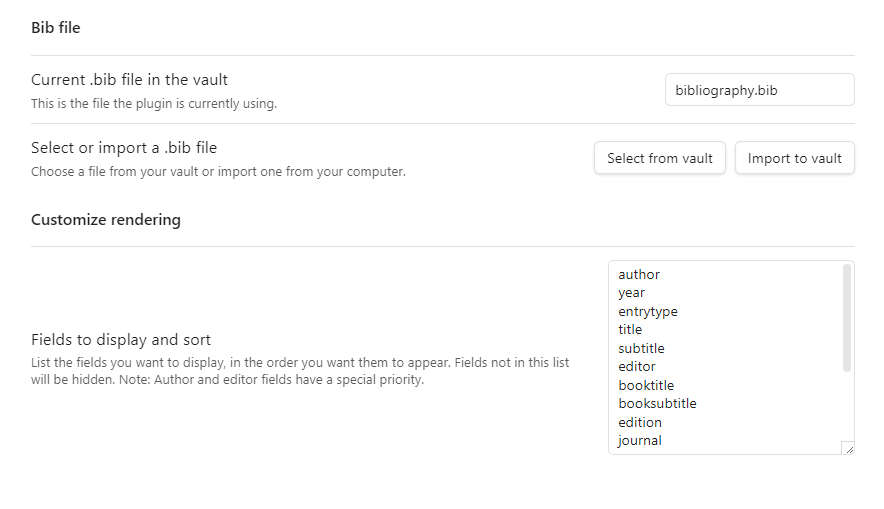
  • Initially, the current .bib file is empty.
  • A user needs to choose the .bib file or the symbolic link in the vault.
  • Or, a user can import a .bib file from outside the vault into the vault.
    • Beware: This will overwrite any file that has the same name in the vault.

customize rendering

  • A user can choose fields and their order to render.

in a note

  • Write a codeblock in the following format
```bibkey
{bibkey}
```

known bug or malfunctioning

  • It seems that the plugin does not show suggestions irregularly when using a plugin Various Complements. Looking into this problem. (@ v. 0.2.0)

what is planned to add next

  • adding a command to manually update the entry indicies when updating the target .bib file of the symbolic link.
  • fuzzy search for autocompletion suggestion

support

  • If you like this project, please support.

ko-fi

license

MIT

Similar Plugins

info
• Similar plugins are suggested based on the common tags between the plugins.
Zotero Desktop Connector
4 years ago by mgmeyers
Insert and import citations, bibliographies, notes, and PDF annotations from Zotero into Obsidian.
Pandoc Reference List
4 years ago by mgmeyers
Display a formatted reference in Obsidian's sidebar for each pandoc citekey in the active document.
Pretty BibTeX
4 years ago by Sandro Figo
A plugin for Obsidian that shows raw BibTeX bibliography entries in a prettier way. (https://obsidian.md)
Quran Lookup
3 years ago by Abu Ibrahim
Retrieve Quran verses in Obsidian.md easily with this simple text replacement plugin
Reference Map
3 years ago by Anoop K. Chandran
Reference and citation map for literature review and discovery
LDS Scriptures Reference
3 years ago by pacokwon
Link LDS Scriptures & General Conference Talks in Your Obsidian Notes!
ZotLit
3 years ago by AidenLx
A third-party project that aims to facilitate the integration between Obsidian.md and Zotero, by providing a set of community plugins for both Obsidian and Zotero.
External Links
2 years ago by Juan Vimberg
Simple Citations
2 years ago by masaki39
Add & update simple literature notes from Zotero.
BibTeX Manager
2 years ago by Akop Kesheshyan
Create literature notes in Obsidian from BibTeX entries, display formatted reference lists, and instantly generate citations.
LDS Library Reference
2 years ago by Paco Kwon, Stein Ingebretsen
Link LDS Scriptures in Your Obsidian Notes!
Citations
5 years ago by Jon Gauthier
Obsidian plugin which integrates your academic reference manager with the Obsidian editor. Search your references from within Obsidian and automatically create and reference literature notes for papers and books.
Wikipedia
5 years ago by Jonathan Miller
Grabs information from Wikipedia for a topic and brings it into Obsidian notes
Copy as LaTeX
4 years ago by mo-seph
Quick plugin to be able to copy/paste from Obsidian/Markdown into a Latex document
Bible Reference
4 years ago by tim-hub
Take Bible Study notes easily in the popular note-taking app Obsidian, with automatic verse and reference suggestions.
Perplexity Converter
a year ago by Henrik Seidel
This plugin fixes sources (citations, Quellen) and their links in text pasted from Perplexity.
Latex Exporter
a year ago by Matthew S. Scott
BibDesk Integration
a year ago by Andrea Alberti
Integration of Obsidian with bibtex files
Paste Quote
a year ago by Jacob Williams
Helps with formatting and citing quotes when pasting into Obsidian.
Bible sidecar
a year ago by Janis Ringli
This repository contains a plugin for obsidian that lets you view the bible in a sidebar within obsidian.
logos-refs
a year ago by Joey Kilgore
Easily take refs from Logos into Obsidian
Hadith Lookup
a year ago by Adnan Mukhtar
An Obsidian plugin that uses selected text as a reference ID to lookup and insert Quran and Hadith text and translation using the Hadith Unlocked API (https://hadithunlocked.com)
Citation Callouts
9 months ago by Michael Marvive
Obsidian Plugin that formats a quote with a citation in a custom callout
LiteCite
8 months ago by ras0q
A lightweight Obsidian plugin that creates citation notes from a BibTeX / BibLaTeX file
BibTeX Scholar
7 months ago by Qilong Liu
Make your literature review and writing contextual and frictionless—right inside your Obsidian vault!