
README file from
GithubSimple Citations


This is an Obsidian plugin that reinforces the workflow between Zotero and Obsidian. It enables the importation of literature notes from Zotero, and use them not only as the knowledge base but also the references for your writing. Requiring the installation of Better Bibtex for Zotero and Pandoc.
✨ Features
Add & update literature notes from the bibliography file in one go
command: Add literature note
The dataview query in the gif above is as follows:
table without id
authors[0] as FirstAuthor, journal, year, title,
link(file.name, "Note") as Note,
elink(zotero,"Zotero") as Zotero,
elink(doi,"DOI") as DOI
from "Literatures" // set the folder name of the literature notes
sort file.ctime desc
limit 100
And the notes generated by the command is as follows:
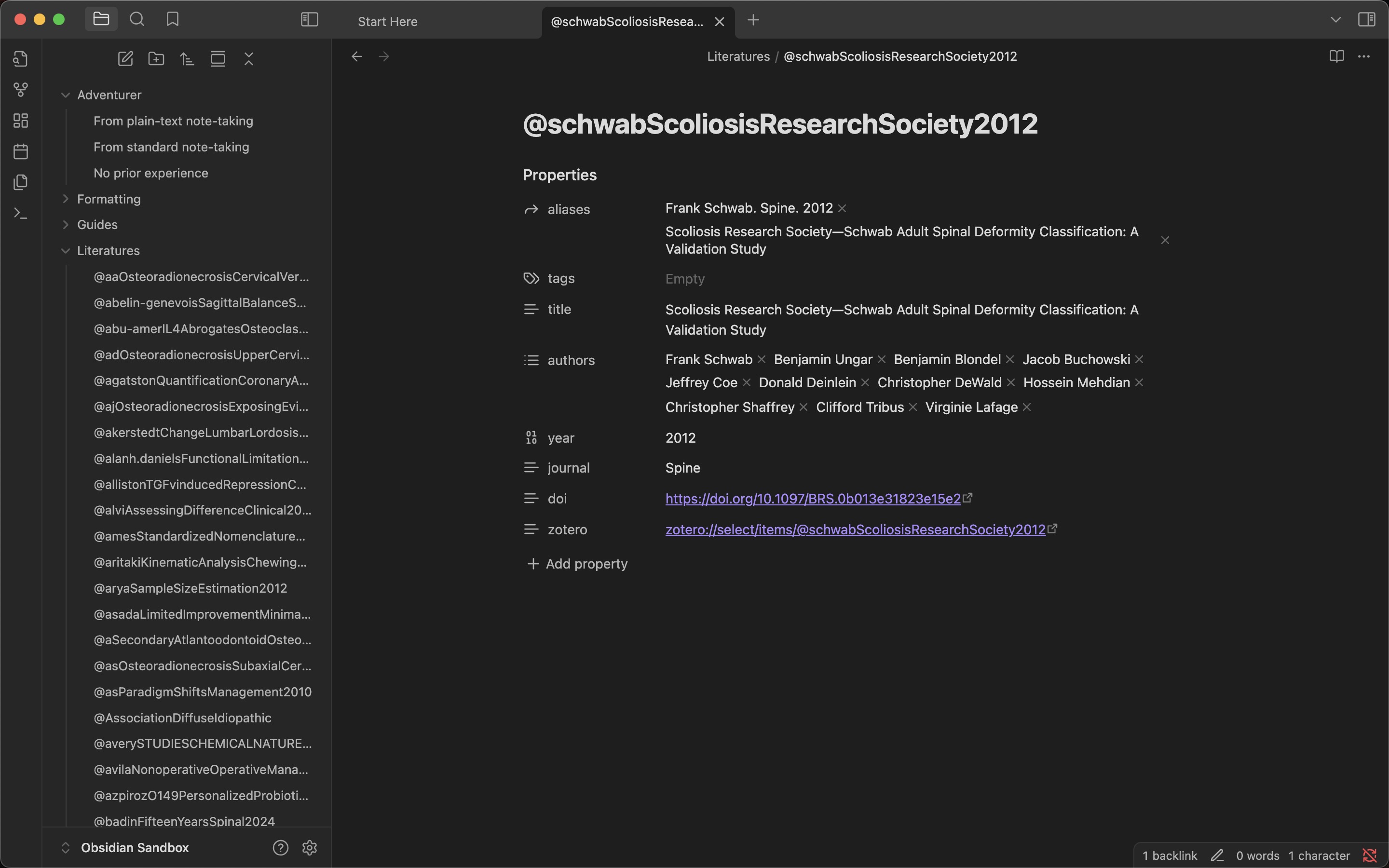
[!important] You have options to add or update literature notes automatically when the bibliography file is updated. You also have options to automatically update literature notes when opened.
This means that you have to add items only to Zotero, and automatically add/update them to Obsidian.
Using literature notes as the references and export to docx(requires pandoc)
command: Pandoc Citeproc Execution (docx)
- Optionally, set csl file path or url in the properties named
csl. - CSL file is the file that defines the citation style of the journal.
- You can download or get url of the csl file from here.
The result file(docx) is as follows:

⚙️ Initial Settings
- Install the better bibtex for zotero to the Zotero and configure the export of the bibliography file.
- Set the export location to your vault.
- Set the automatic export option to true.
- Set the file type to
Better CSL JSONorBetterBibTeX JSON.
[!note] Better CSL JSON supports the Pandoc export feature but contains less information. Additional fields can be added via the postscript workflow described below. BetterBibTeX JSON provides richer data out of the box (group library URI, PDF paths, collections) but cannot be used with the Pandoc export feature. Both formats can be registered simultaneously in the plugin settings.
- Enable the Obsidian community plugin, then install Simple Citations and activate it.
- Set the bibliography file path and export folder path in the plugin settings.
- You can use the commands:
Add literature noteUpdate literature noteUpdate literature note (active file)Pandoc Citeproc Execution (docx)Conver to Pandoc formatCopy missing note links- This command identifies and copies links to literature notes that are not included in the JSON file.
Export PDF(requires export folder to be set)- Copies the PDF file(s) listed in the
pdffrontmatter property to the export folder.
- Copies the PDF file(s) listed in the
Export PDF images(requires Poppler)- Extracts embedded images from PDF(s) as PNG files using
pdfimages.
- Extracts embedded images from PDF(s) as PNG files using
[!warning] Citekeys containing
#^[]|\/:will be skipped as these characters are not allowed in Obsidian filenames. Check the console log if items are missing.
📚 Group libraries support
[!note] BetterBibTeX JSON handles group libraries automatically — no postscript required. The section below applies to Better CSL JSON only.
By default, the Zotero link in each literature note uses zotero://select/items/@citekey, which only works for personal libraries. If you use Zotero group libraries with Better CSL JSON, you need to add the following postscript in Better BibTeX to export the library URI:
if (Translator.BetterCSLJSON) {
  csl.zotero_uri = zotero.uri;
}
When zotero_uri is present and contains a group ID, the plugin automatically generates the correct link: zotero://select/groups/{groupId}/items/@citekey. No additional plugin settings are required.
➕ Additional options
[!tip] The optional content below will be removed if you set the option to false and execute the "Update" command.
🏷️ Tag Option
Generate tags for the following:
author/${firstAuthor}journal/${journalName}
🧩 Optional fields
Better Bibtex for Zotero has the function to add optional fields to the bibliography file.
- Open the Zotero
- Open the "Preferences"
- Set "postscript" as you want
Reference for the script. → Scripting :: Better BibTeX for Zotero
Postscript examples
if (Translator.BetterCSLJSON) {
  csl.key = zotero.key;
}
Set key in the plugin settings.
if (Translator.BetterCSLJSON) {
  csl.pdf = zotero.attachments
    .filter(a => a.localPath && a.localPath.toLowerCase().endsWith('.pdf'))
    .map(a => a.localPath);
}
Set pdf in the plugin settings.
if (Translator.BetterCSLJSON) {
  function path(key) {
    const coll = Translator.collections[key];
    if (!coll) return '';
    if (!coll.parent) return coll.name;
    return `${path(coll.parent)}/${coll.name}`;
  }

  let collections = [];
  zotero.collections.forEach((key) => {
    const p = path(key);
    if (p) collections.push(p);
  });

  csl.collections = collections;
  csl.zotero_uri = zotero.uri;
}
Set collections in the plugin settings. Each entry gets its Zotero collection paths (e.g. ["Folder/Subfolder"]).
From Issues #5
if (Translator.BetterCSLJSON) {
  function path(key) {
    const coll = Translator.collections[key];
    if (!coll) return '';
    if (!coll.parent) return coll.name;
    return `${path(coll.parent)}/${coll.name}`;
  }

  let collections = [];
  let library = Translator.exportPath.replace(/.*[\\/]/, '').replace(/\.[^.]+$/, '');
  zotero.collections.forEach((key) => {
    const p = path(key);
    if (p) collections.push(library + ": " + p);
  });


  csl.collections = collections.length > 0 ? collections : [library];
  csl.zotero_uri = zotero.uri;
}
Set collections in the plugin settings. Each collection is prefixed with the library name derived from the export file name (e.g. "My Library: Folder/Subfolder"). Entries without collections show the library name alone (e.g. ["My Library"]).
📝 Abstract Option
Insert the abstract section in the top of the note. The comment tag below is used to identify the abstract section.
<!-- START_ABSTRACT -->
<!-- END_ABSTRACT -->
📄 Template Option
Insert the template content in the top of the note. The comment tag below is used to identify the template section.
<!-- START_TEMPLATE -->
<!-- END_TEMPLATE -->
[!note] This template is applied to all notes and the content is static. Therefore, it is recommended to use Dataview for setting dynamic templates.
🔗 Link Formatting
When executing the "Pandoc Citeproc Execution (docx)" command, the link format is temporarily converted to the format of the pandoc citeproc.
The plugin modifies the link format as follows:
[[@citation-key]]→[@citation-key][[@citation-key|aliases]]→[@citation-key]// aliases are allowed[[@citation-key]][[@citation-key]]→[@citation-key;@citation-key]// multiple citations are allowed[[@citation-key]] [[@citation-key]]→[@citation-key;@citation-key]// spaces or line breaks can be inserted between links- End of a sentence:
[[@citation-key]]→ end of a sentence[@citation-key]. // inserts links before.if there is nothing between them.