CSV Lite

by Jay Bridge
5
4
3
2
1
Score: 50/100

Description

Category: File Management

The CSV Lite plugin allows users to view and edit CSV files directly within Obsidian without introducing complex interfaces or additional learning curves. Focused on simplicity, it integrates CSV management seamlessly into the Obsidian workspace, treating tables like regular text files while maintaining clean metadata storage. The plugin emphasizes minimalism, removing the need for modals, sidebars, or external documentation, and ensures that interacting with CSV data remains intuitive and fast.

Reviews

No reviews yet.

Stats

33
stars
6,946
downloads
1
forks
379
days
92
days
92
days
14
total PRs
0
open PRs
1
closed PRs
13
merged PRs
37
total issues
9
open issues
28
closed issues
0
commits

Latest Version

3 months ago

Changelog

What's Changed

Full Changelog: https://github.com/LIUBINfighter/csv-lite/compare/1.6.1...1.7.0

README file from

Github

CSV Lite

Simple enough for csv, no more fancy function you need to learn and think!

中文版本 Readme

DOI Obsidian Download Total Downloads GitHub Issues GitHub Last Commit

v1.1.0

Introduction

Keep your mind on track! Don't waste time creating fancy tables.

A plugin designed to view and edit CSV files directly within Obsidian.

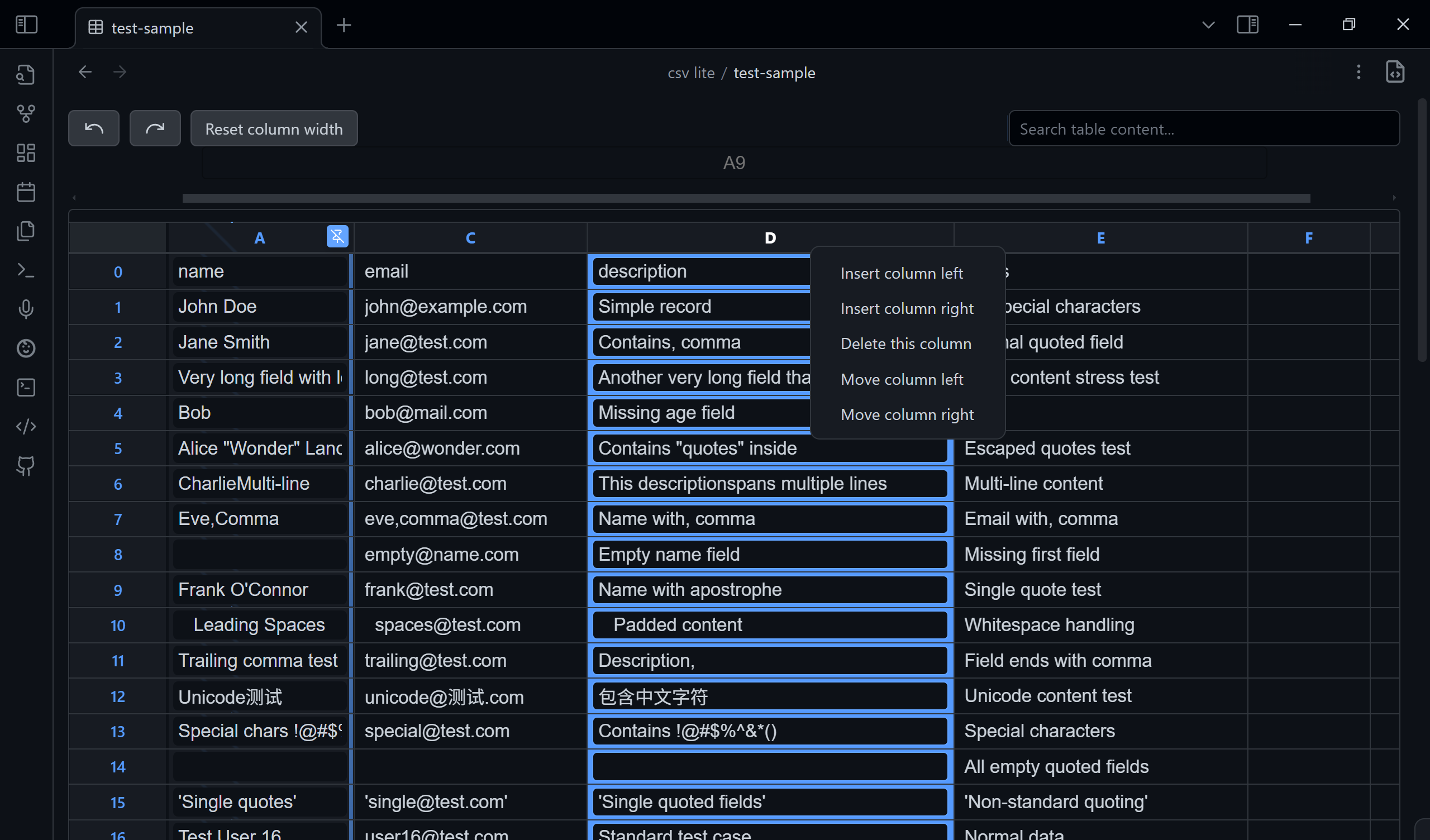
  • View CSV files in a clean, readable table.
  • Search the entire file to quickly find data (esc to clean).
  • Navigate easily with numbered rows and columns.
  • Pin the selected column so it's always visible.
  • Toggle between the table view and raw source-mode.
  • Edit cells directly by clicking and typing.
  • Manage rows and columns (add, delete, move) with a simple right-click on the header.
  • Create new CSV files: use the command palette or right-click in the File Explorer to quickly create a new .csv file. A unique name like new.csv or new-1.csv will be generated automatically.
  • Switch Delimiter Non‑Destructively: Auto‑detects the file delimiter (comma, semicolon, tab, etc.). Changing the delimiter in the toolbar only re-parses the view; it does NOT rewrite your file. Your original delimiter is preserved when saving edits.
  • Clickable URLs: Plain-text URLs and Markdown-style links ([text](url)) in cells are automatically detected and rendered as clickable links. Click a link to open it in your browser, or click the edit button (✎) to edit the cell content.

I have a plan to design my own database using json and csv only. If you have fancy idea about tables or csv, please feel free to issue (I will consider it in csv-lite or my new plugin) or search it in community.

Why Another CSV Plugin?

There are so many CSV plugins. Why choose this one?

Because it is designed to be simple and straightforward. It also keeps up with the latest Obsidian API and typings. No fancy features—just open and edit.

Philosophy

  • No fancy UI, SAY NO TO - modals - sidebar - settingTab - other online docs & tutorials
  • All functions of the ui components above will be covered in a single File view.
  • All in TextFileView/workspace.
  • No more pollution to your vault, all metadata store in ./.obsidian/plugins/csv in json format. (Currently no data.json)
  • Every function must be completed within 3 steps: 0. Locate it visually
    1. Click/Hotkey
    2. Input (if needed)
    3. Confirm/Leave
  • The interface should remain minimal yet functional.
  • Users shouldn't need to leave their workflow environment.
  • CSV manipulation should be as natural as text editing.

Purpose

This plugin enhances Obsidian's functionality by allowing users to work with CSV (Comma-Separated Values) files seamlessly within their vault, eliminating the need to switch between different applications for CSV handling.

Delimiter Handling Philosophy

Team repositories or shared datasets often mix delimiter styles (, ; \t). For safety:

  1. The plugin auto-detects the delimiter when opening a file.
  2. The dropdown ("Auto, , ;") lets you temporarily re-interpret the file without changing it on disk.
  3. Saving edits (cell changes, row/column operations) writes the file back using the ORIGINAL detected delimiter, not the one you temporarily selected—unless the file already used that delimiter.
  4. This prevents accidental mass diffs in version control or breaking pipelines that assume a specific separator.

If you ever need an explicit “convert delimiter” feature, open an issue—we’ll gate it behind a confirmation instead of doing it silently.

Getting Started

Install the plugin through Obsidian's community plugins section and start viewing your CSV files directly in your notes.

Trouble Shooting

You can issue here.

if you encounter any problems exactly with csv, download test/test-sample.csv to see what's different from the test csv file. Issue with an screenshot will help us fix it faster.

Similar Plugins

info
• Similar plugins are suggested based on the common tags between the plugins.
Android nomedia
3 years ago by JakeisAwesome
When syncing Obsidian with Android you will see a lot of media associated with your vaults. This will add the .nomedia file to ever folder in your Vault.
Auto Archive
3 years ago by Shane Burke
Auto Archive plugin for Obsidian
Auto Filename
3 years ago by rcsaquino
Auto Filename is an Obsidian.md plugin that automatically renames files in Obsidian based on the first x characters of the file, saving you time and effort.
Better File Link
5 years ago by Marc Julian Schwarz
A plugin for the note taking app Obsidian to add better external file links to your notes.
Binary File Manager
4 years ago by qawatake
An Obsidian plugin to manage binary files
Cloud Storage
2 years ago by Jiajun Ma
Obsidian Cloud Storage is a powerful and user-friendly plugin designed to seamlessly integrate cloud storage capabilities into your Obsidian workflow. This plugin allows you to effortlessly upload your attachments to the cloud, freeing up local storage space and enabling easy sharing and access across all your devices.
Cloudinary Uploader
4 years ago by Jordan Handy
An uploader for Obsidian to Cloudinary
Copy Metadata
3 years ago by wenlzhang
An Obsidian plugin to copy metadata to clipboard and insert it into file name.
Edit History
3 years ago by Antonio Tejada
Obsidian Edit History Plugin, automatically save all the edit history of a note, browse and restore previous versions
External File Card
2 years ago by James-Yu
A plugin for Obsidian showing a card displaying basic information of a file in pre-defined folders.
External Rename Handler
a year ago by mnaoumov
Obsidian Plugin that handles external renames made outside of the app
File chucker
3 years ago by Ken Lim
File Hider
4 years ago by Oliver Akins
A plugin for https://obsidian.md that allows hiding specific files and folders from the file explorer.
File Order
3 years ago by lukasbach
Obsidian plugin to reorder files with drag-and-drop by customizing a number-prefix in the filenames
File Preview
2 years ago by Huajin
Add file preview contents under file in file explorer.
Folder Focus Mode
4 years ago by grochowski
Focus file explorer on chosen folder and its files and subdirectories, while hiding all the other elements.
Git File Explorer
2 years ago by Mateus Molina
Graphic Organizer
2 months ago by Nick Le Guillou - Superhuman Curiosity
Interactive tree view for visualizing and managing your vault's file hierarchy.
Guid Renamer
2 years ago by Taskscape LTD, Kacper Pabianiak
Renames the currently selected file by providing a unique file name based on GUID pattern
HTML Reader
4 years ago by Nuthrash
This is a plugin for Obsidian (https://obsidian.md). Can open document with .html and .htm file extensions.
Inbox Organiser
a year ago by Jamie Hurst
Obsidian plugin to capture any new notes into an inbox and periodically prompt to organise these into other folders within the vault.
Insert Multiple Attachments
a year ago by mnaoumov
Obsidian Plugin that allows to insert multiple attachments at a time
Link indexer
5 years ago by Yuliya Bagriy
Local Any Files
a year ago by ShermanTsang
A obsidian plugin used to extract and download files in your obsidian note.
Luhman
5 years ago by Dylan Elliott
Markdown Hijacker
a year ago by Yongmini
Beyond the Vault. One hub for every Markdown, everywhere
Media Companion
a year ago by Nick de Bruin
Merge Notes
3 years ago by fnya
Merge Notes is Plugin for Obsidian
New Filename
a year ago by Amin Sennour
Simple plugin to change the default name for a new note from "Untitled" to a UUID.
New Note Fixer
a year ago by mnaoumov
Obsidian Plugin that unifies the way non-existing notes are created when clicking on their links
Note archiver
3 years ago by thenomadlad
NSFW filter
2 years ago by catvatar
Obsidian Plugin adding a button to toggle visiblity of NSFW notes
Open File by Magic Date
4 years ago by simplgy
Paste image rename
4 years ago by Reorx
Renames pasted images and all the other attachments added to the vault
Recently Added Files
a year ago by Lemon695
List files by last added, includes pictures, pdfs, etc.
Remote Fetch
8 months ago by Shaharyar
Remove Empty Folders
3 years ago by fnya
Remove Empty Folders for Obsidian
Rename File to Selection
a year ago by Aava
Rename your file to the current text selection.
Reveal Active File Button
4 years ago by Clare Macrae
Obsidian plugin to add a button to the top of the Obsidian File Explorer, to reveal the active file.
S3agle
2 years ago by Turner Monroe (turnercore)
Screwdriver
4 years ago by vorotamoroz
Simple Archiver
a year ago by Mike Farr
An Obsidian plugin that enables you to quickly archive a single note or an entire folder of notes.
Simple Image Inserter
2 years ago by Joey Holtzman
Add images from the file system into Obsidian notes through a built-in file explorer
Structured Copy: Files & Folders
a year ago by SchmidA
sync-db-os
2 years ago by ketd
Syncthing Integration
3 years ago by LBF38
Obsidian plugin for Syncthing integration
Telegram Sync
3 years ago by Burtasov Volodymyr
Transfer messages and files from Telegram to Obsidian
Tencent COS for Imgur
a year ago by bobostudio
🔥 Obsidian 腾讯云 COS 图床插件
Trash Explorer
4 years ago by Per Mortensen
Restore and delete files from the Obsidian .trash folder
Unique attachments
5 years ago by Dmitry Savosh
Obsidian plugin. Renames attachments, making their names unique.
Update frontmatter modified date
3 years ago by Alan Grainger
Automatically update a frontmatter/YAML modified date field
Update Relative Links
4 years ago by val
Update time on edit
5 years ago by beaussan
Vault Transfer
2 years ago by ImaginaryProgramming
Transfers a note from one vault to another.
VaultSync
a year ago by Justin Bird
Obsidian plugin to link your vault to a cloud storage provider.
VSCode Editor
3 years ago by Sun Xvming
Edit Code Files like VSCode in Obsidian.
WebDAV Explorer
2 months ago by 蓝星晓夜
WebDAV Explorer: Connect to WebDAV server, preview files directly in web view, and generate links through simple drag-and-drop.
Webdav File Explorer
3 years ago by red0orange