Paste image rename

by Reorx
5
4
3
2
1
Score: 50/100

Description

The Paste image rename plugin allows users to efficiently rename images and other attachments when added to an Obsidian vault. It prompts users to rename images immediately upon pasting or dragging them into notes, ensuring better file organization and clarity. Customization options enable users to define name patterns using variables like the file name, date, or a frontmatter key. The plugin can automatically handle duplicate names by appending suffixes or prefixes and supports batch renaming of multiple images or attachments within a note. With support for all types of attachments, not just images, users can maintain a clean and logical file structure. Features such as auto-renaming and the ability to rename all embedded files in a note streamline the user experience, making it ideal for users dealing with large volumes of images or media files.

Reviews

No reviews yet.

Stats

406
stars
134,329
downloads
60
forks
1,483
days
139
days
1,196
days
21
total PRs
9
open PRs
6
closed PRs
6
merged PRs
97
total issues
70
open issues
27
closed issues
0
commits

Latest Version

3 years ago

Changelog

What's Changed

New Contributors

Full Changelog: https://github.com/reorx/obsidian-paste-image-rename/compare/1.6.0...1.6.1

README file from

Github

Obsidian paste image rename

:loudspeaker: Starting from 1.4.0, Paste image rename becomes a general-purpose renaming plugin that can handle all attachments added to the vault.

This plugin is inspired by Zettlr, Zettlr shows a prompt that allows the user to rename the image, this is a great help if you want your images to be named and organized clearly.

image

Paste image rename plugin not only implements Zettlr's feature, but also allows you to customize how the image name would be generated, and eventually free you from the hassle by automatically renaming the image according to the rules.

Table of Contents

How to use

Basic usage

After installing the plugin, you can just paste an image to any document and the rename prompt will display:
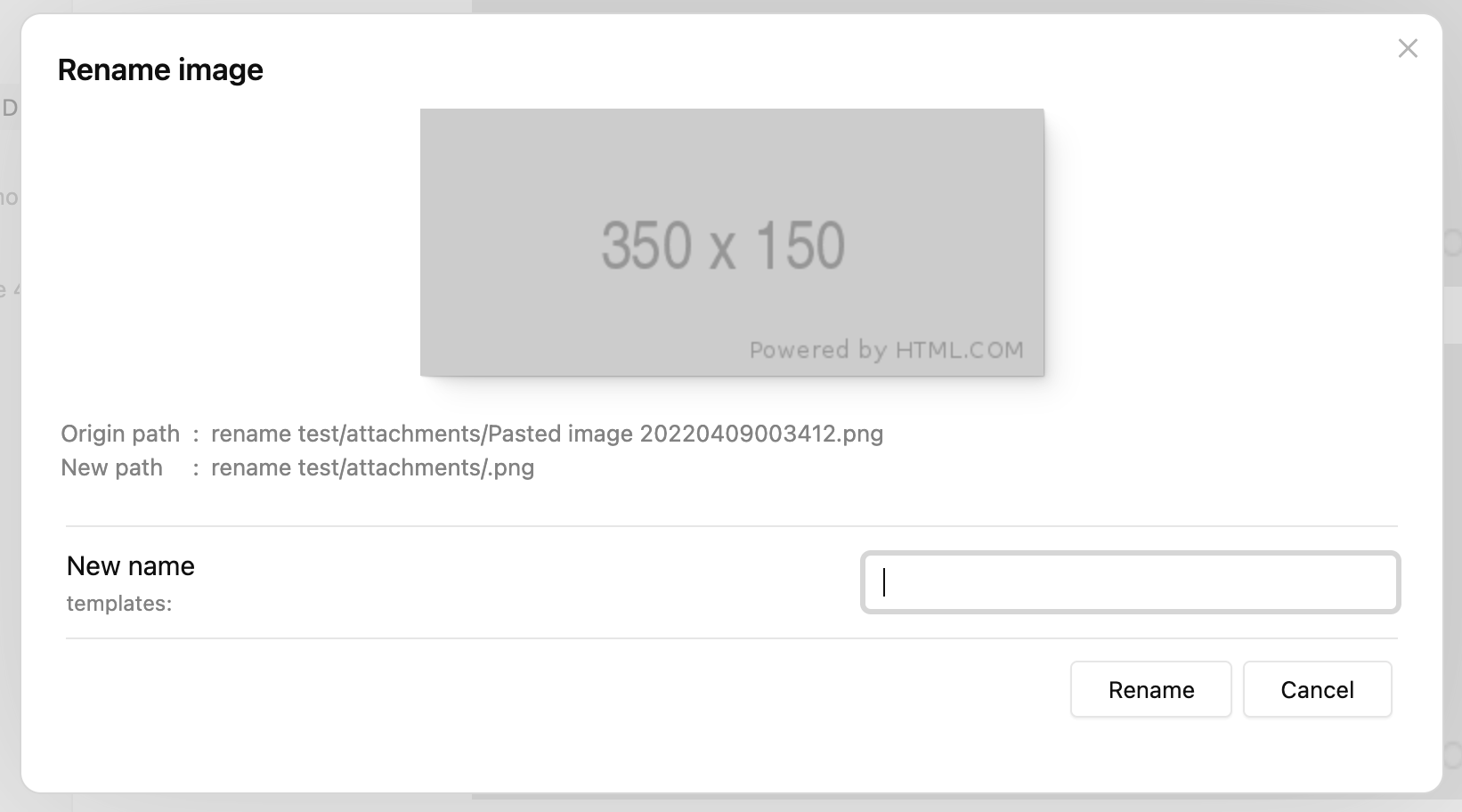
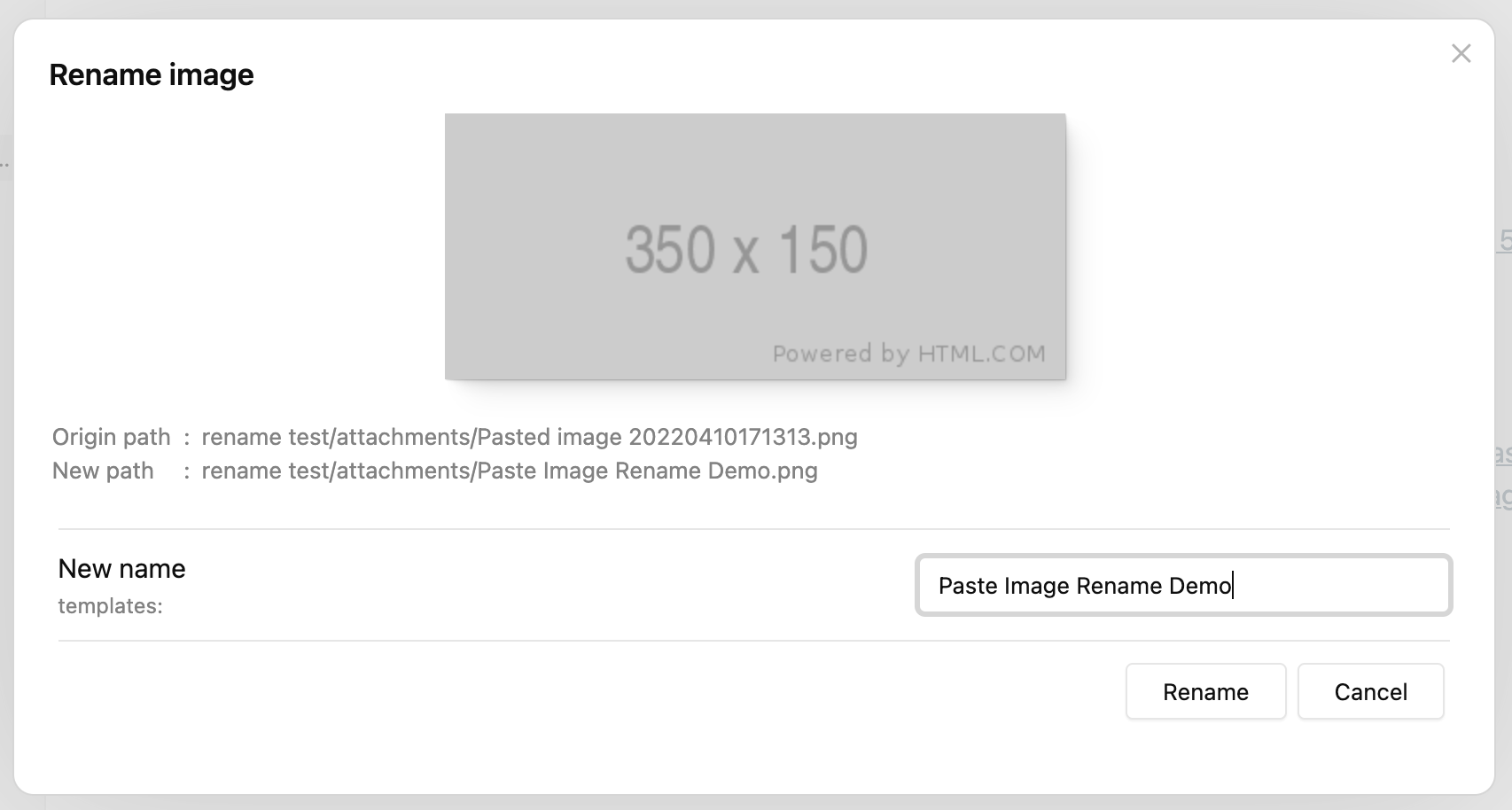
By typing the new name and clicking "Rename" (or just press enter), the image will be renamed and the internal link will be replaced with the new name.

If you set "Image name pattern" to {{fileName}} (it's the default behavior after 1.2.0), "New name" will be generated as the name of the active file.
Set imageNameKey frontmatter

While adding a lot of images to one document, people possibly want the images to be named in the same format, that's where imageNameKey is useful.

First set a value for imageNameKey in frontmatter:

---
imageNameKey: my-blog
---

Then paste an image, you will notice that the "New name" has already been generated as "my-blog", which is exactly the value of imageNameKey:
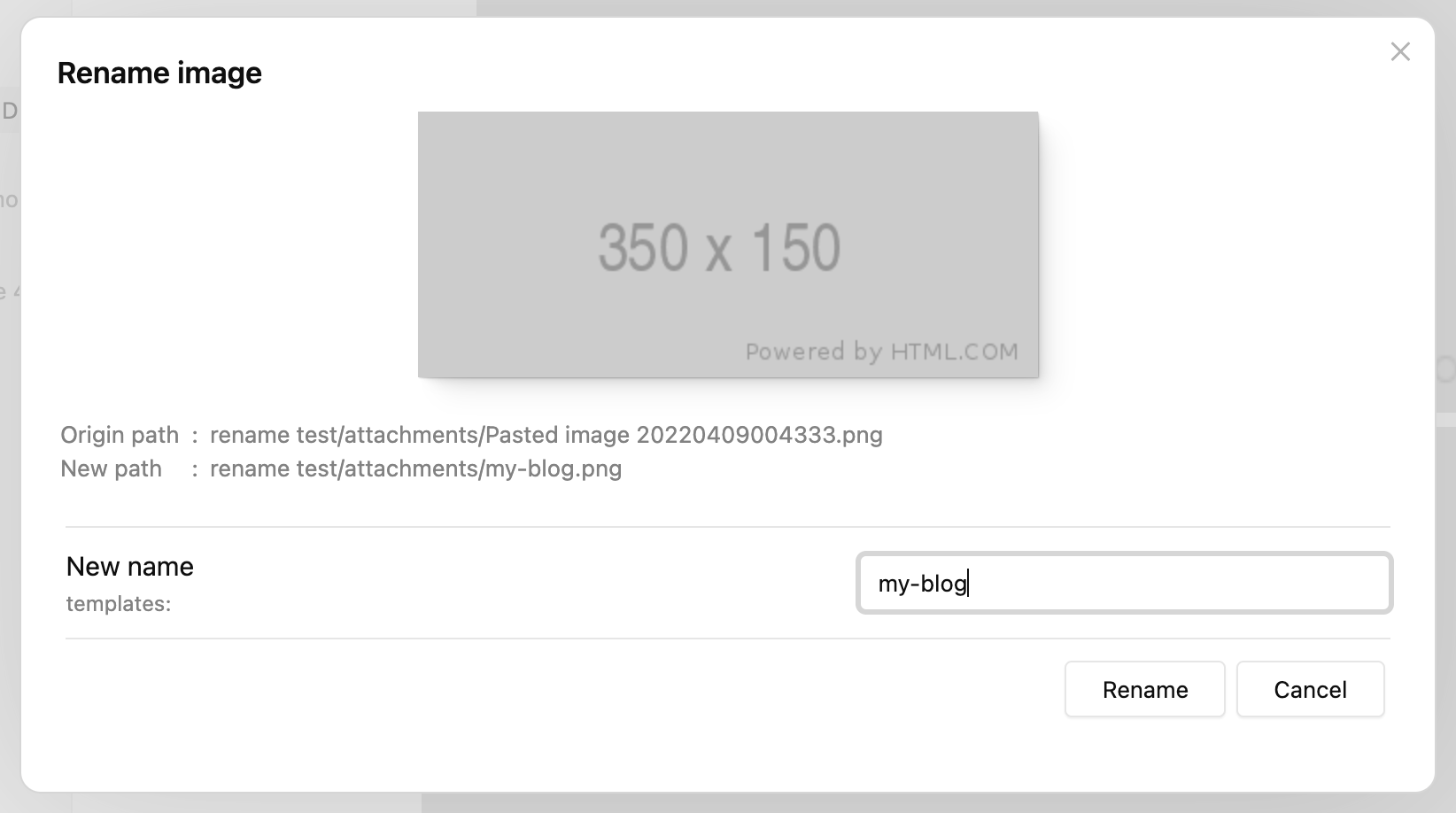
You can change the pattern for new name generating by updating the "Image name pattern" value in settings.

For a detailed explanation and other features such as auto renaming, please refer to Settings.

Add prefix/suffix to duplicated names

The plugin will always try to add a prefix/suffix if there's a file of the same name.

Let's continue from the last section and paste the second image, the prompt will still show the new name as "my-blog", now if we just click "Rename", the file will be renamed as "my-blog-1.png", not "my-blog.png":

The -1 suffix is generated according to the default settings:

  • Because "Duplicate number at start" is false, suffix is used rather than prefix
  • "Duplicate number delimiter" - is put before the number 1

If we paste the third image without editing the "New name" input, its name will be "my-blog-2.png", the number is increased according to the largest number of "my-blog-?.png" in the attachment directory.

This feature is especially powerful if you enable "Auto rename" in settings, you can just add new images without thinking, and they will be renamed sequentially by the pattern and imageNameKey set.

Batch renaming process

New in 1.3.0

You can use the command "Batch rename embeded files in the current file" to rename images and other attachments (even notes) in the current file.
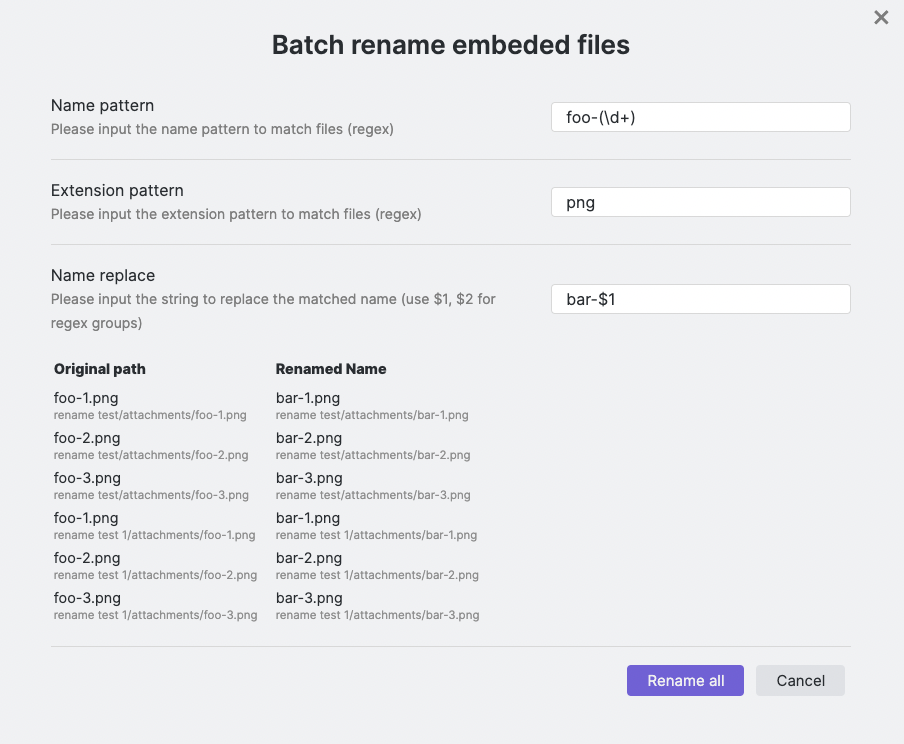
The image above demonstrates how to rename all the foo-1.png, foo-2.png… png files to bar-1-png, bar-2.png… with this feature.

You can also rename the images to the same name, and let the plugin handle the name deduplication for you. See a video demonstration here: https://i.imgur.com/6UICugX.mp4

Batch rename all images instantly

New in 1.5.0

The command "Batch rename all images instantly (in the current file)" will rename all the images in the current file according to "Image name pattern" in settings.

This is a shortcut for using Batch renaming process with certain arguments, makes everyday image renaming much easier.

Note that this command has no confirmation, please use it with caution!

Handle all attachments

New in 1.4.0

Paste image rename is not just a plugin for pasted images, it has the potential to handle all attachments that are added to the vault, no matter whether they are pasted or dragged.

To use this feature, you need to enable the "Handle all attachments" option in settings.
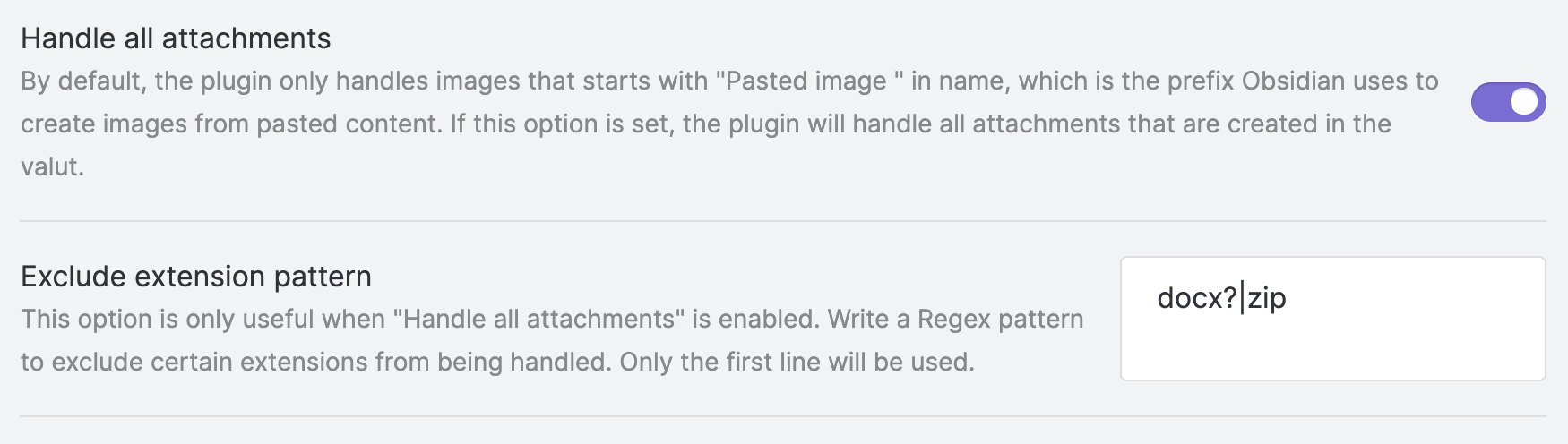
Additionally, you can configure the "Exclude extension pattern" to ignore files that match the given extension pattern.

FAQ

  • Q: I pasted an image but the rename prompt did not show up.

    A: This is probably because you are using the Windows system and pasting from a file (i.e. the image is copied from File Explorer, not from a browser or image viewer). In Windows, pasting from a file is like a regular file transfer, the original filename is kept rather than being created and named "Pasted image ..." by Obsidian. You need to turn on "Handle all attachments" in settings to make it work in this situation.

Settings

  • Image name pattern

    The pattern indicates how the new name should be generated.

    • Available variables:

      • {{fileName}}: name of the active file, without ".md" extension.
      • {{imageNameKey}}: this variable is read from the markdown file's frontmatter, from the same key imageNameKey.
      • {{DATE:$FORMAT}}: use $FORMAT to format the current date, $FORMAT must be a Moment.js format string, e.g. {{DATE:YYYY-MM-DD}}.
    • Examples

      Here are some examples from pattern to image names (repeat in sequence), variables: fileName = "My note", imageNameKey = "foo":

      • {{fileName}}: My note, My note-1, My note-2
      • {{imageNameKey}}: foo, foo-1, foo-2
      • {{imageNameKey}}-{{DATE:YYYYMMDD}}: foo-20220408, foo-20220408-1, foo-20220408-2
  • Duplicate number at start (or end)

    If enabled, the duplicate number will be added at the start as prefix for the image name, otherwise, it will be added at the end as suffix for the image name.

  • Duplicate number delimiter

    The delimiter to generate the number prefix/suffix for duplicated names. For example, if the value is -, the suffix will be like "-1", "-2", "-3", and the prefix will be like "1-", "2-", "3-".

  • Auto rename

    By default, the rename modal will always be shown to confirm before renaming, if this option is set, the image will be auto renamed after pasting.

  • Handle all attachments

    By default, the rename modal will always be shown to confirm before renaming, if this option is set, the image will be auto renamed after pasting.

  • Exclude extension pattern

    This option is only useful when "Handle all attachments" is enabled. Write a Regex pattern to exclude certain extensions from being handled. Only the first line will be used.

  • Disable rename notice

    Turn off this option if you don't want to see the notice when renaming images. Note that Obsidian may display a notice when a link has changed, this option cannot disable that.

Similar Plugins

info
• Similar plugins are suggested based on the common tags between the plugins.
Image Window
4 years ago by Jeremy Valentine
Adds the ability to open images in new Obsidian windows
Binary File Manager
4 years ago by qawatake
An Obsidian plugin to manage binary files
Chevereto Image Uploader for Obsidian
4 years ago by kkzzhizhou
obsidian plugins: chevereto image uploader
File Cleaner
4 years ago by Johnson0907
A file cleaner plugin for Obsidian.
Screwdriver
4 years ago by vorotamoroz
Paste image Png to Jpeg
4 years ago by musug
When pasting screenshots into obsidian notes, convert the images to jpeg and compress them
Folder Focus Mode
4 years ago by grochowski
Focus file explorer on chosen folder and its files and subdirectories, while hiding all the other elements.
Nuke Orphans
4 years ago by Sandorex
Obsidian notes plugin that trashes orphaned files and attachments
Image Gallery
4 years ago by Luca Orio
A zero setup masonry image gallery for Obsidian
File Hider
4 years ago by Oliver Akins
A plugin for https://obsidian.md that allows hiding specific files and folders from the file explorer.
Open File by Magic Date
4 years ago by simplgy
Janitor
4 years ago by Gabriele Cannata
Performs various maintenance tasks on the Obsidian vault
HTML Reader
4 years ago by Nuthrash
This is a plugin for Obsidian (https://obsidian.md). Can open document with .html and .htm file extensions.
Update Relative Links
4 years ago by val
Trash Explorer
4 years ago by Per Mortensen
Restore and delete files from the Obsidian .trash folder
Copy document as HTML
3 years ago by mvdkwast
Obsidian plugin: copy document as HTML, including images
Emo
3 years ago by yaleiyale
Use image/file hosting in Obsidian by clipboard or draging file. Obsidian 图床聚合 & Github上传器
Image Layouts
3 years ago by Luke Chadwick
Obsidian markdown export
3 years ago by bingryan
This plugin allows to export directory/single markdown to a folder. support output format(html/markdown/text)
Local images plus
3 years ago by catalysm, aleksey-rezvov, Sergei Korneev
This repo is a reincarnation of obsidian-local-images plugin which main aim was downloading images in md notes to local storage.
File chucker
3 years ago by Ken Lim
S3 attachments storage
3 years ago by TechTheAwesome
An Obsidian plugin for storage and retrieval of media attachments on S3 compatible services.
Image Captions
3 years ago by Alan Grainger
Add captions to images with inline Markdown and link support. The caption format is compatible with the CommonMark spec and other Markdown applications.
Awesome Image
3 years ago by AwesomeDog
One-stop solution for image management.
Avatar
3 years ago by froehlichA
An obsidian plugin for displaying an avatar image in front of your notes.
File Order
3 years ago by lukasbach
Obsidian plugin to reorder files with drag-and-drop by customizing a number-prefix in the filenames
Smart Rename
3 years ago by mnaoumov
Obsidian Plugin that helps to rename notes keeping previous title in existing links
Google Keep Import
3 years ago by Dale de Silva
Imports Google Keep backup files
Image OCR
3 years ago by kaffarell
Runs ocr on pasted images and posts result in details box. This allows to search in images.
Android nomedia
3 years ago by JakeisAwesome
When syncing Obsidian with Android you will see a lot of media associated with your vaults. This will add the .nomedia file to ever folder in your Vault.
Attachment Management
3 years ago by trganda
Attachment Management of Obsidian
Image To Lskypro
3 years ago by NekouTarou
支持直接上传图片到图床Lsky,基于https://github.com/renmu123/obsidian-image-auto-upload-plugin.git改造。
Telegram Sync
3 years ago by Burtasov Volodymyr
Transfer messages and files from Telegram to Obsidian
Note archiver
3 years ago by thenomadlad
Cloudinary
3 years ago by Uday Samsani, Jordan Handy
Cloudinary plugin for content uploading and transformation.
Edit History
3 years ago by Antonio Tejada
Obsidian Edit History Plugin, automatically save all the edit history of a note, browse and restore previous versions
Syncthing Integration
3 years ago by LBF38
Obsidian plugin for Syncthing integration
Update frontmatter modified date
3 years ago by Alan Grainger
Automatically update a frontmatter/YAML modified date field
Image Converter
3 years ago by xRyul
⚡️ Convert, compress, resize, annotate, markup, draw, crop, rotate, flip, align images directly in Obsidian. Drag-resize, rename with variables, batch process. WEBP, JPG, PNG, HEIC, TIF.
Media Sync
3 years ago by fnya
Media Sync is Plugin for Obsidian
Webdav File Explorer
3 years ago by red0orange
Copy Metadata
3 years ago by wenlzhang
An Obsidian plugin to copy metadata to clipboard and insert it into file name.
Auto Archive
3 years ago by Shane Burke
Auto Archive plugin for Obsidian
Merge Notes
3 years ago by fnya
Merge Notes is Plugin for Obsidian
Qiniu Image Uploader
3 years ago by Jade Zheng
Uploads images from your clipboard to qiniu.com and embeds uploaded image to your note.
VSCode Editor
3 years ago by Sun Xvming
Edit Code Files like VSCode in Obsidian.
Image2LaTEX
3 years ago by Hugo Persson
This is a plugin for obsidian that will read your latest copied image from clipboard and generate math latex from it
Auto Filename
3 years ago by rcsaquino
Auto Filename is an Obsidian.md plugin that automatically renames files in Obsidian based on the first x characters of the file, saving you time and effort.
Remove Empty Folders
3 years ago by fnya
Remove Empty Folders for Obsidian
Markdown Image Caption
3 years ago by Hananoshika Yomaru
Generate image caption easily. Completely markdown-based.
File Cleaner Redux
2 years ago by husjon
A plugin for Obsidian to help clean up files in your vault
Attachment Uploader
2 years ago by zhuxining
An attachment uploader plugin for Obsidian
Image Helper
2 years ago by Chongmyung Park
Context menu to convert a image to another format in reading view in Obsidian.md
Git File Explorer
2 years ago by Mateus Molina
Image Inline
2 years ago by Zackary W
convert images into base64 encoded strings and embed them directly within your notes
Image Collector
2 years ago by tdaykin
Image Magician
2 years ago by luxmargos
This is a plugin for Obsidian (https://obsidian.md). Supports viewing and exporting various image formats using ImageMagick.
Simple Image Inserter
2 years ago by Joey Holtzman
Add images from the file system into Obsidian notes through a built-in file explorer
Display Relative Path Img
2 years ago by Dyc
Display the relative path image referenced by <img> in Obsidian without altering the original document
Tiff Viewer
2 years ago by Jan Ullmann
An obsidian plugin to easily convert tiff files to png so that they can be displayed in obsidian
Vault Transfer
2 years ago by ImaginaryProgramming
Transfers a note from one vault to another.
Note Companion Folder
2 years ago by Chris Verbree
A Obsidian Plugin providing a way to associate a folder to a note
S3agle
2 years ago by Turner Monroe (turnercore)
File Preview
2 years ago by Huajin
Add file preview contents under file in file explorer.
Infostacker Note Publish
2 years ago by Taskscape LTD, Patryk Nowak, Kacper Pabianiak
Infostacker plugin for Obisidian
Guid Renamer
2 years ago by Taskscape LTD, Kacper Pabianiak
Renames the currently selected file by providing a unique file name based on GUID pattern
NSFW filter
2 years ago by catvatar
Obsidian Plugin adding a button to toggle visiblity of NSFW notes
Import Attachments+
2 years ago by Andrea Alberti
Import attachments by moving them into the vault.
Image Metadata
2 years ago by alexeiskachykhin
Adds image metadata editing capabilities to Obsidian
Lite Gallery
2 years ago by Jordan Poles
Fast Image Auto Uploader
2 years ago by Longtao Wu
upload images from your clipboard by gopic
sync-db-os
2 years ago by ketd
External File Card
2 years ago by James-Yu
A plugin for Obsidian showing a card displaying basic information of a file in pre-defined folders.
Link indexer
5 years ago by Yuliya Bagriy
Tag Wrangler
5 years ago by PJ Eby
Rename, merge, toggle, and search tags from the Obsidian tag pane
Consistent attachments and links
5 years ago by Dmitry Savosh
Obsidian plugin. Move note with attachments.
Unique attachments
5 years ago by Dmitry Savosh
Obsidian plugin. Renames attachments, making their names unique.
Image in Editor
5 years ago by Ozan Tellioglu
This Obsidian plugin to view Images, Transclusions, iFrames and PDF Files within the Editor without a necessity to switch to Preview.
Clear Unused Images
5 years ago by Ozan Tellioglu
Obsidian plugin to clear the images that are not used in note files anymore
Image auto upload
5 years ago by renmu123
auto upload image with picgo
Image Context Menus
5 years ago by NomarCub
Image Context Menus - Obsidian.md image context menus: copy, open in default app, show in system explorer, reveal in navigation context menu. Also Open PDF externally context menu.
Image Toolkit
5 years ago by sissilab
An Obsidian plugin for viewing an image.
Luhman
5 years ago by Dylan Elliott
Better File Link
5 years ago by Marc Julian Schwarz
A plugin for the note taking app Obsidian to add better external file links to your notes.
Banners
5 years ago by Danny Hernandez
An Obsidian plugin that adds banners to your notes
Update time on edit
5 years ago by beaussan
Local images
5 years ago by catalysm, aleksey-rezvov
Custom Attachment Location
5 years ago by RainCat1998
Customize attachment location with variables($filename, $data, etc) like typora.
Cloudinary Uploader
4 years ago by Jordan Handy
An uploader for Obsidian to Cloudinary
Mousewheel Image zoom
4 years ago by Nico Jeske
An Obsidian plugin that enables you to increase/decrease the size of an image by holding down a configurable key (defaults to left alt), hovering over an image in preview mode and scrolling.
Reveal Active File Button
4 years ago by Clare Macrae
Obsidian plugin to add a button to the top of the Obsidian File Explorer, to reveal the active file.
Enhanced Image
2 years ago by situ2001
Enhance the experience of image in Obsidian, seamlessly.
Pixel Banner
2 years ago by Justin Parker
🚩 Enhance your Obsidian notes with customizable banner images, including AI-generated designs and a curated store of downloadable banners. Transform your workspace with visually stunning headers that add context, improve aesthetics, and take your note-taking beyond the ordinary.
Find Orphaned Images
2 years ago by Josmar Cristello
Find Orphaned Images is an Obsidian plugin designed to help you keep your vault clean and organized by identifying and managing images that are not linked anywhere in your notes.
Cloud Storage
2 years ago by Jiajun Ma
Obsidian Cloud Storage is a powerful and user-friendly plugin designed to seamlessly integrate cloud storage capabilities into your Obsidian workflow. This plugin allows you to effortlessly upload your attachments to the cloud, freeing up local storage space and enabling easy sharing and access across all your devices.
Local Media Embedder
2 years ago by seyf1elislam
an obsidian plugin allows you to Embed videos and images and audios from your local device in your notes.
复制图文 (Copy Image Text)
2 years ago by msgk
obsidian插件,复制笔记内容(包括文本和图片)到剪贴板
PDF2Image
2 years ago by RasmusAChr
Arweave Uploader
2 years ago by makesimple
Featured Image
a year ago by Johan Sanneblad
Obsidian plugin to automatically set a featured image property in your notes based on the first image, YouTube link, or Auto Card Link image found in your document. This allows you to create rich note galleries using Folder Notes and Dataview.
Recently Added Files
a year ago by Lemon695
List files by last added, includes pictures, pdfs, etc.
Image Tools
a year ago by Andrey Serov
Image Uploader For Note
a year ago by Yunfi
Upload images in a note, and if the image is only used in this note, delete it from vault.
Insert Multiple Attachments
a year ago by mnaoumov
Obsidian Plugin that allows to insert multiple attachments at a time
Structured Copy: Files & Folders
a year ago by SchmidA
Inbox Organiser
a year ago by Jamie Hurst
Obsidian plugin to capture any new notes into an inbox and periodically prompt to organise these into other folders within the vault.
Local Any Files
a year ago by ShermanTsang
A obsidian plugin used to extract and download files in your obsidian note.
Tencent COS for Imgur
a year ago by bobostudio
🔥 Obsidian 腾讯云 COS 图床插件
External Rename Handler
a year ago by mnaoumov
Obsidian Plugin that handles external renames made outside of the app
New Filename
a year ago by Amin Sennour
Simple plugin to change the default name for a new note from "Untitled" to a UUID.
New Note Fixer
a year ago by mnaoumov
Obsidian Plugin that unifies the way non-existing notes are created when clicking on their links
Media Companion
a year ago by Nick de Bruin
Image Size
a year ago by Jie Zhang
Set the default size for pasted images.
Paste Image Into Property
a year ago by Nito
VaultSync
a year ago by Justin Bird
Obsidian plugin to link your vault to a cloud storage provider.
Media Slider
a year ago by Aditya Amatya
An obsidian plugin that helps to make slider for images, audios, videos, pdfs, markdown, etc in obsidian notes.
Image Picker
a year ago by ari.the.elk
Attachments Cache
a year ago by luisbs
Obsidian plugin to cache attachments locally
Image to HTML
a year ago by 0x1DA9430
A plugin for Obsidian that converts pasted images to HTML format instead of Obsidian's wikilink or Markdown format
Simple Archiver
a year ago by Mike Farr
An Obsidian plugin that enables you to quickly archive a single note or an entire folder of notes.
Auto Folder Note Paste
a year ago by d7sd6u
Convert your note into folder note upon pasting or drag'n'dropping an attachment
Rename File to Selection
a year ago by Aava
Rename your file to the current text selection.
CSV Lite
a year ago by Jay Bridge
Simple enough for csv, no more fancy function you need to learn and think!
Paste Image Rename and Convert
a year ago by iaos
An obsidian plugin that renames pasted images and covert formats
Markdown Hijacker
a year ago by Yongmini
Beyond the Vault. One hub for every Markdown, everywhere
Linked Note Exporter
9 months ago by the-c0d3r
Obsidian plugin to export a note along with all its attachments and linked notes—cleanly, conveniently, and ready to share.
Remote Fetch
8 months ago by Shaharyar
Memories
3 months ago by DIMFLIX
Plugin to display a gallery directly in a note.
WebDAV Explorer
2 months ago by 蓝星晓夜
WebDAV Explorer: Connect to WebDAV server, preview files directly in web view, and generate links through simple drag-and-drop.
Graphic Organizer
2 months ago by Nick Le Guillou - Superhuman Curiosity
Interactive tree view for visualizing and managing your vault's file hierarchy.
Lskypro Upload V2
2 months ago by 3kk0
Auto upload local images to LskyPro.