Pixel Banner

by Justin Parker
5
4
3
2
1
Score: 74/100

Description

Category: Note Enhancements

The Pexels Banner plugin is a game-changer for Obsidian users who want to elevate their note-taking experience with visually appealing headers. This plugin allows you to automatically add beautiful banner images to your notes using Pexels/Pixabay APIs, direct URLs, or folder-specific settings. With its intuitive settings and customization options, you can tailor the appearance of your banners to fit your style. From adjusting image size and orientation to setting default keywords and vertical positions, this plugin gives you total control over how your banner images look and behave. Whether you're a student, writer, or researcher, Pexels Banner is an excellent tool for making your notes stand out and improving their overall aesthetics.

Reviews

No reviews yet.

Stats

195
stars
115,323
downloads
11
forks
593
days
23
days
62
days
115
total PRs
2
open PRs
3
closed PRs
110
merged PRs
197
total issues
26
open issues
171
closed issues
240
commits

Latest Version

2 months ago

Changelog

What's New 🎉

v3.6.18 - 2026-03-08

🐛 Fixed

  • Fixed banner flickering on every keystroke when a note contains frontmatter and uses folder group banners (issue #318)

v3.6.17 - 2026-03-08

🐛 Fixed

  • Fixed content start position not applying correctly when changed in settings (issue #297)

v3.6.16 - 2025-11-15

🐛 Fixed

  • Fixed an occasional error that could prevent banners from displaying correctly

v3.6.15

🐛 Fixed

  • Resolved issue with plain paths not working for video files (.mp4, .mov)

v3.6.14

🐛 Fixed

  • Resolved issue with .webp images not being displayed

v3.6.13

✨ Added

  • Support for Multiple Image Reference for new AI Image Generation models
    • Nano Banana
    • Seedream 4

v3.6.12

🐛 Fixed

  • Resolved incorrect Pixel Banner Plus Server URL

v3.6.11

✨ Added

  • New toggle to turn on/off Pixel Banner Plus in the main Pixel Banner select modal

📦 Updated

  • Added unquoted wiki-link support for Image Icons paths (e.g. [[path/icon.png]])

v3.6.10

🐛 Fixed

  • Icon images and emojis not being displayed properly

v3.6.9

✨ Added

  • New Icon Image Size Multiplier setting to the General settings tab to control the global size of banner icon images
  • Check for version updates when opening General settings and show update button if available

📦 Updated

  • Moved AI Model selection from radio buttons to a dropdown for better organization
  • Changed default banner fade value from -70 to -40

v3.6.8

✨ Added

  • Added Enter key support for submitting the save image form in the Save Image Modal.
  • Added "Pin Image URL" option to save API images directly as URL references in frontmatter without downloading to vault.

📦 Updated

  • Replaced manual frontmatter string manipulation with Obsidian's native processFrontMatter API for more reliable metadata updates.

v3.6.7

🐛 Fixed

  • Fixed ImageViewModal to properly display banner images and videos when clicking the "Show View Image Icon"
    • Added support for MP4 and MOV video files in the ImageViewModal with proper video player controls
    • Correctly display actual image URLs instead of keywords for 3rd party API banners in the ImageViewModal
    • Local images, videos, and file:/// paths maintain original display behavior

v3.6.6

🐛 Fixed

  • New folder group entries now inherit the user's default Content Start Position setting instead of being hardcoded to 150px

v3.6.5

🐛 Fixed

  • Fix refresh button to use original comma-separated keywords from frontmatter instead of the cached single keyword
  • Resolved issue with the default x/y frontmatter fields not being hidden when the "Hide Pixel Banner Fields" option is enabled
  • Updated API call for Pexels to conform to spec changes on their side

v3.6.4

✨ Added

  • Banner images now support local file protocol for images outside of your vault (e.g. file:///C:\path\banner.jpg)

📦 Updated

  • Allow commas in banner filenames

🐛 Fixed

  • When pinning an 3rd party API banner, use the current displayed image when saving
  • Ensure banner icons are only rendered when a main banner image is present
  • Banner Icon Image not always rendered until the note was clicked/focused

v3.6.3

✨ Added

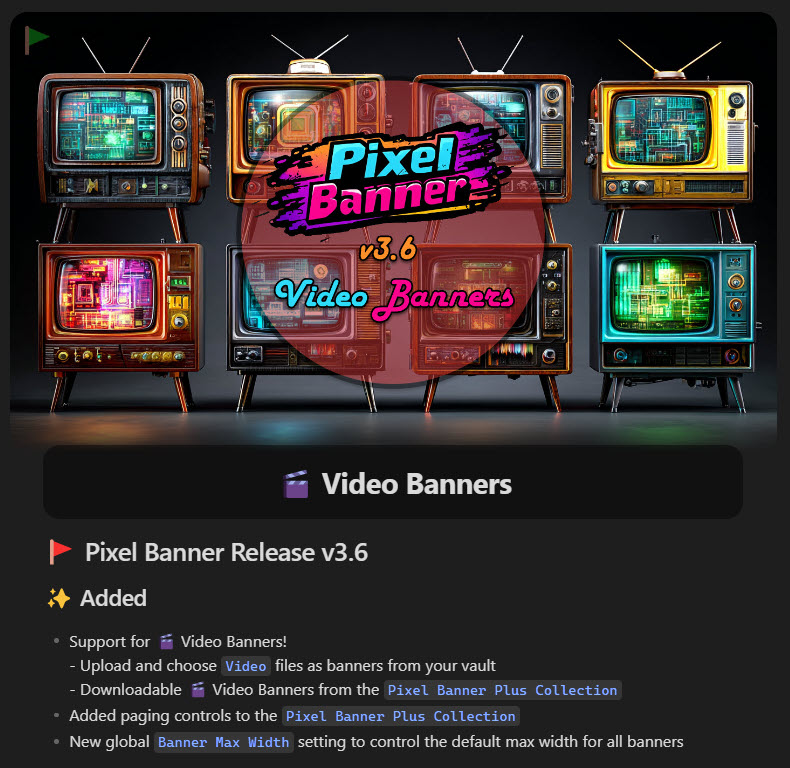
  • Support for 🎬 Video Banners!
    • Upload and choose Video files as banners from your vault
    • Downloadable 🎬 Video Banners from the Pixel Banner Plus Collection
  • Added paging controls to the Pixel Banner Plus Collection
  • New global Banner Max Width setting to control the default max width for all banners
  • Added filesize display to the store modal

📦 Updated

  • Moved Default Saved Banners Folder setting to the General tab
  • Renamed Pixel Banner Plus Store to Pixel Banner Plus Collection as many items are free
  • Improved debounce logic to prevent multiple banner reloads when opening a note

🐛 Fixed

  • Icon Image selection modal now properly handles file objects and strings

v3.6.0

YouTube Video


Please consider sending me a tip to support my work 😀

🍵 tip me here

⇢ 💻 Visit eQuill Labs ⇢ 💬 Join the Discord

README file from

Github

🚩 Pixel Banner for Obsidian

Pixel Banner is a powerful Obsidian plugin that transforms your notes with customizable banner images, creating visually stunning headers that enhance your knowledge workspace. Go beyond simple note-taking with banners that provide visual context and improved aesthetics.

Maintained by

Key Features

✨ Smart Banner Creation

  • AI-Generated Banners: Create stunning, custom banners using AI generation without design skills.
  • Banner Collection: Browse and use professional banner images and videos from the integrated Pixel Banner Plus Collection, including many free options.
  • 3rd Party APIs: Connect to Pexels, Pixabay, Flickr, and Unsplash to automatically fetch banner images based on keywords.
  • Local Image Support: Use images from your vault as banners with advanced customization options.
  • External File Support: Reference images outside your vault using the file:/// protocol (e.g., file:///C:\Images\banner.jpg on Windows or file:///Users/username/Images/banner.jpg on macOS/Linux).
  • Video Banner Support: Add dynamic MP4 and MOV videos from your vault as animated banners, with full download support from the Pixel Banner Plus Collection.
  • Direct URL Banners: Apply banners from any web URL for maximum flexibility.
  • Note Properties Integration: Control all banner aspects through Obsidian's properties feature.

🎨 Visual Customization

  • Position Control: Fine-tune banner placement with precise vertical and horizontal positioning for perfect alignment.
  • Appearance Options: Customize transparency, border radius, animation effects, and spacing for seamless integration.
  • Display Flexibility: Choose between display modes (cover, auto, contain) with options for repetition and sizing.
  • Banner Icons: Add and customize decorative icons with control over size, position, color, background, and style.
  • Title Integration: Style in-line titles with custom colors that complement your banner designs.
  • Hide Frontmatter: Automatically hide banner-related fields in reading view for a cleaner look.

⚡ Efficient Workflow

  • Banner Selection Modal: Quick visual picker for local images with sorting options.
  • Command Integration: Access all banner functions via command palette and hot keys.
  • Quick Action Icons:
    • Select: Quickly choose a banner source.
    • Pin: Save a banner from a URL or API as a local file.
    • Refresh: Get a new image from the same keyword or URL.
    • View: Open the full banner image in a modal.
  • Custom Field Names: Rename any banner property field to fit your workflow.

📂 Smart Organization

  • Folder-Specific Settings: Configure default banner behavior per folder.
  • Image Shuffling: Automatically rotate through images in specified folders.
  • Direct Children Option: Apply settings only to immediate folder contents.
  • Default Saved Banners Folder: Configurable default location for saving downloaded banners from the collection or pinned from APIs.
  • File Extension Preservation: Automatically saves banners with correct file extensions (.jpg, .png, .gif, .svg, .mp4, .mov).

🎬 Video Banner Features

  • Video File Support: Full support for MP4 and MOV video files as animated banners.
  • Video Collection: Download and use professional video banners from the Pixel Banner Plus Collection.
  • Smart UI Elements: Video banners display with distinct badges and play icons for easy identification.
  • Flexible Saving: Choose custom save locations and filenames when downloading video banners.
  • Seamless Integration: Videos work with all existing banner features (positioning, sizing, icons, etc.).

💎 Premium Features (Pixel Banner Plus)

  • Token-Based System: Generate AI banners with a flexible pay-as-you-go model.
  • Banner History: Access your previously generated banners.
  • Prompt Inspiration: Get AI assistance with banner ideas.
  • Daily Game: Play a fun daily game to earn banner tokens.
  • No Subscription Required: Purchase tokens only when needed.

Enhance your Obsidian experience with beautiful, intelligent banners that make your notes visually distinctive and organized. Whether you prefer AI-generated art, professional designs from the store, or your own images, Pixel Banner helps create a visually cohesive knowledge base.

🔧 Installation

  1. Open Obsidian and go to Settings
  2. Navigate to Community Plugins and disable Safe Mode
  3. Click on Browse and search for "Pixel Banner"
  4. Install the plugin and enable it

🚀 Basic Workflow

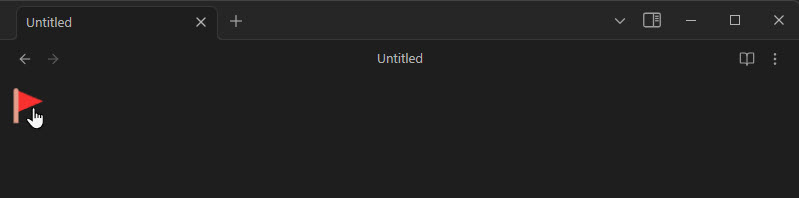
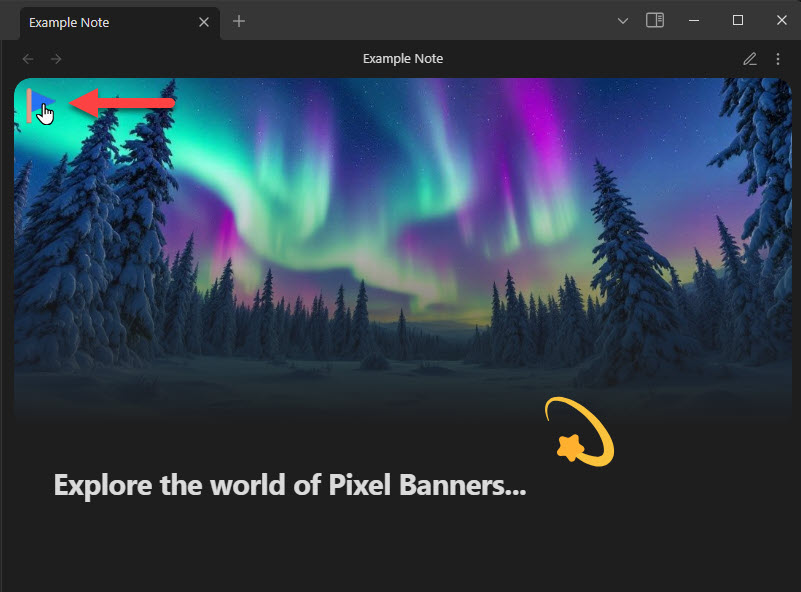
  1. Open a note and click the Banner Flag in the top left corner of your Note

    1

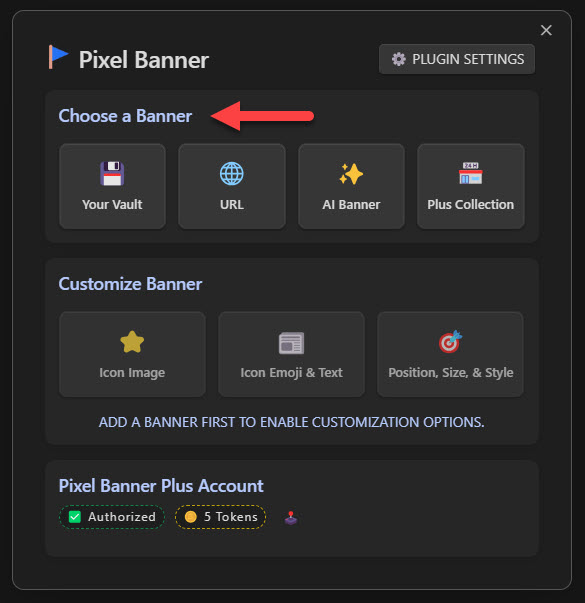
  2. Select a Source for your Banner (the AI and Collection options require you to first create a FREE Pixel Banner Plus account at: https://pixel-banner.online)
    2

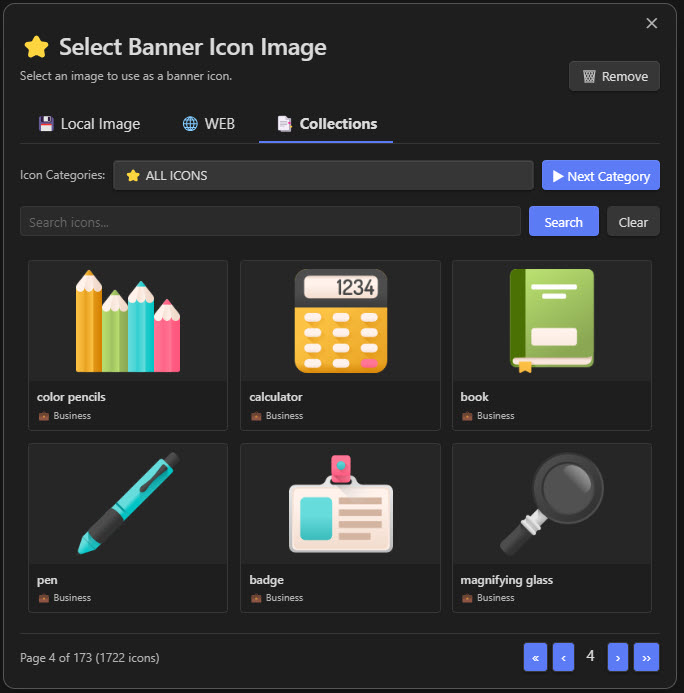
  3. Optionally Add an Icon Image (choose from your vault, the web, or our online free collection)
    3

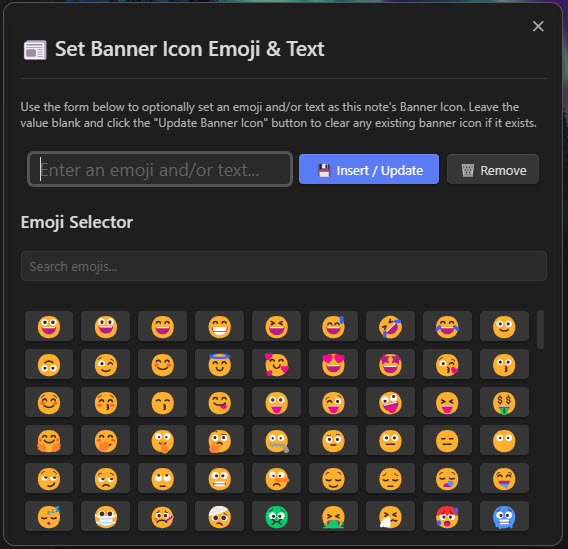
  4. Optionally Add Icon Emoji & Text (this can be any text, but it is advised to use an Emoji 🤣)
    4

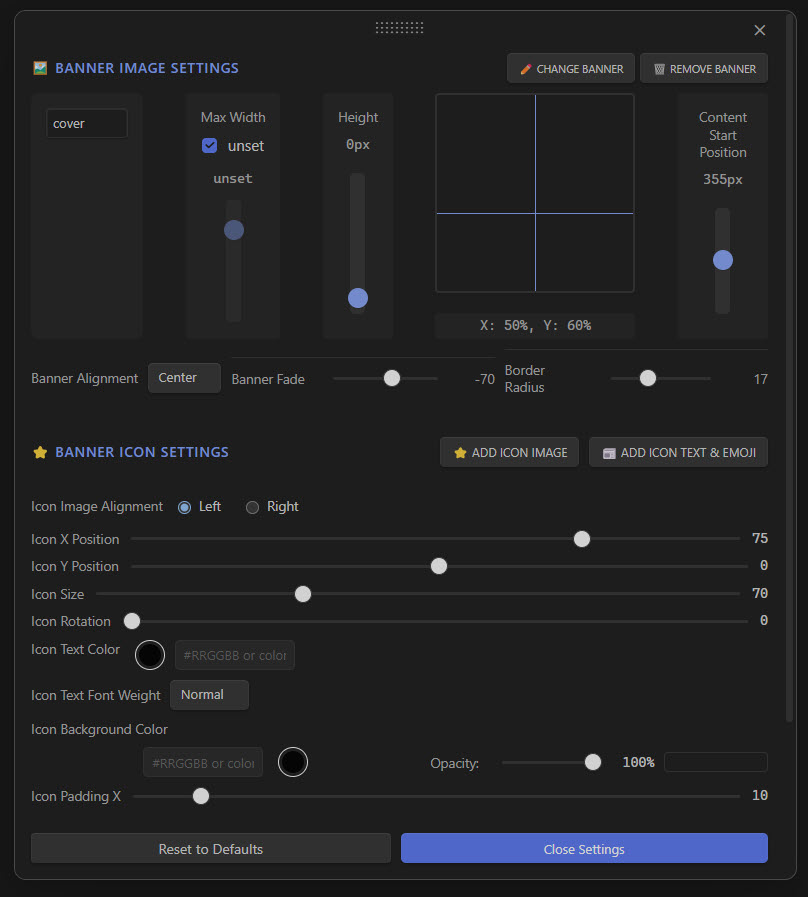
  5. Optionally adjust the position, size, color, and other properties for the Banner Image and Banner Icon of the note (by default they will inherit the General settings in Pixel Banner's main setting page, but are customizable per note)
    5

  6. Click the Banner Flag icon anytime to adjust any of these settings (the GUI is the most user-friendly way to adjust a note's pixel banner settings though you can also access and modify them through the properties of the note)

    6

🗂️ Using External Images (file:// Protocol)

You can now reference images stored outside your vault using the file:/// protocol. This is useful for:

  • Sharing banner images across multiple vaults
  • Using images from a central image library
  • Referencing system-wide image collections

Usage Examples (frontmatter):

  • Windows: banner: file:///C:\Images\banner.jpg or banner: file:///C:\Users\username\Pictures\banner.png
  • macOS: banner: file:///Users/username/Pictures/banner.jpg or banner: file:///Applications/MyApp/images/banner.png
  • Linux: banner: file:///home/username/Pictures/banner.jpg or banner: file:///opt/images/banner.png

Note: The image file must exist at the specified path and be accessible to Obsidian.

📝 Manual Banner Configuration (Frontmatter)

You can manually configure banners by editing the frontmatter (properties) of your notes. Pixel Banner supports multiple formats for maximum flexibility:

Supported Banner Formats

banner: [[folder/subfolder/image.jpg]]
banner: [[subfolder/image.jpg]]
banner: [[image.jpg]]
banner: "[[folder/subfolder/image.jpg]]"
banner: "[[subfolder/image.jpg]]"
banner: "[[image.jpg]]"
banner: "![[folder/subfolder/image.jpg]]"
banner: "![[subfolder/image.jpg]]"
banner: "![[image.jpg]]"
Markdown Image Formats
banner: "![](https://raw.githubusercontent.com/jparkerweb/pexels-banner/HEAD/folder/subfolder/image.jpg)"
banner: "![](https://raw.githubusercontent.com/jparkerweb/pexels-banner/HEAD/subfolder/image.jpg)"
banner: "![](https://raw.githubusercontent.com/jparkerweb/pexels-banner/HEAD/image.jpg)"
Plain Path Formats
banner: folder/subfolder/image.jpg
banner: subfolder/image.jpg
banner: image.jpg
banner: "folder/subfolder/image.jpg"
banner: "subfolder/image.jpg"
banner: "image.jpg"
URL Formats
banner: https://example.com/image.jpg
banner: "https://example.com/image.jpg"
banner: sunset beach
banner: "sunset beach"
banner: nature, landscape, mountains

Important Notes

  • Partial Path Resolution: Paths like image.jpg or subfolder/image.jpg are resolved relative to your note's location
  • YAML Limitation: Unquoted values starting with ! (like banner: ![[image.jpg]]) don't work due to YAML parsing rules. Always quote them: banner: "![[image.jpg]]"
  • Video Support: All formats work with video files (.mp4, .mov) as well as images

🎯 Image Property Format Setting

Pixel Banner allows you to choose how banner image paths are saved in your frontmatter when using the GUI. This setting is especially useful for compatibility with other plugins like Make.md (or any other plugin that prefers the plain path format).

To configure this:

  1. Go to Settings → Pixel Banner → General tab
  2. Find the Image Property Format dropdown
  3. Choose your preferred format:
    • image - Plain path format (e.g., banner: image.jpg) - Compatible with Make.md and other plugins that prefer the plain path format
    • [[image]] - Wiki link format (e.g., banner: [[image.jpg]])
    • ![[image]] - Embedded wiki link format (e.g., banner: ![[image.jpg]])

Note: The plugin can read all three formats regardless of this setting. This setting only affects how new banner paths are saved to frontmatter when inserted through the GUI.

🎬 Working with Video Banners

Adding Video Banners

  1. From Your Vault: Select video files (.mp4, .mov) from your vault just like images
  2. From Collection: Browse video banners in the Pixel Banner Plus Collection (marked with video badges)
  3. Download & Save: Videos are automatically saved with correct file extensions and you can choose the save location

Video Banner Features

  • Smart Badges: Video banners display with "VIDEO" badges for easy identification
  • Seamless Experience: All existing banner features work with videos (icons, positioning, etc.)
  • Flexible Saving: Choose where to save downloaded videos and customize filenames

🎉 Happy Pixel Bannering 🤣

click a version below to view its features via a YouTube video 📺


Appreciation

If you enjoy Pixel Banner please consider sending me a tip to support my work 😀

🍵 tip me here

Any ko-fi donator automatically recieves free Tokens to spend in Pixel Banner Plus!

Feedback and Support

If you encounter any issues or have suggestions for improvements, please open an issue on the GitHub repository.

Similar Plugins

info
• Similar plugins are suggested based on the common tags between the plugins.
Image Window
4 years ago by Jeremy Valentine
Adds the ability to open images in new Obsidian windows
Chevereto Image Uploader for Obsidian
4 years ago by kkzzhizhou
obsidian plugins: chevereto image uploader
Paste image rename
4 years ago by Reorx
Renames pasted images and all the other attachments added to the vault
Image Gallery
4 years ago by Luca Orio
A zero setup masonry image gallery for Obsidian
Image Inserter
4 years ago by Ray Hao
An Obsidian plugin helps users easily search and insert images to editors from Unsplash.
Copy document as HTML
3 years ago by mvdkwast
Obsidian plugin: copy document as HTML, including images
Emo
3 years ago by yaleiyale
Use image/file hosting in Obsidian by clipboard or draging file. Obsidian 图床聚合 & Github上传器
Image Layouts
3 years ago by Luke Chadwick
Local images plus
3 years ago by catalysm, aleksey-rezvov, Sergei Korneev
This repo is a reincarnation of obsidian-local-images plugin which main aim was downloading images in md notes to local storage.
Image Captions
3 years ago by Alan Grainger
Add captions to images with inline Markdown and link support. The caption format is compatible with the CommonMark spec and other Markdown applications.
Awesome Image
3 years ago by AwesomeDog
One-stop solution for image management.
Avatar
3 years ago by froehlichA
An obsidian plugin for displaying an avatar image in front of your notes.
Image OCR
3 years ago by kaffarell
Runs ocr on pasted images and posts result in details box. This allows to search in images.
Image To Lskypro
3 years ago by NekouTarou
支持直接上传图片到图床Lsky,基于https://github.com/renmu123/obsidian-image-auto-upload-plugin.git改造。
Cloudinary
3 years ago by Uday Samsani, Jordan Handy
Cloudinary plugin for content uploading and transformation.
Image Converter
3 years ago by xRyul
⚡️ Convert, compress, resize, annotate, markup, draw, crop, rotate, flip, align images directly in Obsidian. Drag-resize, rename with variables, batch process. WEBP, JPG, PNG, HEIC, TIF.
Media Sync
3 years ago by fnya
Media Sync is Plugin for Obsidian
Qiniu Image Uploader
3 years ago by Jade Zheng
Uploads images from your clipboard to qiniu.com and embeds uploaded image to your note.
Image2LaTEX
3 years ago by Hugo Persson
This is a plugin for obsidian that will read your latest copied image from clipboard and generate math latex from it
Markdown Image Caption
3 years ago by Hananoshika Yomaru
Generate image caption easily. Completely markdown-based.
Image Helper
2 years ago by Chongmyung Park
Context menu to convert a image to another format in reading view in Obsidian.md
Image Inline
2 years ago by Zackary W
convert images into base64 encoded strings and embed them directly within your notes
Image Collector
2 years ago by tdaykin
Image Magician
2 years ago by luxmargos
This is a plugin for Obsidian (https://obsidian.md). Supports viewing and exporting various image formats using ImageMagick.
Display Relative Path Img
2 years ago by Dyc
Display the relative path image referenced by <img> in Obsidian without altering the original document
Tiff Viewer
2 years ago by Jan Ullmann
An obsidian plugin to easily convert tiff files to png so that they can be displayed in obsidian
Image Metadata
2 years ago by alexeiskachykhin
Adds image metadata editing capabilities to Obsidian
Lite Gallery
2 years ago by Jordan Poles
Fast Image Auto Uploader
2 years ago by Longtao Wu
upload images from your clipboard by gopic
Image in Editor
5 years ago by Ozan Tellioglu
This Obsidian plugin to view Images, Transclusions, iFrames and PDF Files within the Editor without a necessity to switch to Preview.
Clear Unused Images
5 years ago by Ozan Tellioglu
Obsidian plugin to clear the images that are not used in note files anymore
Image auto upload
5 years ago by renmu123
auto upload image with picgo
Image Context Menus
5 years ago by NomarCub
Image Context Menus - Obsidian.md image context menus: copy, open in default app, show in system explorer, reveal in navigation context menu. Also Open PDF externally context menu.
Image Toolkit
5 years ago by sissilab
An Obsidian plugin for viewing an image.
Banners
5 years ago by Danny Hernandez
An Obsidian plugin that adds banners to your notes
Local images
5 years ago by catalysm, aleksey-rezvov
Mousewheel Image zoom
4 years ago by Nico Jeske
An Obsidian plugin that enables you to increase/decrease the size of an image by holding down a configurable key (defaults to left alt), hovering over an image in preview mode and scrolling.
Enhanced Image
2 years ago by situ2001
Enhance the experience of image in Obsidian, seamlessly.
Find Orphaned Images
2 years ago by Josmar Cristello
Find Orphaned Images is an Obsidian plugin designed to help you keep your vault clean and organized by identifying and managing images that are not linked anywhere in your notes.
Local Media Embedder
2 years ago by seyf1elislam
an obsidian plugin allows you to Embed videos and images and audios from your local device in your notes.
复制图文 (Copy Image Text)
2 years ago by msgk
obsidian插件,复制笔记内容(包括文本和图片)到剪贴板
PDF2Image
2 years ago by RasmusAChr
Arweave Uploader
2 years ago by makesimple
Featured Image
a year ago by Johan Sanneblad
Obsidian plugin to automatically set a featured image property in your notes based on the first image, YouTube link, or Auto Card Link image found in your document. This allows you to create rich note galleries using Folder Notes and Dataview.
Image Tools
a year ago by Andrey Serov
Image Uploader For Note
a year ago by Yunfi
Upload images in a note, and if the image is only used in this note, delete it from vault.
Paste Image Into Property
a year ago by Nito
Media Slider
a year ago by Aditya Amatya
An obsidian plugin that helps to make slider for images, audios, videos, pdfs, markdown, etc in obsidian notes.
Image Picker
a year ago by ari.the.elk
Image to HTML
a year ago by 0x1DA9430
A plugin for Obsidian that converts pasted images to HTML format instead of Obsidian's wikilink or Markdown format
Simple Banner
a year ago by Sandro Ducceschi
Visually enhance your Obsidian notes with a customizable banner. Supports icons and time/date display.
Memories
3 months ago by DIMFLIX
Plugin to display a gallery directly in a note.
Banners Reloaded
2 months ago by Dani García
A simple, fast, and lightweight way to add customizable banners to your notes.