Featured Image

by Johan Sanneblad
5
4
3
2
1
Score: 64/100

Description

Category: Note Enhancements

The Featured Image Plugin for Obsidian automatically sets a featured image in the frontmatter of your notes based on the first image, YouTube link, or Auto Card Link it finds. This feature helps create visually rich note lists, similar to those in popular note-taking apps. The plugin supports local images, YouTube thumbnails, and Auto Card Link images, and it even offers bulk update commands to process all notes at once. With optimization features like debounced processing and smart caching, it ensures efficient performance across large vaults. You can also customize which folders to exclude or specify image formats, making it highly adaptable to your needs. Combine it with plugins like Dataview for a beautifully organized note list with previews. Whether you're organizing personal notes or creating a knowledge base, the Featured Image Plugin streamlines visual content management in Obsidian.

Reviews

No reviews yet.

Stats

116
stars
33,817
downloads
2
forks
544
days
50
days
50
days
0
total PRs
0
open PRs
0
closed PRs
0
merged PRs
39
total issues
0
open issues
39
closed issues
157
commits

Latest Version

2 months ago

Changelog

New

  • New setting: Run automatically while editing. Enable to update the featured image automatically when a note changes. Default: true.
  • New command: Update featured image in current file. Refresh the feature image in the active note from the command palette.

README file from

Github

Available in: English • Deutsch • Español • Français • 日本語 • 中文

Featured Image is an Obsidian plugin that automatically finds and sets thumbnail images for your notes. It detects the first image, YouTube link, or Auto Card Link in each document, downloads external images locally for instant loading, and creates optimized resized thumbnails.

The main use case for Featured Image is when you want a property with an image in each markdown file, typically for Bases or Dataviews.

Important!

Before Notebook Navigator version 2.0 was released this was the preferred way to generate image thumbnails for Notebook Navigator. However, as of version 2.0 the thumbnail-generation is now built into Notebook Navigator and saved to a dedicated database separate from the vault.

This means Featured Image is no longer needed for Notebook Navigator.

If you enjoy using Featured Image, please consider buying me a coffee or Sponsor on GitHub ❤️.

Key Features

Automatic Image Detection

  • Finds the first image in each note (local files, external URLs, YouTube videos, or Auto Card Links)
  • Sets a frontmatter property with the image path for use by other plugins
  • Handles complex Wiki link syntax including captions and dimensions
  • Works automatically as you edit notes, or manually via command palette

Smart Thumbnail Generation

  • Creates optimized 128x128 thumbnails for fast loading in file browsers
  • Configurable cropping with alignment control (top/center/bottom, left/center/right)
  • Stores thumbnails separately from originals to preserve quality
  • Reduces memory usage and improves scrolling performance with large vaults

Bulk Processing

  • Update your entire vault or specific folders with one command
  • Preserves original file modification dates during bulk operations
  • Clean up unused downloaded images to save disk space
  • Re-render all thumbnails when you change size or alignment settings

Works With Your Favorite Plugins

  • Obsidian Bases - Show image previews in database table views without network delays (Obsidian 1.9+)
  • Dataview - Include thumbnails in custom queries with fast local image access
  • Runs on desktop and mobile

Installation & Setup

  1. Open Obsidian Settings → Community Plugins → Browse
  2. Search for "Featured Image" → Install → Enable
  3. Click "Options" to configure settings (especially Thumbnails Folder if you want to change where images are stored)
  4. The plugin automatically detects and sets featured images when you edit notes containing images, YouTube links, or Auto Card Links

Bulk Commands

Access these commands via Command Palette (Ctrl/Cmd + P):

  1. Set featured images in all files
    Scans your entire vault and sets featured images based on the first image found in each note. File modification dates are preserved.

  2. Set featured images in current folder
    Same as above but only processes the current folder and its subfolders.

  3. Update featured image in current file
    Updates only the active note. Useful if you disable automatic updates and want to run the plugin manually.

  4. Remove featured images from all files
    Clears all featured image properties from your vault while preserving file modification dates.

  5. Remove unused downloaded images and thumbnails
    Deletes downloaded images that are no longer referenced by any notes to free up disk space.

  6. Re-render all resized thumbnails
    Regenerates thumbnails with your current size and alignment settings.
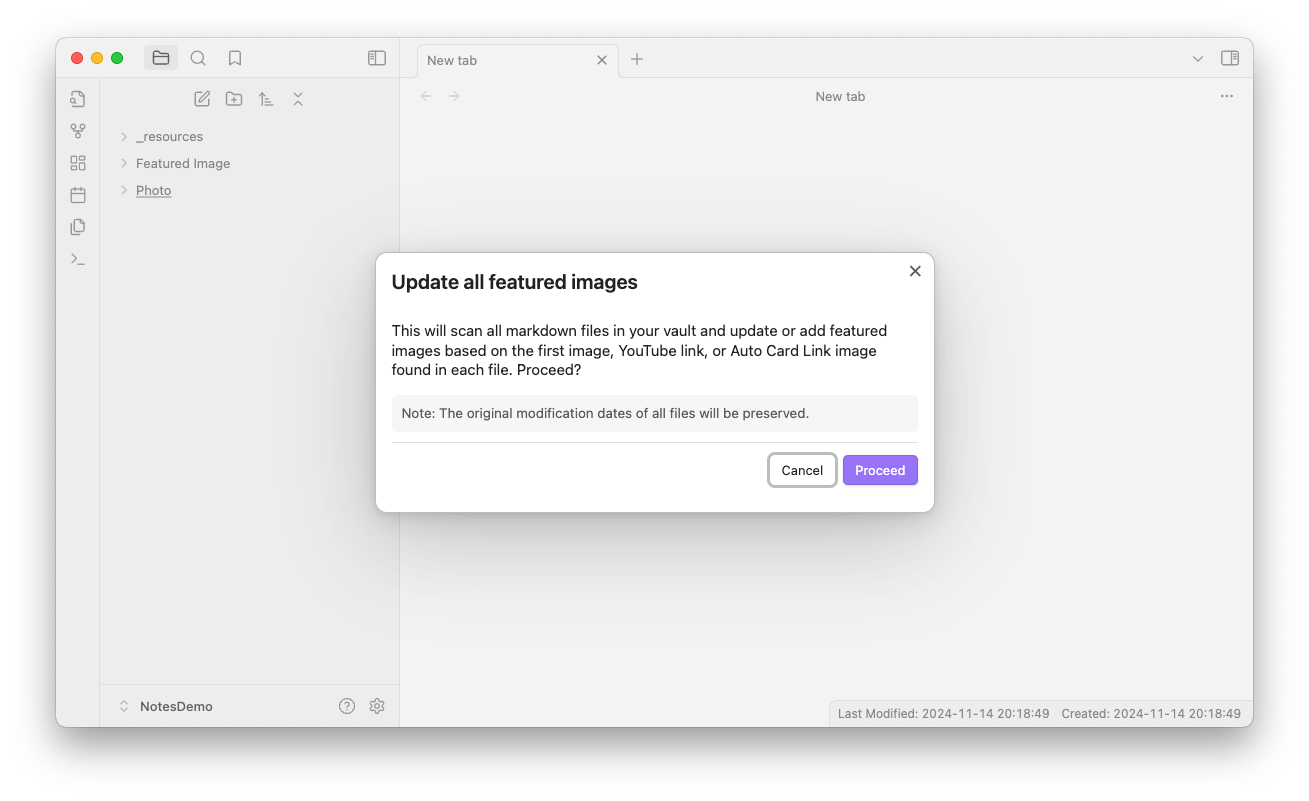
Set featured images in all files

Settings

Basic Settings

  1. Show notifications - Show notifications when the featured image is set, updated or removed.

  2. Run automatically while editing - Automatically updates the featured image when a note changes. Disable this if you prefer to use the Update featured image in current file command manually.

  3. Frontmatter property - The name of the frontmatter property to update with the featured image.

  4. Thumbnails folder - Folder for downloaded thumbnails and resized images. Subfolders will be created automatically for different image types.

  5. Excluded folders - Comma separated list of folders to exclude from the featured image plugin.

Frontmatter

  1. Frontmatter image source properties - Comma-separated list of frontmatter properties to check for image paths/URLs before scanning the document. Supports strings and YAML lists.

  2. Media link format - Choose how to format the featured image property in frontmatter:

    • Plain text: path/to/image.png
    • Wiki link: [[path/to/image.png]]
    • Embedded link: ![[path/to/image.png]]
  3. Only update if frontmatter property exists - Enable this to only update the frontmatter property if it already exists.

  4. Keep empty property - When enabled, the frontmatter property will be kept but set to an empty string if no featured image is found. When disabled, the property will be removed.

  5. Don't clear existing property - When enabled, keeps the existing featured image property if no image is found in the document. When disabled, clears or removes the property when no image is detected (depending on the 'Keep empty property' setting).

External Media

  1. Download external images to thumbnails folder - Store external image links locally. Disable to skip remote images when selecting a featured image.

  2. Download YouTube thumbnails - Store YouTube thumbnails locally. Disable to skip YouTube links when selecting a featured image.

  3. Require exclamation mark for YouTube thumbnails - If enabled, only YouTube links prefixed with an exclamation mark will be considered for thumbnail download.

Resize thumbnail

  1. Resize feature image - Resize feature image for better performance in scrolling lists.
    • Resized thumbnail property name - The name of the frontmatter property to store the resized thumbnail path.
    • Max resized width - Maximum width of the resized thumbnail in pixels. Use 0 for no width restriction.
    • Max resized height - Maximum height of the resized thumbnail in pixels. Use 0 for no height restriction.
    • Fill resized dimensions - When enabled, resized thumbnails will be exactly the size specified by max width and height, maintaining aspect ratio and cropping to fill the dimensions.
      • Vertical alignment - Choose the vertical alignment for cropped images (top, center, or bottom).
      • Horizontal alignment - Choose the horizontal alignment for cropped images (left, center, or right).

Advanced Settings

  1. Debug mode - Enable debug mode to log detailed information to the console.

  2. Dry run - Enable dry run to prevent any changes from being made to your files.

Technical Details

  • Smart Caching - Downloads external images once and stores them locally. Failed downloads use a 1x1 placeholder to prevent repeated attempts
  • YouTube Support - Automatically downloads thumbnails with WebP and multiple JPG fallback resolutions
  • Performance - Single-pass regex matching and Obsidian's metadata cache for fast processing
  • File Preservation - Original modification dates remain unchanged during bulk operations
  • Automatic Organization - Creates subfolders (youtube/, external/, autocardlink/, resized/) for different image types

Code Quality

This plugin follows strict code quality standards using Obsidian's official ESLint plugin and the build process enforces zero tolerance for errors and warnings. All TypeScript is fully typed with no explicit any, and the codebase is validated with ESLint, Prettier, and dead code detection.

Support and Feedback

If you have any questions, suggestions, or issues, please open an issue on the GitHub repository.

Enjoy using Featured Image!

Similar Plugins

info
• Similar plugins are suggested based on the common tags between the plugins.
Image Converter
3 years ago by xRyul
⚡️ Convert, compress, resize, annotate, markup, draw, crop, rotate, flip, align images directly in Obsidian. Drag-resize, rename with variables, batch process. WEBP, JPG, PNG, HEIC, TIF.
Banners
5 years ago by Danny Hernandez
An Obsidian plugin that adds banners to your notes
Image in Editor
5 years ago by Ozan Tellioglu
This Obsidian plugin to view Images, Transclusions, iFrames and PDF Files within the Editor without a necessity to switch to Preview.
Mousewheel Image zoom
4 years ago by Nico Jeske
An Obsidian plugin that enables you to increase/decrease the size of an image by holding down a configurable key (defaults to left alt), hovering over an image in preview mode and scrolling.
Clear Unused Images
5 years ago by Ozan Tellioglu
Obsidian plugin to clear the images that are not used in note files anymore
Local images plus
3 years ago by catalysm, aleksey-rezvov, Sergei Korneev
This repo is a reincarnation of obsidian-local-images plugin which main aim was downloading images in md notes to local storage.
Paste image rename
4 years ago by Reorx
Renames pasted images and all the other attachments added to the vault
Image auto upload
5 years ago by renmu123
auto upload image with picgo
Pixel Banner
2 years ago by Justin Parker
🚩 Enhance your Obsidian notes with customizable banner images, including AI-generated designs and a curated store of downloadable banners. Transform your workspace with visually stunning headers that add context, improve aesthetics, and take your note-taking beyond the ordinary.
Image Toolkit
5 years ago by sissilab
An Obsidian plugin for viewing an image.
Image Context Menus
5 years ago by NomarCub
Image Context Menus - Obsidian.md image context menus: copy, open in default app, show in system explorer, reveal in navigation context menu. Also Open PDF externally context menu.
Force note view mode
5 years ago by Benny Wydooghe
Image Captions
3 years ago by Alan Grainger
Add captions to images with inline Markdown and link support. The caption format is compatible with the CommonMark spec and other Markdown applications.
Front Matter Title
4 years ago by Snezhig
Plugin for Obsidian.md
Update frontmatter modified date
3 years ago by Alan Grainger
Automatically update a frontmatter/YAML modified date field
Local images
5 years ago by catalysm, aleksey-rezvov
Copy document as HTML
3 years ago by mvdkwast
Obsidian plugin: copy document as HTML, including images
Image Window
4 years ago by Jeremy Valentine
Adds the ability to open images in new Obsidian windows
Image Gallery
4 years ago by Luca Orio
A zero setup masonry image gallery for Obsidian
Find Orphaned Images
2 years ago by Josmar Cristello
Find Orphaned Images is an Obsidian plugin designed to help you keep your vault clean and organized by identifying and managing images that are not linked anywhere in your notes.
Image Layouts
3 years ago by Luke Chadwick
Frontmatter Tag Sugest
4 years ago by Jonathan Miller
Autocompletes tags in Obsidian YAML frontmatter. No more deleting #!
Simple Banner
a year ago by Sandro Ducceschi
Visually enhance your Obsidian notes with a customizable banner. Supports icons and time/date display.
Awesome Image
3 years ago by AwesomeDog
One-stop solution for image management.
Frontmatter Markdown Links
a year ago by mnaoumov
Obsidian Plugin that adds support for markdown links in frontmatter
Avatar
3 years ago by froehlichA
An obsidian plugin for displaying an avatar image in front of your notes.
Dataview (to) Properties
10 months ago by Mara-Li
Sync inline Dataview to properties (YAML frontmatter)
Front Matter Timestamps
2 years ago by LighthouseDino
Image Inline
2 years ago by Zackary W
convert images into base64 encoded strings and embed them directly within your notes
Media Slider
a year ago by Aditya Amatya
An obsidian plugin that helps to make slider for images, audios, videos, pdfs, markdown, etc in obsidian notes.
Image Tools
a year ago by Andrey Serov
Banners Reloaded
2 months ago by Dani García
A simple, fast, and lightweight way to add customizable banners to your notes.
Media Sync
3 years ago by fnya
Media Sync is Plugin for Obsidian
Image OCR
3 years ago by kaffarell
Runs ocr on pasted images and posts result in details box. This allows to search in images.
Image2LaTEX
3 years ago by Hugo Persson
This is a plugin for obsidian that will read your latest copied image from clipboard and generate math latex from it
Time Things
2 years ago by Nick Winters
Show clock, track time spent editing a note, and track the last time a note has been edited.
FuzzyTag
3 years ago by Adrian
Fold Properties By Default
a year ago by Tommy Bergeron
Always have editor/metadata properties folded by default.
Emo
3 years ago by yaleiyale
Use image/file hosting in Obsidian by clipboard or draging file. Obsidian 图床聚合 & Github上传器
Local Media Embedder
2 years ago by seyf1elislam
an obsidian plugin allows you to Embed videos and images and audios from your local device in your notes.
Frontmatter Alias Display
3 years ago by muhammadv-i
A plugin for Obsidian.md to show front-matter aliases as display names in the file menu.
Add an ID to the front matter
3 years ago by llimllib
Lite Gallery
2 years ago by Jordan Poles
Note aliases
3 years ago by Pulsovi
This plugin manages wikilinks aliases and save them on the aliases list of the linked note
Auto Front Matter
3 years ago by conorzhong
Image Magician
2 years ago by luxmargos
This is a plugin for Obsidian (https://obsidian.md). Supports viewing and exporting various image formats using ImageMagick.
Frontmatter generator
3 years ago by Hananoshika Yomaru
A plugin for Obsidian that generates frontmatter for notes
Open Related Url
4 years ago by Dan Pickett
Image To Lskypro
3 years ago by NekouTarou
支持直接上传图片到图床Lsky,基于https://github.com/renmu123/obsidian-image-auto-upload-plugin.git改造。
Testing Vault
3 years ago by Michael Pedersen
Cloudinary
3 years ago by Uday Samsani, Jordan Handy
Cloudinary plugin for content uploading and transformation.
Chevereto Image Uploader for Obsidian
4 years ago by kkzzhizhou
obsidian plugins: chevereto image uploader
Current View
10 months ago by Lucas Ostmann
Automatically set the view mode (Reading, Live Preview, Source) for notes in Obsidian using folder rules, file patterns, or frontmatter.
Qiniu Image Uploader
3 years ago by Jade Zheng
Uploads images from your clipboard to qiniu.com and embeds uploaded image to your note.
Blueprint
3 months ago by François Vaux
Repeatable templates plugin for Obsidian
Markdown Image Caption
3 years ago by Hananoshika Yomaru
Generate image caption easily. Completely markdown-based.
Sort Frontmatter
2 years ago by Kanzi
Sort frontmatter automatically
Image Picker
a year ago by ari.the.elk
Image Collector
2 years ago by tdaykin
Conditional Properties
4 months ago by Diego Eis
Automate frontmatter property updates in your Obsidian notes using simple conditional rules.
复制图文 (Copy Image Text)
2 years ago by msgk
obsidian插件,复制笔记内容(包括文本和图片)到剪贴板
Image Helper
2 years ago by Chongmyung Park
Context menu to convert a image to another format in reading view in Obsidian.md
Note UID Generator
a year ago by Valentin Pelletier
Allow you to automatically generate UID for the notes in your vault.
Display Relative Path Img
2 years ago by Dyc
Display the relative path image referenced by <img> in Obsidian without altering the original document
Image Metadata
2 years ago by alexeiskachykhin
Adds image metadata editing capabilities to Obsidian
PDF2Image
2 years ago by RasmusAChr
Tiff Viewer
2 years ago by Jan Ullmann
An obsidian plugin to easily convert tiff files to png so that they can be displayed in obsidian
Colorful Note Background
4 months ago by andresgongora
Set note background based on file location or frontmatter metadata
Paste Image Into Property
a year ago by Nito
Note Favicon
a year ago by mdklab
Obsidian plugin – Show Favicon from Metadata
Memories
3 months ago by DIMFLIX
Plugin to display a gallery directly in a note.
Connections
4 months ago by Eric Van Cleve
Update Time Updater
2 years ago by MURATAGAWA Kei
Obsidian plugin to update the 'update time' element when saving or manually.
AI Note Tagger
a year ago by Jasper Mayone
Auto tagging obsidian notes w/ AI
Draft Indicator
2 years ago by Brian Boucheron
Show draft status with ✎ icons in the Obsidian file explorer.
Enhanced Image
2 years ago by situ2001
Enhance the experience of image in Obsidian, seamlessly.
Image to HTML
a year ago by 0x1DA9430
A plugin for Obsidian that converts pasted images to HTML format instead of Obsidian's wikilink or Markdown format
Template Folder
10 months ago by LucasOe
Obsidian plugin to move notes to a folder when applying a template.
Image Uploader For Note
a year ago by Yunfi
Upload images in a note, and if the image is only used in this note, delete it from vault.
Fast Image Auto Uploader
2 years ago by Longtao Wu
upload images from your clipboard by gopic
Publish Note to Mowen Note
9 months ago by ziyou
This is a mowen plugin for Obsidian (https://obsidian.md)
Frontmatter Metadata Link Classes
10 months ago by Varvara Zmeeva / zmeeva.io
Enhanced internal links with automatic classnames based on frontmatter metadata.
Title-Only Tab
a year ago by tristone13th
a plugin of obsidian for to change showing tab name to short
Arweave Uploader
2 years ago by makesimple
Frontmatter to HTML Attributes
2 months ago by Tarek Saier
Makes YAML frontmatter available as data-* attributes in HTML, enabling metadata based CSS styling.
Insert Arknights URL Banner
10 months ago by Rerurate_514
Obsidianのプラグイン、img_dwnldr_wikigg_ak_ktに保存されている画像を選択してbannersプロパティに簡単に設定できるプラグイン