Evernote Decryptor

by rcmdnk
5
4
3
2
1
Score: 47/100

Description

Category: Note Enhancements

The Evernote Decryptor plugin for Obsidian enables users to decrypt Evernote's encrypted data directly within their notes. It supports decryption using AES-128bit encryption, allowing users to securely view encrypted information by entering a password. The plugin provides multiple commands, including decrypting and replacing encrypted data, encrypting text in the Evernote secret format, and formatting encrypted data as a secret button. It also allows for batch formatting of encrypted text across an entire note. Additionally, the plugin supports integration with the Evernote importer, allowing for seamless management of encrypted data from Evernote. This tool is essential for those looking to manage and access their encrypted Evernote content within Obsidian.

Reviews

No reviews yet.

Stats

5
stars
2,410
downloads
1
forks
814
days
440
days
440
days
1
total PRs
0
open PRs
1
closed PRs
0
merged PRs
2
total issues
1
open issues
1
closed issues
24
commits

README file from

Github

Evernote Decryptor Plugin for Obsidian

When you import notes from Evernote by importer plugin, encrypted data in Evernote is imported as a text.

This plugin provides commands to decrypt the encrypted data in the imported notes.

You can format the encrypted data as an the Evernote Secret button format, which can be decrypted by clicking the button.

It also provides a command to encrypt the selected text as the Evernote secret format.

If you plan to import notes from Evernote, try obsidian-importer-for-evernote-decryptor, which is forked version of importer plugin and formats the encrypted data as the Evernote secret format directly. About obsidian-importer-for-evernote-decryptor, see below.

This plugin is inspired by the inline-encrypter.

[!NOTE] A decryption method is based on the article: Decoding the Evernote en-crypt field payload.

[!WARNING] This plugin support the method using AES-128bit, which was introduced in 2014 (What type of encryption does Evernote use? – Evernote Help & Learning). Old encrypted data with RC2 encryption is not supported.

Features

Following commands will be added:

  • Decrypt Evernote encrypted data: Decrypt the selected encrypted text by entering the password and show the decrypted text.
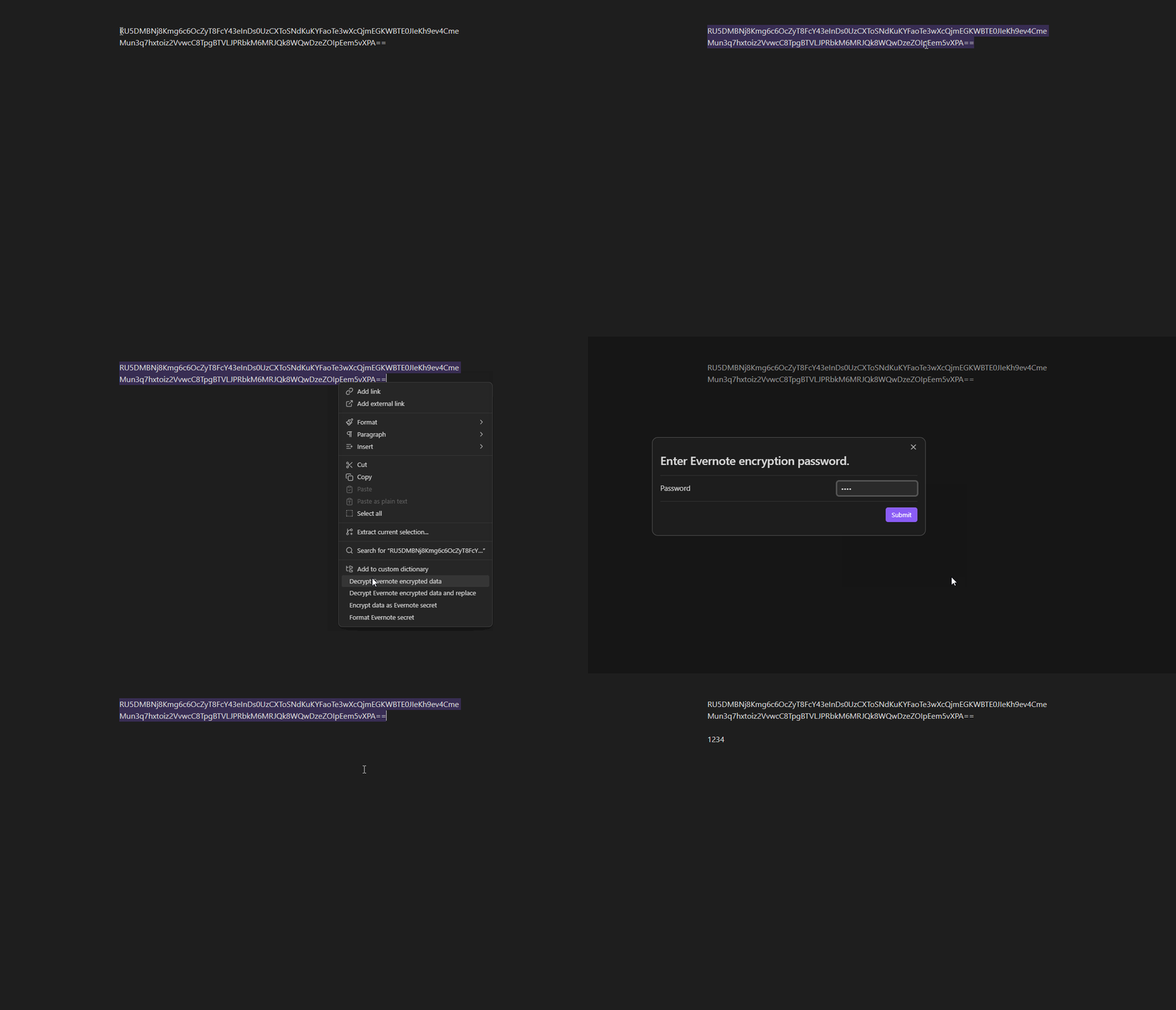
decrypt

  • Decrypt Evernote encrypted data and replace: Decrypt the selected encrypted text and replace the text with the decrypted text.
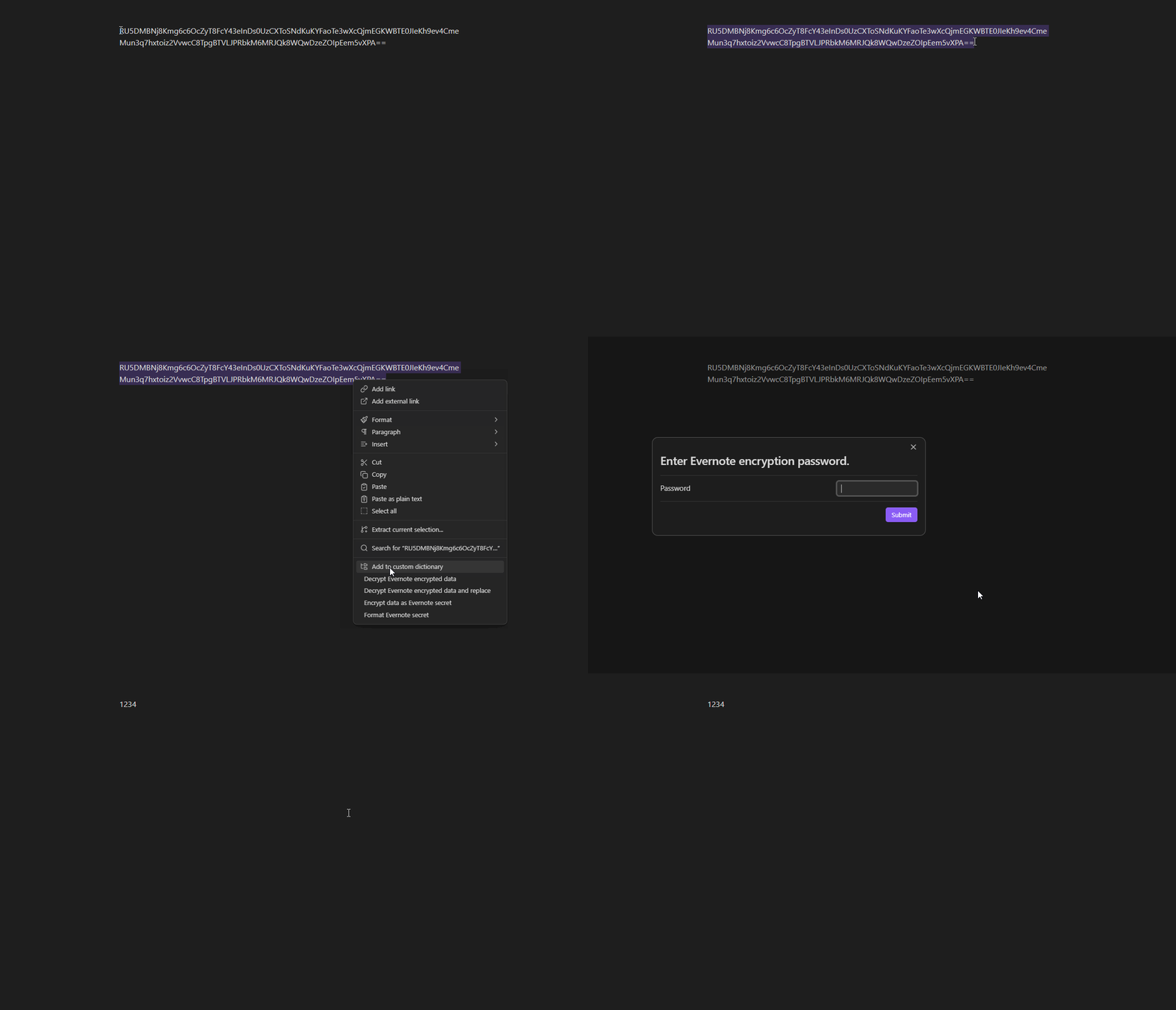
replace

  • Encrypt data as Evernote secret: Encrypt the selected text using a password and replace the text with the encrypted data.

encrypt

  • Format Evernote secret: Format the selected encrypted text as the Evernote secret format.

format

  • Format all Evernote secrets in the note: Format the all encrypted text in the note as the Evernote secret format.

These command can be run from the right click context menu in the editor, too.

Evernote secret format is a inline-code block starting with evernote_secret .

My secret is `evernote_secret <encrypted data>`.

This formatted text is viewed as a button of Evernote Secret in both reading and live preview mode.

By clicking the button, the password input dialog will be shown and the decrypted text will be displayed in a modal.

button

You can directly edit the encrypted text as a inline-code block, too.

edit

Settings

The plugin provides a settings tab under the Obsidian settings menu:

  • Show Editor Context Menu Item: Toggle the display of the editor context menu items.

About encrypted string of Evernote

Evernote makes the encrypted data with reserved starting value: ENC0.

This results in the encrypted data starting with RU5DM.

Therefore, you can find the encrypted data by searching RU5DM in the note.

If the encrypted data is not starting with RU5DM, it could be a old encrypted data with RC2 encryption, which is not supported, or it could be corrupted data.

By Format all Evernote secrets in the note command, all strings starting with RU5DM in the note will be formatted as the Evernote secret format.

If the string is in the code block (including inline code block), bold, italic, or strikethrough, it will not be formatted.

obsidian-importer-for-evernote-decryptor

obsidian-importer-for-evernote-decryptor is a forked version of importer plugin, which formats the encrypted data as Evernote secret format directly.

It is not integrated as a community plugin yet, so you need to install it with BRAT.

If you've installed the original importer plugin, first disable or uninstall it to avoid conflicts.

After installing BRAT from the community plugin and enabling it, add obsidian-importer-for-evernote-decryptor from Add Beta plugin with frozen version button in the BRAT settings.

Use following repository information:

Then you can import notes from Evernote with encrypted data formatted as Evernote secret format.

Similar Plugins

info
• Similar plugins are suggested based on the common tags between the plugins.
Importer
3 years ago by Obsidian
Obsidian Importer lets you import notes from other apps and file formats into your Obsidian vault.
Meld Encrypt
5 years ago by meld-cp
Hide secrets in your Obsidian.md vault
Share Note
3 years ago by Alan Grainger
Instantly share an Obsidian note with the full theme exactly like you see in your vault. Data is shared encrypted by default, and only you and the person you send it to have the key.
Remotely Secure
3 years ago by sboesen
fork of remotely-save with security upgrades
Password Protection
2 years ago by Qing Li
This is a password plugin for protecting your private notes and diary, no encrypt, no decrypt.
QuickShare
4 years ago by Maxime Cannoodt (@mcndt)
📝 An Obsidian plugin for sharing encrypted Markdown notes on the web. Zero configuration required.
Cryptsidian
5 years ago by triumphantomato
Encrypt all files in your Obsidian.md Vault with a password.
Global Proxy
2 years ago by windingblack
🚀 Obsidian Global Proxy is an Obsidian plugin that makes it easy to configure web proxies and use proxies throughout Obsidian.
Lock Screen
4 years ago by Eric Biewener
Differential ZIP Backup
2 years ago by vorotamoroz
gpgCrypt
3 years ago by Tjado Mäcke
Seamlessly encrypts your notes using GPG. Supports smartcards for enhanced security! 🔒📝📎
Garble Text
5 years ago by kurakart
Obsidian plugin for exposing Obsidian's garbleText() function
Sync Vault CE
a year ago by Camus Qiu
The missing bridge between your 10+ TB cloud drive and your AI brain.
Global Markdown Encryption
3 years ago by shlemiel
a plugin for encrypting obsidian markdowns in-memory, single password based.
HackerOne
3 years ago by neolex
A plugin to get our hackerone reports data into obsidian
GPG Encrypt
2 years ago by Luis Jaramillo
Obsidian Plugin GPG Inline Encrypt
Eccirian Encrypt
10 months ago by Entropiex
Next-generation file encryption solution
Cloud sync
9 months ago by Bing
一款强大的 Obsidian 同步插件,支持将笔记自动同步到多种云盘服务,提供端到端加密保护,让您的笔记既安全又便捷。
Crypt It
2 years ago by fyears
Obsidian plugin allowing users to right click on a file to generate an encryption version of the file using a password.
Cliplet
6 months ago by namikaze-40p
An Obsidian plugin that serves as a clipboard and snippet manager — your own, separate from the OS clipboard.
Blur Mode
a year ago by dangehub
Blur Mode - Blur elements on the obsidian interface for presentations or screenshots|模糊模式 - 对obsidian界面上的元素进行模糊处理以便演示或截图
Age Encrypt
a year ago by Metin Ur
A plugin for Obsidian that provides age-based encryption for your notes.
Peekaboo
2 years ago by Wang Guoshi
An Obsidian plugin protects your privacy by setting a password to hide notes.
File Share
2 years ago by muckmuck
A lightweight obsidian.md plugin for sharing files between multiple vaults
Private Mode
a year ago by markusmo3
Vault Encrypt
5 months ago by Pluppen
Obsidian Plugin that encrypts/decrypts the entire vault.
Password Audit
a year ago by Sai Prashanth Pulisetti
Password Audit Plugin
Cypher
a year ago by Atharva Wankhede
Obsidian Plugin
Send Note
a year ago by jvsteiner
Instantly share an Obsidian note text/content with other users. Data is shared encrypted by default, and only you and the person you send it to have the key.
Simple Steam Auth
3 months ago by dreamscached
🔑 Generate Steam Guard codes right in your Obsidian vault.