Harper

by Elijah Potter
5
4
3
2
1
Score: 70/100

Description

Category: Note Enhancements

The Harper plugin integrates a local grammar checker directly into Obsidian, providing users with instant, private, and open-source grammar correction. Unlike other tools, Harper runs entirely on your device, ensuring your data stays secure without the need for additional setup or internet connectivity. The plugin automatically checks your documents in real-time, highlighting errors as you type. Hovering over an error reveals suggested corrections for a seamless editing experience. With a lightweight design and efficient functionality, Harper enhances writing productivity while maintaining user privacy.

Reviews

No reviews yet.

Stats

144
stars
85,945
downloads
3
forks
631
days
10
days
9
days
0
total PRs
0
open PRs
0
closed PRs
0
merged PRs
0
total issues
0
open issues
0
closed issues
19
commits

Latest Version

10 days ago

Changelog

See the main release notes here.

README file from

Github

harper-obsidian-plugin

Downloads

Put simply, Harper is a grammar checking plugin that doesn't violate your privacy. Other systems, like LanguageTool, ship your writing over the internet to centralized servers, where it's used for god-knows-what. Harper isn't like that.

Instead, Harper runs its grammar checking engine directly inside Obsidian. That means your data doesn't go anywhere you don't want it to. Your Obsidian vault should be just what you expect: locked down and private.
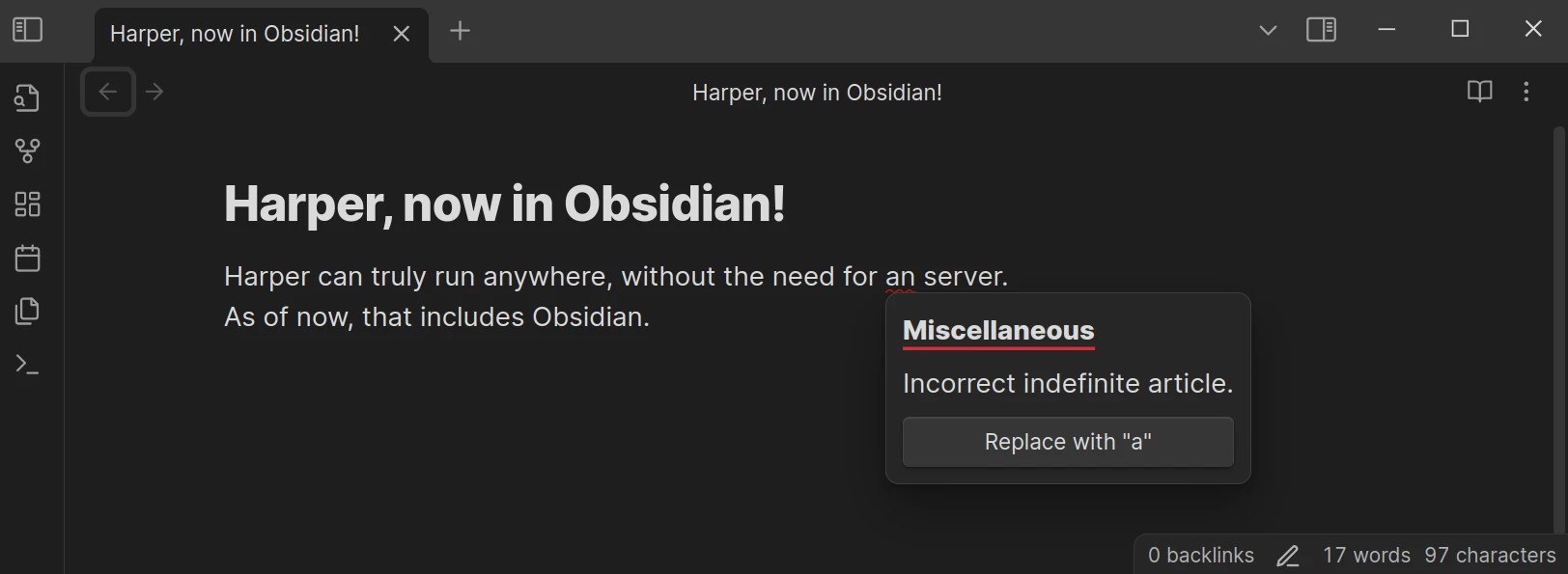
A screenshot of Obsidian with Harper installed

Unlike other offerings (like Grammarly) Harper also explicitly ignores the contents of code fences and inline code blocks. Since it runs entirely on-device, Harper also ends up being noticeably faster than alternatives, partly because there is no network latency.

Open Source

  • Harper is fully open source, allowing transparency and community contributions to improve its functionality.
  • Developers can review the codebase or contribute directly via the GitHub repository.

How It Compares to Other Plugins

Feature Harper LanguageTool
Privacy 100% offline Requires self-hosting for privacy
Real-Time Checking Yes Yes
Language Support English (extensible) 30+ languages
Open Source Yes Partially
Ease of Use Simple setup Requires API/self-hosting setup
Performance Fast and lightweight Resource-intensive

Installation Guide

  1. Open Obsidian and navigate to Settings → Community Plugins → Browse.
  2. Search for "Harper" in the plugin library.
  3. Click "Install" and then "Enable."
  4. Start typing in your notes—Harper will automatically highlight errors as you go!

Warning Harper expects an up-to-date version of the Obsidian installer. If you have issues, reinstall Obsidian or otherwise update your installer version.

Where's all the code?

All the code for the Harper Obsidian plugin lives in the main Harper monorepo. This repository exists to satisfy the requirements laid out by the Obsidian team for their plugins.

I have a problem or feature request...

Let me know if you have any problems, feature requests, or feedback of any kind by filling out an issue on the main repository.

Similar Plugins

info
• Similar plugins are suggested based on the common tags between the plugins.
Age Encrypt
a year ago by Metin Ur
A plugin for Obsidian that provides age-based encryption for your notes.
Android nomedia
3 years ago by JakeisAwesome
When syncing Obsidian with Android you will see a lot of media associated with your vaults. This will add the .nomedia file to ever folder in your Vault.
Blur Mode
a year ago by dangehub
Blur Mode - Blur elements on the obsidian interface for presentations or screenshots|模糊模式 - 对obsidian界面上的元素进行模糊处理以便演示或截图
Cryptsidian
5 years ago by triumphantomato
Encrypt all files in your Obsidian.md Vault with a password.
Garble Text
5 years ago by kurakart
Obsidian plugin for exposing Obsidian's garbleText() function
Korean Spellchecker
10 months ago by dldisud
LanguageTool
2 years ago by Lars Wrenger, Clemens Ertle
LanguageTool Plugin for Obsidian
Ledger
5 years ago by Tony Grosinger
Plain text accounting in Obsidian.md
Nova
3 months ago by Shawn Duggan
Nova - AI plugin for Obsidian that edits your documents directly through natural conversation. Stop copying from chat, start collaborating with AI.
NSFW filter
2 years ago by catvatar
Obsidian Plugin adding a button to toggle visiblity of NSFW notes
Orthography
5 years ago by denisoed
The Obsidian plugin for checking grammar and correcting spelling errors in text.
Password Protect
2 years ago by Aspharmyx
Password Protection
2 years ago by Qing Li
This is a password plugin for protecting your private notes and diary, no encrypt, no decrypt.
Peekaboo
2 years ago by Wang Guoshi
An Obsidian plugin protects your privacy by setting a password to hide notes.
Private Mode
a year ago by markusmo3
Simple Disguise
a year ago by slow-groovin
Obsidian plugin: disguise/obscure/hide the content in a very simple way
Vault Encrypt
5 months ago by Pluppen
Obsidian Plugin that encrypts/decrypts the entire vault.
Write Good
a year ago by Mark Hesketh
Obsidian plugin to help improve writing style
