Simple Disguise

by slow-groovin
5
4
3
2
1
Score: 51/100

Description

The Simple Disguise plugin provides an easy way to obscure the content in your editing area, making it less visible to others in public spaces. By toggling a button in the sidebar, users can switch between normal and disguise modes. The plugin alters the background and text colors of the editor using CSS to reduce the clarity of displayed content. While it does not support reading mode or command-based controls, users can manually adjust styles by editing the plugin's CSS file. This tool is ideal for enhancing privacy during note editing in shared environments.

Reviews

No reviews yet.

Stats

0
stars
284
downloads
0
forks
479
days
487
days
514
days
0
total PRs
0
open PRs
0
closed PRs
0
merged PRs
0
total issues
0
open issues
0
closed issues
5
commits

Latest Version

README file from

Github

Simple disguise / 简单伪装

Introduction

Disguise/obscure/hide the content in a very simple way. Prevent your editing content from being seeing clearly too easily by others passing by in public spaces.
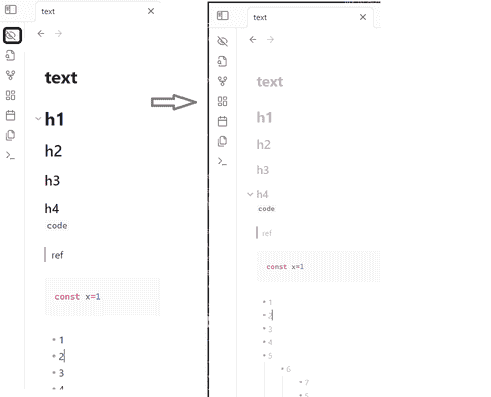
intro.png

Implementation Principle

This feature is implemented using minimal code.
Modifying the styles of the editing area via CSS.

Usage

After installing and activating the plugin:
Click the button in the sidebar to toggle between disguise mode and normal mode.

Not Supported:

  • Reading view.
  • Command-based control.
  • Defining styles in settings (styles can only be adjusted directly by editing the styles.css file in the plugin directory).

功能简介

一键切换编辑内容的背景颜色和文本颜色, 防止在公共空间中编辑内容时, 被路过的人过于容易的看清楚正在编辑的内容

实现原理

使用最简单的方式实现这个功能 通过css修改编辑框中的样式

使用方式

安装并开启插件后, 点击侧边栏中的按钮, 控制伪装/恢复正常

不支持:

  • 阅读视图
  • 命令方式控制
  • 在setting中定义样式(只能直接修改插件目录中的styles.css进行样式调整)

Similar Plugins

info
• Similar plugins are suggested based on the common tags between the plugins.
Android nomedia
3 years ago by JakeisAwesome
When syncing Obsidian with Android you will see a lot of media associated with your vaults. This will add the .nomedia file to ever folder in your Vault.
Password Protection
2 years ago by Qing Li
This is a password plugin for protecting your private notes and diary, no encrypt, no decrypt.
Password Protect
2 years ago by Aspharmyx
Definition List
2 years ago by shammond42
Obsidian.md plugin to add HTML definition list support.
Spoilers
2 years ago by Jacobtread
Spoiler blocks for Obsidian
NSFW filter
2 years ago by catvatar
Obsidian Plugin adding a button to toggle visiblity of NSFW notes
Harper
2 years ago by Elijah Potter
Ledger
5 years ago by Tony Grosinger
Plain text accounting in Obsidian.md
Garble Text
5 years ago by kurakart
Obsidian plugin for exposing Obsidian's garbleText() function
Cryptsidian
5 years ago by triumphantomato
Encrypt all files in your Obsidian.md Vault with a password.
Peekaboo
2 years ago by Wang Guoshi
An Obsidian plugin protects your privacy by setting a password to hide notes.
Blur Mode
a year ago by dangehub
Blur Mode - Blur elements on the obsidian interface for presentations or screenshots|模糊模式 - 对obsidian界面上的元素进行模糊处理以便演示或截图
Age Encrypt
a year ago by Metin Ur
A plugin for Obsidian that provides age-based encryption for your notes.
Private Mode
a year ago by markusmo3
Vault Encrypt
5 months ago by Pluppen
Obsidian Plugin that encrypts/decrypts the entire vault.
Nova
3 months ago by Shawn Duggan
Nova - AI plugin for Obsidian that edits your documents directly through natural conversation. Stop copying from chat, start collaborating with AI.