ObsidianTweaks

by Jeppe Klitgaard
5
4
3
2
1
Score: 45/100

Description

Category: Customization & UI

The ObsidianTweaks plugin introduces a variety of enhancements to the Obsidian experience, particularly in formatting and hotkey customization. It allows users to enable or disable specific features like better toggles for bold, italics, and other markdown elements, improving consistency in formatting. Users can also assign hotkeys for commands such as moving selections, toggling headings, and duplicating files. The plugin offers smoother, more predictable behavior for text formatting and provides a more efficient workflow by customizing default hotkeys and improving the toggling of text styles. With no features enabled by default, it gives users control over which enhancements to activate, making it a highly customizable tool.

Reviews

No reviews yet.

Stats

55
stars
5,991
downloads
4
forks
1,586
days
1,070
days
1,527
days
1
total PRs
0
open PRs
0
closed PRs
1
merged PRs
22
total issues
7
open issues
15
closed issues
0
commits

Latest Version

4 years ago

Changelog

README file from

Github

ObsidianTweaks

GitHub release (latest SemVer) GitHub All Releases

This is a small plugin that implements some features of Obsidian that I believe should've been part of the core release -- perhaps in the future they will be? ❤️

Philosophy

  • By default no features are enabled. You can enable the features you want.
    • Thus all features can also be disabled.
  • All code is released into public domain without any requirement for attribution using the Unlicense.

Features

Below is a list of the current functionality available for you to enable.

Note that hotkeys cannot be 'disabled', but they can be set to Blank. They are all set to Blank by default. Go to Settings > Hotkeys to set the shortcut to match suggestions below, or use your own binding!

Commands

Recommended hotkey Action
Shift + Ctrl + Alt + ← Move Selection Left
Shift + Ctrl + Alt + → Move Selection Right
Blank Better Toggle Bold (asterisks)
Ctrl + B Better Toggle Bold (underscores)
Blank Better Toggle Italics (asterisks)
Ctrl + I Better Toggle Italics (underscores)
Blank Better Toggle Code
Ctrl + / Better Toggle Comment
Blank Better Toggle Highlight
Blank Better Toggle Strikethrough
Ctrl + Shift + A Select Current Line(s)
Shift + Alt + ↑ Copy Current Line(s) Up
Shift + Alt + ↓ Copy Current Line(s) Down
Shift + Alt + ← Copy Current Line(s) Left
Shift + Alt + → Copy Current Line(s) Right
Ctrl + Alt + 1 Toggle Heading - H1
Ctrl + Alt + 2 Toggle Heading - H2
Ctrl + Alt + 3 Toggle Heading - H3
Ctrl + Alt + 4 Toggle Heading - H4
Ctrl + Alt + 5 Toggle Heading - H5
Ctrl + Alt + 6 Toggle Heading - H6
Blank New Adjacent File
Blank Duplicate File

Better Toggles

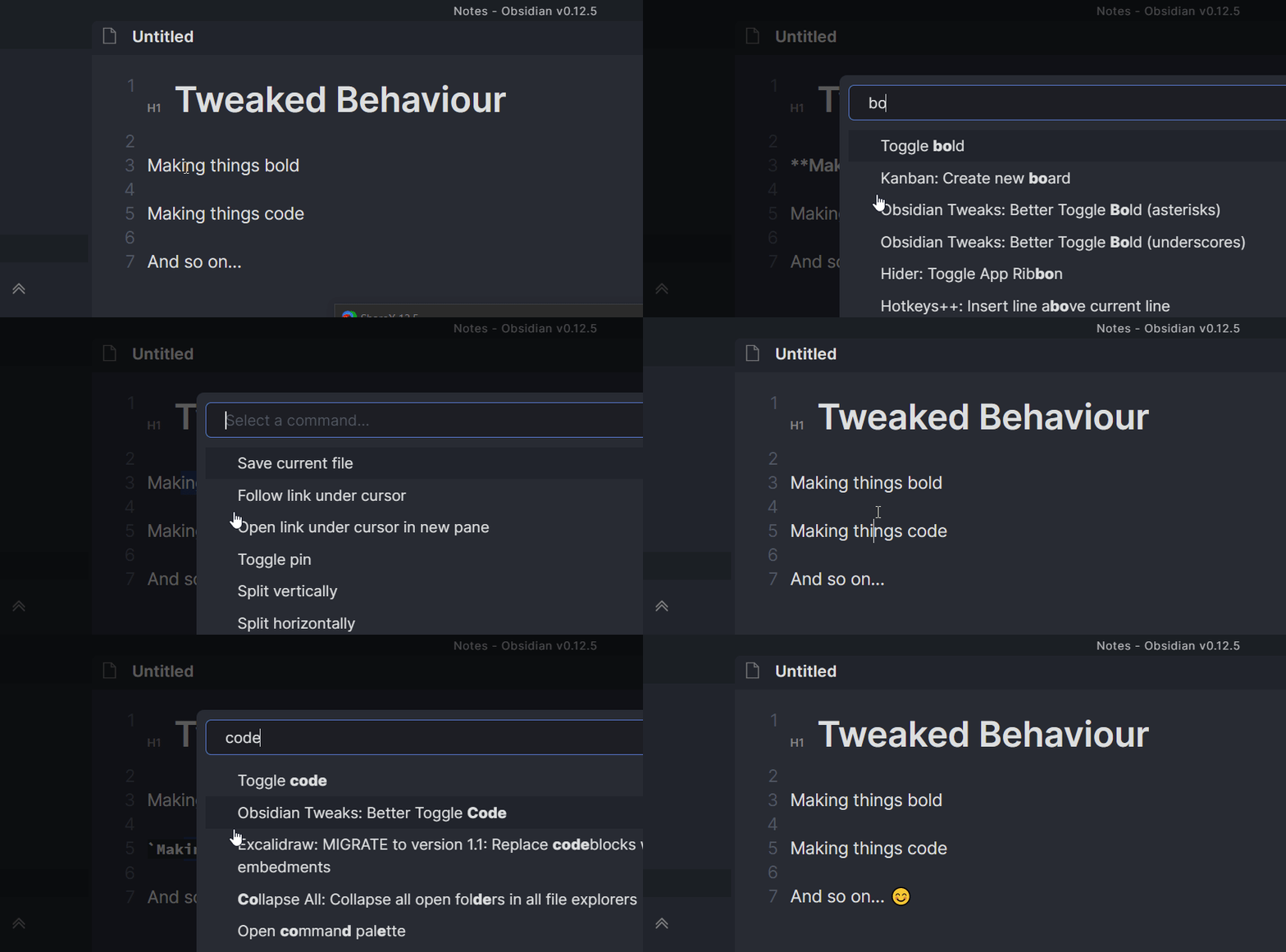
The default toggles in Obsidian can be a bit wonky at times and do not always work well. The toggles implemented here should always return to the same state when toggled twice.

They also do nice word-wrapping for you.

Additionally Bold and Italics are implemented with underscores as well as asterisks. Simply bind the command you want.

Math toggles are also included.
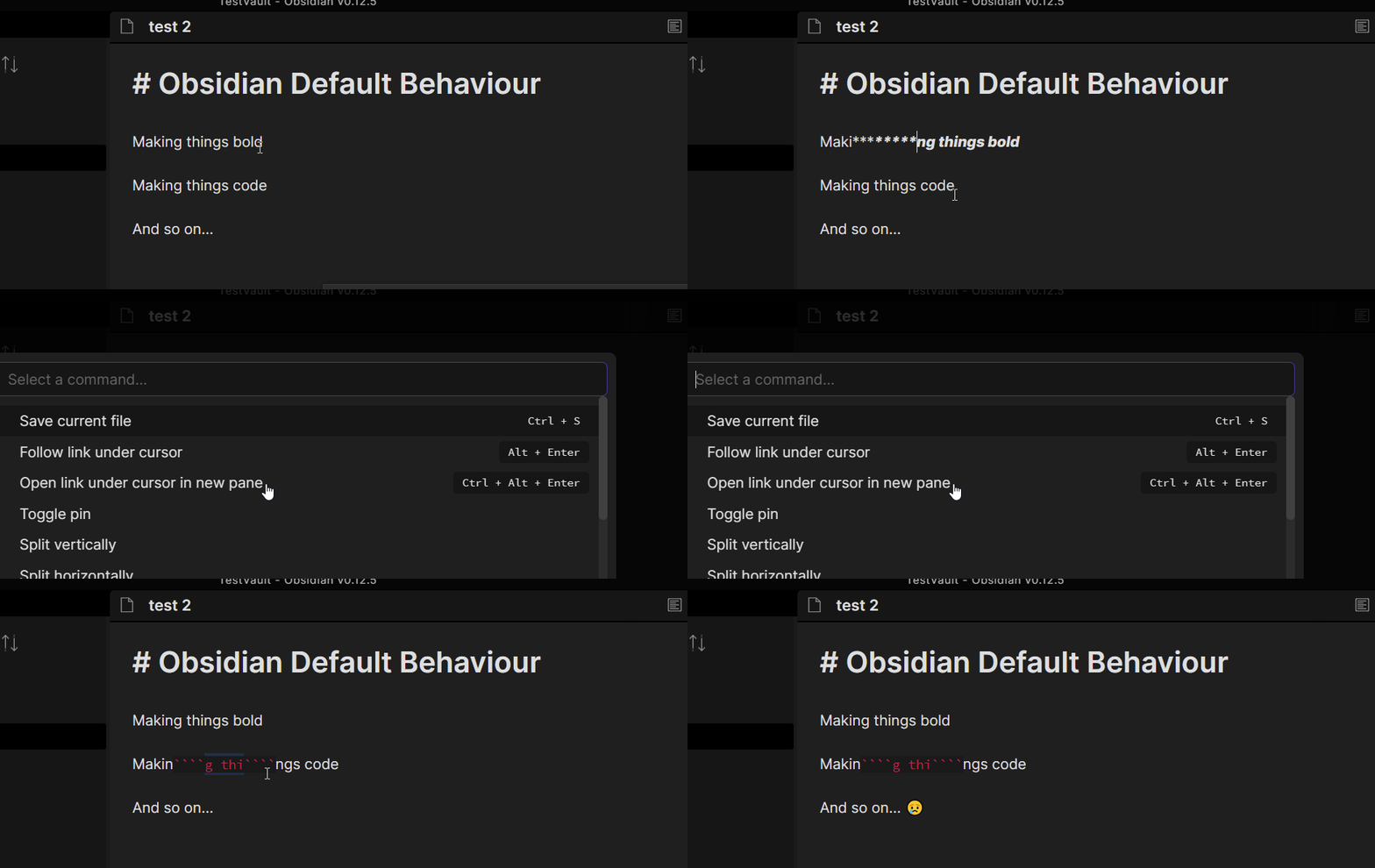
Default formatting

Better formatting

How to install

Install the Obsidian plugin via one of the three methods described below.

Community Plugins

Install this plugin via the Obsidian Community Plugin interface (Strongly Recommended)

You can activate this plugin within Obsidian by doing the following:

- Open Settings > Third-party plugin
- Make sure Safe mode is off
- Click Browse community plugins
- Search for "**AnkiBridge**"
- Click Install
- Once installed, close the community plugins window and activate the newly installed plugin

BRAT

If you have Obsidian BRAT plugin installed you can install ObsidianTweaks by doing the following:

- Open `Command Palette`
- Select the `Obsidian42 - BRAT: Add a beta plugin for testing` command
- Paste in `JeppeKlitgaard/ObsidianTweaks` into the text field
- Press `Add Plugin`
- Activate the plugin now found under the `Settings → Community Plugins` menu

Manual Installation

Alternatively you can do a manual installation:

- Download the latest `ObsidianTweaks-X.Y.Z.zip` from GitHub releases.
- Create a new folder named `ObsidianTweaks`
- Extract the files within the zip file into `ObsidianTweaks` folder
- Place the folder in your .obsidian/plugins directory
- Reload plugins (the easiest way is just restarting Obsidian)
- Activate the plugin as normal.

Why Unlicense?

In case the developers of Obsidian want to just straight copy some code into Obsidian, they can do that without worrying about licensing at all.

Note that any contributions to ObsidianTweaks will thus also be Unlicensed.

Honorable Mentions

I initally planned to contribute to the Hotkeys++ plugin, but since I don't necessarily want ObsidianTweaks to be limited to hotkeys in the future, I decided to make my own.

Contributors

Similar Plugins

info
• Similar plugins are suggested based on the common tags between the plugins.
Admonition
5 years ago by Jeremy Valentine
Adds admonition block-styled content to Obsidian.md
Advanced Tables
6 years ago by Tony Grosinger
Improved table navigation, formatting, and manipulation in Obsidian.md
Auto pair chinese symbol
5 years ago by renmu123
中文符号自动补齐
Auto-\displaystyle Inline Math
2 years ago by Ryota Ushio
An Obsidian.md plugin to automatically make all inline maths \displaystyle.
Autocorrect Formatter
2 years ago by b-yp
A plugin running on Obsidian that utilizes autocorrect to format Markdown content.
Better Order List
2 years ago by Boninall
Blockquote Levels
4 years ago by Carlo Zottmann
A plugin for Obsidian (https://obsidian.md) that adds commands for increasing/decreasing the blockquote level of the current line or selection(s).
Bottom to Top
2 years ago by Henry Gustafson
Calculite
a year ago by Holo
Standard calculator plugin for Obsidian.
Callout Integrator
3 years ago by
A plugin for Obsidian to allow the integration of long blocks of text into callouts.
Callout Toggles
2 years ago by Aly Thobani
An Obsidian plugin to quickly add, change, or remove callout wrappers in your notes.
Canvas Format Brush
a year ago by wenlzhang
An Obsidian plugin that allows you to copy and paste formatting attributes (size and color) between canvas elements, similar to the format painter in Word.
Capitaliser
3 months ago by Emanuel Oliveira
Cycle text capitalisation (lowercase, Capitalise Each Word, UPPERCASE).
Change Case
3 years ago by David Brockman
Plugin to let you change the case (camelCase, snake_case, etc) of the current selection.
Chat clips
a year ago by sleepingraven
Record chat in ordinary markdown list.
Chorded Hotkeys
4 years ago by Trey Connor Meyers
Type multiple letters at the same time to trigger text insertion, template insertion, or command execution.
cMenu
5 years ago by Chetachi
An Obsidian.md plugin that adds a minimal text editor modal for a smoother writing/editing experience ✍🏽.
Code block from selection
5 years ago by Dmitry Savosh
Obsidian plugin. Adds code block for the selected text.
Code Editor Shortcuts
5 years ago by Tim Hor
Obsidian plugin to add keyboard shortcuts commonly found in code editors such as Visual Studio Code (vscode) or Sublime Text
Custom Commands
a year ago by Staaaaaaaaaan
Create custom commands to be executed in the command palette, and by hotkey. Currently supports opening specific notes, creating notes, inserting snippets, and executing sequences of commands.
Custom list character
3 years ago by Lilian POULIQUEN
Custom list character is a simple plugin allowing you to choose which character to use when making bullet lists in Obsidian.
Cycle In Sidebar
3 years ago by Houcheng
Cycle through tabs of left/ right sidebar panel
Discord Timestamps
a year ago by Erika Gozar
Displays discord timestamps in read mode as they would appear in Discord.
Duplicate line
a year ago by Marcin Sztolcman
Plugin for Obsidian: duplicate current line, or selection.
Editing Mode Hotkey
2 years ago by Signynt
Obsidian plugin to change the default editing mode (between Live Preview and Source) using a command or hotkey
Editor Commands Remap
5 years ago by cactus5
Obsidian plugin to map hotkeys to editor commands
Extended Markdown Syntax
a year ago by Kotaindah55
Extend your Markdown syntax using delimiters instead of HTML tags, such as underlining, superscript, subscript, highlighting, and spoiler.
Font Size Adjuster
2 years ago by Ryota Ushio
An Obsidian.md plugin to adjust font size via commands.
Format Hotkeys
5 years ago by Ansel Santosa
Google Docs style formatting hotkeys for Obsidian
Global Hotkeys
4 years ago by Marc Jessome
Global hotkey support for Obsidian.md
Heading Level Indent
3 years ago by svonjoi
obsidian plugin for hierarchical structuration of document content based on heading levels
Heading Toggler
2 years ago by Lord Turmoil
Toggle heading levels in Obsidian
heti
2 years ago by Moeyua
HOME key
8 months ago by shichishima
Obsidian Plugin to move cursor to beginning of text, considering Markdown heading characters.
Hotkey Helper
5 years ago by PJ Eby
Easily see and access any Obsidian plugin's options pane or hotkey assignments (including conflicts) from the Community Plugins tab
Hotkeys Chords
4 years ago by Dario Balboni
Hotkeys for Bookmarks
5 years ago by Vinzent
Hotkeys for specific files
5 years ago by Vinzent
Hotkeys for templates
5 years ago by Vinzent
Hotkeys++
6 years ago by Argentina Ortega Sainz
Adds hotkeys to toggle todos, ordered/unordered lists and blockquotes in Obsidian
Hotstrings
a year ago by wakywayne
Hyperlink Remover
a year ago by Daniel Agafonov
Easily remove hyperlinks and wikilinks from selected text or the entire note.
Image Helper
2 years ago by Chongmyung Park
Context menu to convert a image to another format in reading view in Obsidian.md
Image Size
a year ago by Jie Zhang
Set the default size for pasted images.
Inline spoilers
2 years ago by logonoff
Adds Discord-like syntax for inline spoilers.
Interlinear Glossing
3 years ago by Mijyuoon
An Obsidian plugin for interlinear glosses used in linguistics texts.
Jisage -Japanese Indentation-
2 years ago by Telehakke
Obsidian plugin.
Jump to link
6 years ago by MrJackphil
Quick jump between links using hotkeys
Keyboard Analyzer
4 years ago by cogscides
Obsidian plugin to display command hotkeys on a visible keyboard layout
Keyboard Formatter
9 months ago by Lauloque
Formats keyboard text (kbd) in your Obsidian notes quickly and consistently.
Keyshots
3 years ago by KrazyManJ
🔮📝 Obsidian plugin that adds classic hotkey/shortcuts commands from popular IDEs like Visual Studio Code or JetBrains Family.
LaTeX to unicode converter
3 years ago by fjdu
Convert LaTeX commands into unicode sequences
Leader Hotkeys
5 years ago by Tony Grosinger
Use a leader-key (tmux style) for hotkeys in Obsidian.md
Markdown Formatting Assistant
5 years ago by Reocin
This Plugin provides a simple WYSIWYG Editor for Markdown and in addition a command line interface. The command line interface facilitate a faster workflow.
Min3ditorHotkeys
5 years ago by Davor Sauer
Obsidian plugin adding minimal editor hotkeys
Multi-line Formatting
5 years ago by nmady
Format Obsidian text over an entire selection, even if that selection has paragraph breaks in the middle!
Note Placeholder
a year ago by XZSt4nce
Replaces text of note link to placeholder in view mode.
Open File by Magic Date
4 years ago by simplgy
Open in Cursor
9 months ago by awaken233
An Obsidian plugin to open files in Cursor IDE or other VSCode-based editors (VSCode, Kiro, etc.) with automatic cursor position jumping. 一个可以在 Cursor IDE 或其他类 VSCode 编辑器中打开文件并自动跳转光标位置的 Obsidian 插件。
Ordered List Style
4 years ago by erykwalder
Paste Mode
5 years ago by Jacob Levernier
Obsidian Notes plugin for pasting text and blockquotes to the cursor's current level of indentation.
Paste Reformatter
a year ago by Keath Milligan
A plugin for Obsidian that reformats pasted HTML and plain text content, giving you precise control over how content is transformed when pasted into your notes.
Recent Tab Switcher
2 years ago by Samuel Ang
Recent Tab Switcher Plugin for Obsidian.
Remove Newlines
2 years ago by Elias Jaffe
A plugin for Obsidian.md which removes newlines and blank lines from selected or pasted text.
Search Everywhere
4 years ago by Mom0
Obsidian Search Everywhere Plugin
Select word
2 years ago by Connor Espino
Sequence Hotkeys
4 years ago by Ruan Moolman
Obsidian plugin to support a sequenced of keyboard shortcuts to run commands.
Smart Typography
5 years ago by mgmeyers
Converts quotes to curly quotes, dashes to em dashes, and periods to ellipses
SupSub
3 years ago by Wjgoarxiv
::SupSub enables wrapping selected text with `<sup>` or `<sub>` tags::
Symbol linking
a year ago by Evan Bonsignori ; Mara-Li
Adds ability to link with any trigger in Obsidian. Each trigger can limit linking to specific folders or file.
Table Extended
5 years ago by AidenLx
Extend basic table in Obsidian with MultiMarkdown table syntax
Text Conversions
3 years ago by Juan D Frias
Text conversions for Obsidian
Toggle Case
3 years ago by automattech
Obsidian plugin to toggle between `lowercase` `UPPERCASE` and `Title Case`
Vim Marker Sharpener
a year ago by Artem Dvoryadkin
Text formatting commands in Vim mode. Supports applying styles (bold, italic, etc.). Works correctly in visual mode with selected text.
Wrap with shortcuts
4 years ago by Manic Chuang
Wrap selected text in custom tags with shortcuts.
Writing
3 years ago by johackim
Write and format your next book directly from Obsidian
复制图文 (Copy Image Text)
2 years ago by msgk
obsidian插件,复制笔记内容(包括文本和图片)到剪贴板