
README file from
GithubWordNet dictionary plugin for Obsidian
WordNet plugin for Obsidian. WordNet is a large lexical database of English terms developed by Princeton University and its license allows use in other applications.
Learn more by reading the documentation: https://tfthacker.com/wordnet
Instructions
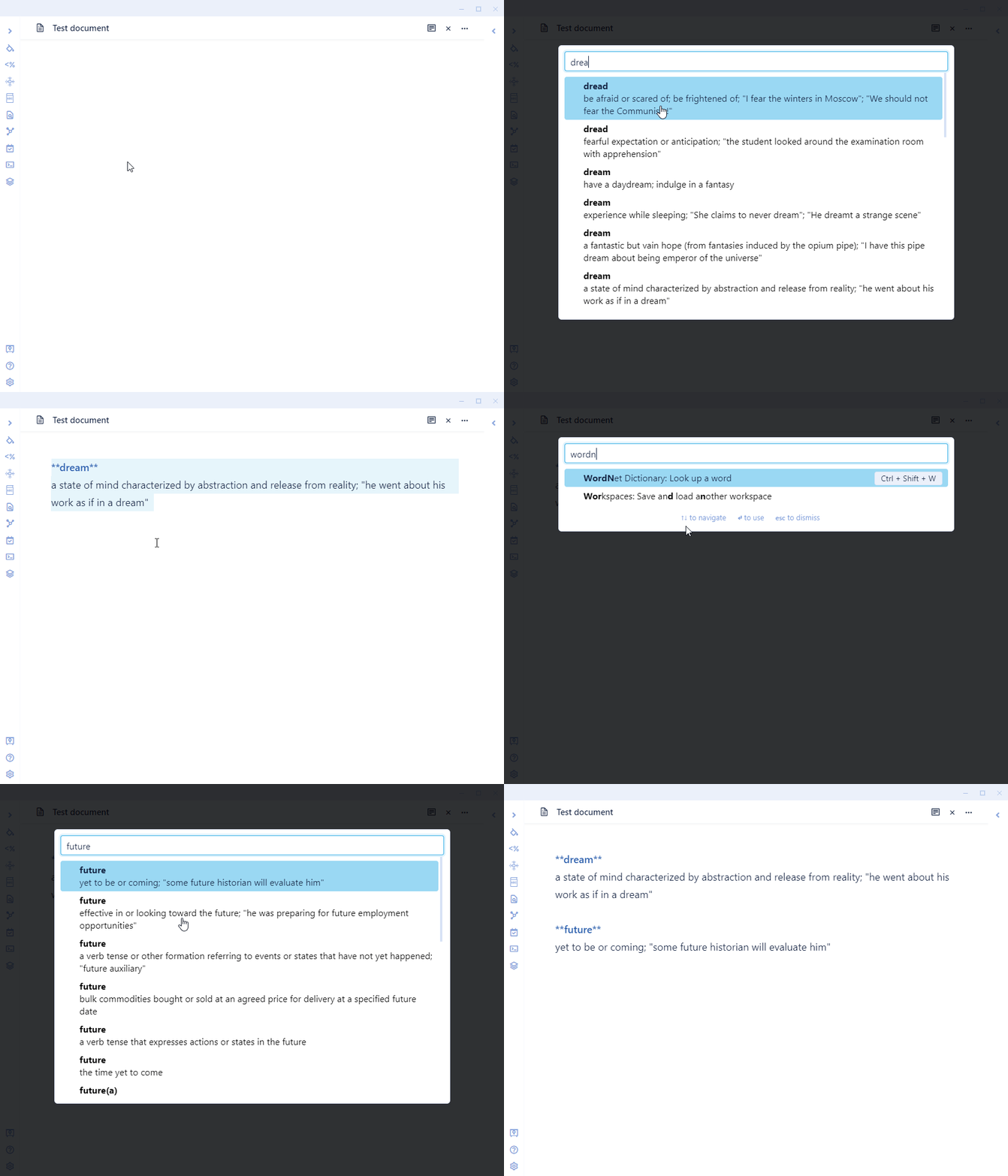
The WordNet dictionary can be accessed either through the command palette or the WordNet button on the ribbon.
Once invoked, WordNet will allow you to input the word you want to look up. As you type, options are shown. Once you find the word that interests you, you can press enter to have it inserted into the current document. If the current document is in preview mode, the definition will be displayed in a notification window for about 10 seconds.
Ways to connect with me and more information on my work
You might also be interested in a few products I have made for Obsidian:
- JournalCraft - A curated collection of 10 powerful journaling templates designed to enhance your journaling experience. Whether new to journaling or looking to step up your game, JournalCraft has something for you.
- Cornell Notes Learning Vault - This vault teaches you how to use the Cornell Note-Taking System in your Obsidian vault. It includes learning material, samples, and Obsidian configuration files to enable Cornell Notes in your vault.
You can find me on Twitter @TfTHacker
My website https://tfthacker.com/