

There are 17 new plugins and 57 plugin updates during the week 2025-10-18 to 2025-10-26.
This week brings 17 fresh plugins and 57 updates spanning canvas navigation, clean plaintext copying, smarter reading-time signals, linear issue sync and glossy frontmatter with pretty properties. You'll also find new helpers for quick time stamps, external link oversight and a couple of thoughtful AI tools that stay inside your notes.
⭐ New Plugins
1. Canvas Link to Group
Released on 2025-10-24 by TGRRRR
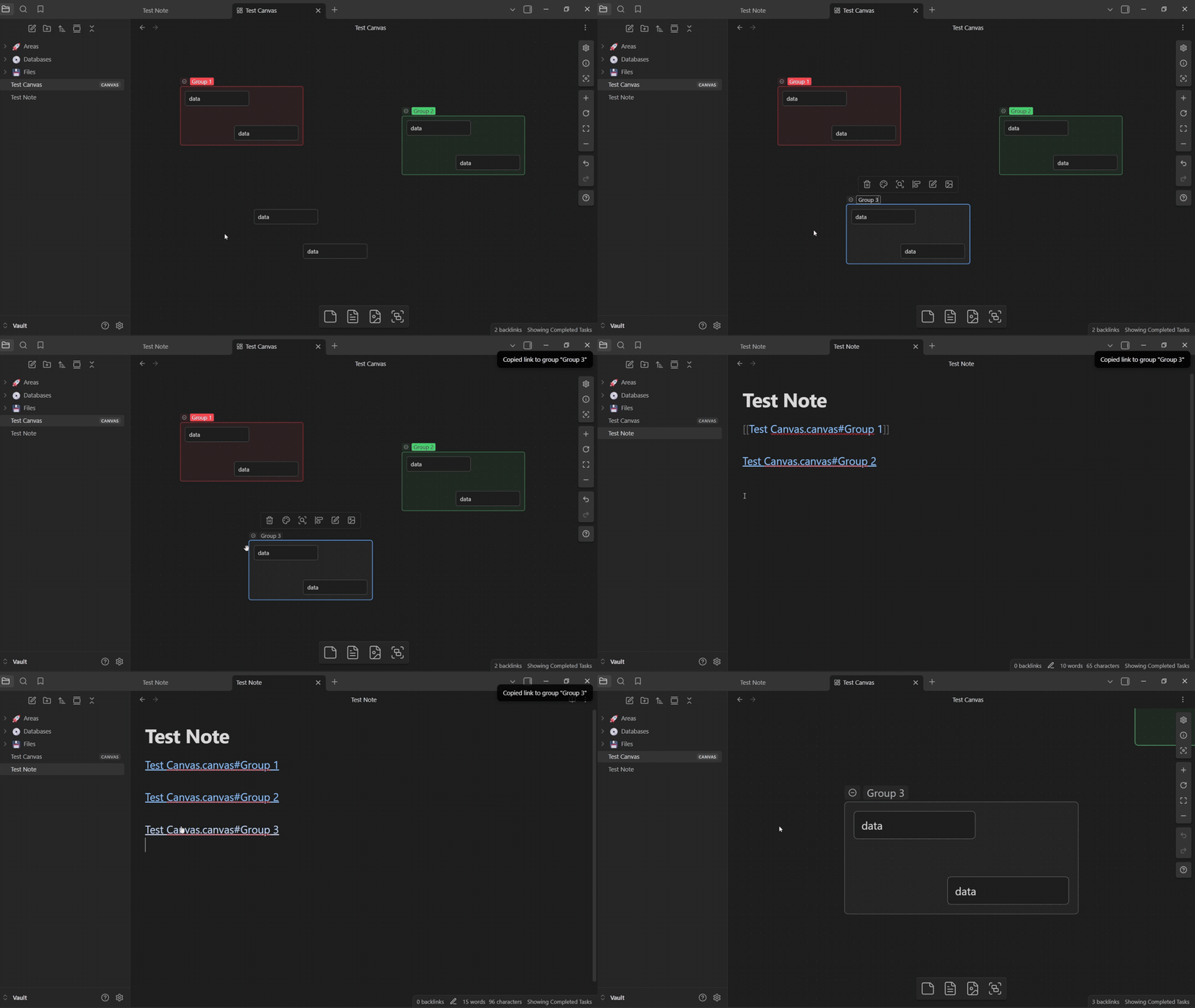
The Canvas Link to Group plugin lets you create and use direct links to specific groups inside canvas files, allowing quick navigation across complex visual notes. You can right-click a group or use the command palette to copy a link and paste it into any note for one-click access. The plugin supports intuitive link handling - open in the same tab or a new one with modifier keys - making it suitable for both mouse and keyboard workflows. It also provides helpful notifications when links are invalid or when multiple groups share the same name, ensuring accurate navigation within large canvases.
2. Remaining reading time
Released on 2025-10-24 by ununnamed
The Remaining Reading Time plugin displays the estimated time left to finish reading a note along with real-time progress in the status bar. It extends the idea of the original Reading Time plugin but shifts focus from writing efficiency to reading experience. The plugin continuously calculates how much of a note has been read and how long it will take to complete, making it useful for reading long articles, study materials, or book excerpts within the app.
3. Copy As PlainText
Released on 2025-10-23 by Finickyspider
The Copy As PlainText plugin adds a one-click way to convert your markdown content into clean, unformatted text. Whether you're stripping headings, links, tables, math blocks, or footnotes, this plugin gives you fine-grained control over what gets removed. It offers two modes: a quick regex-based Simple Mode for basic formatting, and a slower but more accurate AST-based mode that parses full GitHub-flavored markdown. You can toggle individual syntax elements like hashtags, LaTeX, YAML frontmatter, or highlight markers in the settings. Access is quick via right-click or the command palette, making it ideal for copying notes into emails, documents, or plain-text apps without markdown clutter.

4. Prologue
Released on 2025-10-23 by joshavanier
The Prologue plugin displays a random note, quote, or personal reminder whenever a new tab is opened. It pulls entries from a designated markdown file, where each item is separated by blank lines. Whether you're looking for inspiration, gentle nudges, or recurring affirmations, this plugin helps you integrate them seamlessly into your daily workflow. The file used for these entries is customisable through the settings, allowing users to manage their own collection of motivational snippets or thought-provoking ideas. It's a minimalist, distraction-free way to add a bit of serendipity to your workspace without needing any extra input once set up.

5. Image Darkmodifier
Released on 2025-10-23 by 0qln
The Image Darkmodifier plugin lets you apply visual filters to images directly through your markdown syntax. By using special annotations like @darkmode, @invert, or @transparent, you can transform how embedded images appear - inverting colours, removing white backgrounds, or boosting lightness for better visibility in dark themes. The plugin supports both local and remote image links, inline markdown, and even raw HTML <img> tags. Filters are applied in order from left to right, and users can customise parameters like transparency thresholds or lightness levels using a concise, structured syntax.
6. Open or Create File
Released on 2025-10-23 by Ilya Paripsa
The Open or Create File plugin streamlines repetitive file creation by letting you define custom commands that generate or open files using date-based patterns. Whether you're maintaining daily notes, weekly logs, or recurring checklists, you can automate file naming and folder paths with dynamic placeholders like {date}, {week}, or {dow}. You can also apply time shifts like '+1 day' to target future or past dates, making it perfect for prepping tomorrow's journal entry or last week's review. Each command is fully customisable, with options to use templates and assign unique names for fast access via the command palette. Settings can be exported or imported as JSON, allowing easy reuse or sharing of workflows.
7. Linear Integration
Released on 2025-10-23 by casals
The Linear Integration plugin bridges the gap between your markdown notes and Linear issue tracking with full bidirectional sync. You can create, update, and manage Linear issues directly from within notes using inline tags like @assignee/john or @label/bug, with smart autocomplete and hover tooltips that pull live data from your Linear workspace. It supports real-time syncing, conflict resolution, and comment mirroring, while letting you customise templates, label colours, and even kanban-style agendas. For power users, it allows per-folder config with .linear.json, bulk operations, and GraphQL filtering. Enterprise users benefit from multi-workspace handling, secure token storage, and detailed sync analytics.
8. Pretty Properties
Released on 2025-10-22 by Anareaty
The Pretty properties plugin transforms how frontmatter metadata appears by adding visual flair and interactivity. You can embed cover images, banners, and icons directly into the metadata area, with customizable shapes, placements, and sizes. It supports colorful styling for list values, tags, text fields, and even dates-allowing you to visually distinguish metadata at a glance. It also offers progress bars for number fields, relative date coloring, and clickable property values for instant search. For power users, it integrates with Bases (still experimental) and TaskNotes, syncing task counts into note properties. The plugin also includes several quality-of-life touches, like the ability to hide properties or apply custom CSS to pill elements.

9. External Links View
Released on 2025-10-22 by theamritanair
The External Links View plugin gives you a centralised overview of all external URLs referenced across your notes. It scans your vault and displays clickable links, neatly grouped by the notes they appear in. You can quickly access this view from a ribbon icon or the command palette, making it easy to manage web references scattered across your content. A handy exclusion feature allows you to filter out unwanted URLs using custom regex patterns.

10. Emoji selector
Released on 2025-10-21 by summer
The Emoji Selector plugin brings a fast and customisable way to insert emojis into your notes. It features a quick insertion trigger (like ::) for auto-completion, an emoji picker panel with regex and fuzzy search, and support for OWO-format emoji collections. Users can load emoji packs from local files or remote URLs, and even define custom insertion templates in HTML or Markdown. With full keyboard navigation and recent emoji tracking, it's ideal for keyboard-centric workflows.
11. Canvas LLM
Released on 2025-10-21 by Mike Farlenkov
The Canvas LLM plugin offers a visual, node-based interface for interacting with large language models. Instead of the usual linear chat, it lets users create branching conversations using canvas-style cards. You input prompts in Input cards and receive model outputs in Generate cards, allowing for multiple lines of thought or variations in a single workspace. Each block can independently connect to a different model, making it flexible for experimentation or comparing responses. The plugin supports eight API providers, including Google, OpenRouter, and SambaNova, but users must bring their own API keys. This makes it ideal for research-heavy workflows or creative projects that benefit from nonlinear thinking.

12. AI Agent
Released on 2025-10-21 by Manuel Magaña López
The Obsidian Agent plugin introduces an AI-powered assistant that can read, write, and manage your notes using Google's Gemini model. With a clean and user-friendly interface, it enables actions like creating and editing notes or folders, listing files, searching within your vault, and performing web searches. You can also customize the agent's behavior to better suit your workflow. The plugin essentially acts as a bridge between your local notes and external AI services, allowing more dynamic content interaction directly from your vault.

13. BibTeX Scholar
Released on 2025-10-21 by Qilong Liu
The BibTeX Scholar plugin helps researchers manage academic references through contextual, Markdown-based notes. Rather than storing citations in rigid folder structures, it allows you to embed BibTeX entries directly in any note and cite them inline using smart ID formats. Hovering over citations reveals popovers with detailed metadata like title, abstract, authors, and utility buttons for linking notes or attaching PDFs. A dedicated paper panel enables full-text search and filtering across your entire library. Designed for academic workflows, it also supports LaTeX export and recurring use cases like AI conference note-taking.
14. Note Navigator
Released on 2025-10-19 by m
The Note Navigator plugin enhances file navigation and deletion workflows, especially for users processing large sets of notes like web clippings or temporary drafts. It lets you quickly move to the next or previous file based on your preferred sort order and scope-either within a folder or across the vault. When deleting a note, it smartly jumps to the next note instead of reverting to the last open file. The plugin also manages clutter by removing orphaned attachments and cleaning up empty folders. Prompts and notifications can be toggled for safety, and detailed stats track deleted items. Additional utilities like scroll-past-end and folder renaming round off the toolset.
15. Ignore Filters Boost
Released on 2025-10-19 by lavton
The Ignore Filters Boost plugin makes it significantly easier to manage excluded folders in your workspace by eliminating the need to dig into settings. With a single click, you can add or remove folders from the ignore list, bulk-exclude everything except one folder, or selectively unignore subfolders even if their parent is excluded. It smartly rearranges filters to maintain consistency and avoid overlap. The plugin respects a set of default ignore filters and offers commands to restore or update them. When enabled, the folder tree view gives you granular control over what gets excluded, supporting focused workflows with minimal fuss.

16. Time Inserter
Released on 2025-10-19 by heycalmdown
The Time Inserter plugin adds a simple yet handy feature-quickly inserting the current time at your cursor, rounded to the nearest 5-minute mark. It outputs time in a clean 24-hour format like 09:05 or 14:35, which is useful for timestamping notes, meeting logs, or daily journals. Designed to be extremely lightweight, it runs only when triggered and uses no background processes or external libraries. This ensures it has virtually no impact on system performance. You can trigger it via command palette or assign a custom hotkey for faster access.
17. DaggerForge
Released on 2025-10-19 by Waleed Alnaimi
The DaggerForge plugin streamlines tabletop RPG management by allowing Game Masters to search, filter, and embed adversaries directly into their notes. It includes tools to build and customise monsters within the note-taking environment, making it easier to prep for sessions or improvise during gameplay. Designed for use with the DaggerHeart system, it integrates adversary management into your workflow without switching contexts. The plugin is still in its early stages, with a roadmap that includes stat blocks for environments and in-note HP and stress trackers, indicating ongoing development and a focus on extending game management features.

🔁 Plugin Updates
We got 57 plugin updates in the last one week's time. You can see all the plugin updates on Obsidian Plugin Stats webapp.
Notable Updates
- Printer - v0.2.3 - Changelog
- Notebook Navigator - v1.6.0 - Changelog
- Task Genius - v9.9.0 - Changelog
- Pretty Properties - v1.8.0 - Changelog
🫡 Plugins Removed
- Media Link to HTML - Repository Deleted
- Images to Gist - Repository Archived
🫡 Themes Removed
- cocoa - Repository deleted
- parfait - Repository deleted