Spaced Repetition

by Stephen Mwangi
5
4
3
2
1
Score: 83/100

Description

Category: Learning & Knowledge Management

The Spaced Repetition plugin helps you actively review notes and flashcards using scientifically backed spaced repetition techniques. It supports various card formats including single-line, multi-line, reversed, and cloze styles, giving users flexibility in how they structure their learning. Cards can be organized through tags or folders, and the plugin intelligently displays contextual headings like note titles and subheadings during reviews. Rich media support-like LaTeX, code blocks, images, and audio-makes it ideal for technical and visual learners.

Reviews

No reviews yet.

Stats

2344
stars
497,653
downloads
268
forks
1,853
days
5
days
11
days
491
total PRs
7
open PRs
65
closed PRs
419
merged PRs
777
total issues
308
open issues
469
closed issues
107
commits

Latest Version

12 days ago

Changelog

v1.14.1 of the Spaced Repetition plugin is out! :rocket: 🗂️

Fixes:

  • Fixed broken edit modal
  • Fixed broken statusbar items

New PRs:

  • fix: fixed a few bugs #1482

README file from

Github

Obsidian Spaced Repetition Plugin

SR_Banner

Fight the forgetting curve by reviewing flashcards & notes using spaced repetition.

  • For more information on how to use the plugin, check either the TL;DR on this page or the documentation.
  • Raise an issue if you have a feature request or a bug report.
  • Visit the discussions section for Q&A help, feedback, and general discussion.
  • The plugin has been translated into Arabic, Chinese, Czech, Dutch, French, German, Italian, Korean, Japanese, Polish, Portuguese, Spanish, Russian, Turkish, and Ukrainian by the Obsidian community 😄.

Features⚡

Reviewing Flashcards🗃️
Reviewing Notes📄
Statistics📈

Usage TL;DR🚀

Creating Decks

  1. Add the tag #flashcards in a note, where you want to write your cards
  2. If you want to have your cards in a specific sub deck, then add your sub deck name to the tag like so: #flashcards/YOUR_SUB_DECK_NAME
  3. Write your card in the note which where you've added your tag

Creating Cards

1. Decide what card type you need:
  • Single line -> Card format: Question::Answer
  • Single line reversable -> Card format: Question:::Answer
  • Multi line -> Card format:
    Question
    ?
    Answer
    
  • Multi line reversable -> Card format:
    Question
    ??
    Answer
    
2. Write your card (In one of those formats) in a note that you have tagged as a deck

Reviewing Cards

1.1. Open the list of all decks with either of two commands(ctrl+p):
  • Review Flashcards from all notes -> Here the algorithm decides based on your past reviews, which cards are due to review
  • Select a deck to cram -> All decks and all cards are reviewable and the algorithm is fully ignored
1.2. Or open the list of all decks within your currently opened note(ctrl+p):
  • Review flashcards in this note -> Here the algorithm decides based on your past reviews, which cards from this note are due to review
  • Cram flashcards in this note -> All decks and all cards from this note are reviewable and the algorithm is fully ignored
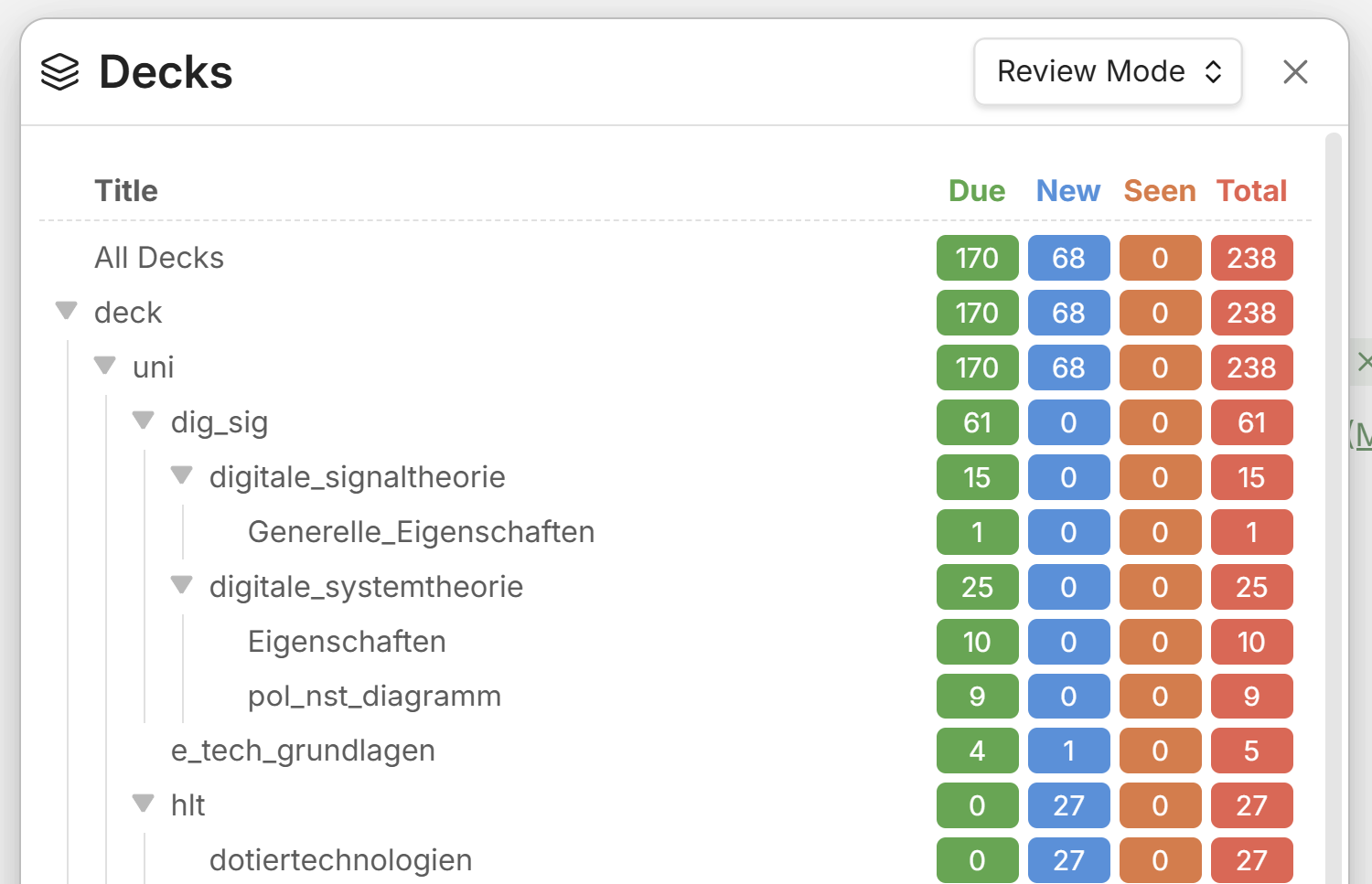
Deck view

2. Select a deck via the list and click on the deck name
3. Rate your ability to remember the answer to the current question
  • This tells the algorithm what you know well and what you don't
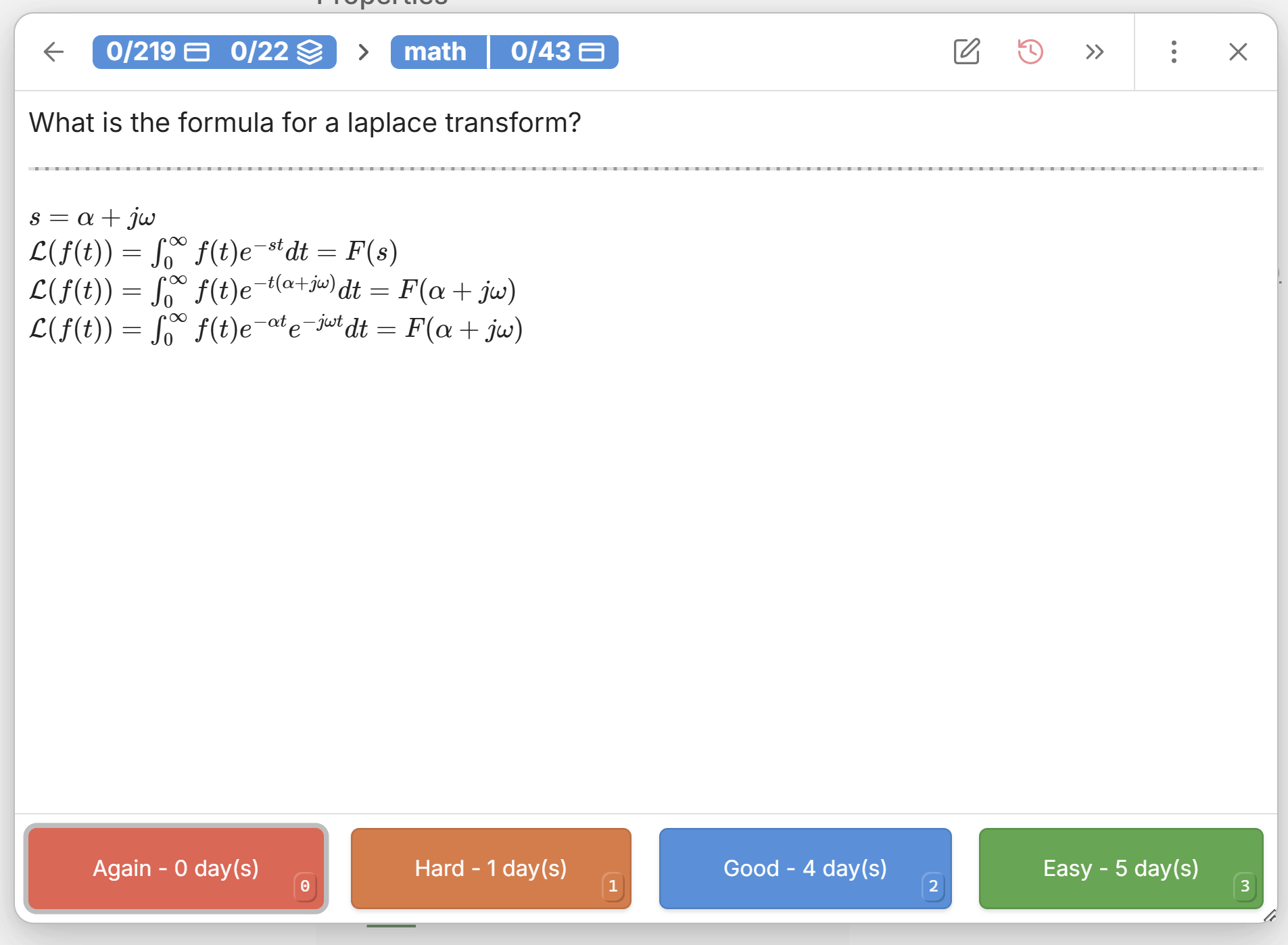
Card view

Creating & reviewing whole notes

Sometimes it makes more sense to recall a whole note, when it isn't just pure facts which you have to learn. This is where marking a note for review comes in handy.

  1. Just like with decks add the tag #review to your note to mark them as reviewable
  2. To see which notes are due for review open the note review queue via the command(ctrl+p): Open Notes Review Queue in sidebar
  3. There you can open up the notes for review, just as if you would open them up in your file explorer, only that they are sorted her by when they are due for review
  4. Once you have recalled/reviewed your note you can rate your recall ability by executing the command(ctrl+p, or just via the 3 dots next to the note): Review note as YOUR_RATING - The algorithm will take your rating into account to calculate a new due date, when you have to review it again

Support Development💻

Similar Plugins

info
• Similar plugins are suggested based on the common tags between the plugins.
Export to Anki
5 years ago by Pseudonium
Script to add flashcards from text/markdown files to Anki
Flashcards
5 years ago by Alex Colucci
🎴 An Anki plugin for Obsidian.md
Review
6 years ago by ryanjamurphy
Add the current note to a future daily note to remember to review it.
HiNote
a year ago by Kai
Add comments to highlighted notes, use AI for thinking, and flashcards for memory.
Quiz Generator
2 years ago by Edward Cui
Generate interactive flashcards from your notes using models from OpenAI (ChatGPT), Google (Gemini), Ollama (local LLMs), and more. Or manually create your own to use with the quiz UI.
Aosr
4 years ago by linanwx
Aosr is Another Obsidian plugin for Spaced Repetition.
Repeat
4 years ago by Andre Perunicic
Review notes using periodic or spaced repetition.
Incremental Writing
5 years ago by Jamesb | Experimental Learning
An incremental writing plugin for Obsidian where you add notes and blocks to prioritized queues and review them incrementally over time, spaced repetition style.
Anki Sync
5 years ago by debanjandhar12
Obsidian plugin to make flashcards and sync them to Anki
Recall
5 years ago by Martin Jirlow
A spaced repetition system for Obsidian!
Yanki
2 years ago by Eric Mika
An Obsidian plugin that syncs flashcards from a folder in your vault to Anki. Pure Markdown syntax. No fuss.
Flashcards LLM
3 years ago by Marco Pampaloni
Use Large Language Models (such as ChatGPT) to automatically generate flashcards from obsidian notes
Note Synchronizer
4 years ago by Songchen Tan
Synchronizes Obsidian notes to Anki in a breeze 💨️
Vocabulary View
5 years ago by nnshi-s
AnkiBridge
4 years ago by JeppeKlitgaard
Yet Another Obsidian Anki Bridge.
Augmented Canvas
2 years ago by Léopold Szabatura
Supercharge your Obsidian canvas experience with AI features.
AI Mentor
3 years ago by clementpoiret
Vocabulary Cards
3 years ago by Eugene Myazin
An easy way to display vocabulary words as flashcards and as a list
Flashcard Learning
3 years ago by Gaétan Muck
Obsidian plugin. Uses flashcard system to learn things across own notes.
Auto Anki
3 years ago by ad2969
Using AI to automate card creation for Spaced Repetion in Anki
Simple note quiz
4 years ago by dorisxx
Flashcard Generator
3 years ago by ChloeDia
Obsidian Plug-in to automatically create a set of questions/answers on your notes !
Mochi Cards Exporter
5 years ago by kalbetre
Mochi Cards Exporter Plugin for Obsidian
Awesome Flashcard
4 years ago by AwesomeDog
Handy Anki integration for Obsidian.
Memorization
3 years ago by Joseph Cochran
Decks
3 months ago by Xherdi Lika
An Obsidian Flashcards plugin
AnkiSync+
3 years ago by RochaG0
Exercises
3 years ago by AlexCCavaco
Create Interactive Exercises along side your Obsidian Notes
braincache
4 years ago by XSPGMike
braincache obsidian plugin
Better Recall
2 years ago by FlorianWoelki
A better spaced repetition and recall plugin for Obsidian inspired by Anki.
QB Reader Parser
3 years ago by Jacob Barta
QBReader parsing for quiz bowl answerlines
Learnie
2 years ago by tankh99
Learnie is an Obsidian plugin that helps to enhance your learning with active recall and spaced repetition.
Mochi Cards Pro
3 years ago by Hayden Carpenter
Create flashcards on Mochi.cards using the API provided by Mochi's Pro subscription in Obsidian.
The Queue
2 years ago by Kolja Sam Pluemer
An Obsidian.md plugin randomly exposing you to your cards. Supports habits, to-dos, spaced repetition flashcards, iterative reading and more.
Anki Integration
a year ago by Noah Boos AKA Rift
Create flashcards from your notes with a seamless interface, structuring them with metadata and syncing effortlessly via AnkiConnect.
Spaced Repetition AI
a year ago by Belinda Mo, Athena Leong
AI + Spaced Repetition Plugin for Obsidian
Spaced everything
2 years ago by Zach Mueller
Obsidian plugin to apply spaced repetition to incrementally develop your notes.
Minimal Quiz
a year ago by Lutu-gl
Obsidian-Minimal-Quiz: The simplest quiz plugin for Obsidian. Define questions directly in your Markdown files. No extra setup required. Just write, quiz, and learn!
Blue Star
2 years ago by Wang Guoshi
A plugin for Obsidian that generates Anki flashcards in various ways.
Simple Quiz
a year ago by Ivan Kalmar
Creating simple quizzes.
Zhongwen Reader
a year ago by natipt
This is a Chinese hover dictionary and vocabulary-building plugin for ObsidianMD.
Simple Anki Sync
10 months ago by Lukas Mayr
AI-AnkiSync
a year ago by goev
OpenWords
a year ago by insile
用于英语学习中背单词与单词管理的 Obsidian 插件
Memodack
a year ago by Pavlo Kobyliatskyi
Your second language memory tool
Dictionary Lexicon
3 months ago by Alvin
Look up words and improve vocabulary by using flash card style cards.
Easy Test
a year ago by Forrest
Student Repo
a year ago by Feirong.zfr
学生知识库助手(Student Repository Helper)是一个面向学生或学生家长的Obsidian 插件,这款插件旨在解决学生在学习阶段面临的资料管理难题,将学习过程中产生的各类重要资料,如试卷、笔记、关键文档、绘画手工作品等,进行系统性的数字化整合与管理,并利用 AI 助手定期进行学习分析总结。随着时间的推移,它将助力你逐步搭建起一座专属你自己的知识宝库,这座宝库将伴随你一生,成为你知识成长与积累的见证。
Come Through
a year ago by mntno
An Obsidian plugin for creating and reviewing flashcards.
Random Wikipedia Article
10 months ago by SpencerF718
An Obsidian plugin to generate a note of a random Wikipedia article.
Anki Helper
3 months ago by Dusk
