Vocabulary View

by nnshi-s
5
4
3
2
1
Score: 47/100

Description

Category: Learning & Knowledge Management

The Vocabulary View plugin allows users to create interactive vocabulary learning blocks directly within Obsidian notes. By using specific block types and subtypes, users can display words and their explanations in list, single-choice question, or card styles. Subtypes provide options to hide either the word or explanation, or mix both randomly. The plugin also features Vocabulary Books, where users can manage words in dedicated markdown files, adding or removing entries as needed. This functionality is ideal for studying and testing vocabulary interactively while maintaining flexibility in note editing.

Reviews

No reviews yet.

Stats

27
stars
7,985
downloads
2
forks
1,668
days
746
days
746
days
0
total PRs
0
open PRs
0
closed PRs
0
merged PRs
5
total issues
3
open issues
2
closed issues
10
commits

Latest Version

2 years ago

Changelog

Fixed the issue that the default number of vocabulary books is 1 instead of 0.

README file from

Github

Obsidian Vocabulary View

Vocabulary view is a plugin for obsidian using which you can write down some words with their explanations and preview them in a vocabulary test style.
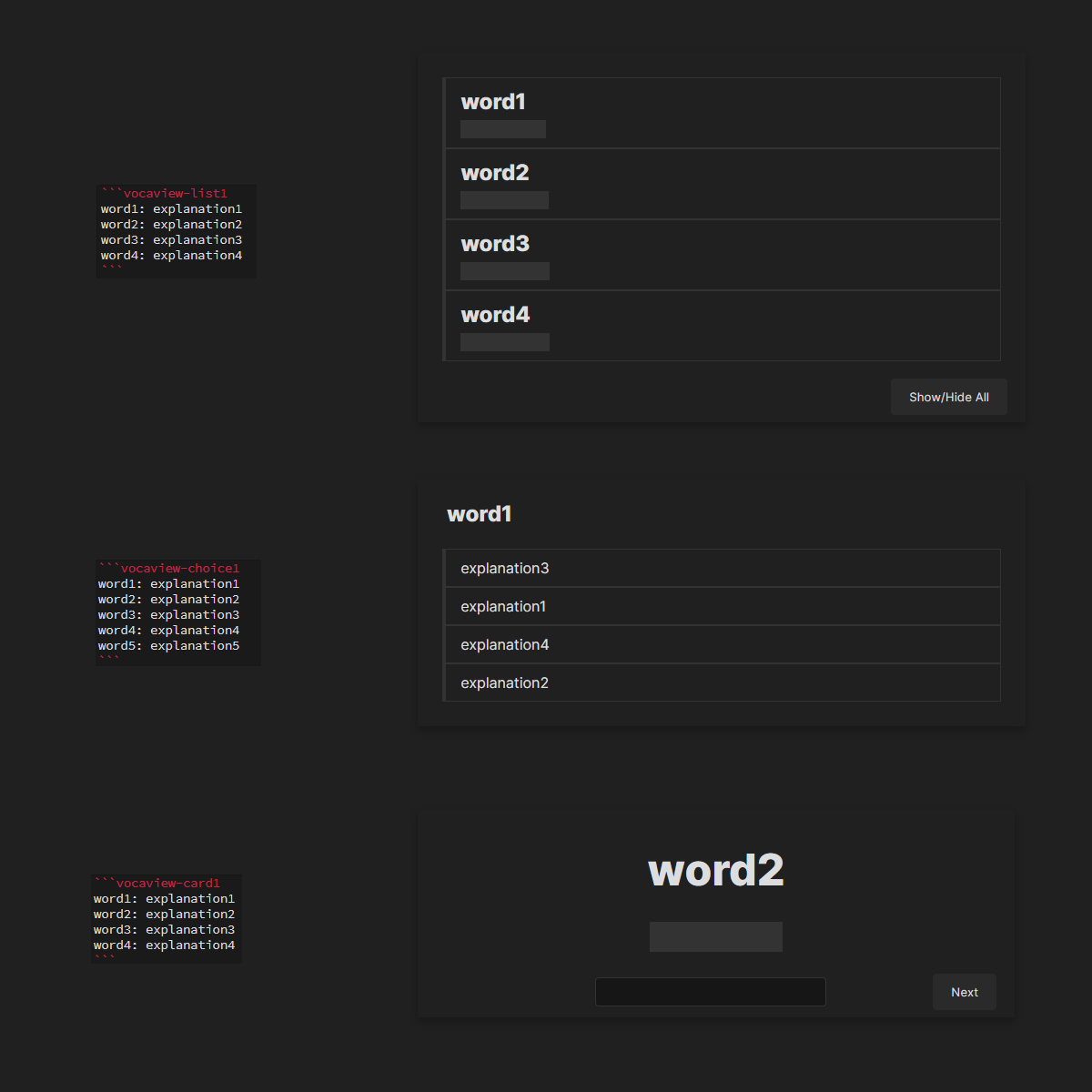
show

Update log

  • 0.1.3: Added Vocabulary Books feature.
  • 0.1.2: Added spell checking to vocaview-cardx blocks

Usage

Create a block with the following format:

    ```vocaview-<blocktype><subtype>
    word: explanation
    ...

    ```

Blocktypes

There are 3 types of block available:

  • list: Preview the words as a list. All words are shown.
  • choice: Preview the words in a single choice queston style. One randomly picked word at a time.
  • card: Preview the words as a card. One randomly picked word at a time.

Subtypes

For each block type, 3 subtypes are available:

  • 1: Show word, hide explanation.
  • 2: Show explanation, hide word.
  • 3: Randomly mix subtype 1 and 2.

Example

For example:

    ```vocaview-list3
    word1: explanation1
    word2: explanation2
    word3: explanation3
    word4: explanation4
    ```

is going to be previewed something like this:
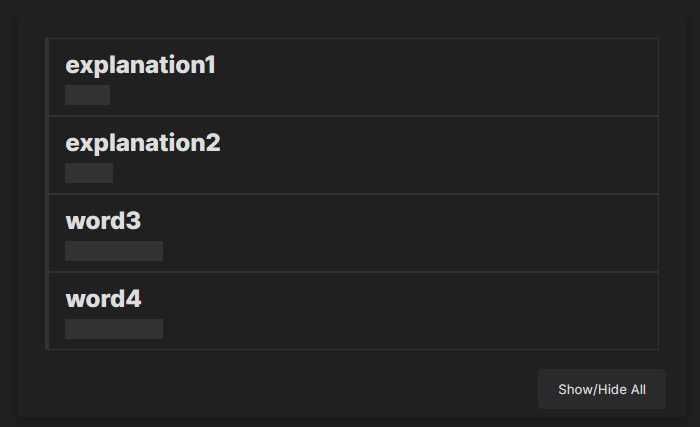
example

Vocabulary Books

vocbooks

You can create a new blank .md file, or designate an existing blank .md file as a vocabulary book. Within the vocaview blocks, you can add words to the vocabulary book or remove words from it. The vocabulary book itself is just another .md file with vocaview blocks.

To use the Vocabulary Books feature:

  1. Go to the settings page of this plugin.
  2. Change the Number of Vocabulary Books setting from 0 to the desired number.
  3. Fill in the Relative Path for each vocabulary book. (Alternatively, you can right-click on an .md file in Obsidian, select Copy Obsidian URL, and paste it as the path.)
  4. Close the settings page and reopen the file with vocaview blocks to refresh the display.

To disable this feature:

  1. Go to the settings page of this plugin.
  2. Change the Number of Vocabulary Books setting back to 0.
  3. Close the settings page and reopen the file with vocaview blocks to refresh the display.

Note: Adding words to or removing words from the vocabulary book will only affect the content of the first vocaview block in the book, and will not affect the rest of the file. You can freely edit the other parts of the vocabulary book file.

Manually installing the plugin

  • Disable obsidian safe mode.
  • Copy over main.js, styles.css, manifest.json to your vault VaultFolder/.obsidian/plugins/your-plugin-id/.

Similar Plugins

info
• Similar plugins are suggested based on the common tags between the plugins.
Simple note quiz
4 years ago by dorisxx
braincache
4 years ago by XSPGMike
braincache obsidian plugin
Flashcard Learning
3 years ago by Gaétan Muck
Obsidian plugin. Uses flashcard system to learn things across own notes.
AI Mentor
3 years ago by clementpoiret
Chess Study
3 years ago by Christoph Lindstädt
A chess study helper and PGN viewer/editor for Obsidian.
Flashcards LLM
3 years ago by Marco Pampaloni
Use Large Language Models (such as ChatGPT) to automatically generate flashcards from obsidian notes
LDS Scriptures Reference
3 years ago by pacokwon
Link LDS Scriptures & General Conference Talks in Your Obsidian Notes!
Flashcard Generator
3 years ago by ChloeDia
Obsidian Plug-in to automatically create a set of questions/answers on your notes !
Exercises
3 years ago by AlexCCavaco
Create Interactive Exercises along side your Obsidian Notes
Vocabulary Cards
3 years ago by Eugene Myazin
An easy way to display vocabulary words as flashcards and as a list
Mochi Cards Pro
3 years ago by Hayden Carpenter
Create flashcards on Mochi.cards using the API provided by Mochi's Pro subscription in Obsidian.
Vocabulary Highlighter
2 years ago by eatgrass
Highlight English words according to the frequency with Obsidian
Quiz Generator
2 years ago by Edward Cui
Generate interactive flashcards from your notes using models from OpenAI (ChatGPT), Google (Gemini), Ollama (local LLMs), and more. Or manually create your own to use with the quiz UI.
Learnie
2 years ago by tankh99
Learnie is an Obsidian plugin that helps to enhance your learning with active recall and spaced repetition.
Spaced Repetition
5 years ago by Stephen Mwangi
Fight the forgetting curve by reviewing flashcards & entire notes on Obsidian
Bible Reference
4 years ago by tim-hub
Take Bible Study notes easily in the popular note-taking app Obsidian, with automatic verse and reference suggestions.
Masking Type
a year ago by Telehakke
Obsidian plugin.
Easy Test
a year ago by Forrest
Student Repo
a year ago by Feirong.zfr
学生知识库助手(Student Repository Helper)是一个面向学生或学生家长的Obsidian 插件,这款插件旨在解决学生在学习阶段面临的资料管理难题,将学习过程中产生的各类重要资料,如试卷、笔记、关键文档、绘画手工作品等,进行系统性的数字化整合与管理,并利用 AI 助手定期进行学习分析总结。随着时间的推移,它将助力你逐步搭建起一座专属你自己的知识宝库,这座宝库将伴随你一生,成为你知识成长与积累的见证。
LLM Test Generator
a year ago by Aldo E George
HiNote
a year ago by Kai
Add comments to highlighted notes, use AI for thinking, and flashcards for memory.
Minimal Quiz
a year ago by Lutu-gl
Obsidian-Minimal-Quiz: The simplest quiz plugin for Obsidian. Define questions directly in your Markdown files. No extra setup required. Just write, quiz, and learn!
OpenWords
a year ago by insile
用于英语学习中背单词与单词管理的 Obsidian 插件
Random Wikipedia Article
10 months ago by SpencerF718
An Obsidian plugin to generate a note of a random Wikipedia article.
Kindle Vocab
9 months ago by Truong Gia Bao
Generate the markdown version of your Vocabulary Builder in Kindle, and put it in your Obsidian Vault.
HiWords
7 months ago by Kai
Effortlessly grow your vocabulary as you read, with automatic highlighting and translation of unfamiliar words.
Dictionary Lexicon
3 months ago by Alvin
Look up words and improve vocabulary by using flash card style cards.
Decks
3 months ago by Xherdi Lika
An Obsidian Flashcards plugin