
README file from
GithubDecks 


English · Deutsch · Español · Français · Italiano · Русский · Türkçe · Shqip · العربية · हिन्दी · 中文 · 繁體中文 · 日本語
Turn your Obsidian notes into flashcards. No special syntax. No separate deck to build.
Coming from the Spaced Repetition plugin? Jump to Decks without losing your progress — the built-in one-click migrator extracts your
::cards into clean Decks decks, rewrites each note into readable prose, and carries over your review history, all while leaving your original notes untouched. You pick up your reviews right where you left off. See Coming from Spaced Repetition.
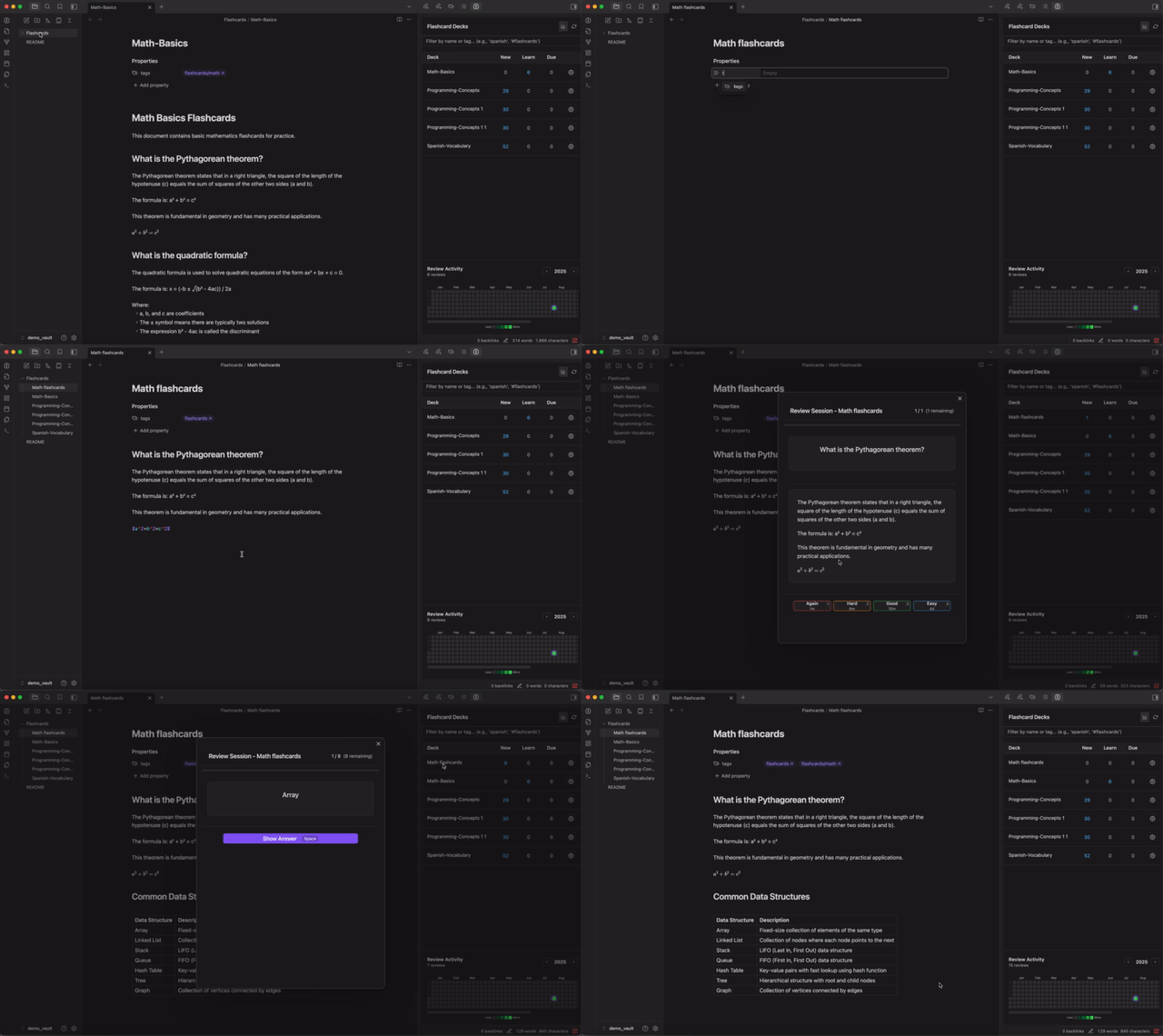
Tag a file with #decks. Each ## heading becomes the front of a card; the text below becomes the back. Tables, image occlusion, and ==cloze== highlights work the same way. Scheduling is handled by FSRS-6 — the modern spaced-repetition algorithm.
Discord · Release notes · Buy me a coffee
Why Decks
- Your notes are already the deck. Tag a file; each heading at your chosen level becomes a front and the text below becomes the back. Coming from Anki, there's nothing to author twice.
- Four formats, no syntax to learn. Headers, two-column tables, image occlusion, and
==cloze==from highlights you already use. - FSRS-native scheduling. Three profiles (Standard / Intensive / Trained), per-tag retention targets, no SM-2 baggage.
- Algorithm tuning. One-click optimizer trains the FSRS weights on your own review history — better scheduling for your forgetting curve, all client-side.
- Real multi-device sync. Database merges across iCloud/Dropbox automatically — review on phone and desktop, no lost history.
- Built for mobile. Touch-tuned review UI, safe-area aware, tested daily on phones.
60-second quick start
-
Install Decks from Community Plugins, enable it.
-
Open any note. Add
#decksto its frontmatter or as an inline tag. -
Write a
##heading, then a paragraph below it. Repeat for as many cards as you want:--- tags: [decks/spanish] --- ## What does "Hola" mean? Hello. ## How do you say "Thank you" in Spanish? Gracias. -
Click the brain icon in the ribbon to open the Decks panel. Click your file. Start reviewing.
The filename becomes the deck name. Cards sync automatically when you save the note.
Card formats
Decks supports four ways to write cards. Pick whichever matches how you already write notes.
---
tags: [decks/spanish]
---

## What does "Hola" mean in English?

Hello.

## How do you say "Thank you" in Spanish?

Gracias.
The filename becomes the deck name. Header level is configurable per profile (H2 by default). Headings above the configured level aren't turned into cards — they're kept as a breadcrumb path (e.g. Chapter 1 > Section 2) attached to each card for context.
Add optional notes to a header-paragraph card with an Obsidian comment (%%a hint or mnemonic%%) anywhere in the body, or by putting the note after a --- divider at the end of the body. Notes are shown on demand (press N) during review, just like the table notes column.
## Concepts

| Question                | Answer                                            |
| ----------------------- | ------------------------------------------------- |
| What is photosynthesis? | The process plants use to convert sunlight        |
| Define gravity          | The force that attracts objects toward each other |
- First column = front, second column = back. Header row is ignored.
- Tables must sit directly under a header (no other paragraphs inside).
- Add a third "Notes" column for hints/mnemonics shown via toggle (press N) during review.
## The Solar System

The ==Sun== is the star at the center of our solar system. The closest planet to the Sun is ==Mercury==, and the largest planet is ==Jupiter==.
Each highlight becomes one card. During review the active blank shows as [...]; tap to reveal. Cloze also works inside table cells. Two context modes per profile (hide or show other clozes). Enabled by default.
Interactive (recommended). Run the command "Create image occlusion at cursor", pick an image, then draw boxes right on it in the editor. Type a Markdown/LaTeX answer for each box, or leave it empty to just hide a baked-in label. It saves as a self-contained decks-occlusion code block (coordinates are percentages, so it scales on any device):
```decks-occlusion
image: "[[anatomy/heart.png]]"
version: 2
masks:
  - id: m1
    x: 12.5
    y: 30
    w: 18
    h: 9.5
    answer: "Left **ventricle**"
  - id: m2
    x: 55
    y: 22
    w: 14
    h: 8
    answer: ""
```
Each box is one card. In review, the box is hidden on the front and revealed on the back (with its answer); in reading view you see the fully answered diagram. Re-edit any time from the block's Edit button or the flashcard manager.
Numbered list (simple). An image embed followed by a numbered list also works:
## Bones of the arm

![[arm_bones.png]]

1. ==Humerus==
2. ==Radius==
3. ==Ulna==
Each list item is one card; the image shows on the front and the matching item is blanked on the back.
Both builds on cloze, so cloze must be enabled on the profile and the block must sit under a parsed header.
Title format — the filename becomes the front, the entire file becomes the back. Set "Title" as the header level in your profile.
Reverse cards — add reverse: true to a file's frontmatter to auto-generate a reversed copy of every card. Progress is tracked separately per direction.
Per-card tags — add #tag directly in headers (e.g., ## What is photosynthesis? #plants #high-school). Tags are stripped from the displayed front, shown as chips during review, and inherited by table rows and reverse cards. Build "filter decks" that pull every card with a given tag across your vault.
Canvas decks
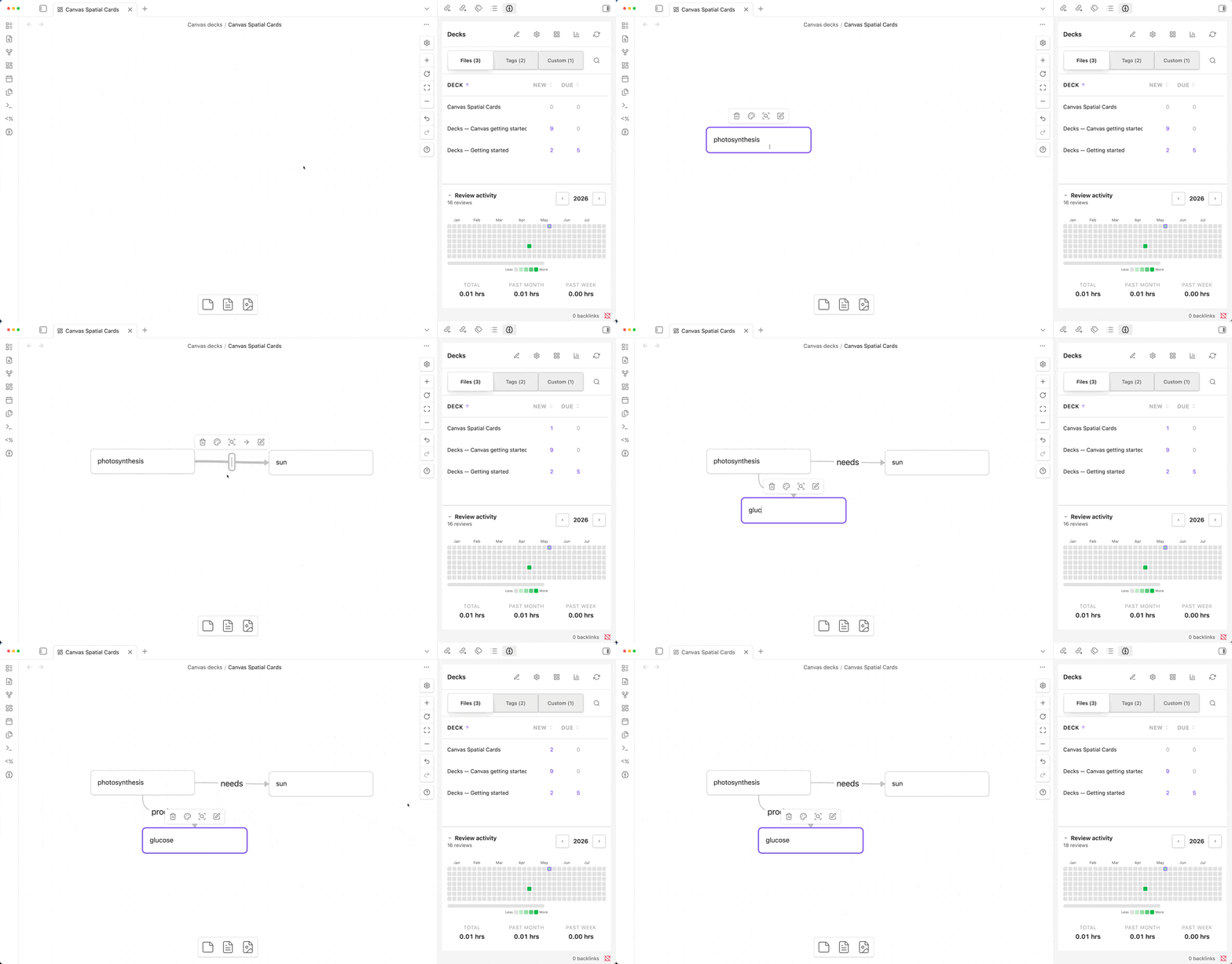
Author cards on an Obsidian Canvas (.canvas) instead of a markdown file. Each canvas in the configured folder becomes one deck; each text node inside it is parsed for the same four card formats above (header-paragraph, table, cloze, image occlusion). One text node can hold a whole table of cards, or one cloze sentence, or a single header + paragraph — mix freely across the canvas.
Set it up in Settings → Canvas decks:
- Canvas decks folder — every
.canvasinside this folder becomes a deck. - Canvas deck tag — applied to all canvas decks for grouping in the Tags view and for profile mapping. Defaults to
#decks/canvas(which uses the DEFAULT profile unless you map it elsewhere).
Canvas decks behave like file decks everywhere: they show up in the deck list, in the Tags view, can be included in custom decks by filter (deckTag = #decks/canvas), are editable from the flashcard manager, and "Go to source" from review opens the canvas and focuses the source text node.
Spatial cards. Connect text nodes with edges and each edge becomes a flashcard: the from-node is the question, the to-node is the answer, and the edge label is an optional hint. Chains (A → B → C), one-to-many, and many-to-one all work; unconnected nodes still parse with the four formats above.
A Decks — Canvas getting started.canvas is auto-created in a Canvas decks/ folder on first install (or first upgrade) to show the formats in action.
See docs/CANVAS_DECKS.md for details.
Templates
Render the rows of a table through a card design you author once. Write it in HTML/CSS or Markdown, drop in
{{Column}} placeholders, and bind it to your tables with a tag — one template styles every matching row.
<ruby>{{Word}}<rt>{{Reading}}</rt></ruby>
Point Settings → Templates at a folder, tag a template file and the table's heading with the same tag,
and you're set. Templates support front/back/notes faces in HTML or Markdown, render in a sanitized,
theme-aware sandbox, and expose CSS variables (--padding, --align, --bg, …) for full layout control —
from comfortable reading cards to edge-to-edge custom designs. Tables with no matching template fall back to
the normal columns.
See docs/TEMPLATES.md for the full guide and examples.
What you get
- Browse mode and timed review sessions with daily limits.
- Per-tag profiles (Standard / Intensive FSRS, retention target, daily quotas).
- Custom decks built from filter rules — e.g., every card tagged
#high-school. - Statistics: heatmap, retention, future-due forecast, intervals, hourly breakdown, answer-button stats.
- Anki export, automatic backups, multi-device merge sync.
- Keyboard shortcuts: Space to flip, 1–4 to rate.
AI assistance (optional)
Decks has optional AI features that are off until you add an API key in Settings → AI:
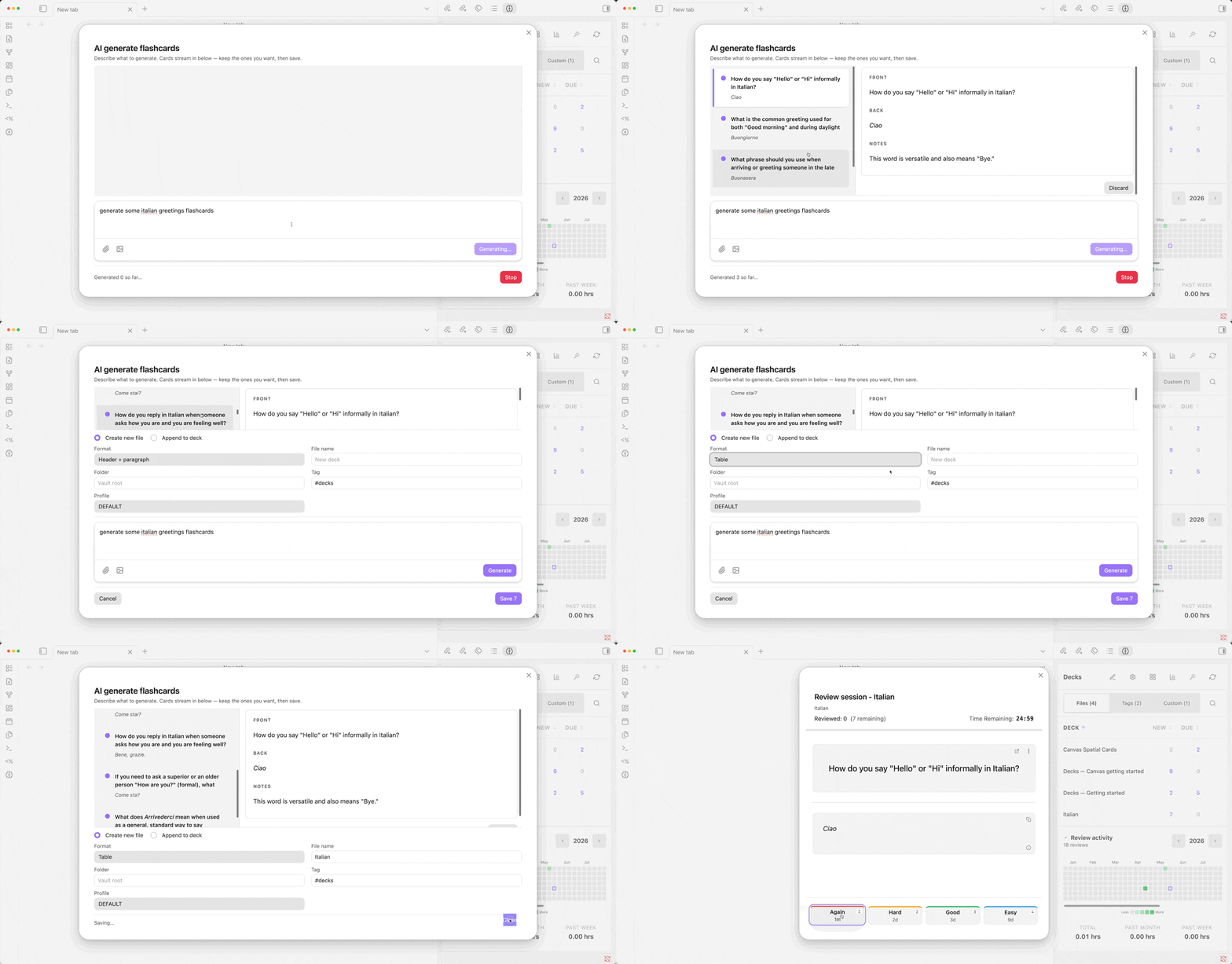
- Generate — describe a topic (and optionally attach notes/images) and stream new flashcards into an inbox; keep the ones you want and save them to a new file or append to an existing deck, as header+paragraph, table, or canvas.
- Refactor — rewrite a single card, or batch-refactor a selection, to improve clarity and fix grammar; or split one dense card into several atomic ones. You review every change before it's applied.
Providers. Bring your own key for OpenAI, Anthropic (Claude), Google (Gemini), or any OpenAI-compatible endpoint (including local servers like Ollama / LM Studio). You pick the provider and model in settings.
Where your key lives. Keys are stored locally in ai-keys.json inside the plugin folder and are never written to data.json — so they never leave your device through Obsidian Sync or any vault file-sync.
Transparency — what is sent, and when. Nothing is sent to a provider unless you explicitly trigger an AI action. When you do, the request contains only: a built-in instruction prompt describing how Decks cards work, your typed instructions, and the relevant content for that action — the card's fields (for refactor) or your topic/prompt (for generate), plus any notes or images you chose to attach. The plugin makes no background or telemetry calls; the only network requests are the ones you start, sent directly to the provider you configured.
Multi-device sync
Decks syncs alongside your vault — iCloud Drive, Obsidian Sync, Dropbox, Syncthing, anything that shares the vault folder works.
The plugin uses two files:
<plugin folder>/flashcards.db— the SQLite database holding every card's FSRS state and full review history. This is the cold-storage snapshot, persisted to disk every ~30 minutes when there's new activity (and on app background / unload).<deviceId>.deckssynclog— one small append-only JSONL file per device, in your vault root. Every state change you make — rating a card, editing a profile, creating a custom deck, starting/ending a review session — is recorded here as a single short line. Other devices read these files on app focus and replay the entries against their own database.
The custom .deckssynclog extension keeps the file out of Obsidian's file explorer; you'll see it in Finder/Files but it never shows up as a note. iCloud and other file-sync providers ship these small text files dramatically faster than the binary database — typically seconds instead of minutes — which is why the cross-device "I just rated this on my Mac, now I see it on my iPhone" lag is usually around 15–30 seconds rather than 1–2 minutes.
The log self-truncates to the last 30 days on plugin load. Long-running cross-device state (months or years of review history) is preserved in the binary database, which still syncs through your file-sync provider on its own slower schedule.
If your sync provider creates conflict-copy files (e.g. iCloud's <deviceId> (Mac's conflicted copy 2026-05-13).deckssynclog), the plugin detects them, applies any unique entries, and renames the original aside as *.consumed-<timestamp> so it's not re-processed.
Personalized scheduling
FSRS ships with sensible defaults that work well out of the box. Once you've accumulated ~100 reviews, you can train the algorithm's 21 weights against your own review history and get card schedules tailored to your specific forgetting curve — the same kind of thing Anki desktop does, but client-side, no server, no telemetry.
Settings → Algorithm tuning → Optimize parameters. Training runs in seconds for typical decks; you'll see a before/after log-loss comparison, click Apply to use the trained weights or Discard to keep defaults. Re-train any time to refine the weights as you accumulate more reviews.
Trained weights are global but per-profile applied — pick Trained in any profile's FSRS profile dropdown to opt that profile in. Intensive profiles continue to use their sub-day defaults; existing card data is preserved through training.
The optimizer matches the open-spaced-repetition reference methodology: Adam optimizer over binary cross-entropy loss, cosine-annealed learning rate, parameter clipping against published FSRS-6 bounds. Step count scales with your review history (more reviews → more iterations).
The implementation has been validated against the published FSRS-6 spec (1396/1396 forward-pass cases match bit-exact) and benchmarked against 443M anonymized Anki reviews — calibration of shipped defaults agrees with empirical recall to within 0.8 percentage points. See docs/FSRS_OPTIMIZER.md for the full write-up: comparison with the reference benchmark, what to expect at different deck sizes, and known limitations.
Settings
Open Settings → Decks for daily limits, retention targets, search paths, session duration, and backup options. Per-tag overrides via the gear icon on any deck.
Profile settings (Manage profiles in the deck panel):
- New cards per day, review cards per day (per deck)
- Retention target (default 90%)
- FSRS profile: Standard, Intensive, or Trained (Trained available after optimizing parameters)
- Header level for parsing (or "Title" to use the filename)
- Review order: oldest due first, or random
- Cloze deletions: enabled by default
- Cloze context: hidden or open
Review settings: session duration (1–60 min), next-day rollover hour (default 4 AM), keyboard shortcuts toggle.
Parsing settings: scan the entire vault, or restrict to a folder.
Other: background refresh interval, automatic backup count, debug logging.
Coming from Spaced Repetition
Already using the Spaced Repetition plugin? You can switch to Decks without losing your cards or your review history — and continue your reviews exactly where you left off.
Open the migrator from the deck panel toolbar (the cube icon) or run the "Migrate from Spaced Repetition plugin" command.
Your original notes are never touched. Migration is additive: it writes new files into a target folder you choose (mirroring your structure) and leaves your source notes exactly as they are. Re-running the migrator simply overwrites the files it generated.
How it works
- Pick a source folder to scan (or leave it empty to scan the whole vault), and a target folder for the output. Decks finds every note with legacy cards — single-line (
Front :: Back), reversed (Front ::: Back), multi-line (?/??), clozes (==…==/{{…}}) — and whole-note reviews (the#reviewtag). - Each note is split into two clean files. A flashcards deck (
<Note> (Flashcards)) holds the extracted cards in standard Decks format, and a readable note keeps the prose — with the card syntax de-sugared into normal text (::/:::become " — ",?/??join question and answer, and==…==/{{…}}clozes are restored to their answer). Your configured separators are honored, so this works even if you customized them. Nothing is stripped away — your reading note stays complete. - The files are cross-linked in frontmatter. The readable note gets a
Flashcardsproperty pointing at its deck and anOrigin noteproperty pointing back at the original; the deck gets anOrigin noteproperty too. If a note already uses one of those property names, the migrator overwrites it rather than creating a duplicate. Your tags are preserved — the legacy base tag (e.g.#flashcards) is translated to your configured Decks tag. - Reversed cards become two cards. A
Front ::: Backcard is expanded into a forward card and a swapped card in the same deck file, so each direction is scheduled independently. - Nested structure is flattened into context. SR treats ancestor headings and nested list bullets as a card's context. Decks captures that whole path into the card's front — e.g. a deeply nested
Function :: PowerhousebecomesCell Anatomy > Mitochondria > … > Function— rendered at your profile's single header level (a lone note-title H1 is omitted). Pick any level via the preinstalled Heading 1–6 profiles. - Smart auto-routing picks the best layout. Short single-line cards become rows in a compact table (no endless scrolling for vocabulary); multi-line cards — with code blocks, lists, or math — become headers so their formatting survives. You can override this to all headers or all tables in the dialog.
- Whole-note reviews migrate too. Notes you reviewed as a whole (the
#reviewtag) become Decks title-mode cards (filename = front, the whole note = back) under a dedicated…/reviewprofile. Their schedule is read from the note'ssr-*frontmatter or its end-of-file marker. - Your scheduling state is translated to FSRS-6. Decks reads the legacy
<!--SR:-->metadata — SM-2 (due, interval, ease) or already FSRS — and maps it to a stability/difficulty/due state. Reversed cards keep two separate histories (reading vs. recall), exactly as the original plugin stored them. - A review log is written for every migrated card, so the moment the cards appear in Decks they're already due on the right date with the right interval — you resume, you don't restart.
Pick a profile in the dialog (or use the default) — its header level and scheduling settings are applied to the migrated decks.
Release notes & support
- Release notes for each version are in
release-notes/. - Discuss on Discord — join the server.
- Support development — Buy me a coffee.
- Translation Guide - Translation Guide.
Built on
Decks is built on @decks/core — the open-source (MIT) engine that implements the parsing, FSRS scheduling, sync log, and AI orchestration. The plugin is the Obsidian-specific shell around it.
Acknowledgements & alternatives
A huge thank you to the original Spaced Repetition plugin by st3v3nmw. It pioneered flashcards within Obsidian and remains an excellent choice for users who prefer writing inline :: cards.
Decks was built as an alternative for users who want a different architectural approach: purely structural Markdown (no special syntax) and conflict-free syncing via a local SQLite database. If you are coming from the original plugin and want to try this approach, use the Decks one-click migrator to bring your cards and review history with you!
License
This project is licensed under the GNU Affero General Public License v3.0 or later (AGPL-3.0-or-later).
In short: you are free to use, modify, and distribute this software. However, if you modify it and distribute your changes — or modify it and offer it to users over a network — you must make your modified source code publicly available under the same AGPL-3.0 license.
Copyright (C) 2026 Xherdi Lika. See the LICENSE file for the full text.