Export to Anki

by Pseudonium
5
4
3
2
1
Score: 63/100

Description

Category: Learning & Knowledge Management

The Obsidian_to_Anki plugin lets users convert markdown notes into flashcards and sync them directly with Anki. It supports flexible custom syntax for flashcard creation, including styles like question-answer, cloze deletions, tables, and even RemNote-style formats. You can define custom note types, specify scan directories, and exclude files or folders using glob patterns. It supports tags, math, embedded images, audio, and even inline notes, making it highly adaptable for different learning styles. Users can assign cards to specific decks and maintain markdown files as the source of truth, with options to auto-delete processed notes. Advanced users can also run it via a standalone Python script, allowing deeper customization through config files.

Reviews

  • Jan
    Reviewed on Feb 19th, 2026
    Plugin worked perfectly for a long time but now I have an issue with resizing images in Obsidian: Any resizing of pictures directly in obsidian will not affect the size of the image on a flashcard in anki. This is bothersome as I need to adjust the size of the pictures again in Anki directly.

Stats

1978
stars
127,701
downloads
192
forks
1,976
days
692
days
837
days
176
total PRs
32
open PRs
61
closed PRs
83
merged PRs
415
total issues
239
open issues
176
closed issues
17
commits

Latest Version

2 years ago

Changelog

What's Changed

New Contributors

Full Changelog: https://github.com/Pseudonium/Obsidian_to_Anki/compare/3.5.0...3.6.0

README file from

Github

Obsidian_to_Anki

Plugin to add flashcards from a text or markdown file to Anki. Run in Obsidian as a plugin, or from the command-line as a python script. Built with Obsidian markdown syntax in mind. Supports user-defined custom syntax for flashcards.
See the Trello for planned features.

Getting started

Check out the Wiki! It has a ton of information, including setup instructions for new users. I will include a copy of the instructions here:

Setup

All users

  1. Start up Anki, and navigate to your desired profile.
  2. Ensure that you've installed AnkiConnect.

Obsidian plugin users

  1. Have Obsidian downloaded
  2. Search the 'Community plugins' list for this plugin
  3. Install the plugin.
  4. In Anki, navigate to Tools->Addons->AnkiConnect->Config, and change it to look like this:
  1. Restart Anki to apply the above changes
  2. With Anki running in the background, load the plugin. This will generate the plugin settings.

You shouldn't need Anki running to load Obsidian in the future, though of course you will need it for using the plugin!

To run the plugin, look for an Anki icon on your ribbon (the place where buttons such as 'open Graph view' and 'open Quick Switcher' are). For more information on use, please check out the Wiki!

Python script users

  1. Install the latest version of Python.
  2. If you are a new user, download obstoanki_setup.py from the releases page, and place it in the folder you want the script installed (for example your notes folder).
  3. Run obstoanki_setup.py, for example by double-clicking it in a file explorer. This will download the latest version of the script and required dependencies automatically. Existing users should be able to run their existing obstoanki_setup.py to get the latest version of the script.
  4. Check the Permissions tab below to ensure the script is able to run.
  5. Run obsidian_to_anki.py, for example by double-clicking it in a file explorer. This will generate a config file, obsidian_to_anki_config.ini.
Permissions

The script needs to be able to:

  • Make a config file in the directory the script is installed.
  • Read the file in the directory the script is used.
  • Make a backup file in the directory the script is used.
  • Rename files in the directory the script is used.
  • Remove a backup file in the directory the script is used.
  • Change the current working directory temporarily (so that local image paths are resolved correctly).

Features

Current features (check out the wiki for more details):

  • Custom note types - You're not limited to the 6 built-in note types of Anki.
  • Custom scan directory
    • The plugin will scan the entire vault by default
    • You can also set which directory (includes all sub-directories as well) to scan via plugin settings
  • Ignore Folders and Files
    • You can specify which files and folders to ignore
    • This can be done in the settings of this plugin with Glob syntax.
    • If you're working on your own globs, you can test them out here
    • Examples:
      • **/*.excalidraw.md - Ignore all files that end in .excalidraw.md
        • => avoids excalidraw files from being scanned which can be extremely slow
      • Template/** - Ignore all files in the Template folder (including subfolders)
      • **/private/** - Ignore all files in folders that are called private no matter where they are in the vault
      • [Pp]rivate*/** - Ignore all files and folders in the root of the vault that start with private or with Private
  • Updating notes from file - Your text files are the canonical source of the notes.
  • Tags, including tags for an entire file.
  • Adding to user-specified deck on a per-file basis.
  • Markdown formatting.
  • Math formatting.
  • Embedded images. GIFs should work too.
  • Audio.
  • Auto-deleting notes from the file.
  • Reading from all files in a directory automatically - recursively too!
  • Inline Notes - Shorter syntax for typing out notes on a single line.
  • Easy cloze formatting - A more compact syntax to do Cloze text
  • Frozen Fields
  • Obsidian integration - A link to the file that made the flashcard, full link and image embed support.
  • Custom syntax - Using regular expressions, add custom syntax to generate notes that make sense for you. Some examples:
    • RemNote single-line style. This is how to use::Remnote single-line style
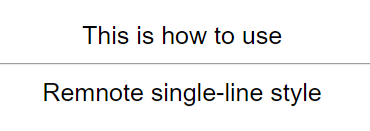
      Remnote 1
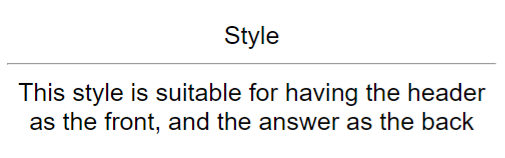
    • Header paragraph style.
    Header 1
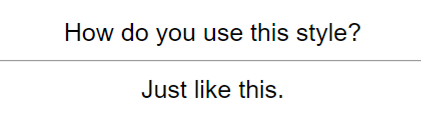
    • Question answer style.
    Question 1
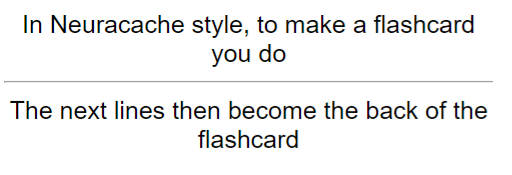
    • Neuracache #flashcard style.
    Neuracache 1
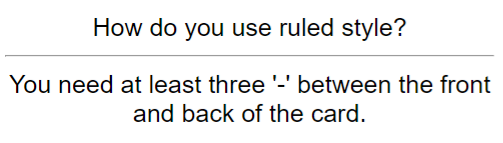
    • Ruled style
    Ruled 1
    • Markdown table style
    Table 2
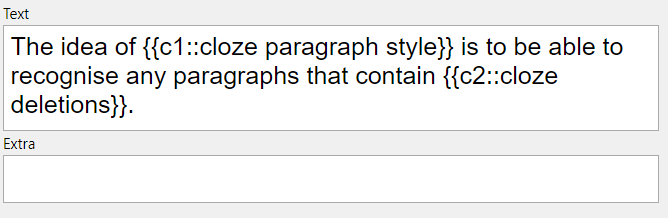
    • Cloze paragraph style
    Cloze 1

Note that all custom syntax is off by default, and must be programmed into the script via the config file - see the Wiki for more details.

Similar Plugins

info
• Similar plugins are suggested based on the common tags between the plugins.
braincache
4 years ago by XSPGMike
braincache obsidian plugin
Aosr
4 years ago by linanwx
Aosr is Another Obsidian plugin for Spaced Repetition.
Note Synchronizer
4 years ago by Songchen Tan
Synchronizes Obsidian notes to Anki in a breeze 💨️
Repeat
4 years ago by Andre Perunicic
Review notes using periodic or spaced repetition.
Awesome Flashcard
4 years ago by AwesomeDog
Handy Anki integration for Obsidian.
Flashcard Learning
3 years ago by Gaétan Muck
Obsidian plugin. Uses flashcard system to learn things across own notes.
text2anki-openai
3 years ago by Mani Batra
Auto Anki
3 years ago by ad2969
Using AI to automate card creation for Spaced Repetion in Anki
Flashcards LLM
3 years ago by Marco Pampaloni
Use Large Language Models (such as ChatGPT) to automatically generate flashcards from obsidian notes
Memorization
3 years ago by Joseph Cochran
Flashcard Generator
3 years ago by ChloeDia
Obsidian Plug-in to automatically create a set of questions/answers on your notes !
QB Reader Parser
3 years ago by Jacob Barta
QBReader parsing for quiz bowl answerlines
Vocabulary Cards
3 years ago by Eugene Myazin
An easy way to display vocabulary words as flashcards and as a list
AnkiSync+
3 years ago by RochaG0
Mochi Cards Pro
3 years ago by Hayden Carpenter
Create flashcards on Mochi.cards using the API provided by Mochi's Pro subscription in Obsidian.
Augmented Canvas
2 years ago by Léopold Szabatura
Supercharge your Obsidian canvas experience with AI features.
The Queue
2 years ago by Kolja Sam Pluemer
An Obsidian.md plugin randomly exposing you to your cards. Supports habits, to-dos, spaced repetition flashcards, iterative reading and more.
Yanki
2 years ago by Eric Mika
An Obsidian plugin that syncs flashcards from a folder in your vault to Anki. Pure Markdown syntax. No fuss.
Better Recall
2 years ago by FlorianWoelki
A better spaced repetition and recall plugin for Obsidian inspired by Anki.
Learnie
2 years ago by tankh99
Learnie is an Obsidian plugin that helps to enhance your learning with active recall and spaced repetition.
KeepSidian
2 years ago by lc0rp
Review
6 years ago by ryanjamurphy
Add the current note to a future daily note to remember to review it.
Flashcards
5 years ago by Alex Colucci
🎴 An Anki plugin for Obsidian.md
Mochi Cards Exporter
5 years ago by kalbetre
Mochi Cards Exporter Plugin for Obsidian
Spaced Repetition
5 years ago by Stephen Mwangi
Fight the forgetting curve by reviewing flashcards & entire notes on Obsidian
Incremental Writing
5 years ago by Jamesb | Experimental Learning
An incremental writing plugin for Obsidian where you add notes and blocks to prioritized queues and review them incrementally over time, spaced repetition style.
Recall
5 years ago by Martin Jirlow
A spaced repetition system for Obsidian!
Anki Sync
5 years ago by debanjandhar12
Obsidian plugin to make flashcards and sync them to Anki
AnkiBridge
4 years ago by JeppeKlitgaard
Yet Another Obsidian Anki Bridge.
Spaced everything
2 years ago by Zach Mueller
Obsidian plugin to apply spaced repetition to incrementally develop your notes.
Blue Star
2 years ago by Wang Guoshi
A plugin for Obsidian that generates Anki flashcards in various ways.
Simple Quiz
a year ago by Ivan Kalmar
Creating simple quizzes.
AI-AnkiSync
a year ago by goev
Memodack
a year ago by Pavlo Kobyliatskyi
Your second language memory tool
Spaced Repetition AI
a year ago by Belinda Mo, Athena Leong
AI + Spaced Repetition Plugin for Obsidian
HiNote
a year ago by Kai
Add comments to highlighted notes, use AI for thinking, and flashcards for memory.
Anki Integration
a year ago by Noah Boos AKA Rift
Create flashcards from your notes with a seamless interface, structuring them with metadata and syncing effortlessly via AnkiConnect.
GitHub Integration
a year ago by Kirill Zhuravlev
Plugin that fetch your github stars into notes
Zhongwen Reader
a year ago by natipt
This is a Chinese hover dictionary and vocabulary-building plugin for ObsidianMD.
Come Through
a year ago by mntno
An Obsidian plugin for creating and reviewing flashcards.
Note Sync
a year ago by ZigHolding
OpenWords
a year ago by insile
用于英语学习中背单词与单词管理的 Obsidian 插件
Simple Anki Sync
10 months ago by Lukas Mayr
Kindle Vocab
9 months ago by Truong Gia Bao
Generate the markdown version of your Vocabulary Builder in Kindle, and put it in your Obsidian Vault.
Granola Sync
7 months ago by Tom Elliot
Sync Granola notes to your Obsidian vault
Dictionary Lexicon
3 months ago by Alvin
Look up words and improve vocabulary by using flash card style cards.
Anki Helper
3 months ago by Dusk
Decks
3 months ago by Xherdi Lika
An Obsidian Flashcards plugin